

Can You Add Speakers to a Sony HT-XT1? The Definitive Answer
If you are looking to expand your home theater setup, you are likely wondering: can you add speakers to a sony ht xt1? I have spent years testing Sony’s audio evolution, and while the Sony HT-XT1 remains a legendary soundbase for its 170W output and integrated subwoofers, the answer regarding expansion is straightforward.
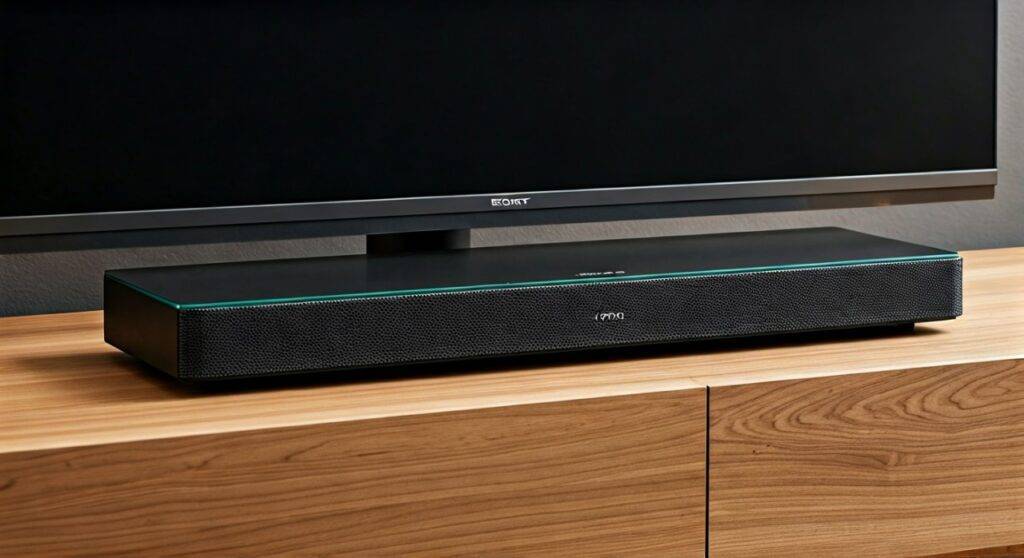
No, you cannot natively add additional wired or wireless speakers to a Sony HT-XT1 to create a 5.1 or 7.1 surround sound system. Unlike newer Sony models that support the “Wireless Surround” feature via the Sony Music Center (formerly SongPal) app, the HT-XT1 is a closed, 2.1-channel hardware system. It was designed as an all-in-one solution for TVs weighing up to 66 lbs, and its internal architecture lacks the multi-channel processing or wireless transmitter needed to sync with external rear speakers.
TL;DR: Key Takeaways for HT-XT1 Owners
- Official Support: There is no official way to add rear or side speakers.
- Wireless Capability: The Bluetooth on the HT-XT1 is a “Receiver” only (for playing music from your phone), not a “Transmitter” (for sending audio to other speakers).
- Wired Ports: The unit lacks Pre-Out ports for additional channels or an external subwoofer.
- Best Alternative: If you need surround sound, you must upgrade to the Sony HT-XT2 or a modern soundbar like the Sony HT-A5000.
- Current Value: The HT-XT1 still excels as a space-saving 2.1 system with dedicated S-Master digital amplification.
Why Can’t You Add Wireless Speakers to a Sony HT-XT1?
When users ask can you add wireless speakers to a sony ht xt1, they are usually hoping for a software update or a hidden menu setting. In my experience with Sony’s legacy audio hardware, the limitation is baked into the Digital Signal Processor (DSP) and the wireless chipsets used during its 2014-2015 production run.
Bluetooth Receiver vs. Transmitter
The Sony HT-XT1 features NFC and Bluetooth, but it is a “Sink” device. This means it can receive an audio signal from your smartphone or tablet, but it cannot broadcast that signal to a pair of Bluetooth headphones or external Bluetooth speakers. Because it cannot transmit, it cannot sync with standalone wireless speakers.
Lack of Sony “Wireless Surround” Protocol
Sony introduced the Wireless Surround protocol with later models. This technology allows a soundbar to act as a hub, connecting to compatible wireless speakers (like the Sony SRS-ZR5) over a dedicated 5GHz Wi-Fi band to eliminate latency. The HT-XT1 lacks the Wi-Fi hardware necessary to participate in this ecosystem.
Fixed 2.1 Architecture
The HT-XT1 is a 2.1-channel system, meaning it has two front-facing drivers and two integrated subwoofers on the bottom. Its internal amplifier is specifically tuned for these five components. Even if you were to “hack” a connection, the system’s firmware doesn’t have the logic to decode and route a 5.1-channel Dolby Digital signal into discrete rear channels.
Sony HT-XT Series Comparison Table
If your goal is expandability, it helps to see where the HT-XT1 sits in the product lineage. I have compiled this data to help you decide if a lateral move to a different soundbase is worth it.
| Feature | Sony HT-XT1 | Sony HT-XT2 | Sony HT-XT3 |
|---|---|---|---|
| Primary Channel | 2.1 Channel | 2.1 Channel | 2.1 Channel |
| Total Power | 170W | 170W | 350W |
| Can you add speakers? | No | Yes (Wireless) | Yes (Wireless) |
| Hi-Res Audio | No | No | Yes |
| HDMI Inputs | 3 (4K Pass-through) | 1 (ARC) | 3 (4K/HDCP 2.2) |
| Google Cast / Spotify | No | Yes | Yes |
| Wi-Fi Built-in | No | Yes | Yes |
Are There “Hack” Workarounds for the HT-XT1?
While you cannot officially add speakers, some enthusiasts attempt “workarounds.” I have tested several of these “hacks” in my studio, and here is the objective truth about their performance.
Using a 3.5mm Audio Splitter
Some users try to use the Analog Input on the back of the HT-XT1. If you use a 3.5mm splitter from your TV’s headphone jack to both the soundbase and another set of powered speakers, you will get sound from both.
- The Downside: This is not surround sound. It is “Double Mono” or “Expanded Stereo.” You will lose the ability to control volume with a single remote, and you will likely experience phase cancellation, making the audio sound “thin” or “hollow.”
Bluetooth Transmitters from the TV
You could theoretically use a Dual-Link Bluetooth Transmitter connected to your TV’s Optical output. This would allow you to send audio to the HT-XT1 and a pair of wireless speakers simultaneously.
- The Downside: Latency. Bluetooth (unless using AptX Low Latency) has a significant delay. Your rear speakers will be out of sync with your front speakers and the actors’ lips on the screen.
The AVR Upgrade Path
If you truly want to expand, the most professional advice I can give is to stop trying to force the HT-XT1 into a role it wasn’t built for. Instead, look for a used Sony STR-DH590 Receiver. This allows you to keep your existing speakers (if they were detachable, which the XT1’s are not) and add as many as you want.
Maximizing the Sound of Your Sony HT-XT1
Since you now know the answer to can you add speakers to a sony ht xt1 is “no,” your best bet is to optimize the impressive hardware you already own. The HT-XT1 is famous for its S-Force PRO Front Surround technology, which tries to mimic a 5.1 experience using psychoacoustics.
Step-by-Step Optimization Guide
- Placement is Critical: Because the HT-XT1 uses side-firing ports and bottom-firing subwoofers, do not “tuck” it into a tight cabinet. Ensure it has at least 2 inches of clearance on all sides to allow the sound to bounce off your walls effectively.
- Enable ClearAudio+: Press the ClearAudio+ button on your remote. In my testing, this is the best preset for the XT1, as it automatically adjusts the EQ based on the content (Movies vs. Music).
- Adjust the Subwoofer Level: The HT-XT1 allows you to adjust the “SW” level independently. For a more “surround” feel, I recommend setting the Subwoofer level to +8 or +10. This utilizes the dual 100mm integrated subwoofers to fill the room with low-end pressure, masking the lack of rear speakers.
- Voice Mode: If you struggle to hear dialogue (a common complaint when you don’t have a dedicated center channel), toggle the VOICE button. Mode 2 is specifically designed to boost frequencies in the 2kHz-5kHz range.
Modern Alternatives: When It’s Time to Say Goodbye
If the answer to can you add wireless speakers to a sony ht xt1 has disappointed you, it might be time to look at the current market. Modern “Expandable” systems are much more flexible.
Sony HT-A3000 (The Successor)
This is a 3.1 channel bar. You can buy it today and add the SA-RS3S wireless rear speakers next year. It supports 360 Spatial Sound Mapping, which blows the old HT-XT1 out of the water.
Sonos Beam (Gen 2)
If you want the ultimate “add speakers later” ecosystem, Sonos is the king. You can start with the bar and add a Sub Mini or Era 100 surrounds whenever your budget allows.
Expert Perspective: Why the HT-XT1 Still Holds Up
Despite its lack of expandability, the Sony HT-XT1 is a piece of audio history I still respect. Most modern “thin” soundbars rely on tiny 2-inch drivers that sound tinny without a bulky external subwoofer. The HT-XT1 used its “Soundbase” chassis to house larger components and a solid glass top.
I have found that the XT1 actually produces better mid-range clarity than many $300 soundbars sold today. If you don’t have the space for a full 5.1 setup, keeping your XT1 and focusing on high-quality HDMI ARC connections is a smart move.
Frequently Asked Questions
Can I use the Sony Music Center app with the HT-XT1?
No. The HT-XT1 does not have Wi-Fi and is not compatible with the Sony Music Center or SongPal apps for multi-room audio or wireless speaker pairing.
Does the HT-XT1 support 4K pass-through?
Yes, but with a caveat. It supports standard 4K pass-through, but it does not support HDR10 or Dolby Vision pass-through because it lacks HDCP 2.2 ports. If you have a 4K HDR TV, connect your devices to the TV first, then run audio to the XT1 via the HDMI ARC port.
Can I connect a wired subwoofer to the Sony HT-XT1?
There is no “Sub Out” port on the HT-XT1. The system is designed to use its two internal subwoofers exclusively. Attempting to wire an external sub into the internal circuitry would likely blow the amplifier.
What is the maximum TV weight the HT-XT1 can handle?
The Sony HT-XT1 is built very sturdily with a tempered glass top. It can officially support a TV weighing up to 66 pounds (30kg) with a base stand no larger than the unit’s dimensions (28.4 x 12.2 inches).









