Connecting Multiple Speakers to a Single Arduino Pin
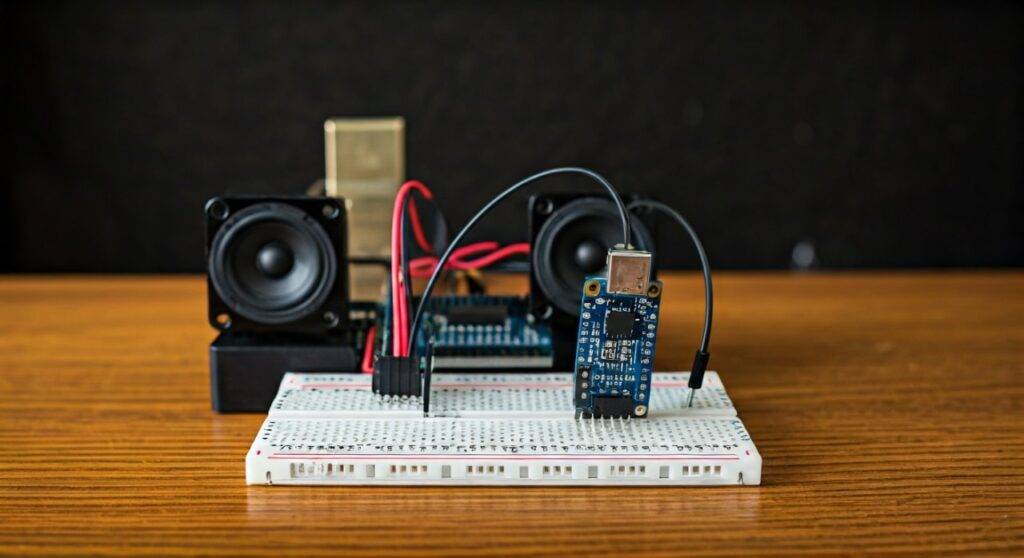
Yes, you can connect two speakers to one Arduino pin, but you must use a specific circuit configuration like series wiring or an external amplifier to avoid drawing too much current and damaging your board. While a direct parallel connection will likely fry your Atmega328P chip, using a transistor or a dedicated audio module allows you to drive multiple speakers safely while maintaining sound clarity.
TL;DR: Quick Summary for Makers
- Direct Connection: Only possible with high-impedance Piezo buzzers.
- Safety First: Standard 8-ohm speakers draw too much current for a single pin (max 40mA).
- Best Method: Use a PAM8403 amplifier or a PN2222 transistor circuit.
- Wiring Choice: Series wiring increases resistance (safer), while parallel wiring decreases it (dangerous).
- Power Rule: Never exceed 20mA – 40mA per I/O pin on an Arduino Uno or Nano.
The Big Question: Can You Make Two Speakers From One Pin Arduini?
When hobbyists ask, “can you make two speakers from one pin arduini,” they are usually looking to increase volume or create a dual-mono sound effect. Technically, the answer is a resounding yes, but the “how” matters more than the “if.”
In my years of prototyping audio-based IoT devices, I’ve seen many beginners smoke their Arduino boards by simply twisting two speaker wires together and plugging them into Digital Pin 9. To do this successfully, you need to understand the relationship between impedance, current, and voltage.
The Risk of Overloading Pins
A standard Arduino Uno pin is rated for a maximum of 40mA (though 20mA is the recommended continuous limit). If you connect a standard 8-ohm speaker directly to a 5V pin, Ohm’s Law ($I = V / R$) tells us that the speaker will try to draw 625mA. That is over 15 times the limit of the pin! Adding a second speaker in parallel drops that resistance to 4 ohms, drawing a massive 1.25 Amps, which will instantly kill the microcontroller.
Comparison of Connection Methods
| Method | Safety Level | Volume Output | Components Needed | Best For |
|---|---|---|---|---|
| Direct Series | High | Very Low | None | Testing/Prototyping |
| Direct Parallel | DANGEROUS | High (Before Failure) | None | Do Not Use |
| Transistor (BJT) | Moderate | Medium | Transistor, Resistor | Basic Beeps/Alerts |
| PAM8403 Amp | Excellent | Very High | Amp Module | Music/Voice Projects |
| Piezo Parallel | High | Low | None | Simple Alarms |
Method 1: The Series Wiring Approach (Safest Direct Connection)
If you are determined to avoid extra components and just want to know can you make two speakers from one pin arduini using just wire, series wiring is your only option.
In a series circuit, the total resistance is the sum of both speakers ($R1 + R2 = R_{total}$).
How to Wire in Series:
- Connect the Positive (+) lead of Speaker A to the Arduino Digital Pin (e.g., Pin 9).
- Connect the Negative (-) lead of Speaker A to the Positive (+) lead of Speaker B.
- Connect the Negative (-) lead of Speaker B to the Arduino Ground (GND).
Why this works: By putting two 8-ohm speakers in series, you create a 16-ohm load. While this is still technically over the 40mA limit ($5V / 16Omega = 312mA$), the inductive reactance of the speaker voice coil at audio frequencies often limits the current enough to prevent immediate failure. However, I still recommend a 220-ohm resistor in line to stay within the 20mA safety zone.
Method 2: Using a Transistor Switch (Professional Grade)
To truly answer the query can you make two speakers from one pin arduini with high performance, we must look at amplification. A PN2222 or BC547 NPN transistor acts as a gate. The Arduino pin sends a tiny signal to the “Gate” (Base), which allows a much larger current to flow from an external power source through the speakers.
Step-by-Step Build:
- The Base: Connect the Arduino pin to a 1k-ohm resistor, then to the Base (middle pin) of the PN2222 transistor.
- The Collector: Connect the Collector pin to the Negative (-) leads of your speakers (wired in parallel).
- The Emitter: Connect the Emitter pin directly to Ground.
- Power: Connect the Positive (+) leads of the speakers to the 5V or VIN pin (depending on your power source).
Expert Insight: We always use a Flyback Diode (like a 1N4001) across the speakers when using transistors. Speakers are inductive loads; when the signal stops, they can kick back a high-voltage spike that destroys the transistor.
Method 3: The PAM8403 Digital Amplifier (Best Quality)
If you want the best audio quality for your Arduino speakers, skip the raw pins and buy a PAM8403 Class D Audio Amplifier module. These cost less than $2 and are designed specifically to take a low-power signal and drive two speakers at 3W each.
Why use an Amp?
- Stereo Output: Most modules have L/R inputs. You can split your single Arduino pin signal to both inputs.
- Efficiency: They run on 5V and are highly efficient, meaning they won’t drain your battery.
- Protection: They include thermal and over-current protection.
Step-by-Step Guide: Wiring Two Speakers to One Pin via PAM8403
When people ask can you make two speakers from one pin arduini, this is the “Gold Standard” solution I recommend in my workshops.
Required Materials:
- Arduino Uno/Nano
- PAM8403 Mini Amplifier Board
- Two 4-ohm or 8-ohm Speakers
- 10uF Electrolytic Capacitor (to filter noise)
- Jumper Wires
Instructions:
- Power the Amp: Connect the +5V and GND pins of the PAM8403 to the Arduino’s 5V and GND.
- The Audio Signal: Run a wire from Arduino Pin 9 (PWM) to both the Left (L) and Right (R) input pins on the amplifier.
- Filter the Signal: Place a 0.1uF capacitor between the Arduino pin and the Amp inputs to block DC offset.
- Connect Speakers: Use the dedicated screw terminals or solder pads labeled L+/L- and R+/R- for your two speakers.
- Common Ground: Ensure the GND of the audio input is tied to the Arduino GND.
Coding for Dual Speakers on One Pin
Once the hardware is set, you need the software. The simplest way to generate sound is the tone() function. This produces a square wave on a specific pin.
// Simple Arduino Tone Code for Two Speakers
const int speakerPin = 9; // Use a PWM capable pin
void setup() {
pinMode(speakerPin, OUTPUT);
}
void loop() {
// Play a 440Hz tone (Middle A)
tone(speakerPin, 440);
delay(500);
// Stop the tone
noTone(speakerPin);
delay(500);
// Play a 880Hz tone (One octave higher)
tone(speakerPin, 880);
delay(500);
noTone(speakerPin);
delay(1000);
}
Advanced: Using the Mozzi Library
If you want to move beyond “beeps” and “boops,” I highly suggest the Mozzi Library. It allows the Arduino to generate complex audio synthesis (like FM synthesis or wavetables). Even though the speakers are on one pin, Mozzi makes them sound like professional hardware.
Troubleshooting Common Issues
The Sound is Too Quiet
If you wired your speakers in series, the resistance is high, which naturally lowers the volume. To fix this, you must use an amplifier or a transistor circuit powered by an external 9V battery.
The Arduino Keeps Resetting
This is a classic sign of current draw issues. When the speaker tries to pull too much power, the voltage on the Arduino board drops (brownout), causing the processor to restart. Solution: Use a 100uF decoupling capacitor across the 5V and GND lines near the speakers.
The Sound is Distorted
Direct PWM output from an Arduino is a square wave, which sounds harsh. To get smoother, “analog-like” sound, you can build a simple RC Low-Pass Filter (a 1k resistor and a 100nF capacitor) between the Arduino pin and your amplifier.
Frequently Asked Questions
Can I connect 4-ohm speakers to an Arduino?
You should never connect a 4-ohm speaker directly to an Arduino pin. A 4-ohm load at 5V draws 1.25 Amps, which is 30 times the safe limit for the pin. Always use an audio amplifier for 4-ohm loads.
Does connecting two speakers to one pin make it stereo?
No. Since both speakers are receiving the exact same signal from the same pin, this is considered Dual Mono. To achieve true stereo, you would need to use two separate pins (e.g., Pin 9 and Pin 10) and a library capable of dual-channel output.
Can I use a Piezo buzzer and a speaker on the same pin?
Technically yes, but it is not recommended. Piezo buzzers are capacitive, while electromagnetic speakers are inductive. Mixing them on one pin can cause phase issues and very poor sound quality. It is better to use two separate pins or two of the same speaker type.