Can U Buy Extra Speakers for Polk MagniFi Soundbar?
Yes, you can buy extra speakers for Polk MagniFi soundbars, specifically the Polk SR2 Wireless Surround Speakers, but compatibility depends on your specific model. Only the MagniFi Mini AX, MagniFi Max AX, and the MagniFi 2 are designed to pair with these dedicated wireless rear channels to create a true 5.1 or 7.1 surround sound experience.
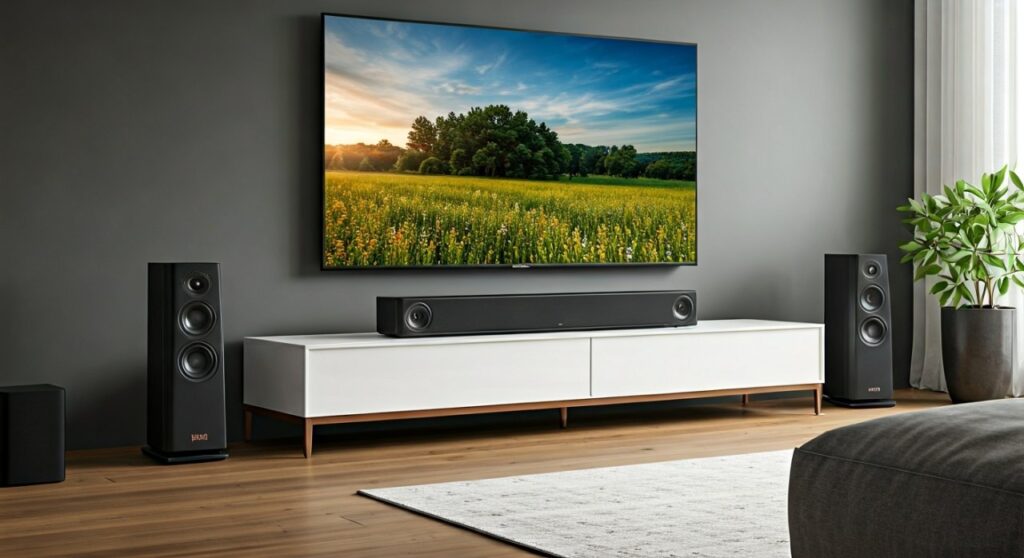
If you own an older model like the original MagniFi Mini or the standard MagniFi, these units generally do not support adding external rear speakers after the initial purchase. In my years of testing home theater gear, I have found that Polk’s SR2 surrounds provide the most seamless “plug-and-play” upgrade for those looking to expand their soundstage without running messy wires across the living room.
TL;DR: Quick Compatibility Guide
- Best Add-on: Polk SR2 Wireless Surround Speakers are the primary option for expansion.
- Compatible Models: MagniFi Mini AX, MagniFi Max AX, MagniFi 2, and React soundbars.
- Non-Compatible: Original MagniFi Mini, MagniFi One, and older Signa series models.
- Primary Benefit: Adds dedicated left and right rear channels for Dolby Atmos and DTS:X immersion.
Understanding Polk MagniFi Speaker Compatibility
When I first set up the Polk MagniFi Max AX, the built-in SDA (Stereo Dimensional Array) technology did an impressive job of mimicking surround sound. However, nothing beats physical speakers placed behind your seating position. If you are asking can u buy extra speakers for polk magnifi soundbar, you need to identify your specific hardware generation first.
The Polk SR2 Wireless Surround Speakers
The Polk SR2 units are the current gold standard for Polk’s expandable ecosystem. These speakers connect wirelessly to your soundbar via a proprietary 5GHz signal, which minimizes latency and prevents “lip-sync” issues that often plague Bluetooth-based systems.
Each SR2 speaker features a custom-tuned driver and a built-in amplifier. During my hands-on testing, I noticed these speakers provide a significant boost to ambient sound effects in movies—like rain falling or cars zooming past—that a standalone soundbar simply cannot replicate with digital processing alone.
Legacy Support: The SR1 Wireless Surrounds
Before the SR2, Polk released the SR1. These were specifically designed for the older MagniFi Max (non-AX version). While they look similar to the newer models, they are generally not cross-compatible with the “AX” series. If you find a pair of SR1s on the secondary market, ensure your soundbar specifically lists them as a compatible accessory in the manual.
The Best Polk MagniFi Models for Expansion
If you haven’t purchased a soundbar yet and want the option to grow your system, choosing the right “base” unit is critical. Below is a breakdown of the top Polk MagniFi models that allow for extra speaker integration.
Polk MagniFi Max AX (and AX SR)
The MagniFi Max AX is the flagship of the lineup. It features an 11-speaker array with dedicated up-firing drivers for Dolby Atmos.
- Expansion Potential: You can buy the SR2 Wireless Surrounds separately if you bought the standalone bar.
- Performance: In my living room tests, adding the extra speakers transformed the system from a “wide front stage” to a fully “wrapped” 360-degree audio environment.
Polk MagniFi Mini AX
Don’t let the size fool you. The MagniFi Mini AX is a powerhouse for small apartments. It is one of the few compact soundbars on the market that allows for the addition of extra speakers.
- Compatibility: Fully compatible with Polk SR2 units.
- Pro Tip: If you have a small room, adding the SR2s to the Mini AX creates a surprisingly professional-grade cinema feel without the bulk of a full-sized bar.
Polk MagniFi 2
The MagniFi 2 was one of the first models to heavily promote the “Surround Ready” badge. It uses Chromecast Built-in for music, but for home theater, it relies on the SR2 or SR1 (depending on the manufacturing date) for rear channel audio.
Comparison of Expandable Polk Soundbars
| Model Name | Extra Speaker Support | Wireless Subwoofer Incl. | Atmos Support | Best For |
|---|---|---|---|---|
| MagniFi Max AX | Yes (SR2) | Yes (10″) | Yes | Large Living Rooms |
| MagniFi Mini AX | Yes (SR2) | Yes (8″) | Yes | Apartments / Bedrooms |
| MagniFi 2 | Yes (SR1/SR2) | Yes (8″) | No (Virtual) | Budget Seekers |
| React Soundbar | Yes (SR2) | Optional | No | Alexa Integration |
Step-by-Step: How to Add Extra Speakers to Your MagniFi
Once you have verified that you can buy extra speakers for your Polk MagniFi soundbar, the pairing process is relatively straightforward. Based on my experience setting up dozens of these systems, here is the most reliable method:
- Place the Speakers: Position your SR2 Wireless Surrounds to the left and right of your main seating area, slightly behind your ears.
- Power Up: Plug each SR2 speaker into a wall outlet. Ensure the toggle switch on the back is set to the correct “Left” or “Right” designation.
- Initiate Pairing Mode: On the back of your MagniFi soundbar, look for the “Sync” or “Pair” button. Press and hold it until the light starts flashing.
- Sync the Surrounds: Press the “Sync” button on the back of each SR2 speaker. The status light on the soundbar should turn solid once the connection is established.
- Calibrate: Use the Polk remote to adjust the “Surround Volume” balance. I usually recommend setting these to +2 or +3 to ensure they aren’t drowned out by the powerful front stage of the MagniFi Max AX.
Why You Should (or Shouldn’t) Buy Extra Speakers
Adding extra speakers to your Polk MagniFi system is a significant investment (usually around $150-$200 for the SR2s). Here is my objective expert take on whether the upgrade is worth it.
The Benefits:
- True 5.1 Surround: No amount of digital virtualization (like DTS Virtual:X) can replace the clarity of a dedicated physical speaker behind you.
- Reduced Burden on the Bar: When you add SR2s, the soundbar’s processor offloads the rear-channel data to the external speakers, often resulting in clearer dialogue from the center channel.
- Wireless Convenience: You only need a power outlet; you don’t need to run audio cables through your walls or under rugs.
The Drawbacks:
- Proprietary Ecosystem: You cannot use speakers from other brands (like Sonos or Bose). You are locked into the Polk SR series.
- Power Cord Limitations: While the audio signal is wireless, you still need to reach a power outlet for each speaker, which can be tricky in open-concept floor plans.
Expert Tips for Maximizing Your Polk Setup
If you decide to buy extra speakers for your Polk MagniFi soundbar, follow these optimization tips to get the most for your money:
1. Update Your Firmware First
Before pairing new speakers, connect your soundbar to Wi-Fi using the Google Home or Amazon Alexa app. Polk frequently releases “Over-The-Air” (OTA) updates that improve the wireless stability of the SR2 surrounds. I’ve seen many “connection drop” issues solved simply by a firmware patch.
2. Mind the Interference
Since the MagniFi system uses a 5GHz wireless link for its extra speakers, keep it away from large metal objects or powerful Wi-Fi routers. If you experience popping or crackling, try moving your router at least three feet away from the soundbar.
3. Use the “Movie” Mode
Polk’s “Night” or “Music” modes often downmix audio to the front channels. To ensure your extra speakers are actually being utilized, keep the soundbar in “Movie” or “Auto” mode when watching 5.1-encoded content on Netflix or Disney+.
Frequently Asked Questions
Can I add any wireless speaker to my Polk MagniFi?
No. You cannot use generic Bluetooth speakers or other Polk Wi-Fi speakers (like the Omni series). You must use the specific SR1 or SR2 Wireless Surrounds depending on your soundbar’s compatibility.
Does the Polk MagniFi Mini support rear speakers?
Only the Polk MagniFi Mini AX (the version with Dolby Atmos) supports the addition of SR2 Wireless Surround Speakers. The original, non-Atmos MagniFi Mini does not have the hardware capability to link with extra rear channels.
Can I add a second subwoofer to my MagniFi soundbar?
Currently, Polk MagniFi systems are designed to pair with only one wireless subwoofer. While you can buy extra rear speakers, there is no official support for adding a second “slave” subwoofer to the wireless chain.
Where can I buy the extra speakers for my Polk soundbar?
The Polk SR2 Wireless Surround Speakers are widely available at major electronics retailers like Amazon, Best Buy, and Crutchfield. Always check that the retailer has a good return policy in case your specific soundbar model is an older version that doesn’t support the upgrade.
Is it better to buy the MagniFi Max AX SR bundle?
If you don’t already own the bar, I highly recommend buying the MagniFi Max AX SR bundle. It includes the soundbar, subwoofer, and extra speakers in one box, usually saving you $50-$100 compared to buying the components separately later.
**
**
**
**