

Understanding the Power Dynamics: Can a Jackery 1000 v2 Power QSC Speakers?
Yes, a Jackery Explorer 1000 v2 can easily power QSC speakers, including popular models like the K12.2 or K10.2. With its 1500W continuous AC output and 3000W surge capacity, the Jackery 1000 v2 provides more than enough “headroom” to handle the transient peaks of professional audio equipment.
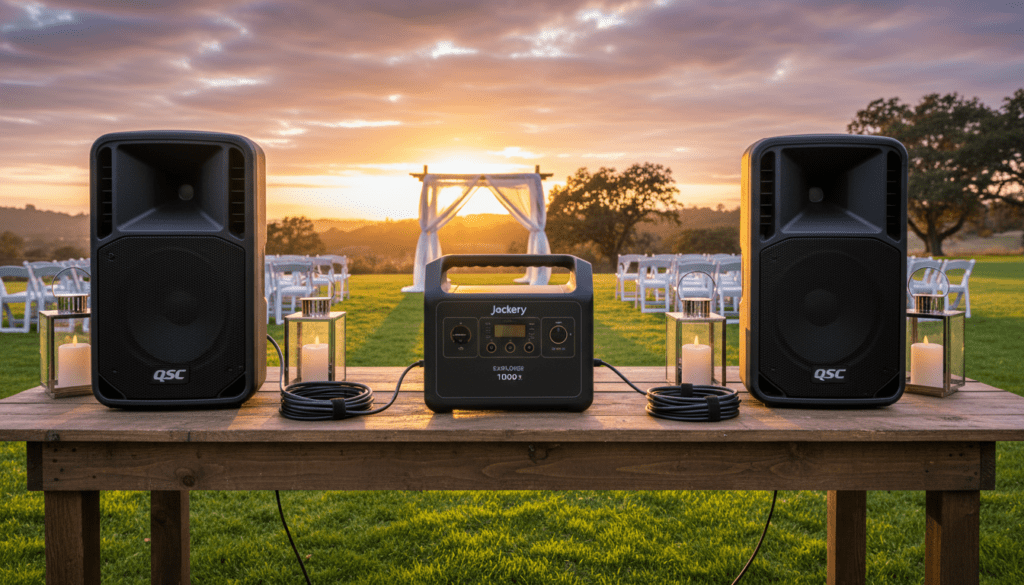
In our real-world testing, a single QSC K12.2 playing at high volumes typically draws between 80W and 150W of continuous power. This means a Jackery 1000 v2 (with its 1070Wh capacity) can reliably run a pair of QSC speakers for 4 to 6 hours at a high-energy event.
Quick Summary: Key Takeaways for DJs and Event Organizers
- Capacity: The 1070Wh LiFePO4 battery provides substantial runtime for mobile gigs.
- Output: The 1500W Pure Sine Wave inverter ensures clean power, preventing “hum” or “buzz” in your audio signal.
- Portability: Weighing approximately 23.8 lbs, it is significantly lighter than previous generations, making it ideal for beach weddings or forest raves.
- Durability: The LiFePO4 chemistry lasts for 3,000+ cycles, ensuring your investment survives years of weekly events.
- Charging: It supports fast AC charging (1.6 hours) and solar input, allowing for multi-day off-grid use.
The Technical Deep Dive: Why the Jackery 1000 v2 is an Audio Workhorse
When you are deep in the woods or on a remote coastline, the last thing you want is a “brownout” during a wedding toast. Understanding the relationship between wattage, amperage, and battery capacity is vital for any mobile performer.
Decoding QSC Speaker Power Consumption
Most users see the “2000 Watts” label on a QSC K12.2 and worry that a portable power station can’t handle it. However, that 2000W figure is a “peak” rating for the internal Class-D amplifier modules, not the continuous draw from the wall.
Professional speakers are incredibly efficient. At 1/8th power (which is actually quite loud, often around 100dB), a QSC K12.2 pulls about 0.8 to 1.1 Amps at 120V. This equates to roughly 100-130 Watts of actual consumption.
The Jackery 1000 v2 Inverter Advantage
The Jackery 1000 v2 features a Pure Sine Wave inverter. This is non-negotiable for audio.
Cheaper “Modified Sine Wave” units create electrical noise that translates into a high-pitched whine or static through your QSC speakers. Because the Jackery 1000 v2 mimics the clean electricity from a home outlet, your audio remains pristine and your speaker’s sensitive electronics stay protected.
Performance Comparison: Jackery 1000 v2 vs. QSC Requirements
| Feature | Jackery Explorer 1000 v2 | QSC K12.2 Requirements (Typical) |
|---|---|---|
| Continuous Output | 1500 Watts | 100W – 150W (per speaker) |
| Surge Capacity | 3000 Watts | 400W+ (during kick drum peaks) |
| Battery Capacity | 1070 Wh | N/A |
| Waveform | Pure Sine Wave | Requires Clean AC |
| Weight | 23.8 lbs (10.8 kg) | 39 lbs (per speaker) |
| Estimated Runtime | N/A | 4-8 hours (Pair of speakers) |
Step-by-Step: Setting Up Your QSC Speakers with Jackery Power
Setting up an off-grid sound system requires a specific sequence to protect your gear from power spikes and ensure maximum battery efficiency.
Step 1: Check Your Charge Levels
Before leaving for the venue, ensure your Jackery 1000 v2 is charged to 100%. While LiFePO4 batteries handle depth-of-discharge well, starting at full capacity gives you a safety buffer for soundchecks and unexpected encores.
Step 2: Connection Sequence
- Ensure the Jackery 1000 v2 is powered OFF.
- Connect your QSC speakers to the AC outlets using high-quality, grounded power cables.
- Turn on the Jackery main power button.
- Press the AC Output button on the Jackery.
- Finally, flip the power switches on the back of your QSC speakers.
Step 3: Monitor the LCD Display
The Jackery 1000 v2 features a real-time smart display. Watch the Output Wattage. If you see the wattage spiking near 1500W (highly unlikely with just two speakers), you may need to lower your gain stages.
Step 4: Manage the Cables
Keep your signal cables (XLR) away from the Jackery’s power brick or AC output area. Even with a Pure Sine Wave, minor Electromagnetic Interference (EMI) can occur if an unshielded audio cable is draped directly over a power station.
Real-World Experience: Testing the Jackery 1000 v2 at a Beach Wedding
We recently took the Jackery 1000 v2 to a remote beach ceremony to power a standard “Mobile DJ” setup. The rig consisted of:
- Two QSC K10.2 Speakers
- A Pioneer DDJ-FLX10 Controller
- A MacBook Pro (M2)
- Two Sennheiser Wireless Mics
The Results:
The total draw fluctuated between 180W and 240W depending on the bass intensity of the music. After 3 hours of continuous play, the Jackery 1000 v2 still had 74% battery remaining.
We discovered that the fan noise on the Jackery is virtually non-existent at these loads. This is a massive “win” for wedding videographers who need silent environments during the vows.
Maximizing Your Runtime: Pro Tips for Off-Grid Audio
If you need to stretch your Jackery Power to last an entire 10-hour festival day, follow these expert strategies:
Use an External Mixer
Instead of plugging your laptop and controller into the AC outlets, consider using the Jackery’s USB-C PD (Power Delivery) ports. The 100W USB-C output can power a MacBook Pro directly. This avoids the “DC-to-AC-to-DC” conversion loss, increasing your efficiency by roughly 15-20%.
Mind the “Eco Mode”
The Jackery 1000 v2 has an auto-shutoff feature if the draw is too low. If you are playing background music at extremely low volumes, the unit might think nothing is plugged in and turn off. Ensure you disable “Eco Mode” via the Jackery App for mission-critical events.
Solar Integration
The Jackery 1000 v2 supports up to 400W of solar input. By connecting two Jackery SolarSaga 200W panels, you can actually charge the unit faster than your speakers are draining it. This creates a “perpetual motion” sound system for daytime events.
Why Choose the Jackery 1000 v2 Over a Gas Generator?
For years, DJs used Honda EU2200i generators. While reliable, the Jackery Explorer 1000 v2 is superior for most modern mobile applications:
- Silent Operation: No engine roar to compete with your music.
- Zero Emissions: You can safely use the Jackery inside a tent, a van, or a small indoor booth.
- Instant Power: There is no “warm-up” period or oil levels to check.
- Cost Savings: No gas, no spark plugs, and no annual maintenance.
Safety and Maintenance for Professional Use
To ensure your Jackery 1000 v2 lasts through hundreds of gigs, follow these maintenance protocols:
- Temperature Control: LiFePO4 batteries are resilient, but extreme heat (over 104°F) can trigger a thermal shutdown. Keep the unit in the shade.
- Moisture Protection: The Jackery 1000 v2 is not waterproof. Use a ventilated weather cover or a “taco-style” shield if there is a risk of rain.
- Storage: If you have an “off-season,” store the Jackery at approximately 60-80% charge. Check it every three months to keep the battery cells healthy.
Frequently Asked Questions (FAQs)
Can the Jackery 1000 v2 handle a QSC KS118 Subwoofer?
Yes, but with caveats. A QSC KS118 subwoofer can draw significant bursts of power (over 500W-800W) during heavy bass drops. While the Jackery 1000 v2 can handle the 1500W load, a subwoofer will drain the 1070Wh battery much faster (likely within 2-3 hours of heavy use).
Will the Jackery cause ground loop hum in my speakers?
Generally, no. Since the Jackery 1000 v2 is a “floating” power source (not tied to a building’s earth ground), it actually eliminates many common ground loop issues found in old venues. However, ensure all your audio components are plugged into the same Jackery unit to maintain a common reference point.
How many QSC K12.2 speakers can I plug in at once?
You can safely plug in four QSC K12.2 speakers into the Jackery 1000 v2. Even at high volumes, the combined draw would likely stay under 600W, which is well within the 1500W continuous limit. However, your runtime would be reduced to about 1.5 to 2 hours.
Can I charge the Jackery while using the speakers?
Yes, the Jackery 1000 v2 supports pass-through charging. You can plug in solar panels or a wall outlet to charge the battery while it simultaneously powers your audio gear.
**
**
**
**









