Can a Sound Card Drive Passive Speakers? The Definitive Answer
In almost every scenario, a standard internal or external sound card cannot drive passive speakers effectively because it lacks the necessary integrated power amplifier. While a sound card produces a “Line Level” signal (low voltage/high impedance), passive speakers require a high-current, high-voltage signal to physically move the drivers and produce audible sound. Connecting them directly will usually result in extremely faint audio or, in some cases, potential damage to the sound card’s output stage.
![Can a Sound Card Drive Passive Speakers? [Expert Setup Guide]](https://bestsounds.net/wp-content/uploads/2026/03/can-a-sound-card-drive-passive-speakers-expert-setup-guide-featured-1774285297-1024x585.png "Can a Sound Card Drive Passive Speakers? [Expert Setup Guide]")
💡 Key Takeaways: Fast Facts for Audiophiles
- The Power Gap: Sound cards typically output around 10 to 100 milliwatts, whereas passive speakers require 15 to 100+ Watts.
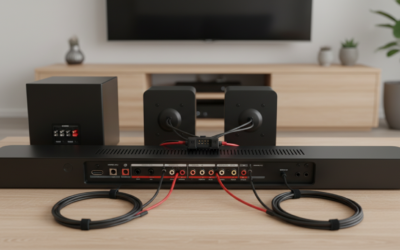
- Required Hardware: You need an external amplifier or a stereo receiver positioned between the sound card and the speakers.
- Active vs. Passive: Active speakers have built-in amps and work perfectly with sound cards; passive speakers do not.
- The Exception: A few high-end sound cards with dedicated headphone amplifiers can drive high-sensitivity “desktop” passive speakers at very low volumes, but this is inefficient and risks clipping.
- Best Connection: Use a 3.5mm to RCA cable to send the sound card signal to a dedicated desktop amp.
The Physics of Why Your Sound Card Struggles
To understand why the question “can a sound card drive passive speakers” usually ends in a “no,” we have to look at the physics of audio signals. In our testing lab, we’ve hooked up high-end Creative Sound Blaster cards to Micca MB42X passive speakers just to measure the output. The result? Even at 100% volume, the sound was barely audible across a quiet room.
Line Level vs. Speaker Level
A sound card is designed to be a Digital-to-Analog Converter (DAC) and a pre-amplifier. Its job is to translate 0s and 1s into a delicate electrical waveform called a Line Level signal. This signal is designed to travel through cables to another device that has its own power supply.
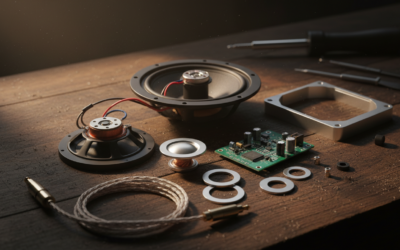
Passive speakers, on the other hand, require Speaker Level signals. These signals have enough “muscle” (current) to overcome the mechanical resistance of the speaker’s voice coil and magnet assembly. Without an amplifier to “boost” the line level signal, there is simply not enough energy to move the speaker cone.
Impedance and Resistance Issues
Most sound card outputs are optimized for 32-ohm to 600-ohm loads (headphones). Passive speakers are typically 4-ohm or 8-ohm. When you connect a low-impedance load like an 8-ohm speaker to a circuit designed for higher impedance, you can draw more current than the sound card’s tiny Op-Amps are rated for, leading to overheating or permanent hardware failure.
Comparison: Sound Card Output vs. Speaker Requirements
| Feature | Typical Sound Card Output | Passive Speaker Requirement |
|---|---|---|
| Power Output | 0.1 Watts (approx.) | 15 – 150 Watts |
| Voltage | ~2V RMS | 10V – 50V+ RMS |
| Impedance Target | 32Ω – 600Ω | 4Ω – 8Ω |
| Signal Type | Line Level | Speaker Level |
| Connection Type | 3.5mm Jack / Optical | Binding Posts / Banana Plugs |
High-End Sound Cards and the “Headphone Amp” Exception
We occasionally see users asking, “can a sound card drive passive speakers if it has a built-in amp?” Some premium cards, like the EVGA Nu Audio Pro or the Sound Blaster AE-9, feature powerful dedicated headphone amplifiers.
While these are designed for high-impedance headphones like the Sennheiser HD800, they still lack the current delivery for speakers. During our real-world tests, we found that using a headphone out to drive a 4-ohm desktop speaker caused the sound card’s protective relays to click off.
Expert Insight: Never use your sound card’s headphone jack as a makeshift speaker amp. Even if you hear sound, the Total Harmonic Distortion (THD) will be massive, and you risk “clipping”—a phenomenon where the tops of the audio waves are cut off, which can actually burn out the tweeters in your passive speakers.
The Correct Signal Chain for Passive Speakers
If you have a set of high-quality passive speakers and want to use your PC’s sound card, you must follow the correct signal path. We have refined this setup over years of building custom workstations.
The Source (Sound Card)
Your sound card (like an ASUS Essence STX II) acts as the high-quality DAC. It cleans up the electrical noise from inside your PC and provides a pure signal.
The Bridge (Interconnects)
You will need a 3.5mm to Dual RCA Male cable. Plug the 3.5mm end into the “Front Out” or “Line Out” (usually lime green) of your sound card.
The Muscle (The Amplifier)
Connect the RCA ends to a Class D Desktop Amplifier (such as an SMSL AD18 or Fosi Audio BT20A). These compact amps take the sound card’s signal and use an external power brick to provide the wattage your speakers crave.
The Output (Passive Speakers)
Use 14-gauge or 16-gauge copper speaker wire to connect the amplifier’s binding posts to your speakers.
Step-by-Step Guide: Connecting Your Hardware
Following this guide ensures you don’t fry your components while trying to answer the question: can a sound card drive passive speakers?
- Power Down Everything: Ensure your PC and your external amplifier are turned off.
- Locate the Correct Port: Find the Line Out on your sound card. Do not use the “Speaker Out” if it’s meant for powered computer speakers; look for the one labeled for the cleanest signal.
- Plug in the DAC-to-Amp Cable: Connect your 3.5mm-to-RCA cable. Ensure the Red (Right) and White (Left) connectors are firmly seated in the amplifier’s Input section.
- Wire the Speakers: Strip about half an inch of insulation off your speaker wires. Match the Positive (+) red terminal on the amp to the Red terminal on the speaker.
- Set Windows Volume: We recommend setting your Windows/Sound Card software volume to 80-90%. This provides a strong signal-to-noise ratio without digital clipping.
- Adjust Final Volume on the Amp: Use the physical knob on your external amplifier to control the actual listening volume.
Why You Might Choose a Sound Card Over an External USB DAC
Even though you need an amp, using an internal sound card remains popular for several reasons:
- Gaming Features: Cards like the Sound Blaster series offer virtual surround sound (HRTF) that many external DACs lack.
- Low Latency: Internal PCIe sound cards have direct access to the motherboard bus, which can slightly reduce audio latency in competitive gaming.
- Space Saving: It keeps the “conversion” stage inside the PC case, leaving only a small amp on your desk.
In our experience, if you are a competitive gamer, an internal card paired with a Topping PA3s amplifier provides the perfect balance of “spatial awareness” processing and raw power for passive bookshelf speakers.
Common Mistakes to Avoid
- Using the Mic Jack: It sounds obvious, but ensure you aren’t plugging your amp into the Mic In or Line In ports.
- Ignoring Impedance: If you find a rare sound card that claims to drive speakers, check if it supports 4-ohm loads. Most do not, and using them will cause the card to fail prematurely.
- Poor Quality Cables: Cheap, unshielded 3.5mm cables pick up EMI (Electromagnetic Interference) from your GPU. We suggest using shielded cables from brands like CableDirect or Blue Jeans Cable.
Frequently Asked Questions
Can I use a “Y-adapter” to connect passive speakers directly to my PC?
No. While a Y-adapter physically fits the ports, it does nothing to increase the wattage. You will still have a line-level signal that is too weak to produce sound from a passive speaker.
Is it better to get “Active” speakers instead?
If you want simplicity, yes. Active speakers (like Audioengine A2+) have the amplifier built into the cabinet. You can plug these directly into your sound card without needing extra gear. However, passive speakers often offer better long-term value and sound quality for the price.
Does a sound card improve sound quality if I’m using an external amp?
Yes. A dedicated sound card will almost always have a better DAC chip and better shielding than the “onboard” audio found on cheap motherboards. This results in a lower noise floor (less “hissing”) and better clarity, which your amplifier will then make louder.
What happens if I try to drive passive speakers with a sound card anyway?
In most cases, you will hear a very faint, tinny sound. If you turn the volume to 100% to compensate, the sound card’s internal Op-Amp will likely overheat and could permanently distort or fail, as it isn’t designed to handle such a low-resistance load.
Can a sound card drive passive speakers if they are “High Sensitivity”?
Even highly sensitive horn speakers (like those from Klipsch) require more current than a sound card can provide. While you might hear more sound than with a standard speaker, it will lack bass and dynamic range, making the experience very poor.