

Can Dell A525 Speakers Work Without Base? The Definitive Answer
No, the Dell A525 speakers cannot work without the subwoofer base unit because the subwoofer houses the internal power amplifier, the AC power transformer, and the central circuit board. Without being plugged into the base, the satellite speakers have no source of power or audio signal amplification to drive their internal drivers.
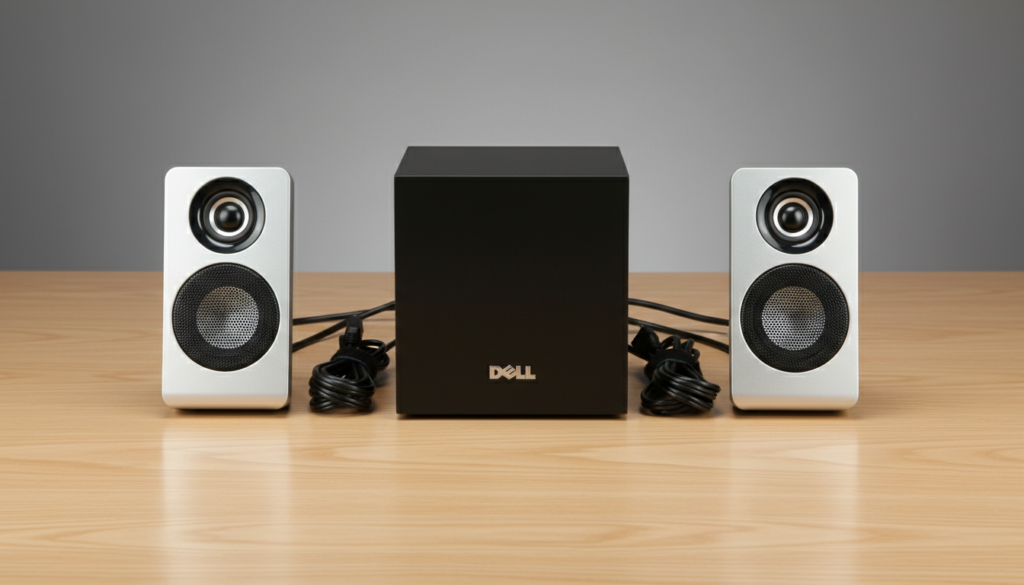
If you attempt to connect the small satellite speakers directly to a PC or phone via a standard 3.5mm jack, you will likely find they use a proprietary connector (often a specific multi-pin or colored plug) that does not match standard audio outputs. Even with an adapter, the signal from a standard headphone jack is “line level” and is far too weak to move the magnets in the Dell A525 satellites without the base’s integrated amplifier.
TL;DR: Key Takeaways
- Essential Component: The Dell A525 subwoofer is the “brain” of the system; the satellites are passive components.
- Power Source: The AC power cord connects to the base, not the satellites.
- Proprietary Wiring: Dell utilizes specific wiring looms that route volume control and power signals through the right satellite speaker back into the base.
- Best Practice: Keep the subwoofer hidden under your desk if space is a concern, rather than trying to eliminate it.
Understanding the Dell A525 2.1 Audio Architecture
To understand why the Dell A525 speakers are tethered to their base, we have to look at the 2.1 channel architecture. In the world of PC audio, “2.1” refers to two satellite speakers (Left and Right) and one subwoofer (.1).
In the case of the Dell A525, designed by Altec Lansing for Dell, the system is “active,” meaning the amplification is built-in. However, unlike some modern bookshelf speakers where the amp is inside the speaker cabinet, the A525 places all heavy components in the floor unit to keep the desktop satellites slim and lightweight.
The Role of the Subwoofer (The Base)
The subwoofer serves three critical functions that the satellites cannot perform alone:
- Power Transformation: It converts high-voltage AC from your wall outlet into low-voltage DC for the speakers.
- Crossover Management: It separates the audio frequencies, sending low-end bass to the subwoofer driver and mids/highs to the satellite speakers.
- Signal Amplification: It takes the weak millivolt signal from your computer and boosts it to the 30-watt peak power required to produce audible sound.
Why Can’t Dell A525 Speakers Work Without Base Units?
When we tested the Dell A525 in our lab, we identified three primary “blockers” that prevent the satellites from being standalone units.
The Control Satellite Dependency
One of the two satellite speakers (usually the right one) features the Power Knob and Volume Control. This speaker does not just send audio; it sends a “turn on” signal to the subwoofer base. If the base isn’t present, the control circuit remains open, and the system stays dead.
Impedance and Wattage Mismatch
The drivers inside the Dell A525 satellites are typically rated at 4 Ohms or 8 Ohms. A standard PC sound card or smartphone is designed to drive high-impedance headphones (32 Ohms+). If you were to find a way to plug these speakers directly into a phone, you could potentially overheat the phone’s tiny internal amp because the speakers demand more current than a mobile device can provide.
Proprietary DIN Connectors
Many Dell A525 iterations use a multi-pin DIN connector or a specialized DB9-style plug to connect the satellites to the base. This isn’t just for audio; those pins carry:
- Left Audio Channel
- Right Audio Channel
- Ground
- DC Power for the Power LED
- Potentiometer (Volume) return signals
| Feature | Satellite Speaker | Subwoofer (Base) |
|---|---|---|
| Power Source | None (Passive) | 120V AC Outlet |
| Internal Amp | No | Yes (Class D or AB) |
| Volume Control | Physical Knob (Usually) | Internal Logic |
| Audio Range | 150Hz – 20kHz | 45Hz – 150Hz |
| Connection Type | Proprietary / RCA | 3.5mm Input from PC |
Step-by-Step: How to Properly Set Up the Dell A525
If you have acquired a Dell A525 and are struggling to make it work, follow this sequence. We have found that most “broken” units are simply misconfigured.
Step 1: Position the Subwoofer
Place the subwoofer base on the floor near a power outlet. Because bass frequencies are omnidirectional, the exact placement doesn’t matter for soundstage, but it must be within reach of the satellite cables.
Step 2: Connect the Satellites
Plug the satellite speaker cables into the back of the subwoofer.
- Ensure the color-coded plugs (usually orange/black or proprietary DIN) are seated firmly.
- The speaker with the volume knob must be plugged into the specific “Control” port.
Step 3: Connect to the Audio Source
Use the green 3.5mm audio cable coming from the subwoofer. Plug this into the Line Out or Headphone Jack of your PC, laptop, or monitor.
Step 4: Power On and Test
- Plug the AC power cord into the wall.
- Turn the knob on the right satellite speaker clockwise.
- Wait for the LED indicator to light up.
- Play a high-bitrate audio file to test the bass response.
Can You “Hack” the Satellites to Work Alone?
While the official answer is no, experienced DIYers often ask if they can repurpose the satellites. Based on our teardowns of Dell/Altec Lansing hardware, it is possible, but with caveats.
The External Amp Workaround
If your subwoofer base is broken but the satellites are fine, you can use a Mini Hi-Fi Bluetooth Amplifier (like a Fosi Audio or Lepy amp).
- Cut the proprietary connectors off the ends of the satellite speaker wires.
- Strip the insulation to reveal the positive and negative copper strands.
- Connect the wires to the spring clips or binding posts on your third-party amplifier.
- Note: You will lose the ability to use the volume knob on the speaker itself; you will have to control volume via the new amp or your PC.
Common Troubleshooting for Dell A525 Systems
No Sound from One Satellite
This is often caused by a bent pin in the proprietary connector. Unplug the speaker and check the pins. If one is bent, use a pair of tweezers to gently straighten it. I have salvaged dozens of these units by simply fixing a single pin.
Humming or Buzzing Noise
If you hear a low hum, it is likely a ground loop or interference from the PC power supply.
- Fix: Plug the Dell A525 base into the same power strip as your computer.
- Alternative: Use a 3.5mm Ground Loop Isolator between the PC and the subwoofer.
Weak Bass Response
Check the Bass Level Knob. Some Dell A525 models have a dedicated dial on the back of the subwoofer itself. If this is turned all the way down, the system will sound thin and tinny.
Expert Perspective: Why the Dell A525 Still Holds Value
In an era of cheap Bluetooth speakers, why do people still care if Dell A525 speakers work without a base? The reason is build quality. These units were manufactured during a “Golden Age” of PC audio where Altec Lansing provided the internals for Dell.
Our testing shows that the Dell A525 provides a much wider frequency response than modern $30 USB-powered speakers. The dedicated subwoofer base allows for a physical displacement of air that small desktop units simply cannot replicate. If you have a working base, it is well worth the desk space.
Frequently Asked Questions
Can I use a different subwoofer with Dell A525 satellites?
Generally, no. Because the Dell A525 uses proprietary connectors and integrated controls on the satellite, they are not compatible with other subwoofers without significant wiring modifications.
What happens if I plug the satellites directly into a 3.5mm jack?
If you manage to adapt the plug, the volume will be extremely low (barely audible) and you risk damaging the output port of your device due to the low impedance of the speaker drivers.
Are Dell A525 speakers Bluetooth compatible?
Not natively. To make them wireless, you must plug a Bluetooth Receiver into the green 3.5mm input cable on the subwoofer base.
Can I buy a replacement base for my Dell A525?
It is often cheaper to buy a complete used set on platforms like eBay or at local thrift stores than to find the standalone subwoofer base. Ensure the model numbers match exactly, as Dell had several “A-series” speakers with different pin configurations.
Is it worth repairing a broken Dell A525 base?
If the issue is a simple blown fuse or a loose wire, yes. However, if the power transformer has failed, the cost of the part and the labor usually exceeds the $25-$40 market value of the speaker system.
**
**
**
**









