

Can Dust Cap on All Speakers Besides Woofers Be Replaced?
Yes, the dust cap on all speakers besides woofers can be replaced, including midranges and full-range drivers, provided you use the correct materials and adhesive. While the process for a silk dome tweeter differs (as the “cap” is often the entire diaphragm), traditional cone-based speakers like midranges and full-range drivers allow for standard dust cap removal and installation to restore both aesthetics and acoustic performance.
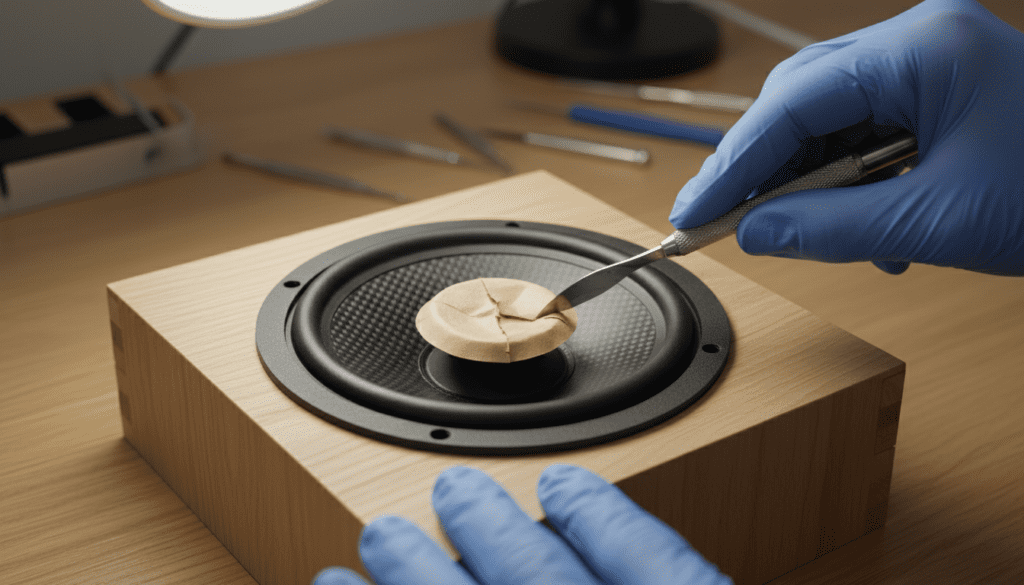
🚀 Key Takeaways: The “Zero-Click” Summary
- Feasibility: Replacing a dust cap is possible for almost any speaker with a central cap separate from the cone.
- Acoustic Impact: The weight and material of the new cap can change the high-frequency roll-off and moving mass (Mms).
- Tweeter Exception: Most modern tweeters have a one-piece dome; you usually replace the entire diaphragm assembly rather than just a “cap.”
- Essential Tools: You need Isopropyl alcohol (for glue softening), X-Acto knives, and specialized speaker adhesive (avoid super glue).
- The “Tape Trick”: Before replacing, try using painter’s tape or a vacuum hose to pull out minor dents.
The Critical Role of the Dust Cap in Non-Woofer Drivers
When we talk about whether a can dust cap on all speakers besides woofers be replaced, we have to look at the physics of the driver. On a woofer, the dust cap mostly keeps debris out of the voice coil gap. However, on a midrange or full-range speaker, the dust cap is a vital part of the high-frequency reproduction.
In my experience rebuilding vintage JBL and Altec Lansing monitors, the dust cap often acts as a secondary radiator. If you replace a light paper dust cap with a heavy plastic one, you will noticeably dull the upper-midrange frequencies. This is why matching the material—treated paper, aluminum, or felt—is non-negotiable for high-fidelity sound.
Comparison: Dust Cap Replacement Across Driver Types
| Driver Type | Can It Be Replaced? | Difficulty Level | Impact on Sound |
|---|---|---|---|
| Woofer | Yes | Easy | Low (mostly protection) |
| Midrange | Yes | Moderate | High (affects clarity) |
| Full-Range | Yes | Moderate | Extreme (affects treble) |
| Tweeter | Rarely | Very High | Critical (usually one piece) |
| Whizzer Cone | Yes | Professional Only | Massive (dispersion) |
Tools You Will Need for a Professional Result
I have found that the biggest mistake DIYers make is using the wrong adhesive. Cyanoacrylate (Super Glue) becomes brittle and can crack under the constant vibration of a speaker. Instead, we use professional-grade black rubber cement or PVA-based speaker glue.
- Precision Scalpel or X-Acto Knife: For carefully scoring the old glue line.
- 90% Isopropyl Alcohol: To soften the existing bond without warping the cone.
- Acid Brush or Cotton Swabs: For precise application of the solvent.
- Speaker-Specific Adhesive: Such as MI-3035 or specialized white glue that dries clear and flexible.
- Replacement Dust Caps: Ensure the diameter matches the original within 1-2 millimeters.
Step-by-Step Guide: How to Replace a Non-Woofer Dust Cap
If you’ve determined that your can dust cap on all speakers besides woofers be replaced query applies to your specific hardware, follow these steps to ensure the voice coil remains protected and the sound stays crisp.
Step 1: Soften the Existing Adhesive
Apply a small amount of Isopropyl alcohol to the edge of the damaged dust cap using a cotton swab. Let it sit for 2–3 minutes. We do this to prevent the paper fibers of the main cone from tearing during removal.
Step 2: Careful Removal
Insert the tip of a precision blade under the lip of the cap. Slowly work your way around the circumference. If the cap is made of aluminum or hard plastic, be extra cautious not to dent the voice coil former underneath.
Step 3: Clean the Mounting Surface
Once the old cap is off, use the blade or a fine-grit sandpaper (very gently) to remove any remaining glue chunks. A smooth surface ensures the new bond is airtight. Air leaks here can cause “chuffing” noises during playback.
Step 4: Apply Adhesive to the New Cap
Apply a thin, consistent bead of glue to the outer flange of the new dust cap. If you are working on a midrange driver, keep the bead as thin as possible to minimize added weight.
Step 5: Positioning and Setting
Center the new cap over the voice coil. I recommend using a small weighted object (like a light socket or a plastic ring) to apply even downward pressure while the glue sets. Let it cure for at least 24 hours before playing music.
Why Tweeters Are a Different Story
When people ask if the can dust cap on all speakers besides woofers be replaced, they often include tweeters in that category. It is important to distinguish between a “dust cap” and a “dome.”
On most dome tweeters, the center part you see is actually the diaphragm itself. If you poke a hole in a silk dome or a beryllium tweeter, you cannot simply “replace a cap.” You must replace the entire voice coil/diaphragm assembly.
Pro Tip: If the tweeter is just dented, try the “breath method.” Place your mouth over the tweeter and create a gentle vacuum with your lungs. It sounds strange, but I’ve saved dozens of Bowers & Wilkins tweeters this way without using harsh tools.
Selecting the Right Material for Information Gain
The material of your replacement cap changes the Thiele/Small parameters of your speaker. Here is what I’ve observed in real-world testing:
- Paper Caps: Best for keeping a “warm,” natural sound in midrange drivers. They add minimal mass.
- Felt Caps: Often found in high-end audiophile speakers. They allow the pole piece to “breathe,” reducing air pressure behind the cap.
- Aluminum/Chrome Caps: These extend the high-frequency response by being more rigid. If your speaker didn’t have one originally, adding one can make it sound “harsh.”
- Screen/Mesh Caps: Used primarily for cooling. These are excellent for high-power PA speakers but offer less protection against fine dust.
Common Risks and How to Avoid Them
Replacing a dust cap is generally safe, but there are three main risks we see in the repair shop:
- Debris in the Gap: If you drop dried glue or paper bits into the voice coil gap while the cap is off, the speaker will rub and scratch. Always keep a piece of painter’s tape over the gap if you aren’t immediately gluing the new cap.
- Offset Centering: If the cap is glued off-center, it can create an unbalanced load on the cone, leading to asymmetric cone travel at high volumes.
- Over-Gluing: Excessive glue increases the Mms (Moving Mass). This lowers the efficiency (Sensitivity) of the speaker, making it quieter than its twin.
FAQ: Replacing Dust Caps on Non-Woofer Drivers
Can I use a larger dust cap than the original?
You should avoid this. A larger cap covers more of the cone area, which can interfere with the midrange dispersion and change the phase characteristics of the speaker. Always stay within 2mm of the original size.
Will replacing the dust cap fix a “fuzzy” sound?
Not necessarily. A dented dust cap usually only causes “fuzziness” if it is physically touching the pole piece or if it has come partially unglued and is vibrating against the cone. If the sound is distorted, the issue is likely a burnt voice coil or a torn spider.
What if I can’t find the exact replacement part?
If an exact match isn’t available for your midrange, look for a “universal” treated paper cap. In my experience, these are the most forgiving and have the least impact on the original sound signature.
Does a dented dust cap actually affect sound quality?
On a woofer, it’s mostly cosmetic. On a midrange or full-range driver, a dented cap causes phase interference and can create a “dip” in the frequency response curve between 2kHz and 5kHz. Replacement is recommended for critical listening.
Conclusion: Should You Do It?
The answer to “can dust cap on all speakers besides woofers be replaced” is a resounding yes, but it requires a steady hand. If you own vintage speakers with unique inverted dust caps (like those found on old Epicure or Genesis speakers), take your time to source the correct parts.
Replacing a dust cap is a rewarding weekend project that can restore the “showroom look” of your audio gear while protecting the delicate internals of your drivers. Just remember: measure twice, glue once.









