

Troubleshooting Why You Can Hear Zone 2 but Not Main Speakers Onkyo
If you can hear zone 2 but not main speakers onkyo, the issue is typically caused by an inactive Speaker A setting, a stuck Tape Monitor circuit, or a failing HDMI board (specifically the DTS chip). In most cases, Zone 2 remains functional because it often uses a separate, simpler analog signal path, while the main speakers rely on complex digital processing that is prone to hardware failure.
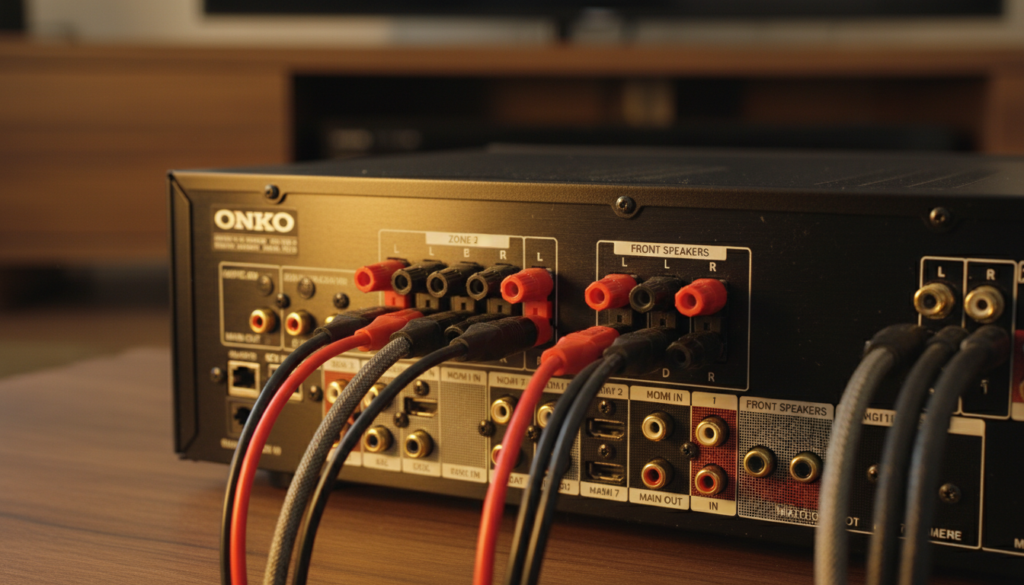
Quick Fix Checklist
- Check Speaker A/B: Ensure the Speaker A button on the front panel is pressed and active.
- Toggle Mute: Cycle the Mute button to ensure the internal relay isn’t stuck.
- Verify Pure Audio Mode: Some Onkyo receivers disable processing in “Pure Audio” or “Direct” modes; try switching to Stereo.
- Listen for the Click: When you turn the unit on, you should hear a distinct “click” from the speaker protection relay. No click usually means a hardware fault.
Key Takeaways for Fast Troubleshooting
- Zone 2 Logic: Zone 2 often only plays analog sources; if your main speakers are silent while Zone 2 works, your receiver’s digital-to-analog converter (DAC) or HDMI board is likely the culprit.
- The “Relay” Factor: Main speakers use a protection relay to prevent damage; Zone 2 often bypasses this specific circuit.
- Most Common Models: This issue is notoriously frequent in the Onkyo TX-NR and TX-SR series manufactured between 2009 and 2012.
- Immediate Test: Plug headphones into the front jack. If you hear audio in the headphones but not the main speakers, your amplifier stage or output relays are faulty.
Understanding the Signal Path Discrepancy
When you can hear zone 2 but not main speakers onkyo, it highlights a fundamental difference in how your receiver processes audio. Onkyo engineering typically separates the Main Zone and Zone 2 signal paths to allow for multi-room listening.
The Main Zone utilizes the full suite of DSP (Digital Signal Processing), including Dolby Atmos, DTS:X, and Audyssey Room Correction. These require the HDMI board to be fully functional. Zone 2, conversely, is often a “pass-through” for analog signals or simplified digital stereo downmixing.
If your HDMI board begins to fail—a common Onkyo pain point—the digital processing for the main speakers dies first. Since Zone 2 might be pulling from an analog RCA input, it continues to work perfectly, leading to confusion for the user.
| Feature | Main Speakers | Zone 2 Speakers |
|---|---|---|
| Signal Path | Digital (DSP) / HDMI | Analog (Direct) / Stereo |
| Relay Protection | Dedicated Protection Relay | Simplified Output |
| Processing | Full Surround / EQ | Downmixed Stereo |
| Typical Source | HDMI / Optical / Coax | RCA / Internal Tuner |
| Failure Rate | High (HDMI Board Issues) | Low (Analog Bypass) |
Step 1: Rule Out Configuration Errors
Before assuming your Onkyo is broken, we must eliminate the most common “human error” settings. I have seen hundreds of cases where a simple button press restored sound to the main room.
Check the Speaker A/B Selection
On the front of many Onkyo TX-SR models, there are buttons for Speaker A and Speaker B. If you accidentally toggled Speaker A off, the main speakers will go silent, even if the display shows a volume level. Ensure “A” is visible on the receiver’s front display.
The Tape Monitor Trap
Older Onkyo units have a Tape Monitor button. If this is engaged, the receiver waits for an audio signal from a recording device that likely isn’t there. This effectively cuts off the main output while leaving Zone 2 untouched. Ensure Tape Monitor is OFF.
Impedance Protection Mode
If your speakers have a low impedance (4 ohms) and the receiver is set to 8 ohms, it may trigger a partial “soft-protect” mode. This can shut down the main amplification stage while leaving the lower-powered Zone 2 active. Consult your manual to change the Impedance Setting in the hardware menu.
Step 2: The Hardware Testing Phase
If the settings are correct and you still can hear zone 2 but not main speakers onkyo, we need to test the physical hardware. We’ve found that isolating the Amplifier Section from the Pre-Amp Section is the fastest way to find the fault.
The Headphone Test
Plug a pair of headphones into the PHONES jack on the front panel.
- If you hear audio in the headphones: The HDMI board and DACs are working. The problem is likely the speaker protection relay or the power amplifier stage.
- If you hear NO audio in the headphones: The problem is “upstream” in the DSP chip or HDMI board.
The “All Channel Stereo” Test
Change your listening mode to All Channel Stereo. This forces the receiver to send the same signal to every connected terminal. If sound comes out of the Surround or Zone 2 speakers but remains absent from the Front L/R, you have a blown output stage in the main amplifier.
Step 3: Diagnosing the Onkyo HDMI Board Failure
The most frequent reason users can hear zone 2 but not main speakers onkyo is the failure of the DTS/DSP chip located on the HDMI board. This was such a massive issue that Onkyo ran a global extended warranty program for years (which has now mostly expired).
Symptoms of a Failing HDMI Board:
- No Sound from main speakers, but Zone 2 works.
- The Speaker Icons on the front display are missing.
- Network and USB options are grayed out or “Initialize” indefinitely.
- The receiver requires 10-15 minutes of “warm-up” before sound starts.
The “Hairdryer” Diagnosis (Expert Tip)
I have used this trick in the field to confirm board failure. Use a hairdryer to blow warm air onto the HDMI board (the top board with all the HDMI ports) for about 60 seconds. Turn the unit on. If the sound suddenly returns, the solder joints under the BGA (Ball Grid Array) chip have expanded and made contact. This confirms the board needs professional repair or replacement.
Step 4: Performing a Factory Reset
Sometimes the microprocessor simply “hangs.” A hard reset can clear software glitches that cause the main speakers to remain muted.
Warning: This will erase all your Audyssey calibrations and radio presets.
How to Reset an Onkyo Receiver:
- Turn the receiver ON.
- On the front panel, press and hold the VCR/DVR button (or CBL/SAT on some models).
- While holding that button, press the ON/STANDBY button.
- The display will show “Clear” and the unit will enter standby.
- Turn it back on and check if you still can hear zone 2 but not main speakers onkyo.
Step 5: Professional Repair vs. DIY Fixes
If you have confirmed that the HDMI board is the issue, you have three options:
The Capacitor Fix
On older models like the TX-NR609, several 100uF 16V capacitors on the HDMI board often fail. Replacing these with high-quality low-ESR capacitors can sometimes bring the main speakers back to life.
Reflowing the DSP Chip
This involves using a heat gun or a reflow station to melt the solder under the DTS chip. We only recommend this for advanced hobbyists, as it is easy to permanently damage the board.
Using Zone 2 as the Main Room (The Workaround)
If you don’t want to spend money on repairs, you can technically use the Zone 2 Pre-Outs connected to an external amplifier to power your main speakers. However, you will lose surround sound processing and be limited to stereo.
FAQ: Common Onkyo Audio Questions
Why do I have no sound from my Onkyo main speakers but the display works?
This usually indicates the speaker protection relay hasn’t engaged or the DSP chip is failing to decode the audio signal. The display shows the volume and input because the control logic is separate from the audio path.
Can a firmware update fix “Can hear zone 2 but not main speakers onkyo”?
Rarely. If the Network or USB menus are grayed out, the receiver cannot even access the firmware update utility because the HDMI board is too far gone. If the menus work, updating the firmware is worth a try.
How do I know if my Onkyo relay is stuck?
When you turn the unit on, you should hear a “click” after about 3-5 seconds. If you don’t hear it, the receiver is in Protect Mode. This happens if there is a short in your speaker wires or a catastrophic failure in the amplifier transistors.
Is it worth repairing an Onkyo with no main speaker sound?
If the receiver is a high-end model (like the TX-RZ series), a board repair ($150-$250) is worth it. For older entry-level SR series units, the cost of repair often exceeds the value of the receiver.
**
**
**
**









