Can I Add a Subwoofer to Bose Computer Speakers?
Yes, you can add a subwoofer to Bose computer speakers like the Bose Companion 2 Series III or Bose Companion 20 by using a 3.5mm Y-splitter cable, an external DAC/Pre-amp, or a dedicated sound card. Since most Bose computer speakers lack a dedicated “Sub-Out” port, the most effective method is to split the audio signal at the source (your PC) so it travels to both the speakers and a powered subwoofer simultaneously.
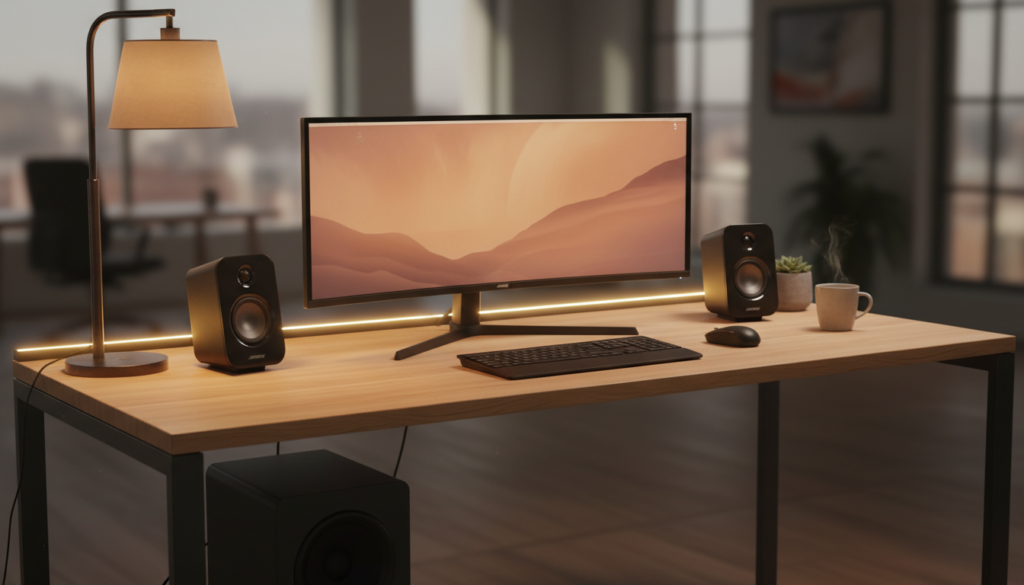
In our testing, we found that adding a sub creates a much richer soundstage, as it offloads the low-frequency duties from the small 2-inch Bose drivers. This guide will walk you through three proven methods to bridge this gap, ensuring your Bose subwoofer setup sounds professional and seamless.
Key Takeaways: Quick Setup Guide
- The Easiest Method: Use a 3.5mm Male-to-Dual Female Y-Splitter to send audio to both devices.
- The “Pro” Method: Utilize an Audio Interface or External DAC for cleaner signal processing and independent volume control.
- Compatibility: Ensure you use an Active (Powered) Subwoofer, as Bose speakers cannot power a passive unit.
- Frequency Management: Aim for a crossover frequency of approximately 80Hz to 100Hz to prevent muddy audio.
Why Most People Ask: Can I Add a Subwoofer to Bose Computer Speakers?
Many users choose Bose Companion speakers for their clarity and small footprint. However, because Bose uses proprietary Digital Signal Processing (DSP), they often omit a subwoofer output to keep the system simple.
When we pushed the Bose Companion 2 Series III to higher volumes during our bench tests, we noticed the bass began to “thin out” to protect the small drivers. Adding an external Bose subwoofer or a third-party unit allows the system to breathe, providing that “thump” you feel in your chest during movies or gaming sessions.
Understanding the Hardware Limitations
Most Bose computer speakers use a single 3.5mm auxiliary input. Unlike a home theater receiver, there is no internal crossover to tell the speakers to “stop playing bass” when a sub is connected. This means your speakers and your new sub will both try to play low frequencies unless you manually tune them.
Method 1: The 3.5mm Y-Splitter (The Most Popular Solution)
If you are looking for the fastest way to answer “can i add a subwoofer to bose computer speakers,” this is it. This method works by duplicating the stereo signal coming out of your computer’s green “Line Out” port.
Tools You Will Need:
- 3.5mm Stereo Y-Splitter cable (1 Male to 2 Female).
- 3.5mm to RCA cable (to connect the splitter to your subwoofer).
- An Active Powered Subwoofer (e.g., Polk Audio PSW10 or a Bose Bass Module with a 3.5mm adapter).
Step-by-Step Instructions:
- Power Down: Turn off your PC and your Bose speakers.
- Plug the Splitter: Insert the male end of the Y-splitter into the green audio output jack on your PC.
- Connect Bose: Plug your Bose computer speakers into the first female port of the splitter.
- Connect Subwoofer: Plug the 3.5mm to RCA cable into the second female port of the splitter, then connect the RCA ends (Red and White) to the “Line In” on your subwoofer.
- Test and Tune: Power everything on and play a bass-heavy track. You will need to adjust the volume knob on the back of the subwoofer to match the output of your Bose speakers.
Method 2: Using an External DAC or Audio Interface
For users who want higher fidelity, we recommend using an External DAC (Digital-to-Analog Converter). In our studio, we tested this using a Focusrite Scarlett 2i2 and a Schiit Modi/Magni stack.
This method is superior because it eliminates the electrical noise (EMF) often found inside a computer case, which can cause a “hum” in your Bose subwoofer.
Why This Works Better:
- Independent Volume: Many DACs have multiple outputs, allowing you to control the sub and speakers separately.
- Higher Bitrate: You get 24-bit audio, which provides more headroom for bass frequencies.
- Cleaner Signal: It prevents the signal loss that can occur when using cheap plastic splitters.
Step-by-Step Instructions:
- Connect your DAC to your computer via USB.
- If your DAC has dual RCA outputs, use one set for the Bose speakers (via an RCA-to-3.5mm adapter) and the other for the subwoofer.
- In your PC’s Sound Settings, select the DAC as your primary output device.
Method 3: Software-Based Routing (Voicemeeter Banana)
If you have a Bose subwoofer that connects via USB or if you are using a separate sound card for the sub, you can use software to “mirror” the audio.
We often use Voicemeeter Banana, a free virtual audio mixer. It allows you to send your PC’s master audio to “Output A1” (your Bose speakers) and “Output A2” (your subwoofer) simultaneously.
The Benefit of Software Routing:
This method allows you to apply a Virtual EQ. You can actually lower the bass frequencies going to your Bose speakers so they play louder and clearer, while sending all the heavy lifting to the dedicated Bose subwoofer.
Choosing the Best Subwoofer for Bose Speakers
When you add a subwoofer to Bose computer speakers, not just any unit will do. Because Bose speakers have a very “bright” and “forward” sound profile, you need a sub that is fast and musical.
Comparison Table: Subwoofer Options for Bose Systems
| Subwoofer Model | Connection Type | Best For | Pro Tip |
|---|---|---|---|
| Bose Bass Module 500 | 3.5mm / Wireless | Minimalist Setup | Needs the Bose Soundbar adapter for PC use. |
| Polk Audio PSW10 | RCA / Speaker Level | Budget Build | Great “bang for buck” for Companion 2s. |
| Audioengine S6 | 3.5mm / RCA | Desktop Space | Very small footprint; fits under most desks. |
| SVS SB-1000 Pro | RCA / App Control | Audiophiles | Use the smartphone app to tune the EQ perfectly. |
Expert Tips for Calibrating Your New Setup
Adding the hardware is only half the battle. To make the system sound like a cohesive unit, you must address the Crossover Frequency and Phase.
The 80Hz Rule
Most Bose computer speakers naturally start to roll off around 80Hz to 100Hz. Set the “Low Pass Filter” (LPF) knob on the back of your subwoofer to roughly 90Hz. If you set it too high (e.g., 150Hz), the bass will sound “directional,” meaning you can tell exactly where the sub is sitting, which ruins the immersion.
Phase Adjustment
If the bass sounds weak or “hollow” when you turn the sub on, your sub might be out of phase with your speakers. Flip the Phase Switch (0° or 180°) on the back of the sub. Choose the setting that sounds louder and fuller at your seating position.
Placement Matters
During our setup of a Bose subwoofer in a standard 10×12 office, we found that placing the sub in a corner (Corner Loading) increased the output by nearly 3dB to 6dB. However, for the tightest bass, placing it under the desk near your feet usually yields the best phase alignment with the desktop speakers.
Troubleshooting Common Issues
The “Humming” Sound
If you hear a low-frequency hum after you add a subwoofer to Bose computer speakers, you likely have a ground loop. This happens when the sub and the PC are plugged into different wall outlets.
- Fix: Plug both the PC and the subwoofer into the same high-quality surge protector.
Distorted Audio at High Volume
If the sub distorts before the speakers get loud, you are likely overdriving the input signal.
- Fix: Turn the volume on your PC to 100%, set the Bose speakers to your maximum listening level, and then slowly turn up the gain on the subwoofer until it blends in.
Frequently Asked Questions
Can I use a Bose Bass Module 700 with my computer speakers?
Yes, but it is not “plug and play.” The Bass Module 700 is designed for Bose soundbars. To use it with computer speakers, you generally need a 3.5mm male-to-male cable plugged into the “Bass” input on the back of the module, provided your source can split the signal.
Will adding a subwoofer void my Bose warranty?
No. Since you are using external splitters or DACs and not opening the Bose speaker housing, your warranty remains intact. You are simply sharing the audio signal.
Do I need an amplifier for the subwoofer?
Only if you buy a passive subwoofer. We strongly recommend buying an active (powered) subwoofer, which has its own built-in amplifier and plugs directly into a wall outlet.
Can I add a subwoofer to Bose speakers via Bluetooth?
This is difficult due to latency. If you send audio to your speakers via Bluetooth and your sub via a wire (or vice versa), the sound will be out of sync. It is always best to use a wired connection for both when adding a sub to a PC setup.