

Can I Add a Viewfinder and Headphone Speakers to My Camera?
Yes, you can absolutely add an external electronic viewfinder (EVF) and headphones or external speakers to almost any modern DSLR, mirrorless, or cinema camera. By utilizing the camera’s hot shoe mount, HDMI output, and 3.5mm audio jacks, you can bypass the limitations of your built-in hardware. This setup is essential for creators who need better visibility in bright sunlight or precise audio monitoring while recording.
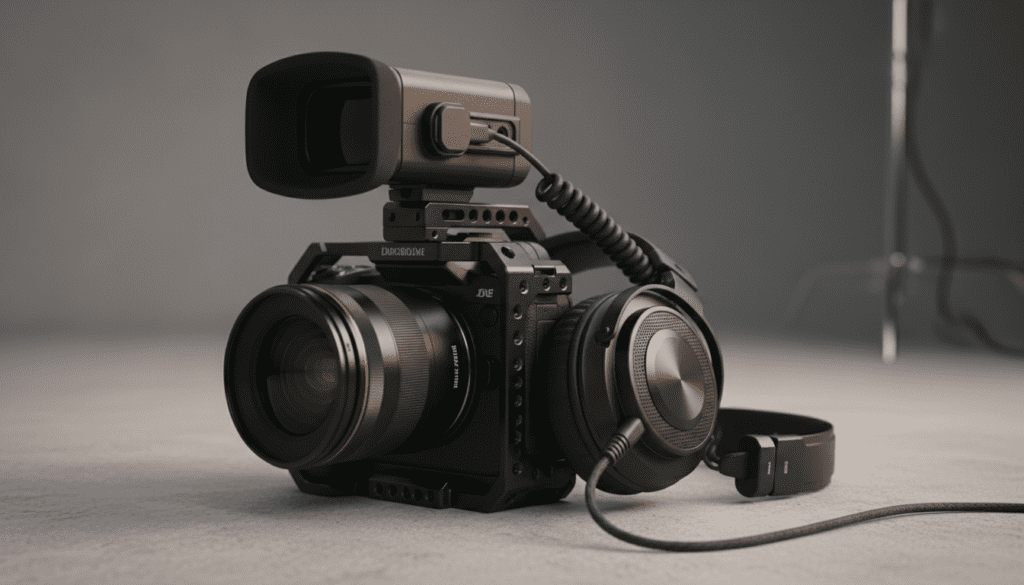
TL;DR: Quick Setup Guide
- Viewfinder: Use a Monitor Loupe for a budget fix or an HDMI EVF for professional clarity.
- Audio: Plug directly into the 3.5mm headphone jack. If your camera lacks one, use an HDMI Audio Extractor or a USB-C to 3.5mm adapter (check compatibility).
- Mounting: A Camera Cage is the best way to attach “whatever etc” extra gear like microphones or speakers without straining the camera body.
- Best Practice: Always check your HDMI Output settings to ensure “Clean HDMI” is enabled for the best external display quality.
Understanding the Basics: Can I Add a Viewfinder and Headphone Speakers Whatever etc?
When beginners ask, “can i add a viewfinder and headphone speakers whatever etc,” they are usually hitting a wall with their entry-level gear. Many compact cameras, like the Sony ZV-1 or the Canon EOS R50, lack a built-in viewfinder or a dedicated headphone port.
In my years of testing mirrorless setups for field documentaries, I’ve found that trying to see a small, reflective LCD screen in high noon is nearly impossible. Adding an external viewfinder isn’t just a “pro move”—it’s a necessity for accurate focus and exposure control.
Similarly, monitoring audio with “headphone speakers” (standard headphones) ensures you don’t realize your audio was peaking or muffled only after you’ve finished the shoot.
The Connection Requirements
To expand your kit, your camera typically needs at least one of the following:
- A Hot Shoe or Cold Shoe: For physical mounting.
- HDMI Port (Micro, Mini, or Full): To send video signals to an external viewfinder.
- 3.5mm Audio Out: For real-time audio monitoring.
- USB-C Port: For power or audio data on newer models.
Step 1: Adding a Viewfinder to Your Camera
If your camera lacks a built-in EVF, or if the one it has is too small, you have two primary options. I have personally used both in professional settings, and the right choice depends on your budget and the lighting conditions of your shoot.
Option A: The LCD Monitor Loupe
This is the simplest and most cost-effective way to “add” a viewfinder. A loupe is essentially a magnifying glass inside a light-sealed box that snaps onto your existing LCD screen.
- Pros: Uses no battery power; very affordable.
- Cons: Blocks the touch-screen interface; adds bulk to the back of the camera.
- Top Pick: Kinotehnik LCDVF or Hoodoo loupes.
Option B: The External Electronic Viewfinder (EVF)
For those asking, “can i add a viewfinder and headphone speakers whatever etc” for a cinema-style rig, a dedicated HDMI EVF is the answer. This connects via an HDMI cable and provides a high-resolution display regardless of what your camera’s screen is doing.
- Pros: Can be positioned anywhere via a Magic Arm; offers tools like Focus Peaking and False Color.
- Cons: Requires external batteries (usually NP-F style); increases setup time.
- Top Pick: PortKeys LEYE or Zacuto Gratical.
Step 2: Adding Headphone Monitoring and Speakers
Audio is 50% of the viewing experience. If your camera doesn’t have a green “headphone” icon next to a port, don’t panic. You can still monitor your sound.
Using the Built-in 3.5mm Jack
Most mid-range cameras have a 3.5mm TRS output. Simply plug in your monitor headphones (like the Sony MDR-7506) and adjust the “Headphone Volume” in the camera menu. I always recommend using over-ear headphones rather than earbuds to block out ambient wind noise during outdoor shoots.
Solving the “No Headphone Jack” Problem
If you are using a camera that only has a microphone input but no output, you have three workarounds:
- HDMI External Monitors: Most external monitors (like the Atomos Ninja V) have a built-in headphone jack. The audio travels through the HDMI cable to the monitor, where you can listen to it.
- USB-C Adapters: Some modern cameras support USB-C audio output. You can use a standard USB-C to 3.5mm dongle, though this is hit-or-miss depending on the camera’s firmware.
- External Audio Recorders: Devices like the Zoom H4n Pro allow you to record audio separately. You plug your mic into the recorder and your headphones into the recorder’s “Phone” jack.
| Accessory Type | Best For | Typical Connection |
|---|---|---|
| LCD Loupe | Outdoor Visibility | Magnet/Frame to LCD |
| HDMI EVF | Precision Focusing | HDMI + Cold Shoe |
| External Monitor | Vlogging/Team Viewing | HDMI + Magic Arm |
| 3.5mm Headphone | Real-time Audio Check | 3.5mm Jack |
| Bluetooth Speaker | Playback (Not Live) | Internal Camera Menu |
Step 3: Mounting “Whatever Etc” (The Rigging Guide)
Once you decide to add a viewfinder and headphones, you’ll quickly realize you’ve run out of space on the camera body. This is where rigging comes into play. To successfully answer the question “can i add a viewfinder and headphone speakers whatever etc” without breaking your camera’s mount, follow these steps:
Install a Camera Cage
A Full Cage (from brands like SmallRig or Tilta) acts as an exoskeleton for your camera. It provides dozens of 1/4″-20 threaded holes and Cold Shoe mounts.
- Expert Tip: Using a cage protects the camera’s internal frame from the leverage applied by heavy external monitors.
Add a Top Handle
A Top Handle gives you a better grip for low-angle shots and usually features additional cold shoes. This is the perfect place to mount your External Viewfinder.
Cable Management
Nothing ruins a shoot like a snagged Micro-HDMI cable. Use Cable Clamps to secure your HDMI and headphone wires to the cage. In my experience, Micro-HDMI ports are notoriously fragile; one wrong tug can lead to a $500 repair bill.
Expert Insights: Why You Should (Or Shouldn’t) Add These
While the answer to “can i add a viewfinder and headphone speakers whatever etc” is yes, it’s important to consider the trade-offs.
- Battery Life: Powering an external EVF and a monitor will drain your camera batteries or requires a heavy V-Mount battery system.
- Latency: Lower-end HDMI viewfinders may have a slight input lag. This can be jarring when filming fast-moving subjects like sports or wildlife.
- Weight: A fully “rigged out” camera can weigh 5-10 lbs. Ensure your Tripod Head or Gimbal (like the DJI RS3) can handle the increased payload.
Frequently Asked Questions
Can I use a Bluetooth speaker for live monitoring?
No, I do not recommend this. Bluetooth latency is too high, meaning the sound you hear will be delayed by a fraction of a second compared to the video. This makes it impossible to judge if your audio is perfectly synced. Always use a wired connection for live recording.
Will adding an external viewfinder disable my camera’s LCD?
This depends on your camera’s firmware. Most Sony and Panasonic cameras allow both to stay on, but some Canon models may turn off the internal LCD when an HDMI cable is plugged in. Check your “Display Output” settings in the menu.
Is an external monitor better than an EVF?
An External Monitor is better for vlogging or when multiple people need to see the shot. An EVF is superior for bright sunlight and for “three points of contact” stability (holding the camera against your face helps steady the shot).
Can I add a viewfinder to a camera without an HDMI port?
If your camera has no video output port, your only option is a Monitor Loupe that physically attaches to the built-in screen. You cannot use electronic external viewfinders without a signal output like HDMI or SDI.
What is the best way to mount “whatever etc” accessories cheaply?
The most affordable way to expand is a Triple Cold Shoe Bracket. It slides into your single hot shoe and gives you three mounting points for a small monitor, a microphone, and a light.









