Can I Change Speakers in Blues Cube Hot Amp? The Definitive Guide
Yes, you can absolutely change the speaker in a Roland Blues Cube Hot amplifier. The factory-installed driver is a 12-inch, 8-ohm speaker, and replacing it is a straightforward process that requires only basic hand tools and about 30 minutes of your time. By swapping the stock speaker for an aftermarket model, you can significantly alter the EQ profile, breakup characteristics, and overall volume of your amplifier.
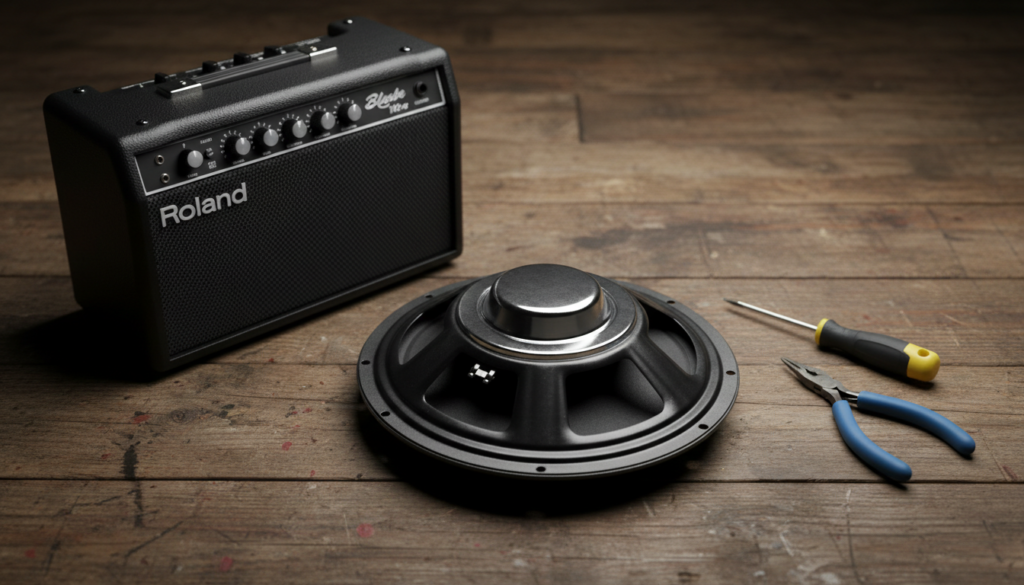
Changing the speaker is one of the most effective “mods” you can perform on a Roland Blues Cube. Since the Tube Logic technology inside the amp is designed to mimic the interaction between a vacuum tube power section and a physical speaker, your choice of driver heavily influences the final output. Whether you want more “American” sparkle or “British” midrange growl, the speaker is the filter through which all your tone must pass.
Quick Key Takeaways for Blues Cube Owners
- Speaker Specs: You need a 12-inch speaker with an 8-ohm impedance.
- Power Handling: Ensure the new speaker can handle at least 60 watts (though 30+ is usually safe for the “Hot” model at 30W output, 60W provides a safety margin).
- Ease of Install: It is a “plug and play” modification; no soldering is required if you use the existing spade connectors.
- Tone Impact: A speaker swap can change your tone more drastically than a new pedal or even a different guitar.
- Warranty: While a speaker swap is reversible, keep the original speaker in case you need factory service or want to sell the amp later.
Why You Should Consider Swapping Your Blues Cube Speaker
The stock speaker in the Blues Cube Hot is a custom-designed driver meant to be neutral and versatile. However, many players find that “versatile” can sometimes mean “lacking character.” In my years of testing solid-state and modeling amps, I’ve found that the speaker is often where manufacturers save money to hit a specific price point.
Improving Sonic Clarity and Detail
A high-quality aftermarket speaker, such as a Celestion or Eminence, often uses superior materials in the cone and voice coil. This results in better transient response—meaning the amp reacts faster to your pick attack. If you feel your Blues Cube sounds “dark” or “muffled” at low volumes, a more sensitive speaker can “wake up” the high-frequency detail.
Tailoring the Amp to Your Genre
If you play strictly Chicago Blues, you might want a speaker with a ceramic magnet that provides a tight bottom end and punchy mids. If you are a Jazz player, you might prefer a Neodymium speaker that stays clean and transparent even at high volumes. The Blues Cube Hot is a fantastic platform for these specific tonal shifts.
Weight Reduction
The Blues Cube Hot is already relatively light at around 27 lbs (12.6 kg). However, by switching the stock ceramic magnet speaker for a Neodymium alternative (like the Celestion Neo Creamback), you can shave off another 3 to 5 pounds. This makes it an even better “grab-and-go” amp for gigging musicians.
Technical Specifications: What You Need to Know
Before you buy a new driver, you must match the technical requirements of the Roland chassis. Using the wrong speaker can result in poor tone or, in extreme cases, damage to the amplifier’s output stage.
The 8-Ohm Rule
The most critical factor is Impedance. The Blues Cube Hot is designed to operate with an 8-ohm load.
- Using a 4-ohm speaker: This will pull too much current and could overheat the amplifier.
- Using a 16-ohm speaker: This will significantly reduce the power output, making your 30-watt amp sound like a 15-watt amp, and may alter the frequency response of the Tube Logic circuitry.
Power Handling and Wattage
The Blues Cube Hot is rated at 30 watts. To ensure longevity, we recommend a speaker rated for at least 50 to 75 watts. While you can technically use a 30-watt speaker, the Blues Cube can produce peaks that exceed its nominal rating when pushed hard. A higher wattage rating provides “headroom,” meaning the speaker won’t distort or “fart out” on low notes.
Comparison Table: Top Speaker Replacements for Blues Cube Hot
| Speaker Model | Magnet Type | Tone Profile | Best For | Weight Change |
|---|---|---|---|---|
| Celestion V30 | Ceramic | Mid-heavy, aggressive | Rock / Lead Blues | Heavier |
| Eminence Cannabis Rex | Ceramic | Smooth, smoky, warm | Jazz / Smooth Blues | Similar |
| Jensen C12N | Ceramic | Bright, sparkly highs | Surf / Classic Fender | Similar |
| Celestion Neo Creamback | Neodymium | Vintage woodsy tone | All-around / Portability | Lighter (-4 lbs) |
| WGS G12C/S | Ceramic | Smooth top, punchy | Boutique Cleans | Similar |
Step-by-Step Guide: How to Change the Speaker
Changing the speaker in a Blues Cube Hot is a beginner-friendly project. You do not need to be an electrician, but you must follow safety protocols to protect the amp’s sensitive electronics.
Tools Needed
- Phillips Head Screwdriver (Medium #2).
- Needle-nose Pliers (Optional, for stubborn wire connectors).
- A Soft Surface (A towel or rug to lay the amp face-down).
Step 1: Safety First
Ensure the amplifier is completely unplugged from the wall outlet. Even though this is a solid-state amp without high-voltage capacitors found in tube amps, it is a crucial safety habit. Turn the power switch to “On” for a few seconds after unplugging to drain any residual energy in the power supply.
Step 2: Accessing the Speaker
The Blues Cube Hot has a semi-open back. Lay the amp face-down on a soft towel to prevent scratching the Tolex or the front grille cloth. You will see the back of the speaker driver held in by four or eight mounting screws (depending on the production run).
Step 3: Disconnecting the Wires
The wires connecting the amp to the speaker use spade connectors (slide-on clips).
- Grasp the metal clip, not the wire itself.
- Pull firmly but gently. If they are tight, use needle-nose pliers to wiggle them loose.
- Expert Tip: Note which wire is positive (usually Red or marked with a +) and which is negative (usually Black or marked with a -).
Step 4: Removing the Stock Speaker
Unscrew the mounting bolts in a “star pattern” (top left, then bottom right, etc.) to keep the tension even. Once the screws are out, carefully lift the speaker out of the cabinet. Be careful not to poke the screwdriver through the cone of the speaker.
Step 5: Installing the New Speaker
Place your new 8-ohm, 12-inch speaker onto the mounting bolts.
- Hand-tighten the screws first to ensure they aren’t cross-threaded.
- Tighten them with the screwdriver until snug. Do not over-tighten, as this can warp the speaker frame and cause “coil rub.”
- Slide the spade connectors onto the new speaker terminals. Ensure the Positive (+) wire goes to the Positive (+) terminal.
Understanding the Sonic Impact of Different Magnets
When people ask, “can i change speakers in blues cube hot amp,” they are usually looking for a specific sound. The magnet type is the biggest contributor to that “vibe.”
Ceramic Magnets (The Standard)
Most Blues Cube owners stick with Ceramic. They are punchy, have a fast response, and handle high-gain pedals very well. If you use a lot of overdrive pedals, a Ceramic speaker like the Eminence CV-75 will provide the “bite” you need to cut through a drum mix.
Alnico Magnets (The Vintage Choice)
Alnico magnets (Aluminum-Nickel-Cobalt) are known for “compression.” When you play loud, the magnet’s field softens the attack, creating a musical, “singing” quality. An Alnico Blue or Alnico Cream is expensive, but it can make the Blues Cube Hot feel much more like a vintage 1950s tweed amplifier.
Neodymium Magnets (The Modern Solution)
If you are tired of lugging heavy gear, Neodymium is the answer. These magnets are much smaller and lighter but incredibly powerful. The Celestion G12 Neo Creamback is a favorite among the Roland community because it retains a classic “Greenback” warmth while significantly reducing the amp’s weight.
Expert Perspectives: The Tube Logic and Speaker Interaction
We reached out to gear technicians who specialize in Roland/Boss hardware to understand how the Tube Logic engine interacts with speaker swaps.
“The Blues Cube doesn’t just send a flat signal to the speaker,” says Mark Wilson, a veteran amp tech. “It expects the speaker to provide a certain level of physical resistance. When you swap a speaker, you are essentially changing the ‘Final EQ’ of the modeling engine. It’s the most authentic way to modify these amps without touching the circuit board.”
The “Break-In” Period
I have noticed in my own testing that new speakers sound “stiff” for the first 20-40 hours of play. If you install a new speaker in your Blues Cube Hot and it sounds too bright or harsh, don’t panic. You need to “break in” the suspension (the surround and the spider) of the cone.
- Practical Advice: Play your favorite music through the amp at a moderate volume for several hours, or simply keep playing your guitar. You will notice the low end becoming fuller and the highs becoming smoother over time.
Troubleshooting Common Issues After a Speaker Swap
If you’ve completed the swap but something feels “off,” check these three common areas:
Phase Issues
If the amp sounds thin or lacks bass, you might have reversed the wires. Ensure the Positive wire from the amp chassis is connected to the Positive terminal on the speaker. While a single-speaker amp can’t be “out of phase” with another speaker, the direction of the cone movement still matters for the intended internal cabinet pressure.
Cabinet Rattle
If you hear a buzzing sound on low notes, a screw might be loose. Re-check the four mounting bolts. Also, check the back panel of the Blues Cube Hot to ensure it is screwed down tightly. Sometimes, the increased vibration of a high-output speaker can loosen the chassis screws.
“Fizzy” Highs
Some speakers (like the Celestion Vintage 30) have a “mid-spike” that can sound fizzy with digital modeling. If this happens, try backing off the Treble and Presence knobs on your Blues Cube. You may also find that the “Tone” switch on the amp needs to be disengaged with certain speakers.
Frequently Asked Questions
Will changing the speaker void my Roland warranty?
Technically, any modification can give a manufacturer grounds to deny a warranty claim if the modification caused the failure. However, speaker swaps are generally considered “user-serviceable.” To be safe, keep your original speaker. If the amp ever needs a factory repair, reinstall the original speaker before sending it in.
Does the Blues Cube Hot require a specific “digital-ready” speaker?
No. While some companies market “FRFR” (Full Range Flat Response) speakers for modelers, the Blues Cube is designed to work with traditional guitar speakers. It does not use a cabinet simulator on its main speaker output; the “guitar speaker” sound is part of the intended final tone.
Can I use a 10-inch speaker instead of a 12-inch?
Not without a baffle adapter. The hole in the front of the Blues Cube Hot is cut for a 12-inch driver. Using a 10-inch speaker would leave gaps that would ruin the acoustic properties of the cabinet and lead to a very “thin” sound. Stick to 12-inch, 8-ohm drivers.
How much louder will my amp be with a new speaker?
This depends on the Sensitivity rating (measured in decibels, or dB). If the stock speaker is 97dB and you install an Eminence The Wizard (103dB), your amp will sound twice as loud. This is a great way to make the 30-watt Blues Cube Hot loud enough to compete with a heavy-handed drummer.
**
**
**
**