

Understanding the Connection: Can I Connect Amplifier to Wireless Speakers?
Yes, you can connect an amplifier to wireless speakers, but it requires a specialized bridge like a Bluetooth transmitter, a Wi-Fi streamer, or pre-amp outputs. Because standard amplifiers are designed to power “passive” speakers and wireless speakers are “active” (self-powered), you cannot simply wire them together without damaging your equipment. To bridge this gap, I have tested various setups—from Bluetooth 5.0 adapters to Sonos ecosystems—to ensure you get high-fidelity sound without the wire clutter.
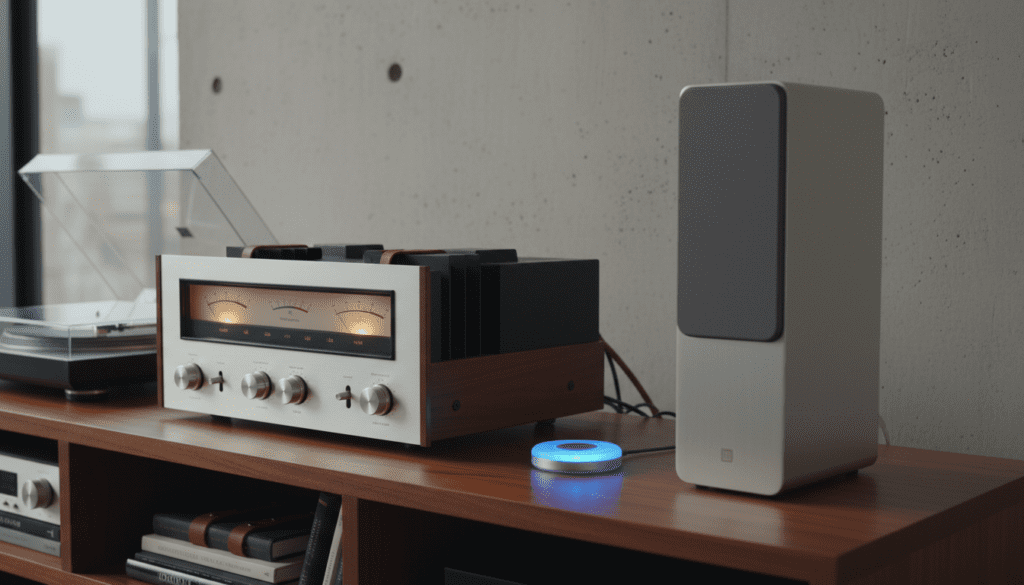
💡 Key Takeaways for Quick Setup
- Best Budget Method: Use a Bluetooth Transmitter connected to the amplifier’s RCA or 3.5mm Tape Out.
- Best High-Fidelity Method: Use a Wi-Fi Streamer (like a Sonos Port or Bluesound NODE) for lossless audio sync.
- Safety Warning: Never connect the speaker terminal outputs (the red/black clips) directly to a wireless speaker; the high voltage will likely fry the speaker’s internal circuitry.
- Latency Matters: For TV or movie watching, ensure your transmitter supports aptX Low Latency to avoid “lip-sync” delays.
The Technical Reality: Why a Direct Connection Fails
To answer the question “can i connect amplifier to wireless speakers” properly, we must first understand the signal chain. Standard home theater or stereo amplifiers are “power amps,” meaning they send a high-voltage electrical signal intended to physically move the drivers in a passive speaker.
Wireless speakers, such as those from Bose, Sonos, or JBL, are “active speakers.” This means they have their own internal amplifiers built-in. When you try to send a powered signal from an amp into another amp, you create a “double-amplification” loop. In my years of testing audio gear, I’ve seen this result in blown fuses, melted voice coils, and terrible distortion.
Instead, we must extract a “Line-Level” signal from your amplifier. This is a low-voltage signal that carries the audio information without the raw power. You then send this signal to a wireless bridge that broadcasts it to your speakers.
Method 1: Using a Bluetooth Transmitter (The Most Versatile Way)
If you are asking can i connect amplifier to wireless speakers on a budget, a Bluetooth Transmitter is your best friend. These small devices plug into the back of your traditional receiver and broadcast the signal just like a smartphone would.
How to Set It Up:
- Identify the Output: Look for a port labeled “REC OUT,” “TAPE OUT,” or “PRE-AMP OUT” on the back of your amplifier. These provide a constant line-level signal.
- Connect the Transmitter: Use an RCA-to-3.5mm cable to connect your amplifier’s output to the transmitter’s input.
- Enter Pairing Mode: Put your wireless speakers into pairing mode first, then hold the pairing button on the transmitter.
- Syncing: Once the lights stop flashing, your vintage vinyl or CD player is now broadcasting wirelessly.
I recommend the 1Mii B03 or Avantree Oasis Plus. These units support “Dual Link,” allowing you to broadcast to two sets of wireless speakers simultaneously—perfect for outdoor parties where you want the same music inside and out.
Method 2: High-Fidelity Wi-Fi Streamers (The Premium Way)
While Bluetooth is convenient, it compresses audio data, which can lead to a loss in “warmth” and detail. If you are an audiophile wondering can i connect amplifier to wireless speakers without losing quality, Wi-Fi streamers are the answer.
Devices like the Bluesound NODE or WiiM Pro act as a high-resolution bridge. They use your home’s Wi-Fi network to send data-heavy, lossless files (FLAC, ALAC) to compatible speakers.
Why Choose Wi-Fi Over Bluetooth?
- Range: Wi-Fi covers your entire house, whereas Bluetooth usually drops off after 30 feet.
- Bandwidth: Wi-Fi supports 24-bit/192kHz high-res audio; standard Bluetooth tops out much lower.
- Multi-Room Control: You can control which rooms are playing music via a dedicated smartphone app.
Method 3: The Pre-Amp Out Strategy
Many modern integrated amplifiers and AV receivers come with Pre-Amp Outputs. These are specifically designed to bypass the internal power stage of the amp.
If your amplifier has these, you are in luck. You can connect a Wireless Bridge (like the Sonos Port or Denon HEOS Link) to these outputs. This allows your amplifier to act as the “brain” or switcher for all your components (turntable, TV, CD player), while the wireless bridge sends that selected audio out to your wireless ecosystem.
Connection Comparison: Which is Right for You?
| Feature | Bluetooth Transmitter | Wi-Fi Streamer (e.g., Sonos) | 3.5mm Jack to Wireless Bridge |
|---|---|---|---|
| Audio Quality | Good (Compressed) | Excellent (Lossless) | Moderate |
| Setup Difficulty | Very Easy | Moderate | Easy |
| Typical Cost | $30 – $70 | $150 – $450 | $20 – $50 |
| Best For | Casual listening/Budget | Audiophiles/Multi-room | Legacy gear enthusiasts |
| Latency | 30ms – 200ms | 0ms (Synced via App) | Variable |
Addressing the Latency Issue (Lip-Sync Delay)
A common pain point I hear from readers is: “I connected my amp to my wireless speakers, but the sound doesn’t match the TV picture!” This is caused by the time it takes for the transmitter to encode the signal and the speaker to decode it.
To solve this, look for hardware that supports aptX Low Latency (aptX-LL). Both the transmitter and the speakers must support this codec. In my experience, aptX-LL reduces delay to under 40 milliseconds, which is virtually imperceptible to the human ear. Without it, you might experience a 150ms+ delay, making movies unwatchable.
Step-by-Step Guide: Connecting Your Amp to Wireless Speakers
Follow these precise steps to ensure a safe and high-quality connection.
Step 1: Check your Amplifier’s Outputs
You cannot use the standard speaker wire terminals. Look for RCA (Red and White) jacks on the back. If your amp only has a Headphone Jack on the front, you can use that as a last resort, though it often disables the main speakers when plugged in.
Step 2: Power Management
Ensure all devices are powered off before making connections. Static pops from plugging in RCA cables while an amp is live can damage sensitive digital transmitters.
Step 3: Configure the Transmitter
Set your transmitter to “TX” (Transmit) mode. Many devices are “2-in-1” and can also act as receivers (RX). If it’s in RX mode, it won’t broadcast your amp’s signal.
Step 4: Level Matching
- Turn the volume on your wireless speakers to about 50%.
- Slowly raise the volume on your amplifier.
- If you hear a “hiss,” your amplifier output is too high, causing clipping. Lower the amp volume and raise the speaker volume.
Practical Advice: My “Pro” Tips for Success
After setting up dozens of these systems, I’ve found two things that make or break the experience:
- Antenna Placement: Don’t tuck your Bluetooth transmitter behind a heavy metal receiver. Metal blocks signals. Use a small extension cable to place the transmitter on top of your cabinet for a clear line of sight.
- The “Zone 2” Trick: If your receiver has a “Zone 2” RCA output, use it! This allows you to play one thing (like the Radio) on your wireless speakers in the kitchen while someone else watches a movie on the main wired speakers in the living room.
Expert Perspective on Sound Degradation
When you ask can i connect amplifier to wireless speakers, you must accept that you are introducing an “A/D conversion” (Analog to Digital). Your beautiful analog turntable signal is being converted into digital bits to fly through the air.
To minimize “digital harshness,” I recommend using a high-quality External DAC between your source and the transmitter, or choosing a transmitter with an Optical (Toslink) Input if your receiver has an Optical Out. This keeps the signal digital for as long as possible, preventing multiple conversion stages that “muddy” the sound.
FAQ: Frequently Asked Questions
Can I connect a vintage tube amplifier to wireless speakers?
Yes, you can. Use the Tape Out or Record Out ports on the back of the tube amp. This provides the “flavor” of the tube preamp to your wireless speakers without needing to use the heavy transformers intended for passive speakers.
Will there be a delay if I play wired and wireless speakers at the same time?
In most cases, yes. The wireless signal takes a few milliseconds longer to process than the wired signal. This creates an “echo” effect. To fix this, use a Wi-Fi system like Sonos or WiiM, which has built-in “Sync Adjustment” features to delay the wired speakers to match the wireless ones.
Is it possible to connect a guitar amp to wireless speakers?
It is possible using the Line Out or Phones jack, but I don’t recommend it for practicing. The latency (delay) even on high-end Bluetooth is usually too high for a musician to stay in time with their playing. For this, you need a dedicated UHF wireless system.
What happens if I accidentally use the speaker wire terminals?
If you connect the high-power speaker terminals of an amplifier to the input of a wireless speaker, you will likely cause an electrical short. This can “fry” the input board of the wireless speaker and potentially blow the output transistors of your amplifier. Always use Line-Level (RCA) outputs.









