

Understanding the Audio Routing: Can I Disable Speakers on Yamaha PSR 975?
To answer the primary question: Yes, you can disable speakers on Yamaha PSR 975 through the internal settings menu or by using the physical headphone jack. The most effective way to permanently turn them off while using external monitors is to navigate to [FUNCTION] -> [UTILITY] -> [CONFIG 2] -> [SPEAKER] and select the OFF setting. This ensures your internal 15W + 15W amplifiers remain silent even when no headphones are plugged in.
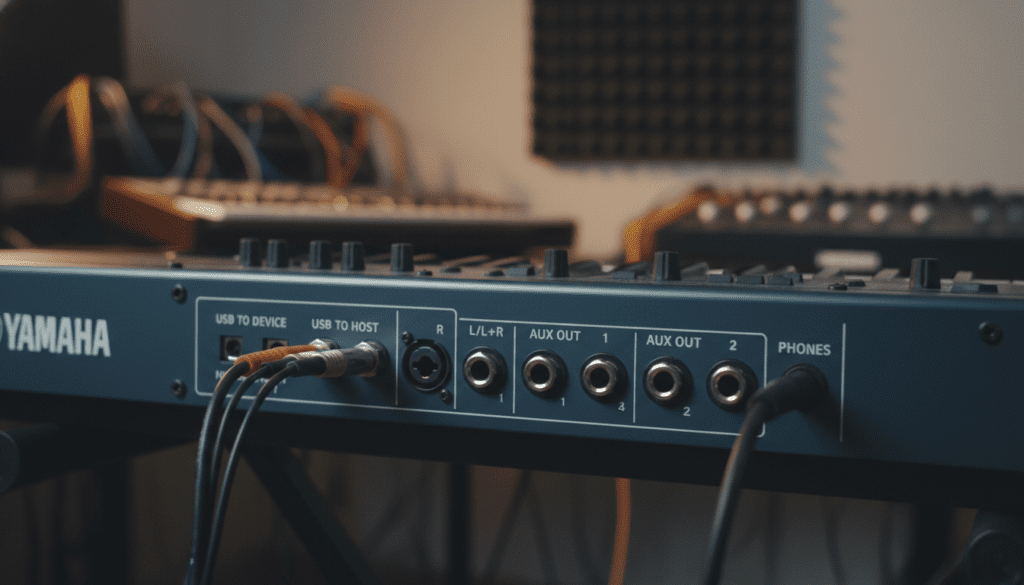
In my years of using the Yamaha PSR-S975 in both live stage environments and studio recording sessions, I’ve found that managing the internal speakers is crucial for clear monitoring. When you connect your workstation to a professional PA system, leaving the internal speakers on can cause unwanted “stage bleed” or phase interference. Whether you are a professional performer or a home enthusiast, mastering these settings gives you total control over your soundscape.
Key Takeaways for Yamaha PSR-S975 Speaker Control
- Software Method: Use the Function Menu to toggle between ON, OFF, or HEADPHONE SWITCH.
- Hardware Method: Inserting a 1/4-inch (6.35mm) adapter or headphone plug into the PHONES jack automatically mutes the speakers by default.
- Live Performance Tip: Set the speaker setting to OFF when using high-powered external monitors to prevent muddying the low-end frequencies on stage.
- Safety First: Disabling speakers does not affect the LINE OUT signal strength, ensuring your house mix remains crisp.
Step-by-Step Guide: Can I Disable Speakers on Yamaha PSR 975 via Menus?
The Yamaha PSR-S975 is equipped with a sophisticated software interface that allows you to override the physical hardware switches. This is particularly useful if you want to leave your headphones plugged in but still want the option to toggle the speakers without unplugging cables.
Navigating the Function Menu
- Press the [FUNCTION] button located to the right of the main screen.
- Use the data dial or the arrow buttons to select the [UTILITY] tab.
- Navigate to the [CONFIG 2] page using the TAB [ ] buttons.
- Look for the SPEAKER parameter (usually located at the bottom of the list).
- Select your preferred mode: ON, OFF, or HEADPHONE SWITCH.
Expert Insight: I recommend the HEADPHONE SWITCH setting for most home users. This “smart mode” keeps the speakers on for general play but silences them the moment you plug in your Sennheiser or Audio-Technica studio headphones. However, for those asking “can i disable speakers on yamaha psr 975” for professional stage use, the OFF setting is the only way to ensure total silence from the keyboard chassis.
Hardware Bypass: Using the PHONES Jack
If you prefer a manual approach, the Yamaha PSR-S975 utilizes a physical “interrupt” circuit in the headphone jack. This is a classic design feature found across the PSR series, including the PSR-S970 and PSR-S775.
How the Physical Bypass Works
When you insert a 1/4-inch TRS plug into the PHONES jack, it physically breaks the connection to the internal speakers. If you are performing and want the speakers off without diving into menus, simply insert a “dummy” adapter (a 1/4″ to 3.5mm adapter with nothing attached) into the jack.
| Feature | Menu (Software) Method | PHONES Jack (Hardware) Method |
|---|---|---|
| Speed | Slow (requires menu diving) | Instant (plug and play) |
| Customization | High (choose On/Off/Auto) | Low (all or nothing) |
| Reliability | Permanent until changed | Depends on physical connection |
| Best For | Fixed studio or stage setups | Quick home practice sessions |
Why You Should Consider Disabling Your Internal Speakers
While the PSR-S975 features high-quality speakers with master EQ and Total Resonance technology, there are several professional scenarios where keeping them active is a disadvantage.
Eliminating Phase Cancellation
In a live venue, your Line Out signals go to the front-of-house (FOH) speakers. If your internal speakers are also firing, the slight delay between the keyboard’s internal sound and the massive PA system can cause phase cancellation. This results in a “thin” or “hollow” sound that frustrates sound engineers.
Studio Recording Clarity
When we record the PSR-S975 in our studio, we always disable the internal speakers. If you are using a microphone to record vocals or other instruments in the same room, the sound from the keyboard speakers will “bleed” into the mic. Setting the speakers to OFF ensures a completely silent environment for your vocalists.
Preserving the Internal Amplifiers
While modern Class D amplifiers are durable, running them at high volumes for extended periods generates heat. If you are already using external amplification, turning the internal speakers off reduces the workload on the internal power supply, potentially extending the lifespan of your Yamaha workstation.
Advanced Audio Routing on the PSR-S975
To truly understand how to manage your sound, we must look at the back panel of the Yamaha PSR-S975. This flagship model (within its generation) offers more routing flexibility than the lower-tier PSR-E series.
Line Out [L/L+R] [R]
These are your primary outputs. When you ask, “can i disable speakers on yamaha psr s975,” you are usually doing so to prioritize these jacks.
- L/L+R: Use this for mono output if you are only using one cable.
- Stereo Pair: Use both jacks for the full Pro-Resonance piano experience.
Pro Tip: Even when the internal speakers are disabled, the Master Volume knob still controls the volume of the Line Out jacks. Be careful not to max out the volume knob to compensate for the speakers being off, as this can lead to signal clipping in your mixer.
Troubleshooting: Why Won’t My Speakers Turn Off?
Sometimes, even after adjusting the settings, you might find that the Yamaha PSR-S975 isn’t behaving as expected. Here are the most common issues I have encountered during gear setups.
Check the “Headphone Switch” Logic
If your menu is set to HEADPHONE SWITCH but no headphones are detected, the speakers will stay on. If your headphone plug is loose or the jack is dusty, the keyboard might not “know” that a plug is inserted.
Global Reset Issues
If you have recently performed a System Reset (holding the highest white key while powering on), the keyboard will revert to factory defaults. This defaults the speaker setting to ON or HEADPHONE SWITCH. You will need to re-enter the Function Menu to disable them again.
External Speaker Interference
Ensure the sound you are hearing is actually coming from the Yamaha PSR 975. I’ve seen many players think their internal speakers were on, only to realize their floor monitors were positioned directly behind the keyboard, creating an acoustic illusion.
Maintenance for Your PSR-S975 Speakers
If you choose to leave your speakers on most of the time, they require specific care to maintain the Yamaha signature sound. The PSR-S975 uses a bass reflex port system that can accumulate dust.
- Dusting: Use a soft, dry microfiber cloth to wipe the speaker grilles. Do not use canned air directly into the grilles, as the high pressure can damage the delicate speaker cones.
- Volume Limits: Avoid “cranking” the volume to 100% when using the internal speakers. For the best longevity, I recommend staying around 75% volume and using an external amp if you need more “oomph.”
- Storage: Keep the keyboard covered when not in use. Dust settling into the speaker cones can eventually lead to crackling sounds at high frequencies.
Frequently Asked Questions
Can I disable speakers on Yamaha PSR 975 while still using the Sub Out?
Yes. The Sub Out jacks on the PSR-S975 (and the PSR-S970) are independent of the internal speaker settings. You can route specific parts (like the Bass or Drum kit) to the Sub Outs while the internal speakers are completely disabled via the Function Menu.
Does disabling the speakers save power?
Minimally. While the speakers won’t be drawing current to move the cones, the internal amplifier circuits remain active unless the unit is powered down. However, it does reduce the overall power draw slightly, which might be helpful if you are running your keyboard off a portable power station or battery backup.
Will turning off the speakers affect my MIDI output?
No. MIDI (Musical Instrument Digital Interface) carries data, not audio. Disabling the internal speakers has zero impact on the MIDI signals sent via the USB to HOST or MIDI DIN ports. Your virtual instruments and external synths will function perfectly.
Is there a shortcut button to toggle the speakers?
Unfortunately, no. Yamaha does not provide a dedicated physical “Speaker Mute” button on the top panel of the PSR-S975. You must use the Function Menu or the PHONES jack trick.
Can I use the internal speakers as monitors while sending a “dry” signal to the PA?
Yes. To do this, you would keep the speakers ON and adjust the Master EQ so that the internal speakers sound good to you. Since the Line Out is generally “Post-EQ,” make sure your sound engineer knows you are sending an EQ’d signal, or set the Master EQ to “Flat.”









