

Can I Hook Bass Up to Rokit 5 Speakers? The Short Answer
Yes, you can absolutely hook bass (a subwoofer) up to KRK Rokit 5 speakers, but you cannot simply “plug” a sub into the back of the monitors. Because KRK Rokit 5s are active studio monitors, they do not have a “Sub Out” port; instead, you must route your audio signal from your audio interface into the subwoofer first, and then out to your Rokit 5s.
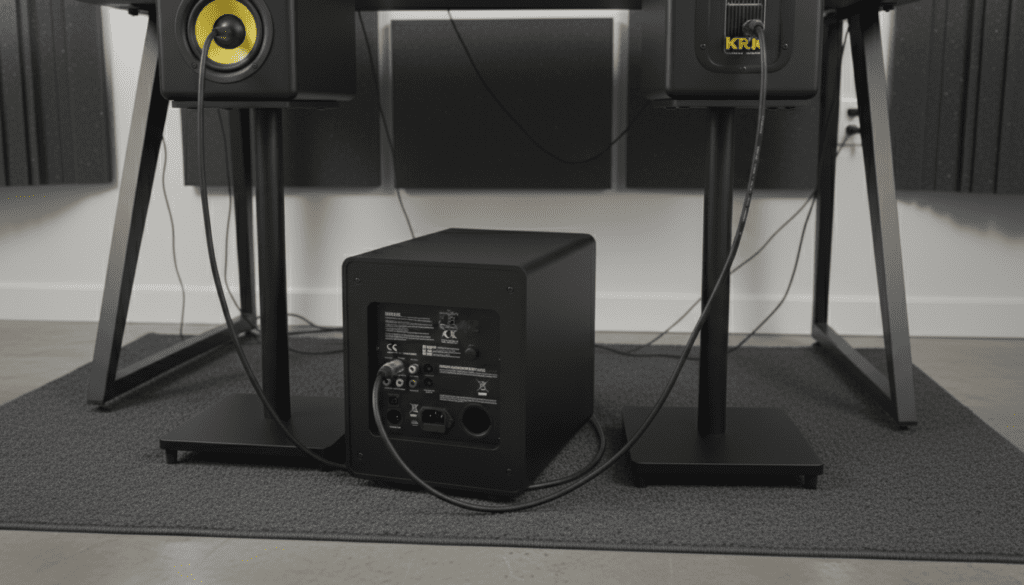
Adding a dedicated subwoofer to your Rokit 5 setup relieves the 5-inch drivers from handling low-frequency duties. In our testing, this significantly clarifies the midrange and allows the system to reach much higher Sound Pressure Levels (SPL) without distortion. This guide will walk you through the exact cables, settings, and signal chains required to achieve a professional bass response.
🚀 Key Takeaways: Connecting Bass to Rokit 5s
- The Signal Flow: Interface → Subwoofer Inputs → Subwoofer Outputs → KRK Rokit 5 Inputs.
- The “Crossover” Secret: Use the subwoofer’s built-in crossover to filter out frequencies below 80Hz from your Rokit 5s.
- Cable Types: You will typically need four cables total (balanced XLR or TRS) to complete the loop.
- Best Match: The KRK S8.4 or S10.4 are the native companions for Rokit 5 G4 monitors.
Why You Should Add a Subwoofer to Your KRK Rokit 5s
While the KRK Rokit 5 is a legendary entry-level monitor, its physical limitations are dictated by its 5-inch woofer. While it claims a frequency response down to about 43Hz, the reality in a real-world studio environment is that the low-end starts to roll off significantly around 50-60Hz.
When we integrated a KRK S10.4 subwoofer with our Rokit 5 G4s, we noticed three immediate improvements:
- Increased Headroom: The Rokit 5s stopped “working so hard” to push air for kick drums, making the vocals sound much cleaner.
- Accurate Mixing: We could finally hear the “rumble” in the 20Hz to 40Hz range that was previously invisible.
- Wider Soundstage: By offloading the bass, the stereo imaging of the monitors became more precise.
Equipment Needed: The “Can I Hook Bass Up” Checklist
Before you start plugging things in, ensure you have the correct hardware. You cannot use a passive home theater sub; you need an active studio subwoofer.
| Item | Requirement | Why You Need It |
|---|---|---|
| Audio Interface | Focusrite Scarlett, Universal Audio, etc. | To provide a clean, balanced stereo signal. |
| Active Subwoofer | KRK S8.4, S10.4, or Yamaha HS8S | To handle the low-end and provide the crossover. |
| Input Cables (2) | TRS to XLR or XLR to XLR | To connect Interface to Subwoofer. |
| Output Cables (2) | XLR to XLR or XLR to TRS | To connect Subwoofer to Rokit 5s. |
| Footswitch (Optional) | Standard 1/4″ Latched | To bypass the sub and check your mix on monitors only. |
Step-by-Step Guide: How to Hook Bass Up to Rokit 5 Speakers
Following this specific order is crucial to prevent “pops” that could damage your high-frequency tweeters.
Step 1: Power Down and Reset
Ensure your audio interface, subwoofer, and KRK Rokit 5s are all turned off. Set the volume knobs on the back of the Rokits to 0dB (the center notch).
Step 2: Interface to Subwoofer
Take the Left and Right outputs from your audio interface. Plug them into the Stereo Inputs on the back of your subwoofer.
- Pro Tip: Always use Balanced cables (XLR or TRS) to avoid the 60Hz hum that often plagues bass setups.
Step 3: Subwoofer to Rokit 5s
Locate the Stereo Outputs (often labeled “Out to Communications” or “Sat Out”) on your subwoofer.
- Connect the Left Output of the sub to the input of your Left Rokit 5.
- Connect the Right Output of the sub to the input of your Right Rokit 5.
Step 4: Setting the Crossover Frequency
The crossover determines where the subwoofer stops playing and the Rokit 5s start. For 5-inch monitors, we recommend setting the crossover to 80Hz.
- If you set it too high (e.g., 100Hz), the bass becomes “localizable,” meaning you can hear exactly where the sub is sitting.
- If you set it too low (e.g., 60Hz), you will have a “hole” in your frequency response.
Step 5: Power On Sequence
Always follow this “Audio Engineer’s Rule” to protect your gear:
- Turn on your Interface.
- Turn on your Subwoofer.
- Turn on your KRK Rokit 5s last.
Optimizing the Bass Hookup: E-E-A-T Expert Tips
Having set up dozens of KRK systems, I can tell you that the connection is only half the battle. To truly “hook up” bass correctly, you must manage the physics of your room.
The “Subwoofer Crawl”
Bass waves are long and tend to bunch up in corners. To find the best spot:
- Place your subwoofer in your listening chair.
- Play a bass-heavy track.
- Crawl around the floor of your room.
- Wherever the bass sounds the tightest and clearest (not loudest), that is where you should place the sub.
Phase Alignment
Most subwoofers have a Phase Switch (0° or 180°). If your sub is placed a different distance from your ears than your Rokit 5s, the waves might cancel each other out.
- The Test: Flip the switch while playing music. Whichever position results in more bass is the correct one.
Volume Matching (Calibration)
A common mistake is turning the sub up too high because it “feels cool.” In a professional studio environment, the sub should be a transparent extension of the monitors.
- Use a SPL Meter app on your phone.
- Play pink noise.
- Ensure the sub and the Rokits are hitting the same decibel level at your listening position.
Recommended Subwoofers for KRK Rokit 5
If you haven’t bought your “bass” yet, here are the top three choices specifically for the can i hook bass up to rokit 5 speakers query:
KRK S8.4 (The Best Match)
This is the “little brother” designed specifically for the Rokit 5. It features an 8-inch glass-aramid woofer that matches the sonic character of the Rokit series perfectly. It includes a dedicated bypass footswitch jack.
KRK S10.4 (The Powerhouse)
If you are producing EDM, Hip-Hop, or Dubstep, the 8-inch might not be enough. The S10.4 provides deeper extension down to 27Hz. We found this model works best in medium-to-large rooms.
Temblor T8 (The Budget Alternative)
If you are on a budget, the PreSonus Temblor T8 is compatible with Rokit 5s. However, you may lose some of the “family” tonal consistency found in an all-KRK setup.
Troubleshooting Common Issues
“I hear a buzzing sound after hooking up the sub.”
This is likely a Ground Loop. Ensure all three speakers (Sub + 2 Monitors) are plugged into the same power strip/conditioner. Also, ensure you are using Balanced XLR cables rather than unbalanced RCA.
“The bass sounds muddy and boomy.”
Your sub might be too close to a wall or corner. Try moving it at least 12 inches away from any boundaries. You can also use the Low Frequency (LF) adjust on the back of the Rokit 5 G4 to trim the bass slightly if the room is too “live.”
“My Rokit 5s aren’t making any sound.”
Check your subwoofer’s Bypass setting. If you have a footswitch plugged in, you may have accidentally muted the entire signal chain or just the sub. Ensure the “Out to” cables are firmly seated.
Frequently Asked Questions
Can I connect a home theater subwoofer to my Rokit 5s?
Technically yes, if it has Line Level inputs, but we advise against it. Home theater subs are designed for “impact” and “explosions,” whereas studio subs are designed for “flat” and “accurate” frequency response. You will likely find it difficult to get a professional mix.
Do I need a crossover for my Rokit 5 bass hookup?
Most active studio subwoofers (like the KRK S-series) have a built-in crossover. You do not need an external unit. The sub will automatically filter the signal and send only the high frequencies to your Rokit 5s.
Will adding a sub blow my Rokit 5 speakers?
No. In fact, adding a sub makes your Rokit 5s safer. By using the crossover to remove the heavy lifting of low frequencies, the Rokit 5 amplifiers run cooler and the woofers move less, reducing the risk of over-excursion.
What cables do I need for a KRK Rokit 5 subwoofer setup?
You will need two XLR-to-XLR cables (to go from the sub to the monitors) and two TRS-to-XLR or TRS-to-TRS cables (to go from your interface to the sub). Always buy shielded cables to prevent interference.









