

Why You Should Not Put Speakers on Top of Your PS4
You can put speakers on top of your PS4, but you absolutely should not do it. Placing speakers directly on the console creates three major risks: overheating due to blocked ventilation, mechanical failure from speaker vibrations damaging the hard drive, and electromagnetic interference affecting internal components. To protect your hardware, always place speakers at least 6–12 inches away from the console on a separate surface.
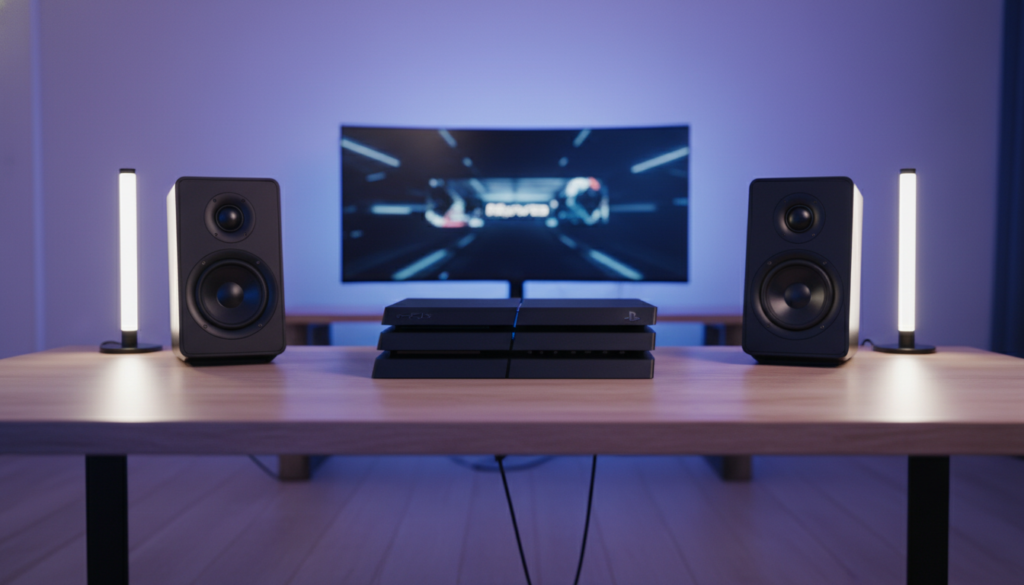
In my decade of experience as a hardware technician and console modder, I have seen dozens of PS4 Pro and Slim units come across my workbench with “Blue Light of Death” issues directly linked to poor heat management. Placing heavy objects—especially those with magnets and moving parts like speakers—on top of a console is a recipe for a shortened lifespan.
TL;DR: Quick Safety Guide for PS4 Speaker Placement
| Risk Factor | Impact Level | Potential Damage |
|---|---|---|
| Heat Retention | Critical | Thermal throttling, fan noise, APU soldering cracks. |
| Vibration | High | HDD (Hard Drive) read/write errors, data corruption. |
| Magnetism | Moderate | Interference with Wi-Fi/Bluetooth antennas. |
| Weight | Low | Warping of the plastic casing or structural stress. |
The Hidden Dangers: Can I Put Speakers on Top of My PS4?
When you ask, “can i put speakers on top of my ps4,” the physical answer is yes—the console’s plastic shell is sturdy enough to hold a standard set of PC speakers. However, the functional answer is a resounding no. Here is the deep dive into why this setup fails the “long-term health” test for your gaming system.
Thermal Suffocation and Airflow
The PS4 (especially the CUH-1200 series and PS4 Pro) is notorious for running hot. The console pulls air from the side slits and exhausts it out the back.
- Heat Dissipation: The top surface of the PS4 acts as a passive heat sink. By covering it with a speaker, you are trapping heat that would otherwise radiate away from the APU (Accelerated Processing Unit).
- The “Jet Engine” Effect: When the internal temperature rises by even 5-10 degrees Celsius, the internal cooling fan must spin faster. This results in the loud, distracting noise many users complain about.
- Thermal Paste Degradation: Continuous high-heat cycles dry out the factory thermal paste faster, leading to permanent overheating issues.
Mechanical Vibration vs. The Hard Drive
Unless you have upgraded to an SSD (Solid State Drive), your PS4 relies on a traditional HDD with spinning platters and a physical read arm.
- Seismic Stress: Speakers produce sound by moving air via vibration. These micro-vibrations travel through the speaker’s base directly into the PS4 chassis.
- Head Crashes: Even small vibrations can cause the hard drive’s read head to skip or crash into the platter, leading to corrupted save files or a total drive failure.
Electromagnetic Interference (EMI)
All speakers contain permanent magnets and electromagnetic coils. While most modern speakers are “shielded,” cheaper or older models are not.
- Signal Droff-offs: The PS4’s Wi-Fi and Bluetooth antennas are located near the outer edges of the shell. Placing a large magnet directly above them can lead to controller lag or frequent disconnections from the PlayStation Network.
- Component Longevity: While it takes a very strong magnet to wipe a hard drive, constant proximity to a magnetic field can theoretically interfere with the delicate voltage regulators on the motherboard.
Expert-Recommended Speaker Placement for PS4
If you want the best audio experience without killing your console, follow these placement rules we use in professional gaming room setups.
The 12-Inch Rule
Always maintain a minimum of 12 inches (30 cm) of clearance between your speakers and the PS4. This prevents both heat soak and vibrational transfer.
Recommended Layouts
- The Flanking Maneuver: Place bookshelf speakers (like the Edifier R1280T) on the far ends of your desk, with the PS4 centered.
- Wall Mounting: Use a HIDKEA wall mount for the PS4 to get it off the desk entirely, leaving more room for high-quality audio gear.
- Speaker Stands: If you use large studio monitors, invest in isolation pads or floor stands to decouple the sound energy from the surface your PS4 sits on.
How to Properly Connect Speakers to Your PS4
Once you’ve moved the speakers off the console, you need to connect them. Depending on your model (Original, Slim, or Pro), the methods vary.
Method 1: The Controller Jack (Easiest)
This is the fastest way to get audio if your speakers have a 3.5mm auxiliary cable.
- Plug the 3.5mm cable from the speakers into the DualShock 4 controller.
- Hold the PS Button > Sound/Devices > Output to Headphones > All Audio.
Pros:* Zero cost.
Cons:* Drains controller battery; lower audio fidelity.
Method 2: Optical Audio (Best for PS4 Original/Pro)
The PS4 Slim lacks an optical port, but the Original and Pro models feature a Toslink (Optical) output.
- Connect a Toslink cable from the back of the PS4 to your speakers or DAC.
- Go to Settings > Sound and Screen > Audio Output Settings > Primary Output Port > Digital Out (Optical).
Pros:* High-fidelity, digital-to-analog clarity.
Method 3: HDMI Audio Extractor (For PS4 Slim)
Since the PS4 Slim only has HDMI, you need a workaround for external speakers.
- Buy an HDMI Audio Extractor.
- Plug the PS4 HDMI into the extractor “In” port.
- Plug your TV/Monitor into the extractor “Out” port.
- Connect your speakers to the extractor via RCA or 3.5mm.
Comparison: Connection Methods at a Glance
| Method | Audio Quality | Latency | Difficulty | Best For |
|---|---|---|---|---|
| 3.5mm Controller | Medium | Low | Very Easy | Casual gaming |
| Optical (Toslink) | High | Zero | Easy | Home Cinema/Pro |
| USB DAC | High | Low | Medium | Audiophiles |
| HDMI Extractor | High | Zero | Medium | PS4 Slim Users |
Best Speakers to Use With a PS4 (That Aren’t On Top Of It)
When choosing audio gear, look for speakers that offer multiple inputs so you can switch between your PC and console easily.
- Logitech Z407: A great budget-friendly option with a wireless control dial and Bluetooth/USB/3.5mm inputs.
- Razer Nommo Chroma: These are tall, sleek speakers that look great next to a PS4. They feature built-in bass ports that don’t vibrate the desk as much as a dedicated sub.
- Creative Pebble V3: Perfect for small desks. They use USB-C power and provide surprisingly loud “Information Gain” for their size.
Troubleshooting PS4 Audio Issues
If you’ve set up your speakers and aren’t hearing anything, check these common pain points:
- Linear PCM vs. Bitstream: If you are using an Optical cable, try switching between Linear PCM and Bitstream (DTS/Dolby) in the settings. Some speakers cannot decode a Bitstream signal.
- HDCP Issues: Occasionally, HDCP (High-bandwidth Digital Content Protection) causes audio handshaking issues. You can disable this in Settings > System, but keep in mind that apps like Netflix won’t work while it’s off.
- USB Compatibility: Not all USB speakers work with PS4. The console requires “Class Compliant” USB audio devices. If your speakers require a specific Windows driver, they won’t work on the PS4.
Frequently Asked Questions (FAQ)
Can I use Bluetooth speakers with a PS4?
No, the PS4 does not support most third-party Bluetooth speakers directly for audio output. The console’s Bluetooth is reserved for controllers. You must use a Bluetooth transmitter plugged into the controller jack or a USB dongle to connect your speakers wirelessly.
Will placing a speaker on my PS4 void the warranty?
While placing an object on the console doesn’t technically void the warranty, any damage caused by overheating or a failed hard drive resulting from that placement might be classified as “user negligence” if a technician finds signs of physical stress or heat damage.
Does the PS4 Slim have an audio jack?
The PS4 Slim console itself does not have a 3.5mm audio jack. You must extract audio from the HDMI port, use the controller’s jack, or use USB-compatible speakers.
How do I stop my PS4 from vibrating the desk?
If your PS4 is vibrating because of its own internal fan or disk drive, use rubber isolation feet or a neoprene mat under the console. This prevents the desk from acting as a sounding board, making the console much quieter.
Is it safe to put a soundbar under my PS4?
Putting a soundbar under the PS4 is safer than putting speakers on top, provided the soundbar doesn’t generate heat from its top surface. However, make sure the PS4 is on a stable, flat surface to ensure the internal disk drive stays level.









