

Can I Run Rear Speakers in Parallel to Get 7.1?
No, you cannot effectively run rear speakers in parallel to get 7.1 surround sound if your receiver only supports 5.1 channels. While you can physically wire two speakers to a single output, they will play the exact same audio signal, meaning you are still listening to 5.1 audio, just through more speakers. Additionally, wiring speakers in parallel significantly lowers impedance (Ohms), which can overheat or permanently damage your AV receiver.
Key Takeaways for 7.1 Surround Sound Setup
- Parallel Wiring Risks: Connecting two 8-ohm speakers in parallel creates a 4-ohm load, which most entry-level receivers cannot handle without clipping.
- Discrete Channels: A true 7.1 system requires a 7.1-channel AV receiver that can process separate “Surround” and “Surround Back” signals.
- Audio Resolution: 5.1 uses Dolby Digital or DTS, while 7.1 utilizes Dolby TrueHD or DTS-HD Master Audio for discrete rear information.
- The Best Fix: If you want 7.1, invest in a dedicated 7-channel amplifier rather than “daisy-chaining” speakers to a 5-channel unit.
Understanding the Risks: Can I Run Rear Speakers in Parallel?
In my years of calibrating high-end home theaters, I have seen many enthusiasts try to “hack” their way into 7.1 by doubling up on the rear channels. While it is tempting to simply twist two sets of wires together, the physics of electrical resistance make this a dangerous game for your hardware.
When you ask, “can i run rear speakers in parallel to get 7.1,” you are essentially asking if you can split a single signal into two. You can, but you won’t get “7.1.” You will get “5.1 with extra speakers.” More importantly, you risk a thermal shutdown of your amplifier.
The Math of Speaker Impedance
Most home theater speakers are rated at 8 Ohms. When you wire them in parallel, the total resistance the amplifier “sees” is halved.
| Wiring Configuration | Resulting Impedance (with 8-ohm speakers) | Risk Level |
|---|---|---|
| Single Speaker | 8 Ohms | Safe (Standard) |
| Two Speakers in Series | 16 Ohms | Safe (But lower volume) |
| Two Speakers in Parallel | 4 Ohms | High Risk (Heat/Failure) |
Most budget AV receivers are designed for 6 to 8-ohm loads. Forcing them to drive a 4-ohm load in parallel causes the amp to draw more current than it was built for, leading to distorted sound and potentially a dead unit.
1 vs. 7.1: Why Parallel Wiring Fails the “Surround” Test
To understand why you shouldn’t run rear speakers in parallel to get 7.1, you need to understand how Surround Sound Processing works.
In a 5.1 system, the audio tracks are:
- Front Left
- Front Right
- Center
- Surround Left (Sides)
- Surround Right (Sides)
- .1 Subwoofer (LFE)
In a 7.1 system, the processor adds two Rear Back channels. These channels contain entirely different audio data than the side surrounds. For example, if a plane flies from the front to the very back of the room, a 7.1 processor moves that sound from the fronts to the sides, and then to the rears.
If you use parallel wiring on a 5.1 system, the side and rear speakers will play the same sound simultaneously. This destroys the soundstage and creates phase cancellation, where sound waves from different speakers cancel each other out, making your expensive setup sound thin and muddy.
How to Properly Upgrade to a 7.1 Surround Sound System
If you are determined to move beyond 5.1, don’t rely on the question of can i run rear speakers in parallel to get 7.1. Instead, follow these professional steps to achieve a true cinematic experience.
Step 1: Verify Your AV Receiver Capabilities
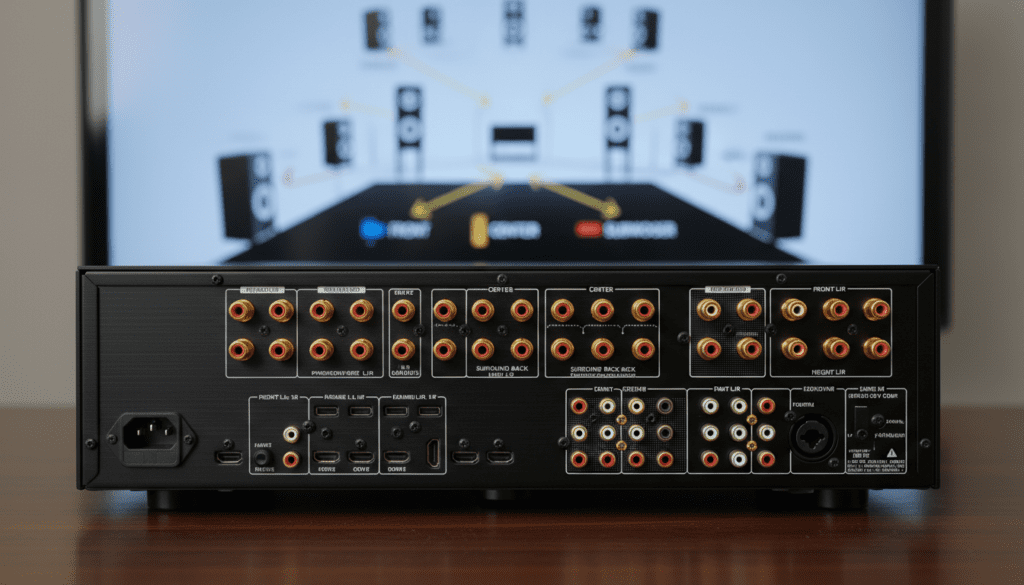
Check the back of your AV Receiver (AVR). You must see dedicated ports labeled Surround Back L/R. If you only see “Surround L/R,” your receiver is capped at 5.1. No amount of wiring tricks will unlock 7.1 processing in a 5.1-channel chip.
Step 2: Optimal Speaker Placement
For 7.1, your speaker geometry changes significantly:
- Surround Speakers: Place these at 90° to 110° relative to the listener (directly to the sides).
- Rear Back Speakers: Place these behind the listener at 135° to 150°.
- Height: Ensure all four surround speakers are roughly 2 feet above ear level to create an immersive “bubble.”
Step 3: Use High-Quality 14-Gauge Wire
When running long distances to the back of a room, voltage drop is a concern. We recommend using 14-AWG oxygen-free copper (OFC) wire. Avoid “Copper Clad Aluminum” (CCA) as it has higher resistance and is more prone to breaking during installation.
Step 4: Run the Auto-Calibration
Once your 7.1 speakers are plugged into the correct discrete ports, use the built-in calibration tool (like Audyssey, YPAO, or Dirac Live). The receiver will send test tones to each speaker to set the time alignment and levels.
Expert Tips for Expanding Your Sound System
We have tested various “phantom” surround configurations, and the results are clear: Discrete is always better than duplicated.
- Don’t Mix Impedance: Never wire a 4-ohm speaker and an 8-ohm speaker together. This creates an uneven power draw that will likely blow the 4-ohm driver or overheat the amp.
- Consider an External Amp: If your receiver has Pre-Outs, you can connect a separate two-channel power amplifier to drive your rear speakers. This is the professional way to expand a system without taxing the main receiver.
- Check for “Zone 2” Options: Some 7.1 receivers allow you to use the extra two channels for a second room (Zone 2). Ensure your settings are switched to “7.1 Surround” mode and not “Multi-Zone” mode.
The “Series Wiring” Alternative (The Only “Safe” Hack)
If you absolutely must use more speakers than you have channels (for example, in a very large room where you want more coverage), use Series Wiring instead of parallel.
How to wire in series:
- Connect the Positive (+) terminal of the receiver to the Positive (+) of Speaker A.
- Connect the Negative (-) of Speaker A to the Positive (+) of Speaker B.
- Connect the Negative (-) of Speaker B back to the Negative (-) of the receiver.
This increases impedance (8 ohms + 8 ohms = 16 ohms). Your receiver will stay cool and safe, though the volume will be lower. Note that this still does not create a 7.1 signal; it just spreads the 5.1 signal across more hardware.
Frequently Asked Questions
Can I damage my receiver by wiring speakers in parallel?
Yes. Wiring in parallel drops the impedance. If the impedance falls below what the receiver is rated for (usually 6 or 4 ohms), the amplifier will draw excessive current, causing it to overheat, enter Protect Mode, or suffer permanent internal damage.
Does 7.1 sound significantly better than 5.1?
In large rooms (over 20 feet deep), 7.1 provides a much smoother audio transition for sounds moving behind the listener. In smaller rooms, the difference is negligible, and a well-placed 5.1 system often sounds better than a crowded 7.1 setup.
What happens if I connect 7 speakers to a 5.1 receiver?
Unless you use a specialized speaker selector box with impedance protection, you will likely trigger the receiver’s circuit breaker. Even if it works, you will not have a 7.1 experience; the rear speakers will simply mirror the side speakers, ruining the directional intent of the movie’s soundtrack.
Can I use a Y-splitter for surround speakers?
You should never use a RCA Y-splitter on powered speaker outputs. For line-level signals (like connecting two subwoofers to one LFE port), a Y-splitter is perfectly fine. However, for “high-level” speaker wires, it creates the same parallel load risks mentioned above.
What is the minimum receiver I need for 7.1?
Look for an AV receiver that explicitly supports Dolby Atmos or DTS:X. These are modern standards that almost always include 7.1 channels of amplification as a baseline. Brands like Denon, Marantz, and Yamaha offer excellent entry-level 7-channel units.









