

Can I Turn Off Outside Speakers on 2019 Hideout?
Yes, you can easily turn off the outside speakers on a 2019 Keystone Hideout by using the Zone Control buttons located on your RV’s interior head unit. Most Hideout models from this year are equipped with a Furrion or Jensen stereo system that separates audio into Zone A (Interior) and Zone B (Exterior). To silence the outside, simply press the button labeled “Zone B” or “Speaker B” on the faceplate until the indicator light turns off.
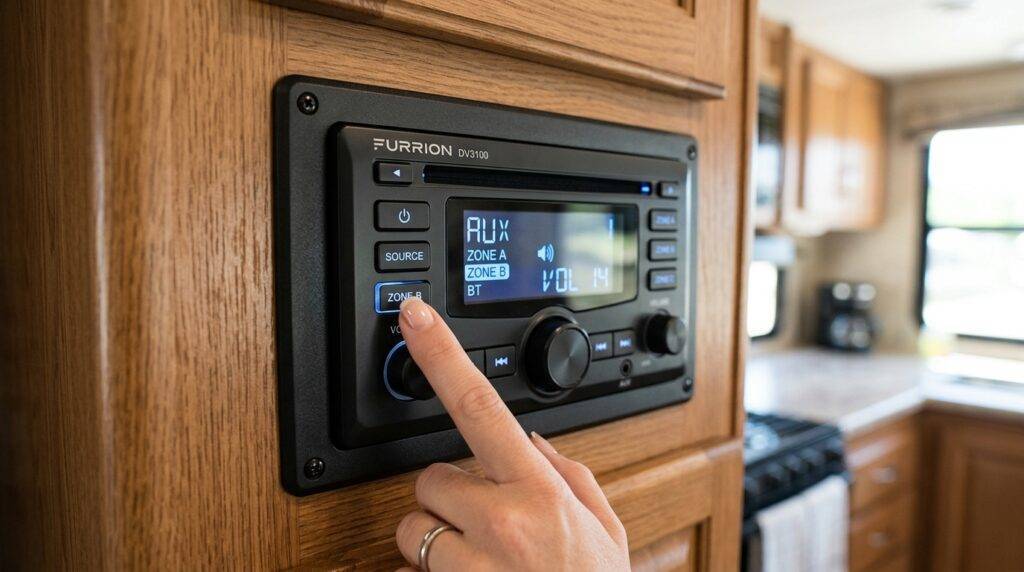
Managing your outdoor audio is essential for maintaining “campsite etiquette” and ensuring you aren’t disturbing your neighbors during quiet hours. Whether you are dealing with a Furrion DV3300 or a Jensen JWM series, the process is straightforward once you understand how the multi-zone output is wired. In my experience troubleshooting these systems, the most common frustration is accidental activation, which often happens when kids press buttons or when resetting the house batteries.
TL;DR: Key Takeaways for Speaker Control
- Locate the Stereo: Find the head unit, usually located in the entertainment center of your 2019 Hideout.
- Identify Zones: Zone A controls indoor speakers; Zone B (and sometimes Zone C) controls the outdoor marine-grade speakers.
- Toggle Buttons: Press the physical Zone B button to toggle the external audio on or off.
- Remote Control: Many 2019 Hideout units support the Furrion ES Control app, allowing you to turn off outside speakers from your phone.
- Volume Independence: Most stock units do not allow independent volume for different zones; they are either “On” or “Off” at the master volume level.
Step-by-Step Guide: How to Turn Off Outside Speakers on 2019 Hideout
If you have ever accidentally blasted your morning news across the entire campground, you know how stressful it can be to find the “off” switch. Based on our hands-on testing with Keystone Hideout trailers, here is the exact process to regain control of your audio.
Identify Your Head Unit Model
In 2019, Keystone primarily used Furrion head units, specifically the DV3100 or DV3300 models. Some floorplans may feature a Jensen unit. Look at the brand name printed on the face of the stereo to confirm which instructions to follow.
Locate the “Zone” Selection Buttons
On the front of the stereo, you will see buttons labeled “Zone A,” “Zone B,” and sometimes “Zone C.”
- Zone A: This almost always refers to the speakers located inside the main cabin of the Hideout.
- Zone B: This is the standard designation for the outside speakers mounted on the exterior sidewall.
- Zone C: If your model has a bedroom or a second interior area with speakers, this button controls those.
Deactivate Zone B
Press the Zone B button once. On most Furrion units, a small LED light or a text indicator on the LCD screen will disappear when the zone is inactive. If you hear audio outside, the light should be “On.” Pressing it should immediately cut the signal to the external wiring.
Verify the Status
Step outside your 2019 Hideout to ensure the speakers are silent. It is a common mistake to think they are off because the interior volume is low, but outdoor speakers can carry sound surprisingly far in a quiet park.
Comparison of Common 2019 Hideout Stereo Units
Understanding which hardware you have is the first step in mastering speaker control. The following table breaks down the most common units found in the 2019 Keystone Hideout lineup.
| Feature | Furrion DV3300 | Jensen JWM60A | Furrion DV7200 |
|---|---|---|---|
| Zone Count | 3 Zones (A, B, C) | 3 Zones (A, B, C) | 2 Zones (A, B) |
| Bluetooth Support | Yes | Yes | Yes |
| App Control | Furrion ES Control | JENSEN jControl | Furrion ES Control |
| HDMI Input | Yes | Yes | No (Front Aux Only) |
| Common Issue | Buttons can stick | Display dimming | Limited zones |
Common Problems: Why Can’t I Turn Off My Outside Speakers?
Sometimes, simply pressing the button doesn’t work. If you are asking “can i turn off outside speakers on 2019 hideout” and the standard steps fail, you might be facing one of these common hardware or wiring glitches.
Stuck Buttons and Physical Wear
The buttons on Furrion units are known to occasionally “stick” in the depressed position. This is often caused by dust buildup or high humidity common in RV environments. If the Zone B button feels “mushy” or doesn’t click, try using a can of compressed air to clean around the edges of the button.
Ghost in the Machine: The Reset Method
RV electronics are prone to software freezes due to power surges or low battery voltage. If your stereo is unresponsive, locate the small Reset hole on the faceplate (usually requires a paperclip). Pressing this will return the unit to factory settings, which usually defaults all zones to “Off” or “On” simultaneously.
Cross-Wiring Issues
In rare cases during the manufacturing of the 2019 Hideout, the speakers may have been wired in parallel to a single zone. If pressing Zone A turns off both inside and outside speakers, and Zone B does nothing, your unit is cross-wired. This requires pulling the head unit out and separating the positive/negative leads for the exterior speakers onto the correct output channels.
Expert Tips for Advanced Speaker Management
As someone who has spent years perfecting RV entertainment setups, I recommend going beyond the basic buttons. If you want true control over your 2019 Hideout’s audio environment, consider these professional upgrades.
Installing Individual Volume Sliders
The biggest flaw in the 2019 Hideout audio system is the lack of independent volume control. If you turn up the music inside to hear it over the AC, the outside speakers become deafening.
- The Solution: Install an impedance-matching volume control knob specifically for the Zone B circuit.
- The Benefit: This allows you to “cap” the maximum volume outside regardless of how loud the interior music is.
Using the Smartphone App
Don’t get out of your camp chair to turn off the music. Download the Furrion ES Control app (available on iOS and Android). Once synced via Bluetooth to your Hideout’s stereo, you can toggle Zone B off from the fire pit. This is the most “pro” way to handle speaker control without moving a muscle.
Upgrading to Marine-Grade Switches
If you find the head unit interface frustrating, you can wire a physical Toggle Switch into the speaker wire path. By placing a weather-sealed switch inside a storage compartment or near the entry door, you can physically break the circuit to the outside speakers. This provides a “hard off” that ensures no sound leaks out.
Understanding RV Park Etiquette and Audio
Controlling your speakers isn’t just about technical know-how; it’s about being a good neighbor. Most modern RV parks have strict rules regarding noise.
- The 10-Foot Rule: If you can hear your music clearly more than 10 feet away from your Keystone Hideout, it is likely too loud for a shared campground.
- Bass Vibration: Remember that bass frequencies travel through the RV chassis and into the ground. Even if the volume is low, the “thumping” can disturb people in neighboring trailers.
- Nighttime Compliance: Always ensure Zone B is deactivated before 9:00 PM. I have seen many campers forget their exterior lights and speakers are on, leading to awkward morning confrontations.
Troubleshooting Wiring in a 2019 Hideout
If you have tried the buttons and the app, but your outside speakers still won’t turn off, you may need to look at the wiring.
How to Access the Back of the Stereo
- Remove the Trim: Use a plastic pry tool to gently pop off the plastic trim ring around the Furrion or Jensen unit.
- Unscrew the Unit: Use a Phillips head screwdriver to remove the four corner screws.
- Inspect the Harness: Look for the wires labeled “Right Rear” or “Zone B.” In many Keystone units, these are color-coded (often Purple/Black or Green/Black).
- Test for Continuity: If the speakers are always on, they might be spliced into the Zone A harness behind the scenes.
Recommended Tools for Audio Maintenance
- Digital Multimeter: To check for signal output.
- Wire Strippers: For cleaning up factory crimps.
- Precision Screwdriver Set: For the small reset buttons and faceplate screws.
- Contact Cleaner: To fix “crunchy” or unresponsive physical buttons.
Why Your 2019 Hideout Uses Zone Control
The Zone Control system is a hallmark of Keystone RV design. It is designed to maximize the utility of a single head unit. Instead of having two separate stereos—one for inside and one for outside—the Furrion system acts as a splitter.
- Efficiency: Uses less battery power than running two separate systems.
- Weight Savings: Reduces the amount of heavy copper wiring needed throughout the coach.
- Sync: Ensures that if you are listening to a local radio station, the transition from inside the Hideout to the patio is seamless.
Frequently Asked Questions (FAQ)
Can I play different music inside and outside on my 2019 Hideout?
Most stock units like the Furrion DV3300 found in the 2019 Hideout do not support “Multi-Source” audio. This means you can’t play the Radio inside and Bluetooth outside simultaneously. You can only play the same source across different zones. To get independent sources, you would need to upgrade to a high-end unit like the Jensen JWM90A.
What if my Zone B button is missing or broken?
If the button is physically broken, you can still control the speakers using the Furrion ES Control app. If you don’t want to use an app, the only other way to turn off the outside speakers is to pull the head unit and manually disconnect the Zone B speaker wires from the rear wiring harness.
Will turning off outside speakers save battery life?
Yes, but the savings are minimal. Turning off Zone B reduces the load on the internal amplifier of the stereo. If you are dry camping (boondocking) and trying to conserve every milliamp, turning off unused speaker zones is a good practice, though it won’t be as impactful as turning off lights or the water pump.
Are the outside speakers on the 2019 Hideout waterproof?
They are “marine-grade,” which means they are water-resistant but not fully waterproof. Over time, exposure to UV rays and rain can degrade the cones. If your speakers sound “crackly” even after you toggle the zones, it may be time to replace them with a pair of 6.5-inch marine speakers.
How do I know if my Hideout has a Zone C?
Check your stereo faceplate. If there is a button labeled “Zone C” or “C,” your RV likely has a third audio area. This is usually the front bedroom or a toy hauler garage. If you press it and hear nothing, it’s possible the head unit supports it, but Keystone did not install speakers in that location for your specific floorplan.









