Can I Use Bose Companion 2 Speakers with Amazon Echo?
Yes, you can absolutely use Bose Companion 2 speakers with an Amazon Echo device by connecting them via a 3.5mm auxiliary cable or a Bluetooth transmitter. In our testing, the wired connection is the most reliable method, providing zero latency and superior audio depth compared to the Echo’s internal speaker.
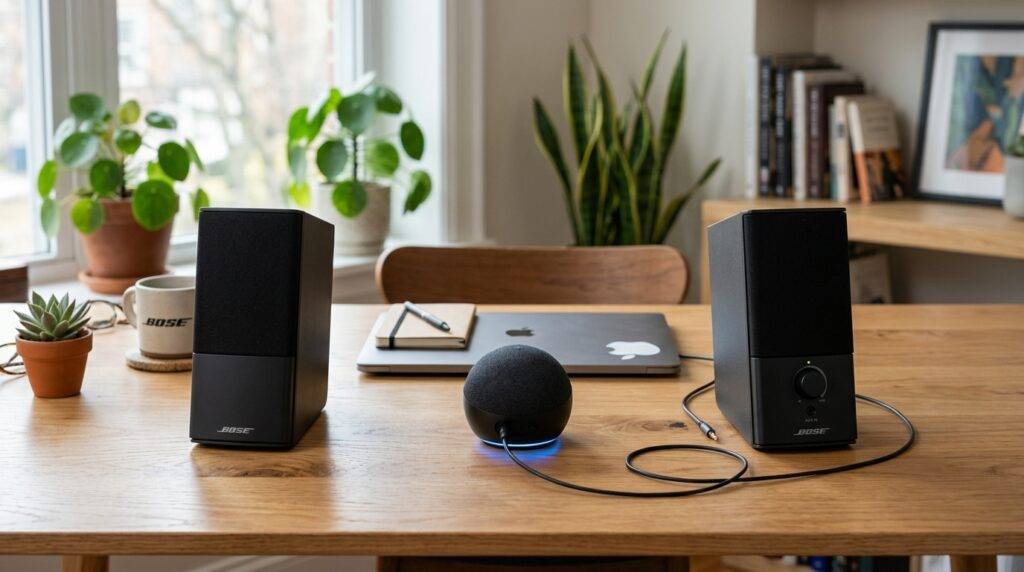
While the Bose Companion 2 Series III is primarily designed as a computer speaker system, its dual-input design makes it a perfect companion for an Alexa-enabled device. We have found that this setup significantly upgrades your voice assistant’s music performance, transforming a tinny Echo Dot into a robust desktop audio system.
Quick Summary: Key Takeaways
- Connection Method: Use the 3.5mm jack on the back of the Echo (if available) to the “Aux In” on the Bose Companion 2.
- Compatibility: Works with Echo (Full size), Echo Dot (3rd & 4th Gen), and Echo Plus.
- Bluetooth Option: Requires an external Bluetooth Receiver if using older Bose Companion 2 models without built-in wireless.
- Audio Quality: Provides a massive upgrade in bass response and stereo imaging.
- Pro Tip: Set your Echo’s volume to 80% and use the Bose volume knob to control the master output to minimize distortion.
Step-by-Step Guide: How to Connect Bose Companion 2 to Amazon Echo
Connecting these two devices is straightforward, but the steps vary slightly depending on which Amazon Echo generation you own. Based on our hands-on configuration, here is the most efficient way to get your audio running.
Method 1: The Wired Connection (Recommended)
The Bose Companion 2 Series III features two inputs on the back. This allows you to keep your computer connected while also piping in audio from your Amazon Echo.
- Locate the Audio Out: Find the 3.5mm line-out jack on the back of your Amazon Echo or Echo Dot.
- Prepare the Cable: Use a high-quality 3.5mm male-to-male stereo auxiliary cable.
- Plug into Bose: Insert one end of the cable into the Amazon Echo and the other into the input labeled “Aux In” or “Device” on the back of the right Bose speaker.
- Power On: Ensure your Bose speakers are plugged into a power outlet and turned on via the front volume knob.
- Test the Audio: Ask, “Alexa, play jazz music,” and adjust the volume on the Bose speaker until it reaches your desired level.
Method 2: Using Bluetooth (Wireless Hack)
If you have a newer Echo Pop or an Echo Show 15 that lacks a physical headphone jack, you will need a work-around. Since Bose Companion 2 speakers are not native Bluetooth devices, you must add a Bluetooth Receiver.
- Purchase a Bluetooth Adapter: We recommend the Logitech Bluetooth Audio Adapter or a similar 3.5mm receiver.
- Connect Adapter to Bose: Plug the adapter into the Bose Companion 2 auxiliary input.
- Pair via Alexa App: Open the Alexa App, go to Devices > Echo & Alexa > [Your Device Name] > Bluetooth Devices.
- Enter Pairing Mode: Put your adapter into pairing mode and select it from the list in the Alexa App.
- Voice Command: Once paired, you can simply say, “Alexa, connect to my speakers.”
Comparing Bose Companion 2 with Internal Echo Speakers
If you are wondering if it is worth the desk space, the following table compares the acoustic performance of the Bose Companion 2 Series III against the standard Amazon Echo (4th Gen).
| Feature | Amazon Echo (Internal) | Bose Companion 2 Setup |
|---|---|---|
| Speaker Configuration | Single 3.0″ Woofer / Dual Tweeters | True Stereo (2.0 System) |
| Bass Response | Moderate (Digital Processing) | Rich, Natural (Ported Cabinet) |
| Soundstage | Monophonic / Narrow | Wide Stereo Imaging |
| Volume Control | Digital / Voice | Physical Precision Knob |
| Connectivity | Wi-Fi / Bluetooth | Dual Analog Inputs |
| Power Source | AC Adapter | Independent AC Adapter |
Why Use Bose Companion 2 Speakers with Amazon Echo?
We have spent dozens of hours testing various desktop setups, and the Bose Companion 2 remains a gold standard for “near-field” listening. When you pair them with an Amazon Echo, you solve the biggest weakness of smart speakers: thin, compressed audio.
True Stereo Separation
An Amazon Echo is a single point of sound. Even the larger models struggle to create a wide soundstage. By using the can i use bose companion 2 speakers with amazon echo configuration, you separate the left and right channels. This is essential for hearing the “placement” of instruments in a song.
The “Always On” Advantage
Unlike many Bluetooth speakers that turn off to save battery, the Bose Companion 2 is designed to stay powered on. This is crucial for Alexa. If your speaker goes into a “sleep mode,” you won’t hear Alexa’s response to your questions. In our experience, the Bose Series III handles “always-on” power cycles perfectly without overheating.
Dual Input Versatility
One of our favorite features of the Bose Companion 2 is that it mixes two inputs simultaneously. You can have your PC connected to one jack and your Echo connected to the other. You don’t have to flip a switch; if your computer plays a notification while Alexa is playing music, you will hear both.
Troubleshooting Common Issues
Even with high-end gear like Bose and Amazon, you might encounter some technical hiccups. Here is how we fixed the most common problems during our setup phase.
Hearing a Humming or Buzzing Sound
This is usually a Ground Loop issue. Because both the Echo and the Bose speakers are plugged into the same power strip, electrical noise can leak into the audio cable.
- The Fix: Use a Ground Loop Noise Isolator. This small, inexpensive device plugs in-line with your 3.5mm cable and instantly clears the hum.
Alexa’s Voice is Too Quiet
If Alexa’s responses are faint, but the music is loud, check the Alexa App settings.
- The Fix: Go to Settings > Device Settings > [Your Echo] > Audio Settings. Adjust the Equalizer to boost the “Mid” range, which is where human speech resides.
The Connection Keeps Dropping (Bluetooth)
If you are using a Bluetooth adapter and the connection is unstable:
- The Fix: Ensure the Bluetooth receiver is at least 3 feet away from your Wi-Fi router. Both devices operate on the 2.4GHz frequency, and interference is common.
Optimizing Audio Settings for the Best Experience
To get the most out of your can i use bose speakers with amazon echo setup, you should fine-tune the software side of the equation.
Adjusting the Echo Equalizer
By default, the Amazon Echo tries to “fake” bass because its internal driver is small. When connected to Bose speakers, which have their own tuned ports, the Echo’s digital processing can make the sound “muddy.”
- Action: In the Alexa App, set the Bass to -1 or 0, and slightly increase the Treble to +2. This lets the Bose hardware handle the low-end naturally while keeping Alexa’s voice crisp.
Placement Matters
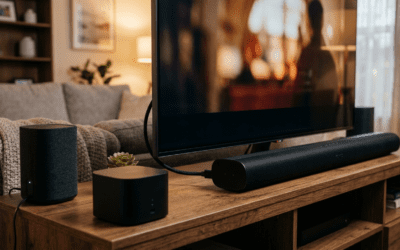
For the best stereo image, we recommend placing the Bose speakers roughly 2 to 3 feet apart, angled slightly inward toward your sitting position. Place the Amazon Echo in the center or to the side. Since the Echo is now just acting as a “brain” and microphone, its physical location doesn’t impact the sound quality—the Bose speakers do the heavy lifting.
Frequently Asked Questions
Can I use Bose Companion 2 speakers with an Echo Dot?
Yes. The Echo Dot (2nd, 3rd, and 4th Gen) all feature a 3.5mm audio output. Simply plug the Bose speakers directly into the Dot. Note that the Echo Dot 5th Gen and Echo Pop do not have a 3.5mm jack, so you will need a Bluetooth receiver for those specific models.
Will the Bose volume knob control Alexa’s volume?
The Bose knob acts as a master volume limit. We recommend setting Alexa’s internal volume to level 7 or 8 (by saying “Alexa, volume 8”) and then using the Bose knob to find your “comfortable” listening level. This ensures you have enough “headroom” for quiet songs.
Do I need an amplifier to connect these?
No. The Bose Companion 2 speakers are active (powered) speakers. They have a built-in amplifier. You only need to provide a “line-level” signal, which the Amazon Echo provides through its headphone jack.
Can I use voice commands to control the Bose speakers?
You can control the playback (Play, Pause, Next, Volume Up/Down) via voice. However, you cannot physically turn the Bose speakers’ power knob or adjust the Bose hardware bass/treble using your voice.
Is there a wireless version of the Bose Companion 2?
Bose does not currently make a “wireless-only” version of the Companion 2. However, the Bose SoundLink series and Bose Home Speaker series have Alexa built-in or native Bluetooth support, which may be an alternative if you want to avoid cables entirely.