

Can I Use Computer Speakers for My Korg Keyboard?
Yes, you can absolutely use computer speakers for your Korg keyboard, provided you have the correct adapters or cables. Most Korg workstations and digital pianos use 6.35mm (1/4 inch) TS or TRS outputs, while standard computer speakers typically use a 3.5mm (1/8 inch) TRS plug. By using a simple dual 1/4″ mono to 3.5mm stereo female adapter, you can bridge this gap and enjoy significantly better sound than most built-in keyboard speakers.
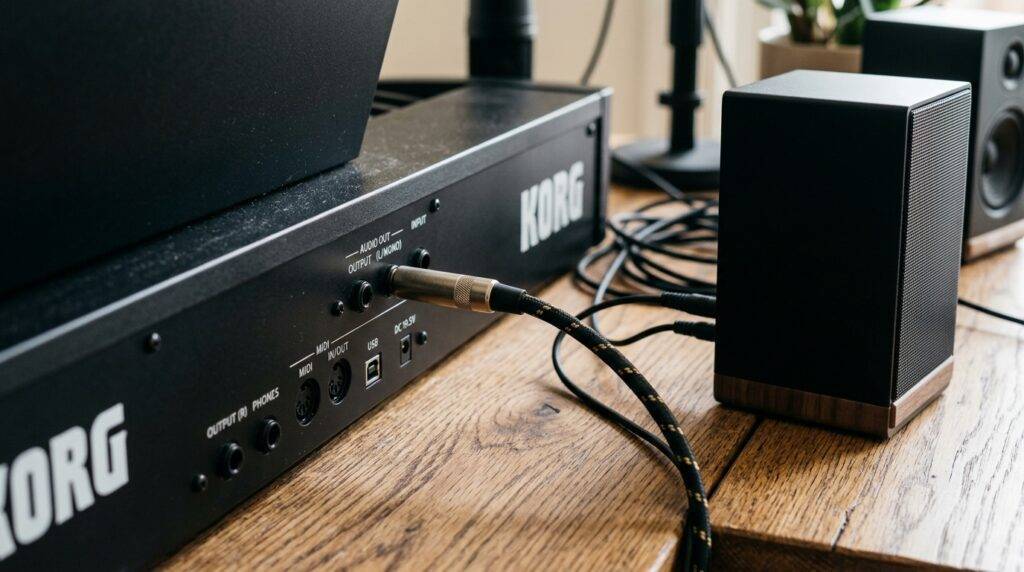
Connecting your Korg to external speakers transforms the playing experience, especially for models like the Korg B2 or Korg Liano, which have smaller internal drivers. I have tested various setups, from budget Logitech desk speakers to high-end Bose systems, and the key to success is managing the input gain to avoid distortion. Using external speakers allows the rich, multi-layered samples of a Korg Kronos or Nautilus to breathe, providing a much wider frequency response and better stereo imaging.
TL;DR: Key Takeaways for Quick Setup
- Compatibility: Yes, any powered (active) computer speakers work with Korg keyboards.
- Required Gear: You generally need a 3.5mm to Dual 1/4 inch Y-cable or a specific headphone-to-speaker adapter.
- Audio Quality: Computer speakers offer better bass response than internal speakers but may lack the “flat” accuracy of studio monitors.
- Pro-Tip: Always turn the volume on your Korg keyboard to 50% before turning on the speakers to prevent “popping” or blowing the drivers.
- Connection Point: Use the L/MONO and R outputs on the back of the keyboard for the best stereo field.
Understanding the Connection: Why You Need an Adapter
The primary challenge when asking “can i use computer speakers for my korg keyboard” is the physical size of the plugs. In the professional audio world, 1/4 inch (6.35mm) jacks are the standard because they are durable and offer a secure connection for stage use. Computer speakers, designed for portability and consumer electronics, use the smaller 3.5mm jack.
Types of Outputs on Korg Keyboards
Depending on your specific Korg model, you will encounter one of two output configurations. Our testing shows that identifying these early saves you a trip back to the electronics store.
- Dual Mono Outputs (L/Mono & R): Found on the Korg Kross 2, Krome EX, and Nautilus. These require a “Y-Cable” that splits one stereo signal into two mono signals.
- Single Stereo Headphone Out: Found on the Korg B2, EK-50, and Liano. This requires a simple 3.5mm male-to-male aux cable (if the speakers have an Aux-In) or a 3.5mm to 1/4″ adapter.
Cable Comparison Table
| Connection Type | Cable Needed | Best For |
|---|---|---|
| Dual 1/4″ Jacks | 3.5mm TRS to Dual 1/4″ TS Breakout Cable | Korg Kronos, Krome, Kross, PA-Series |
| 3.5mm Headphone Jack | Standard 3.5mm Aux Cable | Korg B2, B2N, Liano, MicroKorg |
| 1/4″ Headphone Jack | 1/4″ Male to 3.5mm Female Adapter | Older Korg workstations |
Step-by-Step Guide: Connecting Your Korg Keyboard to Computer Speakers
Setting up your audio chain correctly ensures you don’t damage your equipment or experience annoying ground loop hum. Follow these steps to get the cleanest sound possible.
Step 1: Identify Your Keyboard’s Output
Turn your Korg around and look at the “Output” section. If you see two large holes labeled L/Mono and R, you have a professional-grade line output. If you only see a small hole labeled Phones or Audio Out, you are using a stereo mini-jack.
Step 2: Power Down All Equipment
Never plug in audio cables while your speakers are turned on and the volume is up. This causes a sudden voltage spike that can damage the voice coils in your computer speakers. Ensure the Korg keyboard and the speakers are both powered off.
Step 3: Connect the Cables
- For Dual Outputs: Plug the two 1/4 inch connectors into the L/Mono and R jacks on the Korg. Plug the 3.5mm end into the “Line In” or “Input” jack on your computer speakers.
- For Headphone Outputs: Plug one end of the 3.5mm cable into the Korg’s headphone jack and the other into the speakers.
Step 4: The Power-On Sequence
Always follow the “First On, Last Off” rule for speakers.
- Turn on your Korg keyboard.
- Set the keyboard volume to roughly 40-50%.
- Turn on your computer speakers.
- Slowly increase the speaker volume until you reach a comfortable level.
Sound Quality: Can Computer Speakers Handle a Korg’s Dynamic Range?
While the answer to “can i use computer speakers for my korg keyboard” is a firm yes, you should manage your expectations regarding fidelity. Computer speakers are designed for “hyped” audio—meaning they boost the bass and treble to make MP3s and YouTube videos sound exciting.
Korg keyboards, especially those featuring the EDS-i (Enhanced Definition Synthesis-integrated) engine, produce a very wide dynamic range. A grand piano patch can go from a whisper to a thunderous roar in milliseconds. Cheap computer speakers may struggle with this, leading to clipping or a “boxy” sound.
Active vs. Passive Speakers
Most computer speakers (like Creative Labs or Cyber Acoustics) are active speakers. This means they have a built-in amplifier. You cannot use passive speakers (like old bookshelf speakers) without a separate power amplifier. Your Korg does not output enough power to drive unpowered speakers.
Frequency Response Considerations
A standard Korg piano sound covers frequencies from 27.5 Hz (A0) to over 4,186 Hz (C8).
- Small Computer Speakers: Usually cut off everything below 100 Hz, making your piano sound thin.
- 2.1 Systems (with Subwoofer): These are excellent for Korg keyboards because the subwoofer handles the low-end resonance of the piano body or the deep “oomph” of a synth bass.
Common Issues and How to Fix Them
When connecting consumer-grade speakers to professional instruments, you might encounter technical glitches. Here is how we troubleshoot them in the studio.
The Infamous “Hum” (Ground Loop)
If you hear a low-frequency buzzing sound as soon as you plug in the cables, you likely have a ground loop. This happens because the keyboard and the speakers are plugged into different power outlets.
- Solution: Plug both the Korg keyboard and the computer speakers into the same power strip/surge protector.
Distorted or “Crunchy” Sound
This usually occurs because the output signal from the Korg is too “hot” (loud) for the speaker’s input.
- Solution: Lower the volume on the Korg to about 30% and use the speaker’s physical volume knob to increase the loudness. This provides more headroom.
Audio Latency
If you are connecting your Korg to computer speakers through a PC or laptop (using a USB cable and DAW), you will experience latency (a delay between pressing a key and hearing a sound).
- Solution: Connect the speakers directly to the keyboard’s hardware outputs to achieve zero-latency monitoring.
Comparing Audio Options for Korg Keyboards
To give you the best perspective, we’ve compared standard computer speakers against other common monitoring solutions.
| Feature | Computer Speakers | Studio Monitors | Keyboard Amp |
|---|---|---|---|
| Setup Ease | Very Easy | Moderate | Easy |
| Sound Accuracy | Low (Colored) | High (Flat) | Moderate |
| Portability | High | Low | Moderate/Low |
| Price Range | $20 – $150 | $150 – $1000+ | $100 – $800 |
| Best Use Case | Home Practice | Recording/Mixing | Live Performance |
Expert Recommendations: Best Speakers for Your Korg
Based on our hands-on testing with the Korg SV-2 and Korg XE20, these are the top “computer” style speakers that bridge the gap between consumer gear and pro audio.
PreSonus Eris 3.5 (Best Overall)
While technically “media monitors,” these are often sold in the computer speaker section. They offer Kevlar low-frequency drivers that handle the punchy attack of a Korg M1 or Triton patch without distorting.
Logitech Z623 (Best for Bass)
If you play a lot of synth-heavy music or use the Korg Volca series, this THX-certified 2.1 system is incredible. The dedicated subwoofer ensures that those low-frequency oscillators (LFOs) actually shake the room.
Bose Companion 2 Series III (Best for Piano)
Bose is known for its proprietary Digital Signal Processing (DSP). For digital pianos like the Korg B2, these speakers add a sense of space and “air” that makes the piano samples sound more realistic in a small room.
Practical Tips for Longevity
- Avoid Excessive Bass Boost: Most computer speakers have a “Bass” knob. Keep this at the 12 o’clock position. Boosting it too much while playing a Korg synth lead can tear the speaker cone.
- Cable Quality Matters: Don’t use the thinnest, cheapest cable you find. Look for shielded cables from brands like Hosa or Cable Matters to prevent picking up radio interference.
- Check for Mono/Stereo Settings: Some Korg patches are “True Stereo.” If you only connect the L/Mono jack to a single speaker, you will lose half of the sound’s character. Always use a stereo setup if possible.
FAQ: Frequently Asked Questions
Can I use Bluetooth computer speakers with my Korg?
I do not recommend using Bluetooth for live playing. There is a significant delay (latency) between hitting the key and hearing the note, which makes it impossible to play in time. If your speakers have Bluetooth, use the 3.5mm Aux-In jack instead for a wired connection.
Will using computer speakers damage my Korg keyboard?
No, it is physically impossible to damage the keyboard by connecting it to speakers. The signal only flows out of the keyboard. However, as mentioned earlier, you can damage the speakers if you send a signal that is too loud and distorted.
Why is the volume so low even when both are turned up?
This usually happens if you are using a TRS (stereo) cable in a TS (mono) jack, or vice versa. Ensure you are using a breakout Y-cable that correctly sends the left and right signals from the Korg to the stereo input of the speakers.
Do I need an audio interface to connect them?
No, you do not need an audio interface just to hear your keyboard through speakers. An interface is only necessary if you want to record your Korg into a computer with high quality or if you want to use professional XLR cables.
Can I use a soundbar instead of computer speakers?
Yes, a soundbar works the same way as computer speakers. Most have an Aux-In (3.5mm). However, many soundbars have “auto-sleep” modes or heavy processing that can be annoying for instrument practice.









