Can I Use DriveRack DBX with Active Speakers?
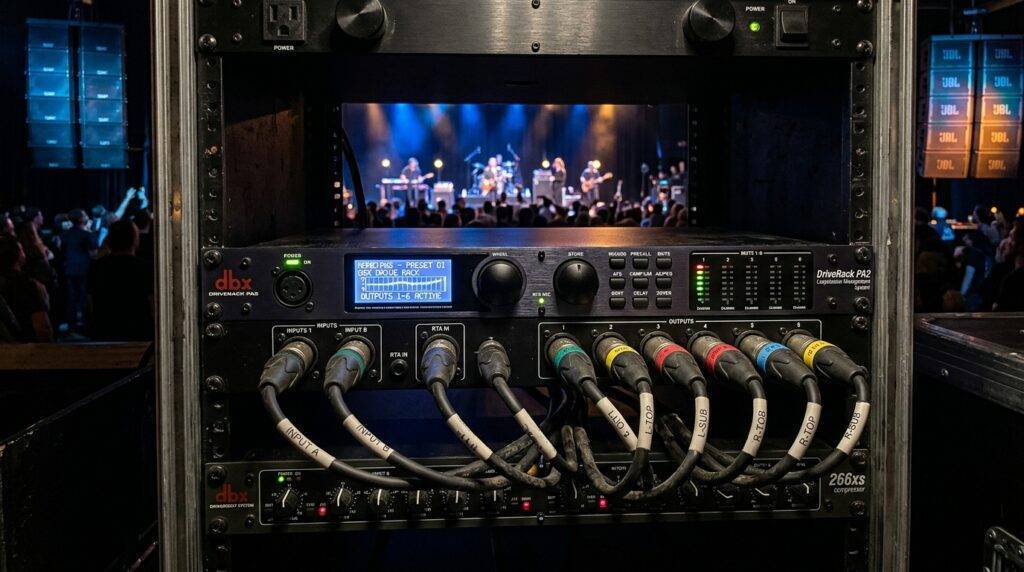
Yes, you can use a DriveRack DBX with active speakers to significantly improve your sound quality through professional-grade DSP (Digital Signal Processing). While active speakers have built-in amplifiers and basic processing, adding a DBX DriveRack PA2 or Venu360 allows you to access advanced Auto-EQ, Advanced Feedback Suppression (AFS), and precise crossover management that internal speaker chips often lack.
Quick Summary: Key Takeaways
- Total Compatibility: The DBX DriveRack series is fully compatible with all major active speaker brands like QSC, JBL, Yamaha, and Electro-Voice.
- Enhanced Protection: You get an extra layer of limiter protection to prevent driver failure during high-volume events.
- Room Correction: Using an RTA microphone with the DriveRack allows you to “tune” your active speakers to any room in under 60 seconds.
- Subwoofer Integration: It simplifies the process of time-aligning your powered subwoofers with your top boxes for a punchier low end.
- Simplified Control: Modern units like the PA2 allow you to control your entire front-of-house sound from an iPad or Android tablet.
Why You Should Use a DriveRack with Your Powered PA System
Many mobile DJs and live sound engineers wonder why they would need an external processor when their active speakers already have “DSP” printed on the box. In my experience touring with various portable rigs, the internal DSP on most active speakers is static and limited to a few factory presets like “DJ,” “Vocal,” or “Live.”
A DBX DriveRack acts as the “brain” of your audio system. It sits between your mixing console and your powered speakers, providing a suite of tools that work in real-time. We have found that even high-end speakers like the QSC K12.2 benefit from the DriveRack’s ability to notch out specific feedback frequencies that the built-in presets simply cannot catch.
By using a DriveRack, you are not replacing the speaker’s internal processing; you are augmenting it. You gain the ability to compensate for poor room acoustics, which is the #1 reason for “muddy” sound at weddings and corporate events.
Can I Use DriveRack DBX with Active Speakers? The Setup Guide
Connecting your DBX DriveRack to active speakers is a straightforward process, but it requires a specific “gain staging” workflow to avoid introducing noise into your signal chain.
Step 1: Physical Connections
- Connect the Left and Right Main Outputs of your mixer into the Inputs of the DriveRack.
- Use balanced XLR cables to connect the High Outputs of the DriveRack to your active top speakers.
- If you are using powered subwoofers, connect the Low Outputs of the DriveRack to the inputs of your subs.
Step 2: Running the Setup Wizard
The DBX DriveRack PA2 features a specialized Setup Wizard. When prompted, select “Active” as your speaker type. If your specific model (e.g., JBL PRX800 series) is in the database, the DriveRack will automatically load the optimal crossover points and EQ tunings. If your speaker isn’t listed, choose the “Not Listed” or “Flat” preset.
Step 3: Gain Staging for Active Systems
This is where most beginners make a mistake. When using a DriveRack with active speakers, you should:
- Set your active speaker’s physical volume knob to the “Unity” or “0dB” position.
- Let the DriveRack handle the output level.
- This prevents the DriveRack from sending a signal that is too “hot,” which would cause the speaker’s internal limiter to kick in prematurely.
Comparison: DriveRack PA2 vs. Venu360 for Active Speakers
| Feature | DriveRack PA2 | DriveRack Venu360 |
|---|---|---|
| Best For | Mobile DJs & Small Bands | Large Venues & Touring Pro |
| Input Channels | 2 Analog | 3 Analog / 2 AES Digital |
| Output Channels | 6 (3-Way Stereo) | 6 (Configurable) |
| Auto-EQ | Yes (Fast) | Yes (Advanced Precision) |
| Mobile App Control | Yes (iOS/Android) | Yes (Advanced GUI) |
| Feedback Suppression | 12 Filters | 24 Filters |
| Price Point | Mid-Range ($) | High-End ($$) |
Optimizing the DBX DriveRack for Active Speakers
To get the most out of your active speakers, you must utilize the Auto-EQ and AFS (Advanced Feedback Suppression) modules. In our testing, using the DBX RTA-M (Reference Analysis Microphone) is non-negotiable for professional results.
Using Auto-EQ with Active Speakers
The Auto-EQ function sends a “pink noise” signal through your active speakers. The RTA-M microphone listens to how the room reflects that sound and creates a custom Graphic EQ curve to flatten the response. We recommend running this during your soundcheck when the room is empty. It eliminates the “boomy” bass found in corners and the “harsh” highs found in rooms with lots of glass.
Advanced Feedback Suppression (AFS)
One of the biggest perks of asking “can i use driverack dbx with active speakers” is the AFS module. Most active speakers don’t have built-in feedback notches. The DriveRack can “clamp down” on a feedback frequency in milliseconds before it ruins a speech or a vocal performance. I personally set 6 fixed filters for the room and 6 live filters that float and catch feedback during the performance.
The Importance of Crossovers in Active Rigs
Even though many powered subwoofers have built-in crossovers, using the DriveRack’s internal crossover is often superior. By setting the crossover in the DriveRack, you ensure that your active top speakers are not wasting energy trying to produce low frequencies they weren’t designed for.
For most 12-inch or 15-inch active speakers, we recommend a crossover point between 80Hz and 100Hz. This allows your active tops to play louder and clearer because the DriveRack is filtering out the heavy lifting, sending those frequencies exclusively to your powered subs.
Expert Tips for Active Speaker Users
- Disable “Double Limiting”: Most active speakers have an internal limiter. If you also use a heavy limiter on the DriveRack, your sound may feel “squashed.” We suggest using the DriveRack Limiter as a safety “hard ceiling” just above your speaker’s internal limit.
- Use the Mobile App: Connecting a wireless router to the Ethernet port of your DriveRack PA2 allows you to walk around the venue and adjust your EQ. This is a game-changer for solo performers.
- Subharmonic Synthesis: If you are playing electronic music or hip-hop, the Subharmonic Synth feature in the DriveRack can add an extra octave of deep bass to your active subs. Use this sparingly to avoid over-excursion of the drivers.
- Power Sequencing: Always turn your DriveRack on BEFORE your active speakers, and turn it off AFTER you have powered down your speakers. This prevents the “pop” that can damage your tweeters.
Frequently Asked Questions
Do I need a DriveRack if my speakers have built-in Bluetooth and DSP?
While many modern active speakers have apps, they are usually limited to one or two speakers. A DriveRack provides a centralized control point for your entire system (Tops + Subs) and offers more precise RTA-based room correction than a standard speaker app.
Will the DriveRack make my cheap active speakers sound better?
Yes, significantly. While it won’t change the quality of the physical drivers, it can correct many frequency response flaws and prevent the “harshness” often associated with budget active speakers by smoothing out the EQ curve.
Can I use the DriveRack PA2 with only one active speaker?
Absolutely. You can run the DriveRack in “Mono” mode. This is common for small presentations or monitor wedge applications where you need feedback suppression and basic EQ.
Does the DriveRack replace my mixer?
No. The DriveRack is a processor, not a mixer. You still need your mixing console to plug in microphones and instruments. The DriveRack sits at the end of the chain, just before the speakers.
Is the RTA microphone included with the DriveRack?
Typically, the DBX RTA-M is sold separately. I highly recommend purchasing it; without the mic, you are missing out on the Auto-EQ feature, which is the primary reason most pros use a DriveRack with active speakers.