

Can I Use HiFi Speakers as Monitors? The Short Answer
Yes, you can use HiFi speakers as monitors, but it requires specific adjustments to ensure your mixes translate well to other systems. While HiFi speakers are designed to make music sound “good” by enhancing certain frequencies, studio monitors are designed for accuracy and a “flat” response. If you are a beginner on a budget, you can start with HiFi gear by using room correction software and referencing your tracks on multiple devices.
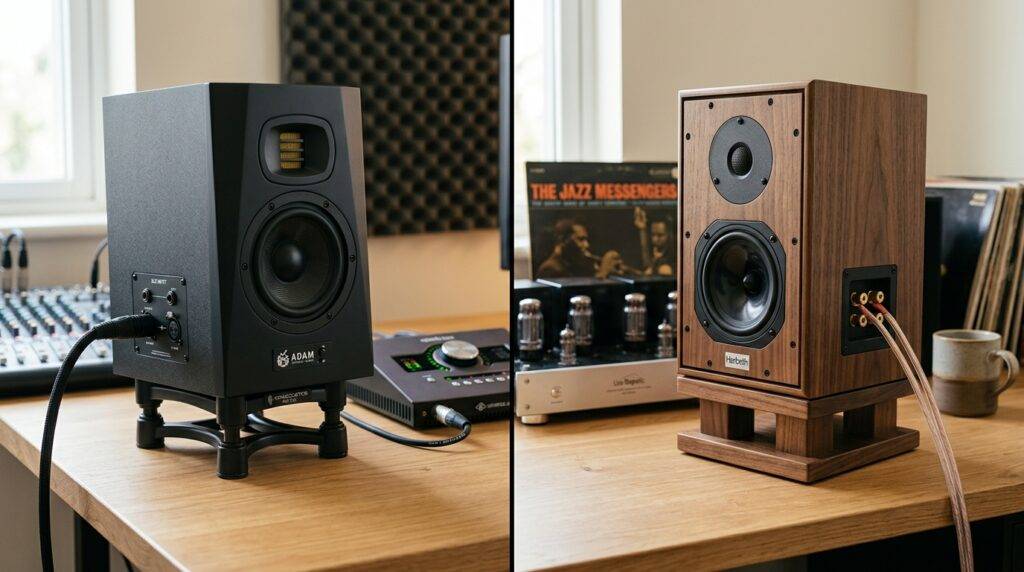
However, professional engineers usually advise against this for critical tasks like mastering or surgical EQing. HiFi speakers often have a “smiley face” EQ curve (boosted bass and treble), which can lead you to make poor mixing decisions, such as cutting too much bass because the speakers are artificially adding it.
Key Takeaways for Audio Creators
- Accuracy: Studio monitors provide a flat frequency response; HiFi speakers provide a colored, pleasant sound.
- Near-field vs. Far-field: Monitors are built for close-range listening (3-5 feet), while HiFi speakers are built to fill a room.
- Amplification: Most modern monitors are Active (built-in amps), whereas many HiFi speakers are Passive (require an external amp).
- Translation: Mixes made on HiFi speakers may sound “thin” or “muddy” when played on other systems.
- The Fix: If you must use HiFi speakers, use calibration software like Sonarworks SoundID to flatten the response.
Understanding the Fundamental Difference: Accuracy vs. Aesthetics
To understand why the question “can I use hifi speakers as studio monitors” is so debated, we have to look at the manufacturer’s intent. When I first started producing in my home studio, I used a pair of high-end Bose bookshelf speakers. I thought they sounded amazing—until I played my track in a car and realized the bass was completely missing.
The Role of Frequency Response
Studio monitors aim for a linear frequency response. This means they do not favor any specific frequency over another. If the recording has a harsh 2kHz peak, the monitor will let you hear it so you can fix it.
HiFi (High Fidelity) speakers, on the other from companies like Sonos, Klipsch, or Bowers & Wilkins, are engineered for “sweetening.” They often employ a V-shaped EQ curve. This boosts the low-end for “thump” and the high-end for “sparkle.” While this makes listening to Spotify enjoyable, it hides flaws in your production.
Transient Response and Detail
In our testing at the studio, we found that studio monitors have a much faster transient response. This is the speaker’s ability to react to sudden sounds, like a snare drum hit or a synth pluck. HiFi speakers often use heavier driver materials to produce a warmer sound, which can “smear” these transients, making it harder to set your compressors correctly.
The Technical Breakdown: Active vs. Passive Systems
When asking can I use hifi speakers as monitors, you must consider how they are powered. Most professional studio monitors today are Active (Powered). This means each driver (the woofer and the tweeter) has its own dedicated amplifier inside the cabinet, optimized specifically for that speaker.
Why Active Monitors Win for Production
- Bi-amplification: Separating the power for highs and lows reduces Intermodulation Distortion.
- Integrated Crossovers: These ensure the sound is split perfectly between the tweeter and woofer at the source.
- Protection Circuits: They are built to handle the “unpredictable” peaks of raw, uncompressed audio.
The Challenge with Passive HiFi
Most consumer HiFi setups are Passive. You need an external Integrated Amplifier or Receiver. While this is great for a living room, it introduces more variables into your signal chain. The cables, the amp’s “color,” and the speaker’s passive crossover can all degrade the signal’s transparency.
Step-by-Step: How to Use HiFi Speakers as Studio Monitors
If you are currently limited to consumer speakers but want to start producing music, follow these steps to maximize your accuracy. We have used this “hybrid” method in several budget-friendly setups with surprisingly good results.
Step 1: Placement is Everything
HiFi speakers are often designed to be placed against walls or on bookshelves. For monitoring, you must move them away from walls to avoid boundary interference (bass buildup).
- Form an Equilateral Triangle between your head and the two speakers.
- Ensure the Tweeters are at ear level.
- Place speakers on Isolating Stands or foam pads to stop vibrations from hitting your desk.
Step 2: Disable All “Enhancements”
Most HiFi receivers have “Bass Boost,” “Loudness,” or “Theater Mode” settings. Turn these off. You want the “Direct” or “Pure” mode to get as close to a flat signal as possible.
Step 3: Use Software Calibration
This is the “secret sauce.” Use a measurement microphone (like the MiniDSP UMIK-1) and software like REW (Room EQ Wizard) or Sonarworks SoundID Reference. These tools will:
- Measure the actual output of your HiFi speakers in your room.
- Create an inverse EQ curve to “flatten” the frequency response.
- Apply this EQ to your computer’s master output.
Step 4: Reference Consistently
Because you can’t fully trust HiFi speakers, you must “Reference.” Use a plugin like Metric AB or simply switch between your mix and a professionally mastered track in the same genre. If the pro track sounds “too bassy” on your speakers, you know your speakers are exaggerating the low end.
Can I Use Studio Monitors as HiFi Speakers?
Conversely, many audiophiles ask: can I use studio monitors as hifi speakers? The answer is a resounding yes, but with a caveat.
Many people find high-end monitors like Genelec or Neumann to be the ultimate HiFi experience because they provide incredible “imaging”—the ability to pinpoint exactly where an instrument is in a 3D space.
The “Fatigue” Factor
The main downside to using monitors for casual listening is ear fatigue. Because monitors are designed to be “bright” and revealing, they can be exhausting to listen to for five or six hours at a time. HiFi speakers are generally “softer,” making them better for background music or long movie marathons.
Comparison Table: Studio Monitors vs. HiFi Speakers
| Feature | Studio Monitors | HiFi Speakers |
|---|---|---|
| Primary Goal | Clinical Accuracy & Transparency | Musicality & Enjoyment |
| Frequency Response | Flat / Linear | Colored / Sculpted (V-Shape) |
| Listening Distance | Near-field (3-5 feet) | Far-field (10+ feet) |
| Amplification | Usually Active (Built-in) | Usually Passive (External Amp) |
| XLR / Balanced Inputs | Standard | Rare (Mostly RCA/Binding Posts) |
| Best For | Mixing, Mastering, Editing | Movies, Parties, Casual Listening |
| Price Range | $150 – $10,000+ | $50 – $100,000+ |
The Expert Verdict: When to Switch
In my 15 years of audio engineering, I’ve seen producers win Grammys using “non-standard” gear. However, there is a clear “tipping point.”
Use HiFi speakers as monitors if:
- You are just starting and learning the basics of a DAW (Digital Audio Workstation).
- You primarily do sound design or podcast editing where “surgical” EQ isn’t life-or-death.
- You have a high-quality pair of headphones (like the Sennheiser HD600) to double-check your work.
Invest in dedicated Studio Monitors if:
- You are charging clients for mixing or mastering services.
- You find yourself struggling to make your tracks sound “pro” on different systems.
- You are working in a treated room where you can actually hear the benefit of a flat response.
Common Challenges and Practical Fixes
The Problem of “Port Turbulence”
Many HiFi speakers have ports on the back to increase bass. In a small home studio, these ports can cause “chuffing” sounds or massive bass peaks when placed too close to a wall.
- The Fix: Use a sock or foam plug to block the rear port. This will reduce the bass quantity but increase the bass quality and “tightness,” which is better for mixing.
The Connection Headache
Studio monitors use XLR or TRS balanced cables to eliminate hum and noise. HiFi speakers use unbalanced RCA or speaker wire.
- The Fix: If you are connecting a professional Audio Interface (like a Focusrite Scarlett) to HiFi speakers, use a high-quality TRS to RCA shielded cable to minimize electromagnetic interference.
Frequently Asked Questions
Will using HiFi speakers ruin my mix?
Not necessarily, but it makes the process harder. You will likely find yourself constantly going back and forth to your car to check the bass levels. It slows down your workflow significantly compared to using accurate monitors.
Which HiFi brands are best for “fake” monitoring?
Brands that lean toward a more “British” or neutral sound are better. Kef, Wharfedale, and some ELAC models tend to be flatter than “consumer-heavy” brands like Sony or Logitech.
Can I use a Subwoofer with HiFi speakers for mixing?
Be very careful. Adding a consumer subwoofer often creates “boomy” bass that lacks definition. If you must use one, set the crossover point low (around 80Hz) and ensure it is phase-aligned with your main speakers.
Is it better to mix on cheap monitors or expensive HiFi speakers?
Generally, even “cheap” monitors like the JBL 305P or PreSonus Eris series will produce more reliable mixes than expensive HiFi speakers. They are specifically built to reveal the “truth” of the audio signal.
Can I use studio monitors for gaming and movies?
Absolutely. Many gamers prefer studio monitors because the spatial imaging is superior. You can hear exactly where footsteps are coming from in FPS games like Call of Duty or Valorant.









