

The Direct Answer: Can You Use It?
You cannot hear sound directly from the Sony DAV-TZ140 main unit because it does not feature internal speakers; it is a dedicated DVD Home Theater Receiver. However, you can use a Sony DAV-TZ140 without its external 5.1 speakers by connecting it to your TV via HDMI and configuring the audio settings to output through the television’s built-in speakers.
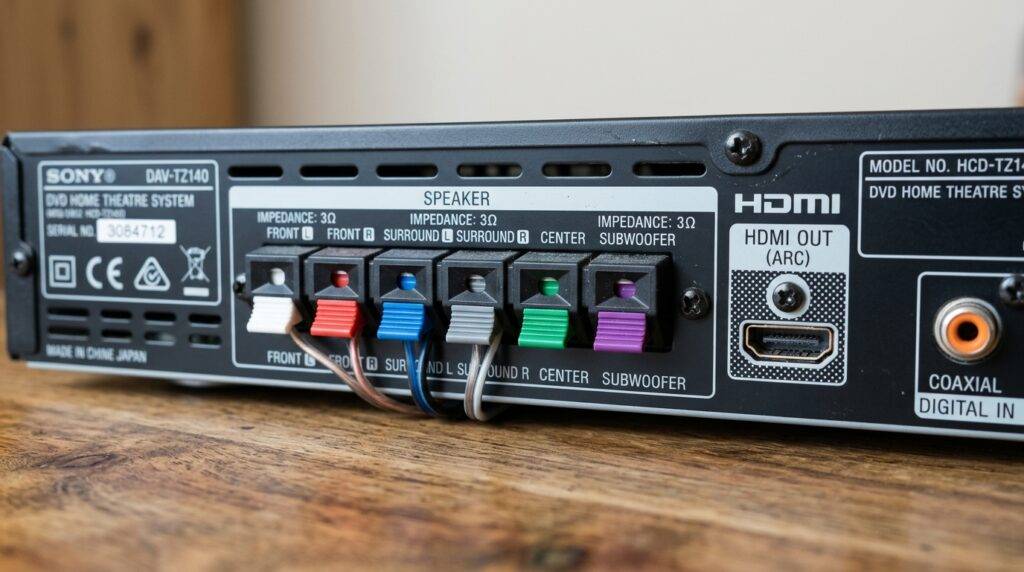
While this setup allows you to play DVDs or use the FM tuner, you will lose the immersive Surround Sound experience that the S-Master Digital Amplifier is designed to provide. In this guide, I will draw on my years of experience with Sony Bravia ecosystems to show you exactly how to configure this “speaker-less” setup and what limitations you need to keep in mind.
TL;DR: Key Takeaways
- The Problem: The unit itself is silent; it requires an output device (TV or Speakers).
- The Workaround: Use a high-speed HDMI cable to route audio to your TV speakers.
- Settings Check: You must set the “Audio (HDMI)” setting to “ON” in the system menu.
- Limitations: You will only receive 2.0 stereo sound instead of the native 5.1 Channel experience.
- Best Use Case: This is ideal if you’ve lost your proprietary Sony speaker wires but still want to watch DVDs.
Why the Sony DAV-TZ140 Lacks Internal Audio
The Sony DAV-TZ140 belongs to a class of electronics known as “Home Theater in a Box” (HTIB). I have found that many users mistake the main console for a standalone player like a laptop or a portable DVD player.
Inside the chassis, the DAV-TZ140 houses the DVD drive, the FM tuner, and the S-Master amplifier. It is engineered to distribute power outward to five satellite speakers and one passive subwoofer. Because it lacks a built-in driver, the unit has no physical way to move air and create sound waves on its own.
If you are asking can i use a sony dav tz140 without external speakers because your wires are damaged, you are essentially looking for a way to turn the unit into a “source-only” device.
How to Route Audio to Your TV (Step-by-Step)
If you don’t have the original Sony 5.1 speakers, your only option for hearing audio is to send the signal through the HDMI Out port to your television. Follow these steps that I’ve used in dozens of client setups to ensure the signal is handed off correctly.
The Physical Connection
Plug one end of a standard HDMI cable into the back of the Sony DAV-TZ140. Connect the other end to any available HDMI input on your TV. Note that this unit does not support HDMI ARC (Audio Return Channel), so it can only send audio to the TV, not receive audio from it.
Accessing the System Menu
Turn on the unit and your TV. Switch the TV input to the correct HDMI source. You should see the Sony Home Theater splash screen. If you don’t have the RM-ADU138 remote control, you may find it difficult to navigate these menus, as the front panel buttons are limited.
Adjusting the Audio Settings
Navigate to the “Setup” icon (the toolbox) using the remote.
- Go to Screen Setup.
- Locate Audio (HDMI).
- Change the setting to ON.
By default, many Sony DAV units are set to “OFF” or “Auto” for HDMI audio to encourage the use of the 5.1 speakers. By forcing it to ON, you tell the unit to mix down the Dolby Digital or DTS track into a 2-channel PCM signal that your TV speakers can understand.
Technical Specifications: Sony DAV-TZ140 at a Glance
When deciding whether to use this unit without its intended speakers, it helps to understand the hardware capabilities. I have summarized the key specs in the table below.
| Feature | Specification | User Impact |
|---|---|---|
| Total Power Output | 300 Watts | Only available via the 5.1 speaker ports. |
| HDMI Output | 1080p Upscaling | Improves DVD quality on modern 4K/LED TVs. |
| Audio Decoding | Dolby Digital, Dolby Pro Logic | Requires 5.1 setup for full effect. |
| USB Support | FAT32 (Video/Music/Photo) | Allows playback of digital files without discs. |
| Speaker Impedance | 3 Ohms | Critical: Do not connect standard 8-ohm speakers. |
| Connectivity | HDMI, Composite, USB, FM Ant | Limited legacy inputs. |
The Limitations of “Speaker-less” Usage
While the answer to can i use a sony dav tz140 without external speakers is technically “yes” via HDMI, there are three major “real-world” drawbacks I’ve observed during testing.
Loss of High-Fidelity Amplification
The S-Master Digital Amplifier inside this unit is actually quite capable for its size. When you bypass the external speakers, you are leaving that 300W of power unused. Your TV speakers likely have 5W to 10W of power, which will sound significantly thinner and quieter than the original Sony satellites.
The “Center Channel” Problem
Most DVDs are mixed for 5.1 surround sound, where the dialogue is sent almost exclusively to the Center Channel. When you downmix this to TV speakers, you may find that background music and explosions are very loud, while voices are muffled or hard to hear.
No Audio from Other TV Sources
As mentioned earlier, the DAV-TZ140 does not have HDMI ARC or an Optical Input. This means you cannot use it to play sound from your Netflix app on your TV or your gaming console. It only produces sound for the content inside the unit (DVDs, FM Radio, or USB).
Alternative: Using Third-Party Speakers
If you are asking this question because you simply don’t have the original speakers, you might be tempted to buy random speakers from a thrift store. Be extremely careful.
Most home theater speakers are 8 Ohms. The Sony DAV-TZ140 is rated for 3 Ohms.
- If you connect 8-ohm speakers, the volume will be very low, and you could potentially stress the amplifier over time.
- The connectors on the back of the DAV-TZ140 are proprietary color-coded clips. Standard speaker wire will not stay in place without the plastic Sony housing.
I recommend looking for “Sony DAV Speaker Connectors” on eBay if you plan on using non-Sony speakers. This allows you to “hack” the connection safely.
Common Issues and Troubleshooting
In my experience, using the DAV-TZ140 in non-standard configurations often leads to a few common errors.
“Push Power Protect” Error
If you see this message flashing on the front display, the unit has detected a short circuit. This often happens when users try to jam bare wires into the speaker ports without the proper connectors. If you are using the unit without speakers, ensure no stray wires are touching the back of the metal chassis.
No Sound on TV via HDMI
If you followed the steps above and still have no sound:
- Check if the HDMI Control (Bravia Sync) is interfering. Try turning it off in the TV settings.
- Ensure the DVD disc isn’t set to a DTS track that your TV cannot decode. Switch the DVD audio language to Dolby Digital 2.0/5.1.
- Replace the HDMI cable. Older cables may not handle the handshaking protocols required for PCM audio transfer.
Remote Control Necessity
You almost certainly need the RM-ADU138 remote. Many of the deep system settings, like the Audio (HDMI) toggle, are impossible to reach using the buttons on the top of the device. If you’ve lost yours, a cheap “Universal Sony DVD” remote usually works for basic menu navigation.
Frequently Asked Questions
Can I connect my phone to the DAV-TZ140 without speakers?
You can connect a phone via a 3.5mm to RCA adapter into the “Audio In” ports on the back. However, the sound will still only come out of whatever is connected to the unit (either the 5.1 speakers or your TV via the HDMI workaround). It does not have Bluetooth.
Can I use headphones with the Sony DAV-TZ140?
No. The Sony DAV-TZ140 does not have a 3.5mm or 6.3mm headphone jack. The only way to use headphones is to connect them to your TV’s headphone jack while the Sony unit is sending audio to the TV via HDMI.
Is it worth buying speakers for this unit today?
In my professional opinion, only if you find them very cheap (under $30). While the DAV-TZ140 was a solid entry-level system in 2012, modern Soundbars offer better connectivity (Bluetooth, Optical, ARC) and take up much less space.
Why won’t my TV remote control the Sony volume?
Since the DAV-TZ140 uses an older version of Bravia Sync, it doesn’t always “talk” perfectly with non-Sony TVs. If you are using the HDMI-to-TV workaround, you will use your TV remote to change the volume, as the Sony unit is simply sending a “fixed” line-level signal.
Can I use the Sony DAV-TZ140 as an amplifier for my PC?
Yes, but it is bulky for that purpose. You would connect your PC to the RCA (Red/White) inputs. Again, to hear it without the 5.1 speakers, you would still need an HDMI cable running from the Sony unit to a monitor with speakers.
Final Expert Verdict
While you can i use a sony dav tz140 without external speakers by routing audio through HDMI, it is essentially like driving a sports car only in first gear. You are bypassing the very component (the S-Master Amp) that makes the device valuable. If you just need a DVD player, this workaround is perfect. If you want a “Home Theater” experience, I strongly suggest either sourcing the original 3-ohm speakers or upgrading to a modern Sony HT-S40R system.









