

Can Tape Out Drive Speakers? The Definitive Answer
No, a Tape Out connection cannot drive passive speakers because it provides a fixed line-level signal that lacks the necessary power (wattage). To successfully use this output, you must route the signal into an external power amplifier or a pair of active (powered) speakers.
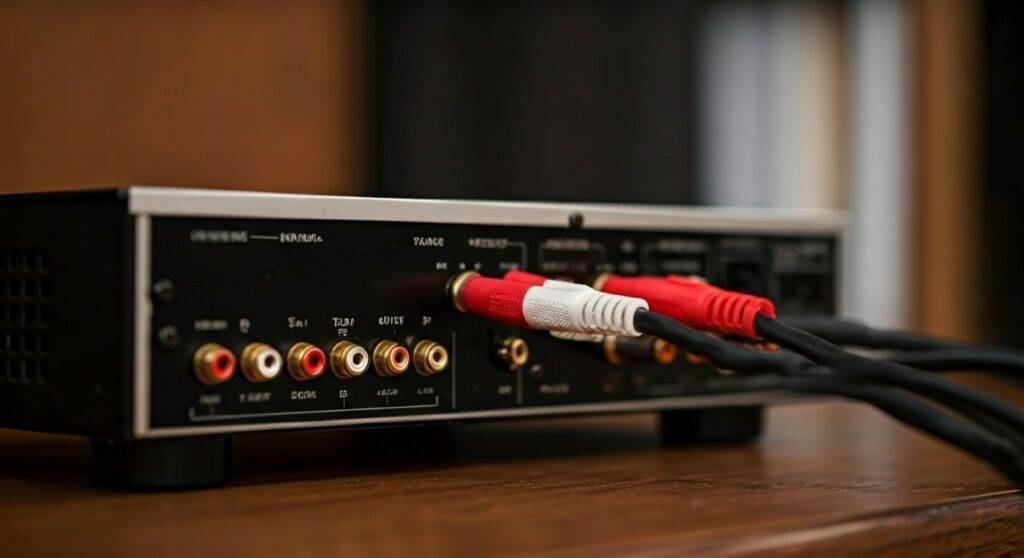
When you attempt to connect standard speakers directly to these RCA ports, you will likely hear nothing at all, or at best, an extremely faint, distorted whisper. This is because Tape Out (also labeled as REC OUT) bypasses the internal power amplification stage of your receiver to provide a clean, unaltered signal for recording devices.
Key Takeaways: Using Tape Out for Audio
- Signal Type: Tape Out delivers a “Line-Level” signal (approximately 150mV to 2V).
- Volume Control: The signal is fixed, meaning your receiver’s volume knob will not change the loudness of the Tape Out.
- Driving Speakers: You cannot drive passive speakers directly; an external amplifier is mandatory.
- Best Use Case: Ideal for connecting headphone amplifiers, digital recorders, or secondary integrated amplifiers for multi-room audio.
- Impedance Mismatch: Tape outputs usually have an impedance of 10k ohms or higher, whereas speakers require 4 to 8 ohms.
Understanding the Technical Limits: Why Tape Out Fails to Move Speakers
In my years of configuring high-end analog Hi-Fi systems, I have seen many enthusiasts mistake the RCA “Tape Out” for a secondary zone output. To understand why can tape out drive speakers is a technical “no,” we have to look at the physics of audio signals.
Line Level vs. Speaker Level
A Tape Out port sends a line-level signal. This is a low-voltage signal intended to pass audio data between components (like a CD player to a cassette deck). Passive speakers require a speaker-level signal, which involves significantly higher voltage and current to physically move the speaker cones and create sound waves.
The Impedance Gap
Electrical impedance is the resistance a circuit offers to the flow of alternating current.
- Tape Out Impedance: Typically 1,000 to 10,000 ohms.
- Speaker Impedance: Typically 4 to 8 ohms.
Connecting an 8-ohm speaker to a 10,000-ohm source creates a massive mismatch. The Tape Out circuit simply cannot provide the current (amperage) required to drive the low-resistance load of a speaker coil.
Tape Out vs. Other Outputs: A Comparison Table
| Feature | Tape Out (Rec Out) | Pre-Out (Pre-Amplifier) | Speaker Out (Binding Posts) |
|---|---|---|---|
| Amplified? | No | No | Yes |
| Volume Controlled? | No (Fixed) | Yes (Variable) | Yes (Variable) |
| Drives Passive Speakers? | No | No | Yes |
| Signal Level | Line Level (~2V) | Line Level (~2V) | High Voltage/Current |
| Best For | Recording, External Amps | Power Amps, Subwoofers | Standard Speakers |
Step-by-Step Guide: How to Use Tape Out to Power Speakers
If you want to use the Tape Out section of your vintage Pioneer or modern Yamaha receiver to hear music through speakers, follow this exact workflow to avoid damaging your equipment.
Gather the Necessary Equipment
You cannot go directly from RCA to Speaker Wire. You will need:
- A pair of RCA Interconnect Cables.
- An External Power Amplifier or Powered Monitors (e.g., Audioengine A5+ or KRK Rokit).
- Standard speaker wire (if using a power amp).
Locate the Tape Out Ports
Look at the rear panel of your primary receiver. Find the section labeled Tape, Record, or Rec Out. Ensure you are plugging into the Output jacks, not the Input/Play jacks.
Connect to the External Device
Plug one end of the RCA cables into the Tape Out. Plug the other end into the Line Input (or Aux Input) of your second amplifier or powered speakers.
Manage the Volume
CRITICAL WARNING: Because Tape Out is a fixed signal, the volume knob on your primary receiver will do nothing. You must use the volume control on the secondary device (the one actually connected to the speakers) to adjust the loudness. If you connect a power amplifier that doesn’t have a volume knob, the speakers will play at 100% maximum volume immediately, which can destroy your speakers and your hearing.
Select the Source
On your primary receiver, select the input you want to hear (e.g., Phono, CD, or Tuner). The receiver will automatically route that signal to the Tape Out bus.
The Role of the “Tape Monitor” Loop
In older gear, you might see a Tape Monitor switch. This was designed so you could listen to the recording being made on a 3-head tape deck in real-time. If you are using Tape Out to send audio to another room, ensure the “Tape Monitor” is OFF on the main receiver, or you may inadvertently cut off the signal to your main speakers.
Real-World Scenarios: When Should You Use Tape Out?
While we have established that can tape out drive speakers is a negative, the port is incredibly useful for other “Zero-Click” audio solutions:
- Adding a Dedicated Headphone Amp: Many integrated amplifiers have mediocre headphone stages. By connecting a high-quality Schiit Magni or JDS Labs Atom to the Tape Out, you get a pure, uncolored signal for your high-impedance headphones.
- Digitizing Vinyl: Connect the Tape Out to the line-in of a PC Soundcard or a Focusrite Scarlett interface. This allows you to record your records into Audacity without the receiver’s tone controls (Bass/Treble) altering the file.
- Daisy-Chaining Receivers: If you are hosting a party and want the same music in the living room and the backyard, run an RCA cable from the Tape Out of the indoor unit to the Aux In of the outdoor unit.
Safety Precautions and Expert Tips
- Avoid “Y-Adapters”: Do not try to split a Tape Out signal to multiple amplifiers without a buffered distribution amp. Doing so can drop the voltage and increase distortion.
- Check for DC Offset: If you are using vintage gear (pre-1980s), occasionally these ports can leak a small amount of DC voltage. If you hear a “pop” when plugging things in, have the capacitors checked by a technician.
- The Subwoofer Trap: Do not connect a powered subwoofer to a Tape Out unless the subwoofer has its own accessible volume remote. Since the output is fixed, the sub will not get quieter when you turn down the main speakers, leading to a bass-heavy mess.
Frequently Asked Questions
Can I damage my speakers by connecting them to Tape Out?
Directly connecting passive speakers to a Tape Out is unlikely to damage the speakers because the power is too low to blow a driver. However, you could potentially stress the output transistors of the receiver’s preamp stage by presenting it with a 4-ohm load it wasn’t designed to handle.
What is the difference between Tape Out and Pre-Out?
The Pre-Out is affected by the volume knob, balance, and tone controls of the receiver. The Tape Out is a “straight-wire” signal that stays at the same volume regardless of the receiver’s settings.
Why is my Tape Out silent?
On some modern AV receivers, the Tape Out only works with analog inputs. If you are playing audio via HDMI or Optical, the receiver might not have an internal Digital-to-Analog Converter (DAC) dedicated to the Tape Out path. You may need to connect your source via RCA to get a signal.









