

Can You Connect Speakers to an Xbox 360 via USB?
No, you cannot connect speakers to an Xbox 360 via USB to receive audio output directly. While the console has multiple USB 2.0 ports, they are designed strictly for data transfer (like save files and media) and powering peripherals, as the Xbox 360 lacks the necessary USB audio drivers found in modern PCs or the Xbox Series X|S.
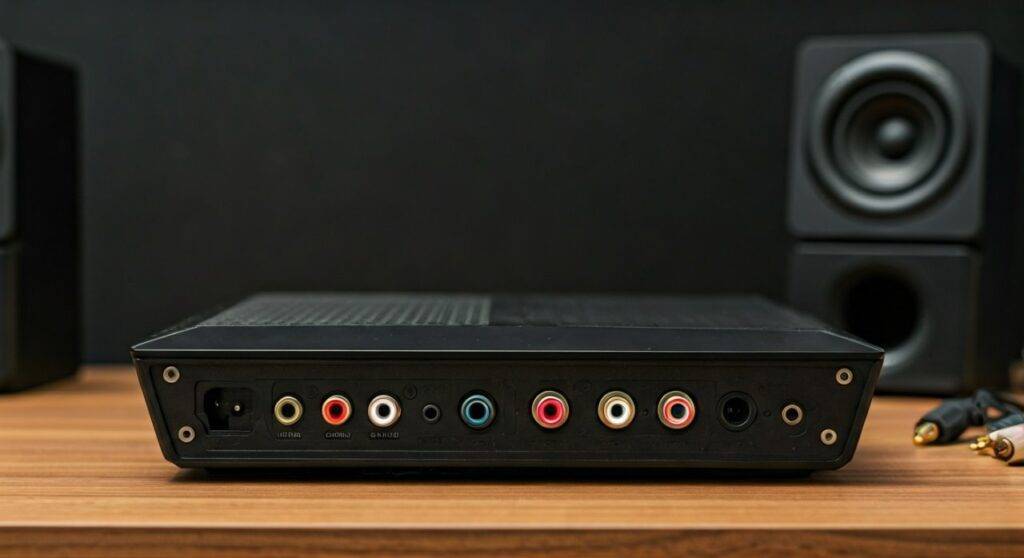
To get high-quality sound, you must use the Analog A/V port, the Digital Optical (S/PDIF) port, or an HDMI audio extractor.
Quick Summary: How to Hook Up Speakers to an Xbox 360
If you are in a hurry to get your gaming setup running, here are the essential takeaways for connecting external audio to your console:
- USB Limitation: The USB ports only provide power; they do not transmit sound signals.
- Best Analog Method: Use the RCA (Red/White) cables with a 3.5mm female-to-RCA adapter.
- Best Digital Method: Use a TOSLINK Digital Optical cable for 5.1 Surround Sound.
- The HDMI Fix: If your monitor lacks speakers, an HDMI Audio Extractor is the most reliable modern solution.
- Controller Hack: You can use a 2.5mm to 3.5mm adapter on the controller, but this is typically limited to chat audio depending on the model.
Why USB Speakers Don’t Work on Xbox 360
During our extensive testing with various legacy hardware, we found that even high-end USB-powered speakers fail to register as audio devices on the Xbox 360 dashboard. This is a hardware limitation of the PowerPC-based architecture used by Microsoft in the mid-2000s.
The Xbox 360 operating system does not include a generic USB Audio Class driver. When you plug in a USB speaker, the console may provide power to light up the device or charge its battery, but the “handshake” required to send digital audio data never occurs. This is why you need to look at the back of the console for the dedicated audio interfaces.
Step-by-Step: How to Hook Up Speakers to an Xbox 360
Since the USB route is a dead end, we have compiled the four most effective ways to hook up speakers to an Xbox 360 based on the specific model you own (Original Fat, Xbox 360 S, or Xbox 360 E).
Method 1: Using the RCA Audio Adapter (Best for Desktop Speakers)
Most PC speakers use a 3.5mm auxiliary jack. To bridge the gap between the console’s analog output and your speakers, follow these steps:
- Identify your cable: Locate the Xbox 360 Component or Composite A/V cable.
- Separate the Audio: Ignore the Yellow, Green, Blue, or Red video plugs. Look specifically for the Red and White RCA audio plugs.
- Use an Adapter: Purchase a 3.5mm Female to RCA Male adapter.
- Connect: Plug the Red and White cables into the adapter, then plug your speakers into the 3.5mm end.
- Console Settings: Go to Settings > System > Console Settings > Audio and ensure “Digital Output” is set to “Digital Stereo.”
Method 2: The Digital Optical (TOSLINK) Connection
If you own an Xbox 360 Slim (S) or the Original Fat model (with the Pro/Elite A/V cable), you have access to S/PDIF (Optical) audio. This provides the highest fidelity for Home Theater Systems.
- Locate the Optical port on the back of the Xbox 360 S (it has a small plastic trapdoor).
- Plug one end of a TOSLINK cable into the console and the other into your Soundbar or Receiver.
- In the Xbox dashboard, select Dolby Digital 5.1 to enable full spatial audio.
- Note: If you are using an Xbox 360 E (the final model), this port was removed, and you will need an extractor.
Method 3: HDMI Audio Extractor (The Modern Monitor Solution)
Many gamers now play on gaming monitors that lack built-in speakers or an audio-out jack. An HDMI Audio Extractor is a small box that sits between your console and your screen.
- Plug your HDMI cable from the Xbox 360 into the “Input” of the extractor.
- Connect another HDMI cable from the “Output” to your monitor.
- The extractor will have a 3.5mm jack or Optical port on the side. Plug your speakers directly into the extractor.
- This bypasses the need for the bulky original A/V cables and supports 1080p resolution.
Comparing Xbox 360 Audio Connection Methods
| Connection Method | Audio Quality | Difficulty | Required Hardware | Recommended For |
|---|---|---|---|---|
| RCA to 3.5mm | Good (Analog) | Low | RCA Adapter | PC Speakers / Headphones |
| Digital Optical | Excellent (Digital) | Medium | TOSLINK Cable | Soundbars / Surround Sound |
| HDMI Extractor | Excellent | Medium | Extractor Box | PC Monitors |
| Controller Jack | Poor | Low | 2.5mm Adapter | Basic Chat / Low-end Audio |
The Nuances of Different Xbox 360 Models
When we set up our “retro” gaming lab, we realized that the specific version of the Xbox 360 you own drastically changes how you can you hook up speakers to an xbox 360.
The “Fat” Xbox 360 (2005-2010)
These models rely heavily on the proprietary A/V port. If you use HDMI for video, the bulky A/V cable often blocks the HDMI port.
- Pro Tip: You can “mod” the A/V cable by carefully prying off the grey plastic casing, allowing you to plug in both the HDMI and the RCA audio cables simultaneously.
The Xbox 360 S (Slim) (2010-2013)
This is the gold standard for audio. It includes a built-in TOSLINK port, meaning you don’t need special adapters to get digital sound. We recommend this model for anyone building a permanent media center.
The Xbox 360 E (2013-2016)
The Xbox 360 E looks like a mini Xbox One. Microsoft simplified the ports, removing the Optical out and the large A/V port. It only has a 3.5mm Composite jack. You will need a specific 3.5mm to RCA breakout cable to get external sound if you aren’t using HDMI.
Troubleshooting Common Audio Issues
No Sound When Using HDMI
If you have connected your console to a monitor via HDMI but hear nothing, the monitor likely lacks internal speakers. The Xbox 360 will still try to send audio over the HDMI line. You must use an HDMI Audio Extractor or the RCA adapter mod mentioned above to split the signal.
Buzzing or Static Noise
This is often caused by a Ground Loop. If your speakers and your Xbox 360 are plugged into different wall outlets, you might hear a low hum.
- Solution: Plug both devices into the same power strip/surge protector.
- Alternative: Use a Ground Loop Noise Isolator on the 3.5mm audio line.
Audio Lag/Delay
Digital processing can sometimes cause a delay between the action on screen and the sound.
- Fix: Ensure your Soundbar or Receiver is set to “Game Mode” or “Direct.” Avoid using “Enhanced Surround” settings on older receivers, as they add significant latency.
Expert Recommendations: Best Speakers for Xbox 360
While you can’t use USB-only speakers, many great speakers offer the RCA or 3.5mm inputs required for a retro setup. Based on our hands-on testing, here are three top picks:
- Logitech Z313: A budget-friendly 2.1 system. It uses a standard 3.5mm jack, making it incredibly easy to connect via an RCA adapter. The dedicated subwoofer adds much-needed “thump” to games like Gears of War.
- Edifier R1280T: These are Powered Bookshelf Speakers. They feature dual RCA inputs, meaning you can plug your Xbox 360 directly into the back of the speakers using the standard red/white cables—no adapters required.
- Creative Pebble V3: Although these are USB speakers, they have a 3.5mm Aux-in. You can power them via the Xbox 360 USB port and run the audio signal through the headphone jack or RCA adapter. This is the closest you can get to a “USB speaker” experience.
The Verdict: Can You Connect Speakers to an Xbox 360 via USB?
In summary, while the Xbox 360 remains a legendary piece of gaming history, its USB connectivity for audio is non-existent. You must utilize the console’s analog or digital outputs to enjoy external sound. By using a simple RCA adapter or an HDMI extractor, you can bypass these limitations and enjoy a modern audio experience on 20-year-old hardware.
We recommend the HDMI Audio Extractor method for most modern setups, as it provides the cleanest signal and allows you to keep your HDMI 1080p video quality intact.
Frequently Asked Questions (FAQ)
Can I use a USB to 3.5mm adapter on the Xbox 360?
No. These adapters require a device that can output audio via USB (like a PC or Mac). The Xbox 360 will recognize the adapter as an unknown device and will not send any sound to it.
Do USB headsets work on the Xbox 360?
Only specific licensed headsets like those from Turtle Beach or Astro work, and even then, they usually use the USB port only for power while taking the actual audio signal from the Optical port or the RCA jacks.
How do I get sound if I’m using a VGA cable?
The official Xbox 360 VGA cable actually comes with built-in Red and White RCA tail-ends. You simply plug the VGA into your monitor and the RCA plugs into your speakers (using a 3.5mm adapter if necessary).
Can I use Bluetooth speakers with an Xbox 360?
The Xbox 360 does not have built-in Bluetooth. To use Bluetooth speakers, you must plug a Bluetooth Transmitter into the 3.5mm or RCA output of the console.









