Can You Mismatch Speakers? The Essential Safety and Performance Guide
You can mismatch speakers in an audio system provided you follow two non-negotiable rules: the impedance (ohms) must be compatible with your amplifier, and the power handling (watts) must be sufficient to prevent hardware failure. While mixing brands or models is electrically possible, doing so often results in “timbre” inconsistencies where the sound quality varies significantly between channels.
I have spent over a decade designing home theater layouts and testing high-end AV Receivers, and the most common question I get from budget-conscious enthusiasts is whether they can reuse old gear. In short, your amplifier does not care what brand name is on the speaker cabinet, but it cares deeply about the electrical resistance it encounters.
🚀 Quick Takeaways: Mixing and Matching Audio Gear
If you are in a hurry to set up your sound system, here is the “Cheat Sheet” for successful speaker integration:
- Safety First: Ensure your amplifier supports the impedance (usually 4, 6, or 8 ohms) of every connected speaker.
- The Golden Rule: Always keep your Front Left and Right speakers identical for a cohesive soundstage.
- Center Channel Criticality: The Center Channel should ideally match the front pair’s brand and series to ensure dialogue sounds natural.
- Surround Flexibility: You have the most freedom with Surround and Atmos speakers, where brand matching is less critical.
- Calibration is Key: Use Room Correction software (like Audyssey or Dirac Live) to “level the playing field” between mismatched drivers.
Understanding the Risks: Can You Mismatch Speakers Safely?
Before we dive into the “how-to,” we must address the “should-you.” When people ask can you mismatch speakers, they are usually thinking about aesthetics or cost, but the real concern is the electrical load.
The Impedance Trap
Impedance, measured in Ohms (Ω), is the electrical resistance a speaker presents to an amplifier. Most home theater receivers are rated for 8-ohm loads.
If you connect a 4-ohm speaker to an amplifier designed only for 8 ohms, the speaker will “pull” more current than the amp can safely provide. I have seen many entry-level receivers go into Thermal Protection Mode or, worse, suffer permanent circuit damage because of this exact mismatch.
Sensitivity and Volume Swings
Another technical hurdle is Sensitivity, measured in Decibels (dB). If you mix a high-sensitivity speaker (95dB) with a low-sensitivity one (85dB), one will be significantly louder than the other at the same volume setting.
You can often fix this using the Channel Level settings on your AVR, but it creates an unbalanced workload for your amplifier’s internal power supply.
Step-by-Step Guide to Mismatching Speakers Correcty
If you have a collection of various speakers and want to build a system, follow these steps to ensure you don’t blow your equipment or ruin your listening experience.
Step 1: Verify Amplifier Compatibility
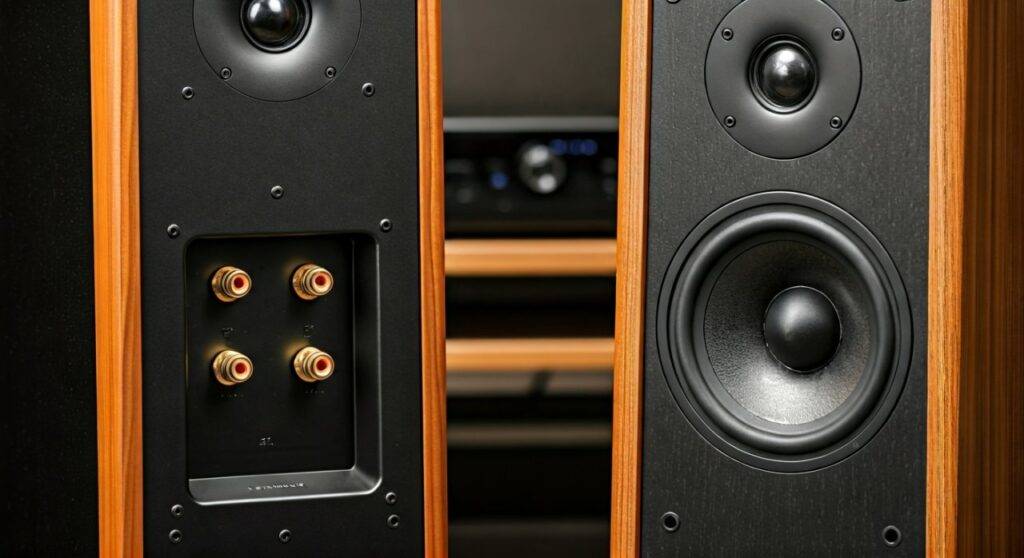
Check the back of your Integrated Amplifier or AV Receiver. It will list a range, such as “6Ω – 16Ω.”
Action: Ensure the Nominal Impedance of your mismatched speakers falls within this range. Never connect a speaker with a lower ohm rating than your amplifier is rated to handle.
Step 2: Prioritize the “Front Stage”
The most important part of any audio system is the Front Three (Left, Center, Right). This is where 80% of the audio action happens.
- Scenario A: If you have two different brands, use the “better” pair for the Left and Right channels.
- Scenario B: If you have three different speakers, try to find a Center Channel that uses the same tweeter material (e.g., silk dome vs. aluminum) as your Left/Right speakers.
Step 3: Match Tweeter Materials
When you mismatch speakers, the biggest “tell” is the high-frequency response. A Klipsch horn-loaded tweeter sounds vastly different from a Wharfedale soft-dome tweeter.
I recommend trying to match the Tweeter Material across your front stage. This ensures that as a car drives across the screen, the sound of the engine doesn’t change “flavor” as it moves from one speaker to the next.
Step 4: Level Matching and Calibration
Once the speakers are wired, you must calibrate them. Use a Sound Pressure Level (SPL) Meter (or a smartphone app) to ensure every speaker hits the same volume at your seating position.
Action: Go into your AVR Settings > Manual Setup > Levels. Play the test tone and adjust each channel until they all read 75dB at your main listening chair.
Mismatching Compatibility Matrix
| Speaker Type | Mismatch Risk | Performance Impact | Expert Recommendation |
|---|---|---|---|
| Front Left/Right | High | Extreme | Never mismatch these. They must be identical. |
| Center Channel | Medium | High | Match the brand/series of the Front L/R if possible. |
| Surround Side/Rear | Low | Moderate | Any decent speaker works; brand matching is optional. |
| Subwoofer | Zero | Low | Brand matching is completely unnecessary. |
| Height/Atmos | Low | Low | Focus on mounting convenience over brand matching. |
Why “Timbre Matching” Matters for Audio Quality
In my experience, the biggest downside to the question “can you mismatch speakers” isn’t electrical—it’s Timbre. Timbre (pronounced “tam-ber”) is the unique voice of a speaker.
Every manufacturer uses different:
- Crossover Networks: These dictate which frequencies go to the woofer vs. the tweeter.
- Cabinet Materials: MDF, wood, and plastic all vibrate differently.
- Cone Materials: Kevlar, paper, and poly-cones produce different “tonal colors.”
If your Center Channel is “bright” and your Front Left/Right speakers are “warm,” the audio will feel disjointed. Dialogue might sound thin and metallic while the music sounds rich and deep. This ruins the “immersion” that home theater is designed to provide.
Practical Advice: When Is It Okay to Mismatch?
While purists will tell you to never mix brands, real-world budgets often dictate otherwise. Here is when we recommend mismatching:
- Using Legacy Surrounds: If you upgraded your main speakers, your old bookshelf speakers make excellent Rear Surrounds. Since surrounds mainly handle ambient noise (rain, wind, background chatter), the timbre mismatch is rarely noticeable.
- Mixing Subwoofers: You can almost always use a different brand for your Subwoofer. In fact, companies like SVS or Hsu Research specialize only in subs, and they are often paired with speakers from Kef, Monitor Audio, or JBL.
- Budget Incremental Upgrades: If you can only afford two high-quality speakers now, buy the best Front Left/Right pair you can. Use your old “junk” speakers for the center and surrounds until you can afford to replace them.
Advanced Troubleshooting: Correcting Mismatched Sound
If you find that your mismatched system sounds “off,” don’t panic. There are technical ways to bridge the gap between different speaker brands.
Use a Graphic Equalizer (EQ)
If your Center Channel is too muffled compared to your Mains, use the manual EQ settings in your receiver. Boosting the 2kHz – 5kHz range can add “presence” to a cheaper center speaker, helping it mimic the clarity of more expensive towers.
Adjust the Crossover Frequency
Mismatching often occurs when one speaker has a large 8-inch woofer and the other has a small 4-inch driver.
Pro-Tip: Set all mismatched speakers to “Small” in your receiver settings and set a universal Crossover Frequency of 80Hz. This sends the heavy lifting to the Subwoofer, which masks the differences in bass response between your mismatched speakers.
Frequently Asked Questions
Can I use 4-ohm speakers with an 8-ohm receiver?
Generally, no. This is the most dangerous form of speaker mismatching. Unless your receiver specifically states it is “4-ohm stable,” you risk overheating the amplifier and potentially causing a fire or permanent hardware failure.
Do I need to match the wattage of my speakers?
Not exactly. The Wattage rating on a speaker is its maximum capacity, not a requirement. It is perfectly safe to use a 100-watt speaker with a 50-watt amplifier, provided you don’t push the amp into “clipping” (distortion).
Can you mismatch speakers from the same brand?
Yes, but with caution. Most brands have a “family sound,” but their entry-level series will sound different from their flagship series. For the best results, try to stay within the same Product Line (e.g., keeping all speakers within the Polk Signature Elite series).
Will mismatching speakers damage my ears?
No, but it may cause “listener fatigue.” If one speaker is significantly brighter or more distorted than the others, your brain has to work harder to process the audio, which can make long movie sessions feel tiring or unpleasant.