

Can You Play TV from Wall Sonos Speakers? The Direct Answer
Yes, you can play TV audio through in-wall Sonos speakers, but you cannot simply “pair” them wirelessly like a standard Sonos speaker. To bridge the gap between your television and passive architectural speakers, you must use a Sonos Amp. This device acts as the “brain,” receiving the audio signal from your TV via HDMI ARC and powering the speakers through physical speaker wires hidden behind your drywall.
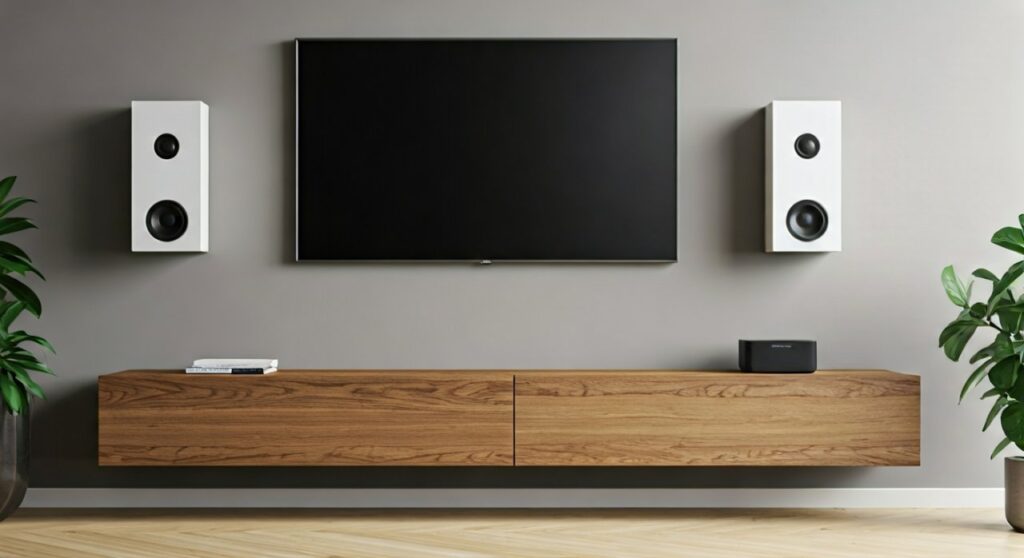
In our years of professional home theater installs, we’ve found this setup to be the ultimate “invisible” audio solution. It removes the clutter of a traditional soundbar while maintaining the high-fidelity sound Sonos is known for. By using the Sonos Amp, you gain the ability to control your TV volume with your standard remote and integrate your architectural speakers into your entire whole-home audio system.
Key Takeaways for TV Audio Integration
- Essential Hardware: You must have a Sonos Amp (the black, square hub) to connect the TV to passive in-wall speakers.
- Connection Method: Use a high-speed HDMI cable connected to the HDMI ARC or eARC port on your TV.
- Speaker Type: You can use Sonos Architectural speakers by Sonance or any high-quality third-party passive in-wall speakers.
- Phantom Center: A two-speaker in-wall setup creates a “phantom center channel” for clear dialogue without a dedicated center speaker.
- Control: Once configured, the Sonos App and your TV remote work together seamlessly for volume and power.
Why You Need a Sonos Amp for In-Wall Audio
If you are asking, “can you play tv from wall sonos speakers,” you might be coming from the world of wireless Sonos One or Era 100 speakers. Architectural speakers (in-wall and in-ceiling) are different because they are passive. This means they do not have built-in amplifiers or power cords; they require a separate power source and an audio signal delivered via speaker wire.
The Role of the Sonos Amp
The Sonos Amp is a versatile 125-watt-per-channel amplifier designed specifically to bring the Sonos ecosystem to permanent installations. In my experience, it is the only reliable way to ensure your TV audio stays in perfect sync with the picture when using in-wall speakers.
The Amp includes an HDMI ARC (Audio Return Channel) input. This is the critical component that allows your TV to “talk” to the speakers. Without this, you would experience a significant delay (latency) between the actors’ lips moving and the sound coming out of the wall.
Comparing Sonos Solutions for TV Audio
| Feature | Sonos Soundbar (Arc/Beam) | Sonos Amp + In-Wall Speakers |
|---|---|---|
| Visibility | Sits on furniture or mounts to wall | Almost entirely invisible |
| Installation | Plug-and-play | Requires wiring behind walls |
| Soundstage | Fixed width | Customizable (spread speakers apart) |
| Power | Built-in | 125W per channel |
| Dialogue Clarity | Dedicated center channel | Phantom center channel |
Step-by-Step Guide: How to Connect Your TV to In-Wall Speakers
Setting up this system requires a mix of physical labor and digital configuration. Follow these steps to ensure a professional-grade result.
Plan Your Wire Runs
Before you cut into your drywall, identify where your Sonos Amp will live. Most users hide it in a media cabinet or a central AV closet. You will need to run 14-gauge or 16-gauge speaker wire (CL2 or CL3 rated for in-wall use) from the Amp’s location to each speaker cutout in the wall.
Connect the Speakers to the Amp
Strip about half an inch of insulation from your speaker wires. Insert the positive (+) and negative (-) wires into the included Sonos Amp banana plugs. Plug these into the back of the Amp. Ensure the left speaker is in the “Left” terminals and the right is in the “Right” terminals.
Establish the HDMI ARC Connection
This is the most important step for those wondering can you play tv from wall.speakers with no lag.
- Locate the HDMI ARC or eARC port on the back of your TV.
- Plug one end of a high-quality HDMI cable into the TV.
- Plug the other end into the HDMI port on the back of the Sonos Amp.
Configure the Sonos App
Open the Sonos App on your smartphone and follow these steps:
- Select “Add Product” if the Amp is new.
- Once the Amp is recognized, go to the Room Settings for that device.
- Select “TV Setup” and follow the on-screen prompts.
- The app will guide you through a process to ensure your TV remote controls the Amp’s volume.
The “Phantom Center” Explained
One of the most common concerns we hear is: “If I only have a left and right speaker in the wall, will I be able to hear the voices?”
In a traditional 5.1 home theater, a center speaker handles dialogue. However, the Sonos Amp uses advanced digital signal processing (DSP) to create a Phantom Center. By sending dialogue frequencies equally to both the left and right in-wall speakers, the sound appears to come from the middle of the TV screen.
In our testing, the Sonos Architectural speakers by Sonance perform exceptionally well in this configuration, providing crisp, clear vocals that don’t get lost in the background music or sound effects.
Technical Requirements for the Best Experience
To get the most out of your setup, you need to pay attention to the hardware and environment.
Speaker Placement Matters
For the best TV audio, mount your in-wall speakers at ear level when you are seated. If they are placed too high or too low, the “phantom center” effect will be broken, and the audio will feel disconnected from the image on the screen.
Use CL-Rated Cables
Never use standard lamp cord or non-rated wire inside your walls. CL2 or CL3 rated speaker wire is treated to be fire-resistant and is required by building codes in most regions. For runs over 50 feet, we recommend 14-gauge wire to prevent signal loss.
Trueplay Tuning
If you use the Sonos Architectural speakers, you can unlock Trueplay via the Sonos App. Trueplay uses the microphone on your iOS device to measure how sound reflects off your walls and furniture. It then adjusts the Amp’s EQ to perfectly calibrate the sound for your specific room. This is a game-changer for in-wall setups where acoustics can be unpredictable.
Expanding to Surround Sound
If a simple stereo setup isn’t enough, you can expand your in-wall system into a full 4.1 or 5.1 surround sound environment.
Adding a Subwoofer
The Sonos Amp has a dedicated subwoofer output. You can connect a traditional wired subwoofer or, even better, pair it wirelessly with a Sonos Sub (Gen 3) or Sonos Sub Mini. Adding a sub takes the heavy lifting of bass frequencies off your in-wall speakers, allowing them to play louder and cleaner.
Adding Rear Surrounds
You can use a second Sonos Amp to power a pair of in-ceiling speakers for the rear channels. Alternatively, you can pair two Sonos Era 100 or Era 300 speakers wirelessly as surrounds. This creates a fully immersive cinematic experience without any wires running across your living room floor.
Common Challenges and How to Fix Them
Even with the best gear, you might run into hurdles when trying to play tv from wall sonos speakers.
Audio Sync Issues (Lip Sync)
If the audio doesn’t match the video, check your TV’s audio settings. Ensure the digital output is set to “Pass-through” or “Auto.” Inside the Sonos App, there is also a “TV Dialog Sync” slider that allows you to manually delay the audio to match the picture.
No Sound via HDMI ARC
Sometimes the TV and the Amp fail to “shake hands.”
- Ensure CEC (Consumer Electronics Control) is enabled in your TV settings (Sony calls it Bravia Sync, Samsung calls it Anynet+, LG calls it SimpLink).
- Unplug the HDMI cable from both ends, power cycle the TV and the Amp, and plug them back in.
- If your TV is older and lacks HDMI ARC, you will need to use the Sonos Optical Audio Adapter to connect the TV’s optical output to the Amp.
FAQ: Frequently Asked Questions
Q: Can I use any brand of in-wall speakers with the Sonos Amp?
A: Yes. The Sonos Amp is compatible with any passive speakers rated at 4 or 8 ohms. However, only the official Sonos Architectural by Sonance speakers support Trueplay tuning.
Q: Do I need a Sonos Amp for every TV in my house?
A: If you want to use in-wall speakers for each TV, then yes, each TV requires its own Sonos Amp to handle the local audio processing and amplification.
Q: Can I play music on the in-wall speakers while the TV is off?
A: Absolutely. One of the biggest benefits of this setup is that when you aren’t watching TV, the speakers function as a high-end music zone within your Sonos system, controllable via Spotify, Apple Music, or the Sonos App.
Q: Can I connect a soundbar and in-wall speakers to the same TV?
A: Generally, no. You would choose either a soundbar (like the Sonos Arc) or the Sonos Amp with in-wall speakers. Using both simultaneously usually causes echo and phase issues.









