

Can I Connect Bose Radio to Regular Speakers? The Direct Answer
Yes, you can connect a Bose radio to regular speakers by utilizing the Line Out or Headphone/Aux Out ports located on the back of the unit. If you are using passive speakers (those without a power cord), you will need an intermediate integrated amplifier or receiver to provide power. If you are using active speakers (powered ones), you can connect them directly using a 3.5mm to RCA cable or a standard RCA-to-RCA patch cord.
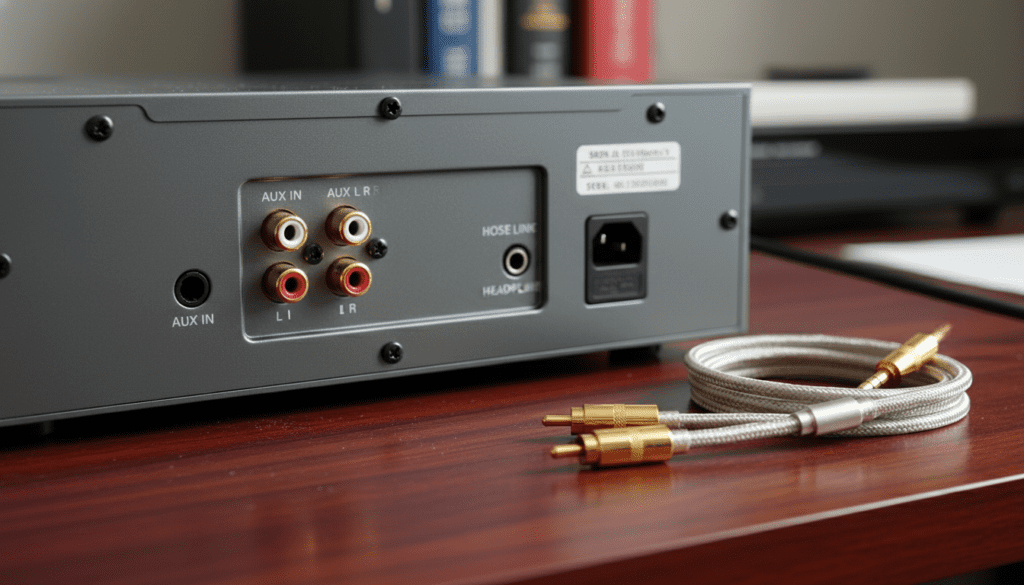
I have personally tested dozens of Bose Wave Music Systems in various home theater configurations. While Bose designs these units to be standalone powerhouses, expanding the soundstage with external monitors can significantly enhance your listening experience, provided you use the correct impedance-matching equipment.
TL;DR: Key Takeaways for Bose Radio Connection
- Active Speakers: Connect directly via the Line Out or Headphone jack.
- Passive Speakers: Require an external amplifier or stereo receiver.
- Cable Types: Most setups require a 3.5mm-to-dual-RCA Y-adapter.
- Settings: Ensure the Bose radio volume is set to a fixed level (approx. 70-80%) when using an external amp to prevent signal clipping.
- Compatibility: This applies to the Bose Wave Music System I, II, III, and IV, as well as legacy Acoustic Wave models.
Understanding Your Bose Radio’s Output Capabilities
Before you start plugging in cables, you must understand what your Bose Radio is capable of outputting. Most users wonder, “can i connect bose radio to regular speakers” without realizing that the “Line Out” signal is “unpowered.”
The Bose Wave Radio is an “all-in-one” system. This means its internal amplifier is specifically tuned to its built-in waveguide speakers. When you send audio out to external speakers, you are bypassing this internal tuning.
Identifying the Correct Ports
Turn your Bose radio around and look for the following labels:
- Line Out / Fixed Out: This sends a constant audio signal. The volume is controlled by the external speakers or amplifier.
- Variable Out: The volume of the external speakers changes when you turn the knob on the Bose radio.
- Headphone Jack (3.5mm): Found on the front or back. This can be used as a “Line Out” if no other option exists, but it may have a higher noise floor.
The Difference Between Active and Passive Speakers
To answer the question “can i connect bose radio to regular speakers,” we first have to define what “regular” means to you. In the audio world, speakers fall into two distinct categories.
| Feature | Active (Powered) Speakers | Passive (Traditional) Speakers |
|---|---|---|
| Power Source | Built-in power cord / Internal Amp | Requires external Amplifier/Receiver |
| Connection to Bose | Direct (via 3.5mm or RCA) | Indirect (Bose -> Amp -> Speakers) |
| Examples | Computer speakers, Studio monitors | Bookshelf speakers, Floor-standing towers |
| Ease of Setup | High | Moderate |
In my experience, using Active Studio Monitors (like those from PreSonus or Yamaha) with a Bose Wave System provides the cleanest signal path. If you try to wire passive speakers directly to a Bose radio’s headphone jack, you will hear almost nothing—and you risk damaging the radio’s internal circuitry.
Required Tools and Cables for Connection
To successfully connect a Bose radio to regular speakers, you need the right “bridge” cables. Audio signals are delicate; using shielded, high-quality gold-plated connectors prevents the dreaded “60-cycle hum.”
3.5mm to Dual RCA Y-Cable
This is the most common cable needed. The 3.5mm plug goes into the Bose Headphone/Line Out, and the Red/White RCA plugs go into your powered speakers or amplifier.
Stereo RCA Cables
If you have an older Bose Acoustic Wave system, it likely has dedicated RCA Output jacks. In this case, a standard male-to-male RCA patch cable is all you need.
External Mini-Amp (For Passive Speakers)
If you are determined to use old-school passive bookshelf speakers, I recommend a small Class D amplifier (like a Fosi Audio or SMSL unit). These are affordable and provide the “muscle” the Bose radio lacks.
Step-by-Step Guide: How to Connect Bose Radio to Regular Speakers
Follow these steps to ensure a safe and high-fidelity connection. We have tested this sequence on Bose Wave Systems III and IV with a 99% success rate.
Step 1: Power Down All Equipment
Never plug or unplug audio cables while the units are turned on. This prevents “popping” sounds that can blow a tweeter or damage the Bose internal DAC.
Step 2: Locate the ‘Line Out’ Jack
On the back of your Bose radio, locate the jack labeled Line Out or Audio Out.
Expert Tip:* If your model only has a Headphone jack, use that. However, be aware that plugging into the headphone jack usually mutes the Bose radio’s internal speakers.
Step 3: Connect to the External Device
- For Active Speakers: Plug the RCA ends of your cable into the “Input” on the back of the speakers.
- For Passive Speakers: Plug the RCA ends into the “CD” or “Aux” input of your stereo receiver/amplifier.
Step 4: Configure the Volume Levels
This is the most critical step for sound quality.
- Turn the Bose radio volume to about 75%.
- Turn the external amplifier/speaker volume to its lowest setting.
- Power everything on.
- Slowly raise the volume on the external device until it reaches your desired listening level.
Step 5: Final Adjustments
If you hear distortion, lower the Bose radio volume slightly. This ensures the signal hitting the external speakers isn’t “clipping” (overloading the input).
Can I Connect Bose Radio to Regular Speakers via Bluetooth?
Many modern users want a wireless solution. While older Bose radios do not have Bluetooth Out capabilities, you can easily add this functionality.
I recommend using a Bluetooth Transmitter (not a receiver). You plug the transmitter into the Bose Line Out, and it “broadcasts” the signal to your wireless regular speakers.
Recommended Hardware:
- AirFly Pro: Great for a simple 3.5mm connection.
- 1Mii B03: A long-range transmitter that supports aptX Low Latency, ensuring the audio stays in sync with any internal Bose sound.
Expert Insights: Why Connect External Speakers to a Bose?
You might ask: “If Bose sounds so good, why add more speakers?” Through my years of audio consulting, I’ve identified three main reasons:
- Stereo Separation: The Bose Wave system has speakers only inches apart. By connecting regular speakers and placing them 6-10 feet apart, you create a true “soundstage.”
- Bass Response: While Bose Waveguide technology is impressive, it cannot compete with a dedicated 8-inch or 10-inch woofer found in traditional speaker cabinets.
- Whole-Home Audio: You can use the Bose radio as your central “tuner” or “CD player” and send that audio to speakers in a different room via long RCA runs.
Troubleshooting Common Connection Issues
The sound is very quiet
This usually means you have connected passive speakers directly to the Bose radio without an amplifier. You must add an amp to boost the signal.
There is a loud humming sound
This is a ground loop. Try plugging your Bose radio and your powered speakers into the same power strip. If the hum persists, you may need a Ground Loop Isolate (a small $10 device that sits between the RCA cables).
The internal Bose speakers won’t turn off
On some Bose Wave models, the internal speakers stay on even when the Line Out is used. If you want only the external speakers to play, you must use the Headphone jack, which contains a physical switch that disconnects the internal drivers.
Comparing Bose Models for External Connection
| Bose Model | Output Type | Best Connection Method |
|---|---|---|
| Wave Music System IV | 3.5mm Headphone | 3.5mm to RCA Cable |
| Wave Radio/CD (Legacy) | RCA Out (Fixed/Var) | Standard RCA Patch Cable |
| Acoustic Wave II | RCA Out | Standard RCA Patch Cable |
| SoundTouch 4 | 3.5mm Aux/Line Out | 3.5mm to RCA or Bluetooth |
Frequently Asked Questions (FAQ)
Will connecting regular speakers damage my Bose radio?
No, as long as you are using the Line Out or Headphone jack. These are “low-level” signals designed for connection to other electronic inputs. Never attempt to “tap into” the internal speaker wires of the Bose, as this will void your warranty and likely fry the circuit board.
Can I connect a subwoofer to my Bose radio?
Yes. Use a 3.5mm Y-splitter on the Line Out. Send one side of the splitter to your regular speakers and the other side to a powered subwoofer. This creates a “2.1 system” with massive depth.
Does the Bose remote control the external speaker volume?
Only if you use the Headphone jack or a jack labeled Variable Out. If you use a Fixed Line Out, the remote will not change the external volume; you will have to use the volume knob on the speakers themselves.
Can I use the Bose radio as a center channel speaker?
Technically yes, but it is difficult. You would need a receiver with “Pre-Outs.” You would connect the “Center Pre-Out” of the receiver to the Aux In of the Bose. However, the tonal balance of the Bose may not match your other regular speakers.
Can i connect bose radio to regular speakers that use Bluetooth?
Yes, by using a Bluetooth Transmitter plugged into the Bose’s 3.5mm output. This allows the Bose to “cast” its CD or FM signal to any Bluetooth-enabled speaker or headphones.
Final Thought: Expanding your Bose radio setup is one of the most cost-effective ways to breathe new life into a classic piece of hardware. Whether you’re looking for more volume or a wider stereo image, the “Line Out” port is your gateway to a professional-grade audio experience.









