

Can You Connect PA Active Speakers to a Stereo Receiver?
Yes, you can connect my pa active speakers to my stereo receiver, provided you use a line-level output such as a Pre-Out, Zone 2, or Tape Out. You must never connect active speakers directly to the standard speaker terminals (the red and black binding posts) because the high-voltage signal from the receiver’s internal amplifier can fry the active speaker’s circuitry. By using the correct RCA to XLR or TRS cables, you can safely integrate professional PA gear into your home audio setup.
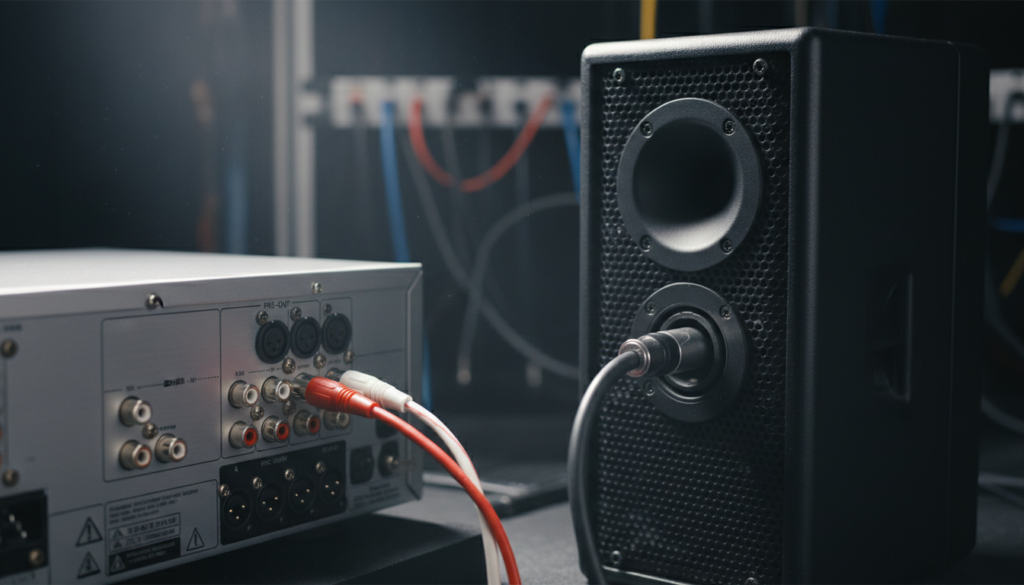
Quick Summary: Key Takeaways for Connecting Active Speakers
| Feature | Pre-Out Connection | Speaker Terminal Connection |
|---|---|---|
| Safety Level | Safe & Recommended | Dangerous (Will damage gear) |
| Signal Type | Line-Level (Low Voltage) | Speaker-Level (High Voltage) |
| Volume Control | Managed by Receiver Knob | N/A (Do not use) |
| Cable Needed | RCA to XLR or RCA to TRS | High-to-Low Level Converter |
| Sound Quality | High Fidelity | Potential for Distortion |
- Avoid the “Magic Smoke”: Active speakers have their own built-in amplifiers; sending a pre-amplified signal into another amplifier causes “double-amping,” leading to catastrophic failure.
- Check Your Back Panel: Look for RCA jacks labeled “Pre-Out” to ensure your receiver supports this setup natively.
- Gain Staging is Key: Set your PA speaker volume to a neutral position (unity gain) and use the receiver to control the master volume.
Understanding the Difference: Active vs. Passive Signals
To understand why you can connect my pa active speakers to my stereo receiver only in specific ways, we have to look at how signals move. A traditional stereo receiver is designed to power passive speakers. These speakers are essentially “dumb” boxes that require the receiver to send a high-voltage, high-current electrical signal to move the woofers.
In contrast, PA active speakers (also known as powered speakers) contain their own internal power amplifiers optimized for their specific drivers. They expect a “whisper” of a signal, known as line-level. When I first started setting up mobile DJ rigs, I saw many beginners make the mistake of piping an amplified signal into an active input—the result is instant distortion and, eventually, a blown input stage.
The Problem with High-Voltage Outputs
The standard binding posts on your Denon, Yamaha, or Sony receiver are meant to deliver 20 to 100+ watts of power. If you try to connect my power active speakers to my stereo receiver via these posts, you are feeding a massive amount of voltage into a circuit designed for millivolts. This is why a Pre-Out section is non-negotiable for a direct connection.
Method 1: Using the Receiver Pre-Outs (The Best Way)
If your receiver has Pre-Out jacks, you are in luck. This is the “gold standard” for connecting professional audio gear to consumer electronics. Pre-Outs bypass the receiver’s internal power amp and send the raw audio signal directly from the volume control.
Why Pre-Outs are Superior
- Variable Volume: The receiver’s volume knob still controls the loudness of the PA speakers.
- Clean Signal: There is no extra noise introduced by the receiver’s power section.
- Simplicity: It only requires a simple unbalanced to balanced cable conversion.
Essential Gear for Pre-Out Connections
- Cables: You will need RCA to XLR Male cables or RCA to 1/4″ TRS cables.
- Shielding: Use high-quality brands like Mogami or Canare to prevent electromagnetic interference (EMI), especially if your cable runs are longer than 15 feet.
Method 2: The Zone 2 or Tape Out Workaround
What if your receiver doesn’t have a dedicated Pre-Out? You can often use the Zone 2 or Tape Out RCA ports. However, there is a major catch: Tape Outs are usually “fixed” level. This means the volume knob on your receiver won’t do anything to the PA speakers; they will play at full blast immediately.
How to Manage Fixed Level Outputs
If you use a Tape Out, you must manually adjust the volume using the gain knobs on the back of your JBL, EV, or Mackie speakers. This is cumbersome and not recommended for daily home theater use. If you use Zone 2, check your receiver’s settings to see if the output can be set to “Variable.”
Method 3: Using a High-to-Low Level Converter
If your receiver only has speaker terminals (no RCA outputs at all), you can still connect my pa active speakers to my stereo receiver by using a Line Output Converter (LOC). These are common in car audio but work perfectly for home setups.
How a Converter Works
The LOC takes the high-voltage signal from the speaker wires and uses a transformer to “step it down” to a safe line-level RCA signal.
- Step 1: Connect speaker wire from the receiver to the input of the LOC.
- Step 2: Connect an RCA cable from the LOC output to your active speakers.
- Pro Tip: Look for a converter with a ground loop isolator to prevent that annoying 60Hz hum often found in PA systems.
Step-by-Step Guide: Connecting Your PA Speakers
Follow these steps to safely connect my power active speakers to my stereo receiver without risking your equipment.
Power Down Everything
Always start with all equipment turned off. Professional Active PA speakers can produce a massive “pop” if a cable is plugged in while they are powered on, which can damage the high-frequency compression drivers.
Identify Your Output Ports
Look at the back of your receiver.
- Best: Labeled Pre-Out (Left and Right).
- Good: Labeled Zone 2 Out.
- Last Resort: Labeled Rec Out or Tape Out.
Select the Correct Cables
Most PA speakers, like the QSC K12.2 or PreSonus Air series, use XLR or TRS inputs.
- Buy an RCA to XLR (Male) cable.
- The RCA end goes into the receiver; the XLR end goes into the speaker.
Set “Unity Gain” on the Speakers
Turn the volume knob on the back of your active speakers to the “0dB” or “12 o’clock” position. This is known as Unity Gain. It allows the speaker to perform at its designed efficiency without introducing internal hiss.
Power On Sequence
Follow the “last on, first off” rule:
- Turn on your Source (TV, CD Player, Streamer).
- Turn on the Stereo Receiver.
- Turn on the PA Active Speakers last.
Test the Levels
Start with the receiver volume at zero. Slowly increase it until you hear sound. If you hear a loud hum or hiss, you may have a ground loop or a bad cable.
Troubleshooting Common Issues
Eliminating the 60Hz Hum
When I connect pro-grade PA speakers to consumer receivers, a loud buzzing noise is the most common complaint. This happens because the receiver is usually two-pronged (ungrounded), while the PA speaker is three-pronged (grounded).
The Solution: Use a DI Box (Direct Injection) with a Ground Lift switch. Plug the receiver into the DI box, and the DI box into the speaker. Flipping the “Lift” switch breaks the loop and silences the hum instantly.
Dealing with Signal Latency
If you are using a modern AV Receiver with digital processing (DSP), there might be a slight delay between the video on your TV and the sound from your PA speakers.
- Go into your receiver’s Audio Settings.
- Look for “Lip Sync” or “Audio Delay.”
- Adjust the milliseconds until the audio matches the video perfectly.
Why Use PA Speakers for Home Audio?
You might wonder if it’s worth the effort to connect my pa active speakers to my stereo receiver. In my experience, the benefits are massive for certain users:
- Headroom: PA speakers are designed for high output. You will never “stress” them during a loud movie or party.
- Durability: They feature built-in limiters that prevent the speakers from blowing, unlike traditional Hi-Fi speakers.
- Clarity: Modern active speakers use sophisticated DSP to ensure a flat, accurate frequency response.
Expert Tips for the Best Sound Quality
- Avoid Long Unbalanced Runs: RCA cables are unbalanced. If your speakers are more than 15-20 feet away from the receiver, the cables will act like antennas for noise. If you must go long distance, use a balanced line driver.
- Check Impedance: While usually not an issue for line-level connections, ensure your high-to-low converter is rated for the wattage your receiver puts out.
- Ventilation: PA speakers generate heat at the backplate. Don’t push them flush against a wall or inside a tight cabinet.
Frequently Asked Questions
Can I plug my active speakers into the headphone jack?
Yes, you can use a 3.5mm to dual RCA or dual XLR cable. However, the headphone amp in most receivers is of lower quality than the Pre-Outs, and it will usually mute your main speakers when plugged in.
Will this setup work for a Home Theater 5.1 system?
Yes, if your AV Receiver has Pre-Outs for all channels (Front, Center, Surround), you can replace every passive speaker with an active PA speaker. This is a common setup for high-end “Pro-sumer” home theaters.
Is it safe to use a cheap RCA-to-XLR adapter?
It is safe, but be aware that most cheap adapters “short” pin 3 to ground. This reduces the signal by 6dB. You may need to turn the gain up slightly higher on the back of your speakers to compensate.
Can I use my receiver’s remote to control the PA speaker volume?
Only if you are using the Pre-Out or a Variable Zone 2 output. If you use a Tape Out, the remote will have no effect on the volume of the PA speakers.









