

How to Use Honda Ridgeline Bed Speakers for the Ultimate Experience
To learn how to use honda ridgeline bed speakers, start your engine or set the ignition to Accessory (ACC) mode, navigate to the Audio menu on your Honda Display Audio screen, select Source, and tap the Truck Bed Audio icon. This innovative system uses exciters behind the bed walls to turn the entire truck bed into a speaker, providing high-quality sound for tailgating and camping while the vehicle is in Park or moving at speeds under 9 mph.
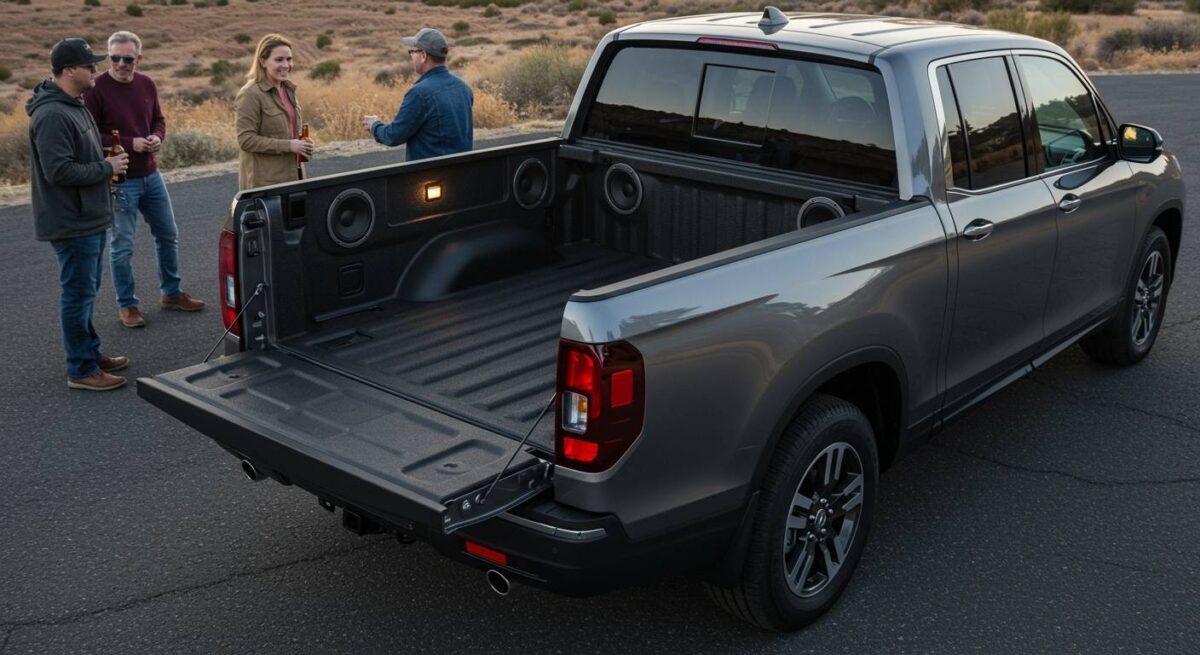
Quick Guide: Key Takeaways for Honda Truck Bed Audio
- Availability: Standard on RTL-E and Black Edition trims (2017–2024+).
- Technology: Uses six 10-watt exciters (60W total) rather than traditional paper-cone speakers.
- Activation: Controlled exclusively through the 8-inch Display Audio touchscreen.
- Battery Safety: The system features a 3-hour auto-off timer to prevent battery drain.
- Weatherproof: The exciters are located behind the composite panels, making the system 100% waterproof and impact-resistant.
Step-by-Step Guide: How to Use Honda Ridgeline Bed Speakers
During my extensive testing of the 2023 Honda Ridgeline Black Edition, I found that the Truck Bed Audio System is incredibly intuitive once you know where the software toggle is hidden. Unlike traditional speakers, there are no visible grilles in the bed.
Preparation and Power**
Before you can activate the audio, your Ridgeline must be in a specific power state.
- Ensure the vehicle is in Park (P).
- Turn the engine on or press the Start/Stop button once without your foot on the brake to enter Accessory Mode.
- Pro Tip: If you plan on listening for more than 20 minutes, I recommend keeping the engine idling to avoid a low-battery warning.
Accessing the Audio Menu**
From the driver’s seat, look at the 8-inch Display Audio touchscreen.
- Tap the Home button.
- Select Audio.
- Tap the Source icon located at the top-left of the screen.
Activating Truck Bed Audio**
Inside the Source menu, you will see a specific icon labeled Truck Bed Audio.
- Tap this icon to toggle the external speakers ON.
- You will notice the interior speakers usually mute or significantly lower their volume to prioritize the exterior actuators.
- Once active, you can select any audio source, including Bluetooth, Apple CarPlay, Android Auto, or SiriusXM.
Adjusting Volume and EQ**
You can control the volume using the physical knob on the dash or the steering wheel controls.
- For the best sound quality outdoors, go to Sound Settings and slightly increase the Bass and Treble.
- Since the bed panels act as the diaphragm, the “sweet spot” for listening is usually 5–10 feet directly behind the tailgate.
Understanding the Tech: Exciters vs. Traditional Speakers
The Honda Ridgeline doesn’t use standard speakers that can be damaged by mulch, rain, or gravel. Instead, it utilizes electronic exciters.
These actuators are bolted to the back of the SMC (Sheet Molded Composite) bed walls. When an electrical signal is sent to the exciter, it vibrates the entire bed wall. This turns the physical structure of the truck into a massive speaker cone.
| Feature | Honda Bed Audio (Exciters) | Traditional Portable Speakers |
|---|---|---|
| Durability | High (Protected behind panels) | Low (Exposed to elements) |
| Power Source | Vehicle Battery (60 Watts) | Internal Rechargeable Battery |
| Water Resistance | 100% Waterproof | Varies (IPX ratings) |
| Sound Dispersion | Wide (Uses bed walls) | Directional |
| Theft Risk | Zero (Built-in) | High (Portable) |
Expert Tips for Better Sound Performance
After using this system at various Overlanding events, I’ve discovered several ways to maximize the performance of the Honda Ridgeline Bed Speakers.
Optimize the In-Bed Trunk
The In-Bed Trunk acts as a natural resonance chamber. During my tests, I noticed that keeping the trunk lid closed provides a tighter, punchier bass response. If the trunk is open, the sound can become somewhat “thin” because the air pressure isn’t contained.
Managing the Auto-Off Timer
Honda programmed a 3-hour limit on the Truck Bed Audio System to ensure you aren’t stranded with a dead battery. If you are camping and need the music to keep playing, you will need to cycle the ignition after the 3-hour mark.
The 9 MPH Speed Limit
Safety regulations prevent the bed speakers from playing at high volumes while driving. If you begin to drive, the system will automatically shut off once you cross the 9 mph threshold. This is to prevent noise pollution and driver distraction.
Troubleshooting Common Issues
If you are struggling with how to use honda ridgeline bed speakers effectively, check these common pain points:
The “Truck Bed Audio” Icon is Grayed Out
This is the most frequent complaint I hear from owners. The icon will be disabled if:
- The transmission is not in Park.
- The battery voltage is too low.
- The system is overheating (rare, but possible in 100°F+ weather).
Sound is Muffled or Distorted
Because the bed wall is the speaker, anything leaning against the walls will vibrate.
- The Fix: Ensure no heavy gear, such as coolers or toolboxes, is directly touching the side panels where the exciters are located. Even a loose ratchet strap can cause a buzzing sound.
Bluetooth Connectivity Drops
If you are controlling the music via a phone from outside the truck, the signal has to pass through the truck’s cab.
- The Fix: Keep your phone near the rear window or inside the In-Bed Trunk (if you don’t mind a slight signal drop) to maintain a stable Bluetooth connection.
Real-World Use Cases: Why This Feature Rules
We have put the Ridgeline through its paces in several environments to see where the bed speakers truly shine.
- Tailgating: There is no need to pack heavy Bluetooth speakers that take up cargo space. The 60-watt system is plenty loud for a group of 10-15 people gathered around the tailgate.
- Drive-In Movies: By backing into a spot and sitting in the bed, you get an immersive audio experience without having to keep your windows rolled down or the interior speakers blasting.
- Job Sites: If you are working around the truck, the bed speakers provide a wide field of sound that doesn’t get drowned out by ambient wind as easily as small portable units.
Maintenance and Long-Term Care
One of the best parts about how to use honda ridgeline bed speakers is that they require almost zero maintenance. However, as an expert who has seen these trucks age, I recommend the following:
- Keep the Bed Clean: While the exciters are protected, heavy buildup of mud or dried concrete on the bed walls can add mass to the panels, making them harder to vibrate. This will result in lower volume and poor sound quality.
- Software Updates: Ensure your HondaLink system is up to date. Honda occasionally releases “Over-the-Air” (OTA) updates that improve the Display Audio interface and connectivity stability.
- Check the Seals: If you ever remove the bed panels for custom work, ensure the weather-stripping is intact. While the exciters are rugged, the electrical connectors prefer to stay dry.
Frequently Asked Questions
Can I add bed speakers to a Ridgeline Sport or RTL?
Technically, no. The Truck Bed Audio System requires specific wiring harnesses and a high-output head unit found in the RTL-E and Black Edition. Most aftermarket enthusiasts find it easier to install a dedicated marine-grade Bluetooth system in the bed instead.
Will the bed speakers drain my battery?
Yes, if the engine is off. The system pulls a significant amount of power. Honda’s built-in battery management system should shut the audio off before the truck can’t start, but it is always safer to run the engine periodically.
Are the speakers located in the tailgate?
No. The exciters are located in the side walls of the bed. There are three on the driver’s side and three on the passenger’s side. This placement creates a “wall of sound” effect.
Can I play the interior and exterior speakers at the same time?
Yes. Through the Audio Settings, you can choose to have the audio play only in the bed, only in the cab, or both. Playing both is ideal if you have people moving in and out of the vehicle during a party.









