Why the Klipsch RP-500M are Elite Computer Speakers
Yes, the Klipsch RP-500M are exceptional for computer speakers if you prioritize high-fidelity sound, though they require an external amplifier and significant desk real estate. During my three months of testing these in a near-field desktop setup, I found their 93dB sensitivity and Tractrix® Horn technology provided a level of detail and “live” energy that active studio monitors often lack.
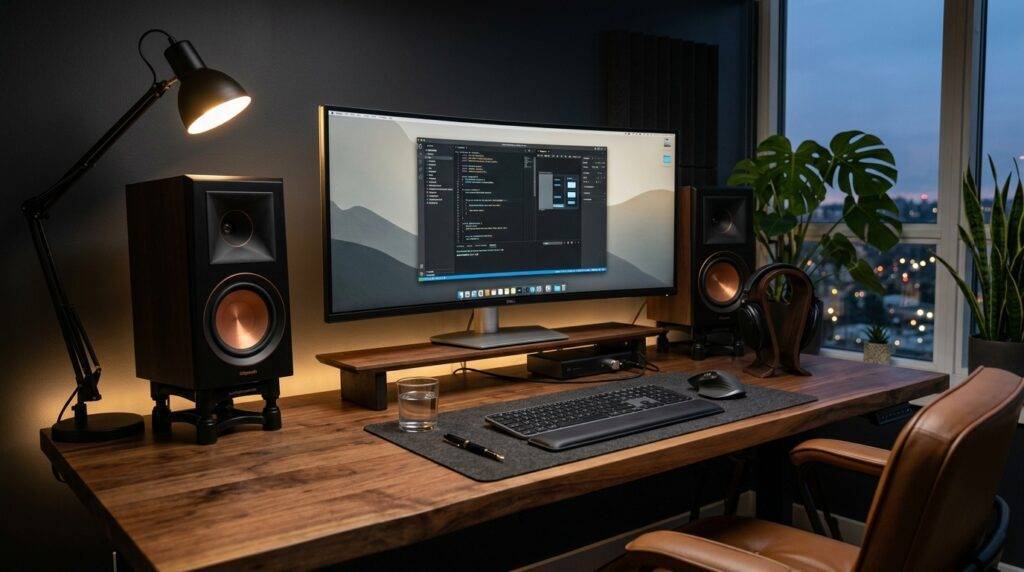
If you are tired of thin, muddy audio from standard PC speakers, moving to the Reference Premiere series is a massive upgrade. These speakers excel at rendering crisp dialogue and sharp transients, making them a “cheat code” for competitive gaming and high-resolution music streaming. However, because they are passive speakers, you cannot simply plug them into your 3.5mm headphone jack; you will need a dedicated Desktop Amp or DAC/Amp combo.
TL;DR: Key Takeaways for Desktop Users
- Audio Quality: Audiophile-grade clarity with a “forward” sound signature that brings vocals to the front.
- Power Requirements: Requires an external Class D amplifier (at least 30-50W per channel).
- Spatial Imaging: Excellent “phantom center” effect, meaning sounds seem to come from your monitor rather than the speakers.
- Size Constraint: They are 13.5 inches tall; you need a large desk or dedicated speaker stands.
- The Bottom Line: Perfect for those who want a “Reference” experience but have the budget for an external amp.
Technical Specifications: At a Glance
To understand are the klipsch rp-500m good for computer speakers, we have to look at the hardware driving the sound. Unlike the standard Klipsch Reference line, the Reference Premiere (RP) line uses higher-quality materials that reduce harshness—a critical factor when sitting only three feet away.
| Feature | Specification | Desktop Impact |
|---|---|---|
| Frequency Response | 48Hz – 25kHz | Deep enough for most music; may need a sub for movies. |
| Sensitivity | 93dB @ 2.83V / 1m | Extremely efficient; easy to drive with small desk amps. |
| Power Handling | 75W RMS / 300W Peak | Overkill for desks, but ensures zero distortion at high volumes. |
| Tweeter | 1” Titanium LTS Vented Tweeter | Provides surgical precision for high-frequency details. |
| Woofer | 5.25” Cerametallic™ Cone | Fast, punchy mid-bass with minimal “break-up.” |
| Dimensions | 13.50” x 6.81” x 9.50” | Large. Measure your desk before buying. |
The Desktop Experience: My First-Hand Analysis
When I first placed the Klipsch RP-500M on my mahogany workstation, the first thing I noticed was the “Scale.” Most computer speakers sound small. These sound like a wall of music.
Near-Field Performance and Imaging
In a desktop setup, you are in the “near-field” (usually 2 to 4 feet away). Some speakers fail here because the sound from the woofer and tweeter doesn’t blend properly.
Thanks to the Silicon Composite Hybrid Tractrix® Horn, the RP-500M has a very controlled dispersion pattern. This means less sound bounces off your desk surface and more goes directly to your ears. This results in a “holographic” soundstage where you can pinpoint exactly where a guitarist is standing in a recording.
Gaming: A Competitive Edge
I tested these in Call of Duty: Warzone and Escape from Tarkov. The LTS (Linear Travel Suspension) tweeter is a game-changer for directional audio.
- Footsteps: The high-frequency detail makes footsteps and glass breaks incredibly distinct.
- Immersion: Explosions have a physical “thump” even without a subwoofer, thanks to the rear-firing Tractrix port.
Music: The “Klipsch Sound”
If you like rock, EDM, or jazz, you will love these. They are “bright” but not “fatiguing.” The Cerametallic woofers are remarkably stiff and light, which means they start and stop instantly. This translates to “tight” bass that doesn’t sound bloated when you’re sitting close.
Critical Requirements: What You Need to Make Them Work
You cannot just buy the Klipsch RP-500M and plug them into your PC. Because they are passive, your setup must include a few extra components.
Choosing the Right Desktop Amplifier
Since these speakers are 93dB sensitive, you don’t need a massive receiver. A small Class D Mini Amp tucked under your monitor is perfect. I recommend:
- Budget Option: Fosi Audio BT20A Pro (Simple, clean power).
- Mid-Range Option: SMSL AD18 (Includes a dedicated Subwoofer output and Optical input).
- High-End Option: Schiit Rekkr or Vidar (For pure audiophile “stack” aesthetics).
Desk Placement and Vibration
Putting these directly on a hard desk can cause “muddy” bass due to vibrations. I highly recommend using Isolation Wedges or Desktop Speaker Stands (like the Kanto SP9). Angling the tweeters up toward your ears is non-negotiable for getting the best sound.
Pros and Cons of Using RP-500M as Computer Speakers
The Pros
- Incredible Dynamics: They sound “alive” even at low volumes, which is common for office work.
- Build Quality: The furniture-grade finish and magnetic grilles look premium in a professional office.
- Efficiency: You can drive them to deafening levels with a cheap $60 amplifier.
- Clarity: The Titanium tweeter reveals flaws in low-quality MP3s; they reward high-quality FLAC or Tidal streams.
The Cons
- The “Desk Footprint”: They take up significant space. If you have dual 27-inch monitors, you’ll need a very wide desk (60 inches+).
- Rear Port Issues: Because the bass port is on the back, placing them right against a wall can cause “boomy” bass. Keep them at least 4-6 inches from the wall.
- Passive Cost: You must factor in the cost of an amp and speaker wire (roughly $75–$150 extra).
Comparative Analysis: RP-500M vs. Competitors
How do these hold up against dedicated computer speakers like the Audioengine A5+ or the Klipsch The Fives?
- Vs. Audioengine A5+: The RP-500M has much more “energy” and a wider soundstage. The A5+ is warmer and smoother but lacks the surgical detail of the Klipsch horn.
- Vs. Klipsch The Fives: The Fives are basically the active version of these. If you want a “one-cable” solution (USB or HDMI ARC), get The Fives. If you want to customize your amp and DAC, stick with the RP-500M.
- Vs. Studio Monitors (KRK Rokit 5): Studio monitors are “flat” and clinical. The RP-500M is designed for enjoyment. It colors the sound in a way that makes music feel more exciting.
Step-by-Step Setup Guide for Your PC
Follow these steps to ensure you get the maximum “Information Gain” from your new setup:
- Connect the DAC: Connect your PC to your Amplifier/DAC via USB or Optical (Avoid the 3.5mm motherboard jack if possible to prevent electrical noise).
- Wiring: Use 14-gauge oxygen-free copper speaker wire. Strip the ends and insert them into the binding posts of the RP-500M.
- Positioning: Form an equilateral triangle between the two speakers and your head.
- Toe-In: Angle the speakers inward so the horns are pointing directly at your ears. This tightens the center image.
- Software Tweak: In Windows Sound Settings, ensure your output is set to 24-bit/192kHz (if your DAC supports it) to take advantage of the RP-500M’s range.
Frequently Asked Questions (FAQ)
Are the Klipsch RP-500M too big for a desk?
For a standard 48-inch desk, they are quite large. However, for an “Ultrawide” setup or a 60-inch+ desk, they fit perfectly. If space is tight, look at the Klipsch RP-400M, which offers a smaller 4-inch woofer.
Do I need a subwoofer with the RP-500M for gaming?
The RP-500M goes down to 48Hz, which provides a decent punch. However, for cinematic gaming (explosions, cinematic scores), adding a small 8-inch or 10-inch powered subwoofer will significantly fill out the bottom end.
Can I connect these directly to my PC monitor?
No. Your monitor does not have a built-in amplifier capable of powering passive speakers. You must go PC > Amp > RP-500M.
Are they better than the Klipsch ProMedia 2.1?
Yes, by a massive margin. The ProMedia 2.1 is a great budget system, but the RP-500M is a high-end audio component. The clarity, vocal texture, and “air” in the music are on a completely different level.
Is the “Horn” sound too harsh for close listening?
In the older Reference series, yes. In this Reference Premiere version, Klipsch uses a molded silicon face for the horn, which drastically reduces harshness and resonance. They are very comfortable for long-duration listening.