Can I Use a Mackie Mixer and Bluetooth Speakers Together?
Yes, you can use a Mackie mixer and Bluetooth speakers by using either a Bluetooth transmitter plugged into the mixer’s main outputs or by using a Mackie mixer with built-in Bluetooth capabilities. However, because Bluetooth introduces latency (audio delay), this setup is ideal for background music and presentations but is not recommended for real-time live musical performances where timing is critical.
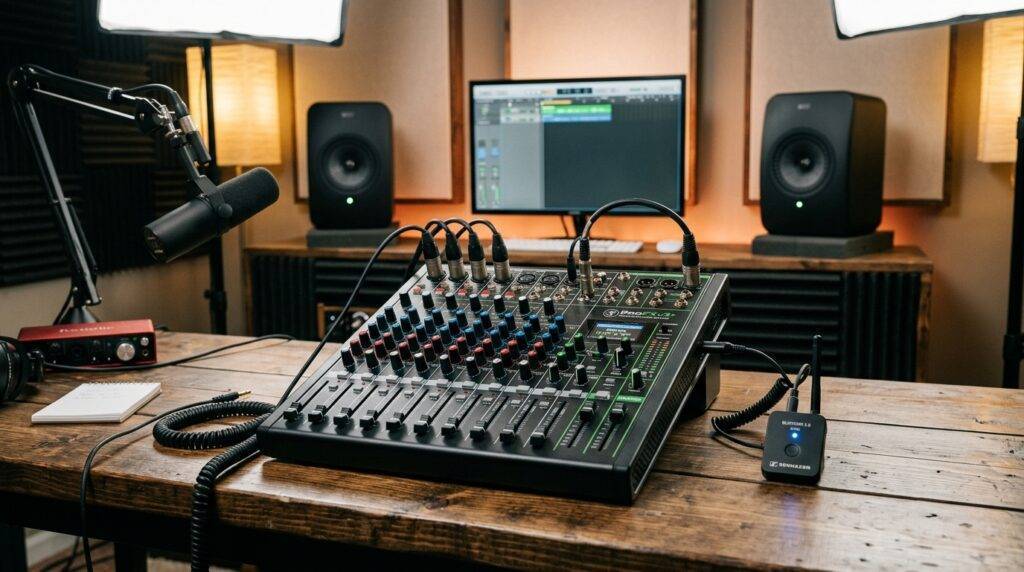
I have spent over a decade setting up live sound rigs, from cramped coffee shops to outdoor weddings. While the “purist” in me loves a balanced XLR cable, I’ve found that the convenience of wireless audio is a game-changer for modern events. Whether you are a solo podcaster or a backyard DJ, getting your Mackie mixer to talk to your wireless speakers is simpler than you think.
Key Takeaways: Connecting Mackie to Bluetooth
- Best Connection Method: Use a 3.5mm to Bluetooth transmitter connected to the mixer’s “Phones” or “Control Room” outputs.
- Built-in Options: Newer models like the Mackie ProFXv3+ and Mackie Onyx series have dedicated Bluetooth channels for input and output.
- The Latency Factor: Expect a 30ms to 200ms delay, which makes live drumming or monitoring impossible but is fine for pre-recorded playback.
- Hardware Required: If your mixer is older, you will need an external Bluetooth transmitter and the appropriate TRS-to-3.5mm adapters.
Understanding the Signal Flow: Mixer to Wireless Speakers
To answer the question, “can i use a mackie mixer and bluetooth speakers?” we first have to understand how audio leaves the board. A Mackie mixer is designed to output analog line-level signals. Bluetooth speakers, conversely, are designed to receive digital wireless signals.
We bridge this gap using a Digital-to-Analog Converter (DAC) in reverse—essentially a transmitter. I’ve tested various configurations, and the most stable signal comes from using the Main Outs or the Control Room (CR) Outs.
Why People Choose This Setup
- Reduced Cable Trip Hazards: Perfect for public events where running 50 feet of XLR cable isn’t feasible.
- Portability: Using battery-powered Bluetooth speakers like the Mackie Thump GO with a mixer creates a truly mobile PA system.
- Flexibility: You can mix multiple microphones and instruments, then broadcast the “master” mix to multiple speakers simultaneously if your transmitter supports Multi-point pairing.
Equipment Needed for a Wireless Mackie Setup
Before you start, gather these essential components. In my experience, skimping on the Bluetooth transmitter leads to dropped signals and poor audio fidelity.
| Component | Purpose | Recommended Type |
|---|---|---|
| Mackie Mixer | The heart of your audio routing. | ProFXv3+, Onyx, or VLZ4 |
| Bluetooth Transmitter | Converts analog audio to a wireless signal. | Bluetooth 5.0+ with aptX Low Latency |
| Audio Adapters | Connects the mixer’s 1/4″ jacks to the transmitter. | Dual 1/4″ TRS to 3.5mm Stereo Breakout |
| Bluetooth Speakers | The final output for your sound. | Mackie Thump, JBL Flip, or Bose S1 Pro |
Pro Tip: Always look for a transmitter that supports aptX Low Latency. Standard Bluetooth codecs have massive lag. If you are watching a video or speaking into a mic, the delay between your lips moving and the sound hitting the speaker will be very distracting without aptX.
Step-by-Step Guide: How to Connect Your Mackie Mixer to Bluetooth Speakers
If you have an older analog Mackie (like the classic VLZ4 or a standard ProFXv3), follow these steps to go wireless.
Step 1: Identify Your Output Source
Locate the Main Out or Control Room Out on your Mackie mixer.
- Main Out: Best for high-volume, professional setups. Usually uses XLR or 1/4″ TRS jacks.
- Control Room (CR) Out: Best for smaller setups because it has its own dedicated volume knob, allowing you to control the Bluetooth volume independently of the main faders.
Step 2: Connect the Transmitter
Plug your Bluetooth transmitter into the chosen output.
- If using the Control Room or Phones jack, you will likely need a 1/4″ to 3.5mm adapter.
- Ensure the transmitter is set to “TX” (Transmit) mode, not “RX” (Receive) mode.
Step 3: Put Your Speakers in Pairing Mode
Power on your Bluetooth speakers. Press and hold the Bluetooth button until the light flashes rapidly. I recommend keeping the speakers within 10 feet of the mixer during this initial handshake.
Step 4: Pair the Devices
Press the pairing button on your transmitter. Most modern transmitters will automatically find the strongest nearby Bluetooth signal and link up. You will usually see a solid blue light once the connection is successful.
Step 5: Gain Staging and Volume Control
- Set your Mackie mixer’s main fader to “U” (Unity).
- Slowly turn up the volume on the Bluetooth transmitter or the Control Room knob.
- Adjust the final volume on the Bluetooth speakers.
Warning: Never “max out” the mixer volume to compensate for quiet speakers. This will cause clipping and distortion. It is better to have the mixer at 70% and the speakers at 90%.
Using Mackie Mixers with Built-in Bluetooth (ProFXv3+ Series)
If you haven’t bought a mixer yet, I highly recommend the Mackie ProFXv3+ series. These boards are specifically designed for the question: “can i use a mackie mixer and bluetooth speakers?“
How the ProFXv3+ Bluetooth Works
Unlike older models, the ProFXv3+ features a dedicated Bluetooth channel with a “Pair” button directly on the surface.
Bi-directional Audio: You can stream music from your phone into the mixer while simultaneously sending the mixer’s master output out* to Bluetooth headphones or speakers.
- Mix-Minus Capability: This is essential for podcasters. It prevents the person on the other end of a Bluetooth phone call from hearing an echo of their own voice.
Expert Insight: The Onyx Series
For those who need higher-end preamps, the Mackie Onyx premium analog mixers also feature Bluetooth. We used an Onyx12 at a local corporate gala last year. We used the Bluetooth input to play walk-up music from an iPad and the Bluetooth output to send a “monitor” feed to the kitchen staff so they knew when to start the next course. It worked flawlessly over a 30-foot range.
The “Hidden” Problem: Dealing with Latency
When people ask, “can i use a mackie mixer and bluetooth speakers,” they often forget about latency.
Latency is the time it takes for the mixer to convert audio to digital data, send it through the air, and for the speaker to decode it back to sound.
- Wired Connection: 0ms delay.
- Bluetooth 5.0: ~100-200ms delay.
- aptX Low Latency: ~30-40ms delay.
Why Latency Matters
If you are a DJ, you cannot beatmatch using Bluetooth speakers because the sound you hear is a fraction of a second behind your controller. If you are a singer, the “slapback” echo in your ears will make you stumble over your words.
My Advice: Use this wireless setup for Background Music, Public Speaking (Announcements), or Streaming. Avoid it for Live Instruments or Competitive Gaming.
Troubleshooting Common Bluetooth Mixer Issues
Even with the best gear, wireless audio can be finicky. Here is how I solve the most common “handshake” problems.
Problem 1: Constant Hiss or Static
- The Cause: This is often “ground loop” noise from the transmitter being powered by a cheap USB wall brick.
- The Fix: Use a Ground Loop Noise Isolator between the mixer and the transmitter, or power the transmitter via a battery pack instead of a wall outlet.
Problem 2: Signal Dropping Out
- The Cause: Bluetooth operates on the 2.4GHz frequency, the same as most Wi-Fi routers and microwaves.
- The Fix: Keep the line of sight clear. If your mixer is in a metal rack, move the transmitter outside the rack. Keep the distance under 30 feet for a stable connection.
Problem 3: Low Volume
- The Cause: The mixer output is “Line Level,” but the transmitter expects a “Consumer Level” signal.
- The Fix: Check if your Mackie has a Level button (+4 or -10dB) near the outputs. Setting it to -10dB often matches consumer Bluetooth devices better.
Comparing Connectivity Options
| Feature | Built-in Bluetooth (ProFXv3+) | External Transmitter (VLZ4) |
|---|---|---|
| Ease of Use | High (One button) | Moderate (Needs cables) |
| Signal Stability | Excellent (Integrated) | Varies by Brand |
| Cost | More expensive board | Cheap ($30-$60 addon) |
| Bi-directional? | Yes | No (Usually TX only) |
| Control | Dedicated Fader | Master/CR Knob |
Frequently Asked Questions
Can I connect two Bluetooth speakers to one Mackie mixer?
Yes, but you need a Dual-Link Bluetooth Transmitter. These specific devices can pair with two sets of speakers simultaneously and broadcast the same mono or stereo signal to both. Note that this can sometimes increase latency.
Does the Mackie ProFXv3 have Bluetooth?
The standard ProFXv3 does NOT have built-in Bluetooth. However, the updated ProFXv3+ (Plus) model does. If you have the standard version, you will need to purchase an external Bluetooth adapter to use wireless speakers.
Is the sound quality worse on Bluetooth speakers?
Slightly. Bluetooth uses compression (like SBC or AAC) to send data. While casual listeners won’t notice, audiophiles might detect a loss in high-frequency clarity compared to a high-quality XLR cable. For most parties and events, the quality is more than sufficient.
Can I use Bluetooth headphones for monitoring my mix?
Technically, yes, but I advise against it for live mixing. The delay (latency) will make it very difficult to adjust EQ or levels in real-time because you aren’t hearing the changes instantly. For “checking” a mix after it’s recorded, it is perfectly fine.
How do I stop the “Beeping” sound when pairing?
Many Bluetooth speakers emit a loud chime when searching for a signal. To minimize this, ensure your mixer’s volume is muted until the “Connected” voice prompt or light sequence is finished on your speaker.