Can You Make External Speakers Powered by PC Power Supply?
Yes, can you make external speakers powered by pc power supply setups successfully by utilizing the 12V yellow rail of an ATX power supply. This method allows you to deliver high-amperage current to DIY amplifiers or car audio systems, providing a massive power boost compared to standard wall adapters.
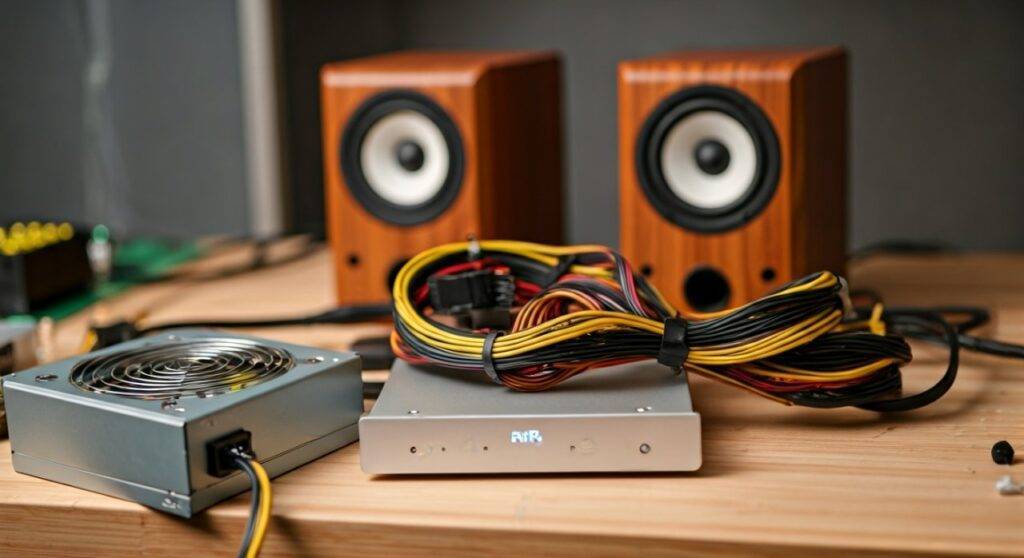
I have spent years building custom “garage setups” and portable boomboxes using salvaged EVGA and Corsair units. Using a PC power supply (PSU) is one of the most cost-effective ways to get 200W to 500W of clean DC power for high-performance Class-D amplifiers. In this guide, I will walk you through the exact wiring, safety protocols, and component selection needed to turn a computer component into the heart of your sound system.
🚀 Key Takeaways: DIY PSU Audio
- Feasibility: Highly effective for 12V amplifiers (Car audio or DIY boards).
- The Secret Sauce: You must “jump” the PS_ON pin (Green wire) to a Ground (Black wire) to turn the PSU on without a motherboard.
- Voltage Focus: Use the Yellow wires (+12V) for the amplifier’s positive terminal and Black wires for the negative/ground.
- Efficiency: Modern 80 Plus Gold units offer stable, filtered power that minimizes “hum” in your speakers.
- Power Capability: A typical 500W PSU can easily provide 30-40 Amps on the 12V rail, enough to power large subwoofers.
Understanding the “Why”: Benefits of PSU-Powered Audio
When people ask, “can you make external speakers powered by pc power supply units,” they are usually looking for more “oomph.” Most consumer computer speakers use tiny 5V or 12V 1-Amp bricks that peak at 12 Watts. A mid-range PC power supply can deliver over 400 Watts on a single rail.
Superior Current Delivery
Audio signals are dynamic; they have sudden peaks during bass hits. A standard wall-wart often “sags” under this load, causing distortion. A PC PSU has massive internal capacitors designed to handle the rapid power shifts of a high-end NVIDIA GPU, making it perfect for the transient demands of a TPA3116D2 amplifier.
Cost-Effectiveness
If you were to buy a dedicated 12V 30A industrial power supply, you might spend $60 to $100. You can often find a used OEM Dell or HP power supply for $15, or even free from an old desktop. This makes it the ultimate “budget audiophile” hack.
Essential Components for Your Setup
Before we start stripping wires, you need a specific list of hardware. I’ve tested various combinations, and the following list provides the best balance of safety and sound quality.
| Component | Recommended Type | Why It Matters |
|---|---|---|
| Power Supply | ATX 2.0 or higher | Provides a dedicated +12V rail with high amperage. |
| Amplifier | Class-D (TPA3116 or TDA7498) | High efficiency (90%+) and runs natively on 12V-24V. |
| Speakers | 4-Ohm or 8-Ohm Passive | Standard bookshelf or car speakers work best. |
| Jumper Wire | 18 AWG or Paperclip | Needed to “trick” the PSU into turning on. |
| Binding Posts | Banana Plugs | Provides a clean, professional connection point. |
Choosing the Right Amplifier
To make this work, you cannot just plug speakers into a PSU. You need an amplifier board. I recommend the Fosi Audio or Nobsound mini-amps if you want a finished product, or raw boards from Parts Express for a true DIY feel. Ensure the amplifier supports a 12V input.
Step-by-Step Guide: How to Power Speakers with a PC PSU
This process involves modifying the 24-pin motherboard connector. Follow these steps precisely to ensure you don’t short the unit.
The “Paperclip Test” (Activation)
A PC power supply will not turn on just by plugging it into the wall. It waits for a signal from the motherboard.
- Locate the Green Wire (PS_ON) on the main 24-pin connector.
- Locate any Black Wire (Ground) next to it.
- Insert a U-shaped paperclip or a toggle switch between these two pins.
- When you flip the back switch, the PSU fan should spin. You now have live power.
Identifying the 12V Rails
For audio, we ignore the red (5V) and orange (3.3V) wires. We want the Yellow wires.
- Yellow: +12V Positive.
- Black: Ground/Negative.
- Pro Tip: I recommend bundling 3-4 yellow wires together and 3-4 black wires together. This increases the surface area of the copper, preventing the wires from getting hot during high-volume playback.
Connecting to the Amplifier
Most DIY amplifiers have screw terminals labeled VCC/Direct Current (+) and GND (-).
- Insert your bundled Yellow wires into the VCC terminal.
- Insert your bundled Black wires into the GND terminal.
- Tighten the screws firmly. A loose connection here can cause electrical arcing or “popping” sounds in your speakers.
Hooking Up the Speakers
Connect your speaker wire from the amplifier’s output to the speakers. Ensure the Polarity is correct (Red to Red, Black to Black) to keep the speakers “in phase.” If they are out of phase, you will lose almost all your bass response.
Handling the “Noise” Issue: Filtering and Stability
One common complaint when people ask can you make external speakers powered by pc power supply units is “coil whine” or “background hiss.” PC power supplies are Switching Mode Power Supplies (SMPS), which can introduce high-frequency noise into the audio chain.
Add a Dummy Load
Some older PSUs require a “load” on the 5V rail to keep the 12V rail stable. If your voltage is fluctuating, connect a 10-ohm 10-watt resistor between a Red wire and a Black wire. This “tricks” the PSU into thinking it’s powering a computer, which flattens the voltage ripple.
Ground Loop Isolators
If you are using your PC as the audio source and using a PSU to power the speakers, you might create a Ground Loop. This sounds like a low-frequency hum. The easiest fix is a $10 3.5mm Ground Loop Isolator placed between your computer’s output and the amplifier’s input.
Safety Measures and Best Practices
Working with power supplies involves high current. While 12V won’t give you a lethal shock, the amperage can melt wires or cause fires if mishandled.
- Fuse the Input: Always place an In-line Fuse (matching your amp’s rating, e.g., 20A) on the yellow wire. This protects the PSU if the amplifier shorts out.
- Insulate Everything: Use Heat Shrink Tubing or high-quality electrical tape on all exposed wire joins. Never leave bare wires exposed.
- Ventilation: Do not block the PSU fan. These units generate heat, especially when driving low-impedance 4-ohm speakers at high volumes.
- Capacitor Discharge: After unplugging a PSU, wait at least 5 minutes before touching internal components. The large primary capacitors can hold a charge long after the power is gone.
Comparison: PSU vs. Dedicated Audio Power Supply
| Feature | PC Power Supply (ATX) | Dedicated Audio Brick |
|---|---|---|
| Max Amperage | Very High (30A – 80A) | Moderate (5A – 10A) |
| Cooling | Active (Internal Fan) | Passive (Silent) |
| Ease of Use | Requires Wiring/Jumping | Plug-and-Play |
| Voltage Ripple | Moderate (Filtered for PC) | Low (Specifically for Audio) |
| Price | Free to $40 | $30 – $120 |
Expert Tips for the Best Sound Quality
In my experience building these systems, the quality of the PSU matters more than the wattage. A Seasonic or Super Flower unit with “Japanese Capacitors” will produce much cleaner audio than a generic “grey box” unit from an old office PC.
Check the Rail Configuration:
Look for the sticker on the side of the PSU. You want a unit with a Single +12V Rail. Some older units use “Multi-rail” designs where the 12V power is split into 12V1 and 12V2. If you use a multi-rail unit, you might trip the Over Current Protection (OCP) if you crank the volume too high on a single wire bundle.
Upgrade the Capacitance:
If you notice the lights on the PSU flickering during heavy bass hits, you can add a Large Capacitor (10,000uF or higher) across the 12V and Ground wires right at the amplifier input. This acts as a local reservoir of energy, taking the “stress” off the PSU during peaks.
Frequently Asked Questions
Can I power a car subwoofer with a PC power supply?
Yes, you can power a car subwoofer using a PC power supply, provided the PSU has enough Amperage on the 12V rail to meet the amplifier’s “RMS” power rating. For a 300W RMS sub, you would need a PSU that can deliver at least 25-30 Amps on the 12V rail.
Will using a PC PSU damage my speakers?
No, the PSU will not damage your speakers as long as the Amplifier is matched to the speakers. The PSU only provides the “fuel”; the amplifier controls the “flow.” However, ensure the voltage (12V) matches what your amplifier requires to prevent over-voltage damage to the amp.
Why does my PSU shut off when the bass hits?
This usually happens because the amplifier is drawing more current than the PSU’s Over Current Protection (OCP) allows, or the voltage is sagging too low. You likely need a higher-wattage PSU or a unit with a stronger single 12V rail. Adding a Power Capacitor can also help smooth out these peaks.
Is it safe to leave a PSU-powered speaker system on 24/7?
As long as the PSU is a high-quality, reputable brand with active cooling, it is generally safe. However, PC PSUs are less efficient at “idle” than dedicated small power bricks. It is better practice to use a Physical Switch on the Green/Black wire jump to turn the system completely off when not in use.
Can I use the 5V rail for anything?
Absolutely. You can use the Red wires (5V) to power a Bluetooth Receiver or a USB Charging Port for your phone while it streams music to the speakers. This makes the PC PSU a versatile “all-in-one” power hub for a DIY boombox.