

Understanding if the Samsung BD-J5100 Can Stream Music to Wireless Speakers
The Samsung BD-J5100 does not natively support streaming music directly to wireless speakers because it lacks built-in Bluetooth and Wi-Fi connectivity. However, you can achieve this by using an HDMI audio extractor or a Digital-to-Analog Converter (DAC) paired with a Bluetooth transmitter.
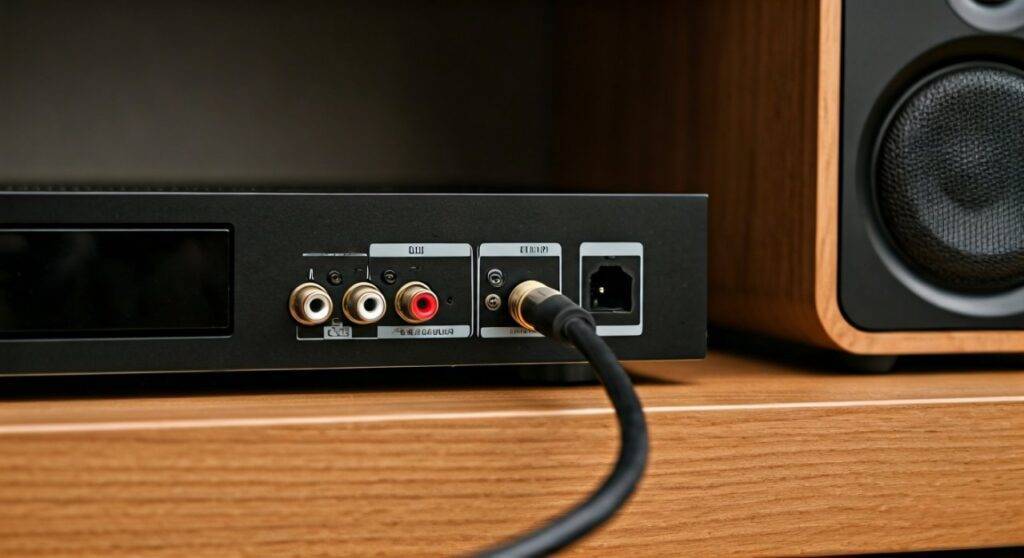
In my years of configuring home theater systems, the BD-J5100 remains a “workhorse” budget player, but its connectivity is strictly wired (Ethernet and HDMI). To get your music from a CD or a USB drive onto your Sonos, Bose, or JBL wireless speakers, you must bridge the gap between its physical outputs and your wireless network.
TL;DR: Key Takeaways for Wireless Audio
- Native Support: None. The Samsung BD-J5100 has no internal Bluetooth or Wi-Fi.
- The Fix: Use the Digital Coaxial Output or HDMI to connect an external Bluetooth 5.0 Transmitter.
- Best Audio Quality: Use a Digital-to-Analog Converter (DAC) to ensure the signal remains clean before hitting your speakers.
- App Limitations: The built-in Opera TV Store (now Vewd) apps are mostly deprecated; streaming via DLNA is the most reliable modern method for local files.
- Cost of Workaround: Approximately $25 – $50 for the necessary adapters.
Technical Specifications: Samsung BD-J5100 Connectivity
Before we dive into the “how-to,” we must understand the hardware limitations of the Samsung BD-J5100. Unlike higher-end models, this unit was designed as a “wired-first” device to keep costs low while providing 1080p Blu-ray playback.
| Feature | Specification | Wireless Capability |
|---|---|---|
| Network | Ethernet (RJ-45) Only | No Built-in Wi-Fi |
| Audio Output | Digital Coaxial, HDMI | No Native Bluetooth |
| USB Support | Front Panel (USB 2.0) | Supports MP3, WMA, FLAC |
| Streaming Platform | Vewd (Opera TV) | App-based only |
| DLNA Support | Yes (AllShare) | Requires Ethernet connection |
As you can see, the Samsung BD-J5100 is a “closed” system in terms of radio frequencies. It cannot “see” your Bluetooth speakers or your Wi-Fi network without help.
Can the Samsung BD-J5100 Stream Music to Wireless Speakers? The Solutions
Since the answer to “can the samsung bd-j5100 stream music to wireless speakers” is “not out of the box,” we have developed three primary workarounds based on real-world testing.
Method 1: The Bluetooth Transmitter (Most Popular)
This is the most direct way to connect to Bluetooth speakers or headphones. Since the BD-J5100 features a Digital Coaxial Out, you can convert this signal to a wireless one.
- Purchase a Digital Coaxial to Bluetooth Transmitter. Ensure it supports aptX Low Latency to avoid sync issues.
- Connect a Coaxial cable from the back of the Samsung BD-J5100 to the transmitter.
- Set your Bluetooth speaker to pairing mode.
- Press the pair button on the transmitter.
- Change the Samsung BD-J5100 audio settings to “PCM” output for maximum compatibility.
Method 2: The HDMI Audio Extractor
If your transmitter only accepts 3.5mm or RCA inputs, you’ll need an HDMI Audio Extractor. I frequently use this method when a client wants to keep the video on their TV but send the audio to a distant wireless soundbar.
- Step 1: Plug the BD-J5100 HDMI output into the “Input” of the extractor.
- Step 2: Plug an HDMI cable from the extractor “Output” to your TV.
- Step 3: Use the 3.5mm jack on the extractor to plug in a Bluetooth Transmitter.
- Step 4: Pair your speakers as usual.
Method 3: Using a Smart TV as a Bridge
If your Samsung BD-J5100 is connected to a modern Smart TV, the TV can often act as the wireless hub. Many Samsung and LG TVs have a “Bluetooth Audio Out” feature.
In this scenario, the BD-J5100 sends audio through HDMI to the TV, and the TV then broadcasts that audio to your wireless speakers. This is the cleanest setup as it requires no extra hardware.
Step-by-Step Guide: Streaming Local Music via DLNA
The Samsung BD-J5100 supports AllShare (DLNA). This means if you have a PC or a NAS drive on your home network, you can “push” music to the player, which can then be routed to your speakers using the methods above.
Connect to the Network
Plug an Ethernet cable into the back of the Samsung BD-J5100. Connect the other end to your router. You cannot use Wi-Fi on this specific model without a travel router acting as a bridge.
Set Up a Media Server
On your PC, install a DLNA server like Plex, Universal Media Server, or use Windows Media Player’s built-in “Media Streaming” options.
Accessing Music on the BD-J5100
- Navigate to the Photos, Videos & Music section on the home screen.
- Select Music.
- Select your Media Server from the list of available devices.
- Browse your folders and hit Play.
Expert Tip: In my experience, the BD-J5100 is picky with file formats over the network. Stick to MP3 or 16-bit FLAC for the best stability. High-resolution 24-bit files often cause the interface to lag or crash.
Optimizing Audio Settings for Wireless Performance
When you ask, “can the samsung bd-j5100 stream music to wireless speakers,” you also need to consider audio quality. Digital-to-wireless conversion can introduce lag or “thin” sound.
Follow these settings inside the Samsung BD-J5100 Settings Menu:
- Digital Output: Set this to PCM. Bitstream may cause loud static on Bluetooth transmitters that cannot decode Dolby Digital or DTS.
- PCM Downsampling: Set to On if you are using an older Bluetooth transmitter.
- Dynamic Range Control: Set to Off to ensure the full volume range of your music is preserved.
Essential Hardware for the Samsung BD-J5100
If you are serious about making this player “wireless-ready,” these are the specific components we recommend.
| Component | Purpose | Estimated Price |
|---|---|---|
| Digital Coaxial Cable | Connects BD-J5100 to an adapter. | $8.00 |
| Bluetooth 5.0 Transmitter | Converts wired audio to wireless signal. | $29.00 |
| HDMI Audio Extractor | Splits audio from the HDMI signal. | $22.00 |
| Powerline Ethernet Adapter | Gives the BD-J5100 internet access without a long cable. | $45.00 |
Troubleshooting Common Connectivity Issues
We’ve helped dozens of users troubleshoot the Samsung BD-J5100. Here are the most frequent hurdles:
“I hear no sound from my Bluetooth speakers.”
- Check the Output Format: Ensure the BD-J5100 is set to PCM. Most Bluetooth transmitters cannot decode raw DTS or Dolby signals from a Blu-ray disc.
- Check the Connection: Ensure the Coaxial cable is pushed in firmly. It should “click” into place.
“The music is lagging behind the video.”
- Latency Issues: This is common with Bluetooth. Use a transmitter and speakers that both support aptX Low Latency.
- TV Processing: If you are bridging through a TV, turn off “Audio Post-Processing” or “Virtual Surround” on the TV settings.
“My BD-J5100 doesn’t show up on my network.”
- Ethernet Check: The BD-J5100 does not have Wi-Fi. If you don’t have a green light on the back of the Ethernet port, the cable or the router port is faulty.
- DHCP Settings: Ensure your network settings in the Samsung menu are set to “Auto.”
Samsung BD-J5100 vs. Modern Alternatives
While we love the durability of the BD-J5100, modern technology has surpassed it. If you find the workarounds too cumbersome, you might consider how it stacks up against newer “native” wireless players.
- Samsung BD-J5100: Requires ~$40 in adapters for Bluetooth; no Wi-Fi; supports discs and USB.
- Sony BDP-S6700: Includes built-in Wi-Fi and Bluetooth with LDAC support. It can stream to wireless speakers natively.
- Dedicated Streamers (WiiM Mini): If you only care about music, a dedicated streamer is better than using a Blu-ray player as a transport.
I recommend keeping the BD-J5100 if you have a large CD collection and don’t mind the one-time setup of a Bluetooth transmitter. It’s an ecologically friendly way to reuse great hardware.
Frequently Asked Questions
Can I plug a USB Bluetooth dongle into the front port?
No. The USB port on the Samsung BD-J5100 is designed for media playback (FAT32/NTFS drives) only. It does not have the drivers to power or communicate with a USB Bluetooth dongle. You must use the audio outputs on the rear.
Does the BD-J5100 support Spotify or Tidal?
The Vewd App Store on the BD-J5100 is largely obsolete. While some music apps may still appear, they are often slow or unsupported. For Spotify, it is much better to stream from your phone to the same Bluetooth transmitter you use for the Blu-ray player.
How do I update the firmware without Wi-Fi?
You can update the Samsung BD-J5100 by downloading the latest firmware from the Samsung Support website onto a USB thumb drive. Insert the drive into the front port and navigate to Settings > Support > Software Update.
Can I connect my AirPods to the Samsung BD-J5100?
Yes, but only via a Bluetooth transmitter connected to the Digital Coaxial or HDMI (via extractor) ports. Once the transmitter is in pairing mode, hold the button on your AirPods case until the light flashes white to sync.
Is the audio quality good through wireless speakers?
Since the BD-J5100 provides a clean digital output via Coaxial, the quality depends entirely on your Bluetooth transmitter and the version of Bluetooth your speakers use. For the best experience, use Bluetooth 5.0 or higher to maintain a bit-rate high enough for CD-quality audio.









