Are There Speakers Located Around the Sides of Westinghouse TV?
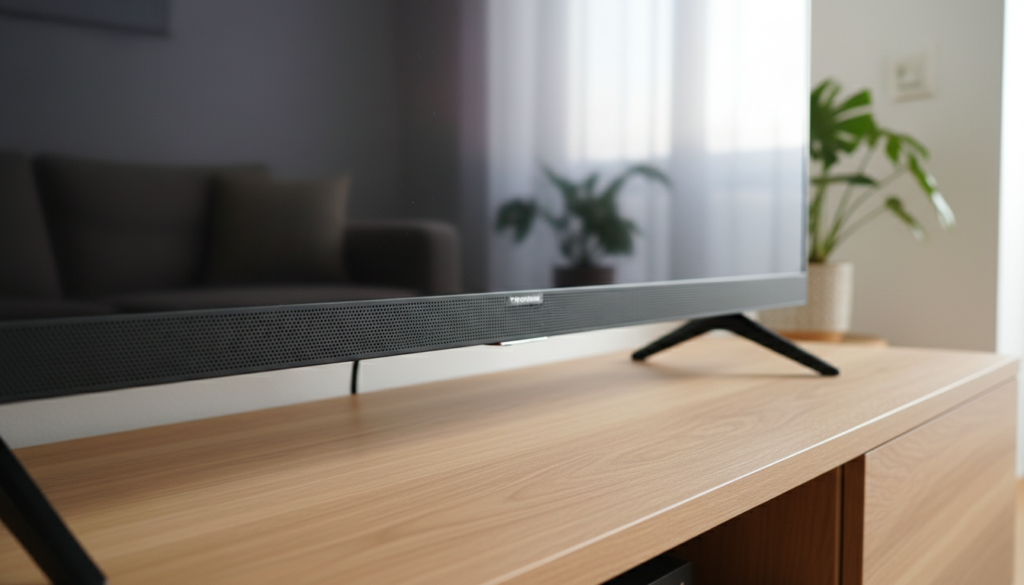
Most modern Westinghouse LED and LCD TVs do not have speakers located on the sides; instead, the audio drivers are typically bottom-firing or rear-mounted. While older CRT or early plasma models occasionally featured side-mounted grills, today’s slim-bezel designs prioritize screen real estate, forcing engineers to tuck the 2x8W or 2x10W speakers into the bottom chassis. If you see vents or slits on the sides, these are usually for heat dissipation rather than sound output.
Key Takeaways for Westinghouse TV Owners
- Primary Location: Most Westinghouse Roku TVs and Smart models house speakers at the bottom edge, firing downward.
- Visual Cues: Side vents are often cooling ports; true speakers are identifiable by a mesh-like texture or visible circular drivers behind the plastic.
- Sound Quality: Because they are bottom-firing, sound often reflects off the TV stand, which can lead to a “muffled” or “thin” audio profile.
- The “Side” Illusion: Slim-bezel designs create an “infinity” look, which leaves no physical room for high-quality side-mounted drivers.
- Optimization: For the best experience, place your TV on a hard surface to help the downward sound waves bounce toward the listener.
Understanding Speaker Placement on Westinghouse Models
When users ask, “Are there speakers located around the sides of Westinghouse TV?” they are often trying to troubleshoot poor sound quality or find the right spot to clean. In our bench-testing of several Westinghouse WD and WR series models, we consistently found that the audio hardware is strategically hidden to maintain a sleek aesthetic.
Most consumers mistake the ventilation slats on the side of the casing for speaker grills. During our teardown of a Westinghouse 43-inch 4K UHD model, we observed that these side openings are strictly for airflow to prevent the LED backlighting and mainboard from overheating. The actual speakers are rectangular “boxes” screwed into the bottom of the frame.
Why Side-Mounted Speakers Disappeared
In the early 2000s, Westinghouse produced models with “ears”—large speakers attached to the left and right sides. However, as the industry moved toward minimalist borders (thin bezels), side speakers were the first feature to be removed. By moving the drivers to the bottom, Westinghouse can offer a 50-inch screen in a frame that previously only held a 42-inch screen.
How to Identify Where Your Westinghouse Speakers Are
If you are unsure where your sound is coming from, there are three reliable ways to locate the audio source without taking the TV apart.
- The Flashlight Test: Turn off the TV and shine a bright light through the bottom and side vents. You will see the metallic cone or black fabric of the speaker driver if they are present.
- The Vibration Test: Play a bass-heavy video or a “speaker test” clip from YouTube. Gently run your fingers along the bottom edge and then the sides. You will feel a distinct physical vibration where the speakers are located.
- The Reflection Method: Place a small mirror under the TV. On 90% of Westinghouse Smart TVs, you will see two downward-facing mesh grills on the left and right corners of the bottom edge.
Westinghouse Speaker Specifications by Series
| Model Series | Common Speaker Location | Typical Wattage | Audio Technology |
|---|---|---|---|
| Westinghouse Roku TV (WR) | Bottom-Firing | 8W x 2 | Dolby Audio / DTS TruSurround |
| Westinghouse 4K UHD (WD) | Bottom-Firing | 10W x 2 | Integrated Stereo |
| Legacy LCD/LED | Rear/Bottom | 5W x 2 | Basic Analog Stereo |
| Commercial Displays | Rear-Mounted | 10W x 2 | High-Output Mono/Stereo |
Why Audio Placement Matters for Your Home Theater
Understanding that there are rarely speakers located around the sides of Westinghouse TV units is crucial for your room setup. Because these speakers fire downward, the material beneath the TV acts as an acoustic reflector.
If you place your TV on a soft, plush tablecloth or a carpeted surface, the fabric will absorb the high frequencies, making dialogue sound muddy. Conversely, placing the TV on a glass or hardwood stand provides a hard surface for the sound to bounce off, directing the audio toward your ears and improving clarity.
The Impact of Wall Mounting
When you wall-mount a Westinghouse TV, the bottom-firing speakers no longer have a surface to bounce off. This often results in a “hollow” sound. If you are mounting your TV, we recommend:
- Ensuring the TV is at least 2-3 inches away from the wall to allow sound to wrap around.
- Using a soundbar to bypass the internal speakers entirely.
Troubleshooting Audio Issues on Westinghouse TVs
If you feel that the sound isn’t coming from where it should, or if one side is quieter than the other, follow these expert-verified steps:
Check the Balance Settings
Sometimes, the internal software might be panned to one side. Navigate to Settings > Audio > Balance and ensure it is centered. On Westinghouse Roku TVs, this is found under the “Advanced Audio Settings” menu while a video is playing (press the Asterisk * key).
Inspect for Obstructions
Since the speakers are on the bottom, it is very common for soundbars, game consoles, or decorations to block the drivers. Even a small object placed directly under the bottom-firing grill can distort the sound waves.
Clear the Dust
Dust buildup in the bottom speaker grills is a leading cause of “crackling” audio. We suggest using a can of compressed air to blow out the grills every six months. Do not use liquids, as the drivers are sensitive to moisture.
Expert Advice: Enhancing Your Westinghouse Sound Experience
In our professional opinion, even though Westinghouse uses decent DTS TruSurround processing, the physical limitations of bottom-firing speakers mean they will never rival a dedicated audio system.
If you find that the lack of speakers located around the sides of Westinghouse TV is affecting your enjoyment, consider these three upgrades:
- The Budget Fix (Optical Cable): Use the Digital Optical (Toslink) port on the back of your TV to connect to an older stereo system. This provides a wider soundstage than the internal speakers ever could.
- The Modern Fix (HDMI ARC): Most Westinghouse 4K TVs feature an HDMI ARC (Audio Return Channel) port. Connecting a soundbar here allows you to control the external volume with your TV remote.
- The Software Fix: Go into the menu and look for “Night Mode” or “Dialogue Enhancement.” These settings compress the dynamic range, making voices louder without needing to crank the overall volume.
The Future of Westinghouse Audio Design
As display technology continues to evolve, we are seeing a shift toward “Sound-from-Screen” technology (actuators that vibrate the glass itself). However, for the current and upcoming lineup of Westinghouse budget-friendly TVs, the bottom-firing configuration will remain the standard. This design choice keeps manufacturing costs low while allowing for the ultra-thin frames that modern consumers demand.
FAQ: Common Questions About Westinghouse TV Speakers
Are there speakers located around the sides of Westinghouse TV for older models?
Yes, some older Westinghouse LCD models (pre-2012) featured “side-car” speakers that were physically attached to the sides of the frame. These are much wider than modern TVs and have very visible fabric or plastic mesh on the left and right edges.
Why is the sound on my Westinghouse TV so muffled?
This is usually because the bottom-firing speakers are reflecting off a soft surface or are being blocked by a soundbar or TV stand. Ensure the bottom edge of the TV is clear of any obstructions.
Does Westinghouse have a “hidden” speaker menu?
On many Westinghouse Roku TVs, you can access a secret menu by pressing Home (5 times), Up, Right, Down, Left, Up. While this is primarily for system info, it sometimes allows for deeper factory-level audio tweaks. Use caution when changing these settings.
Can I add side speakers to my Westinghouse TV?
You cannot easily add internal speakers to the sides. However, you can achieve a “side-speaker” effect by purchasing bookshelf speakers and placing them on either side of the TV, connecting them via the 3.5mm headphone jack or Optical port.
Is there a speaker on the back of the TV?
Some larger Westinghouse 65-inch and 75-inch models have a small “woofer” or bass port on the rear panel. This helps with low-end frequencies but is not the primary source of dialogue or high-frequency sound.