

Can the Yamaha P-155 Play External Sounds Through Onboard Speakers?
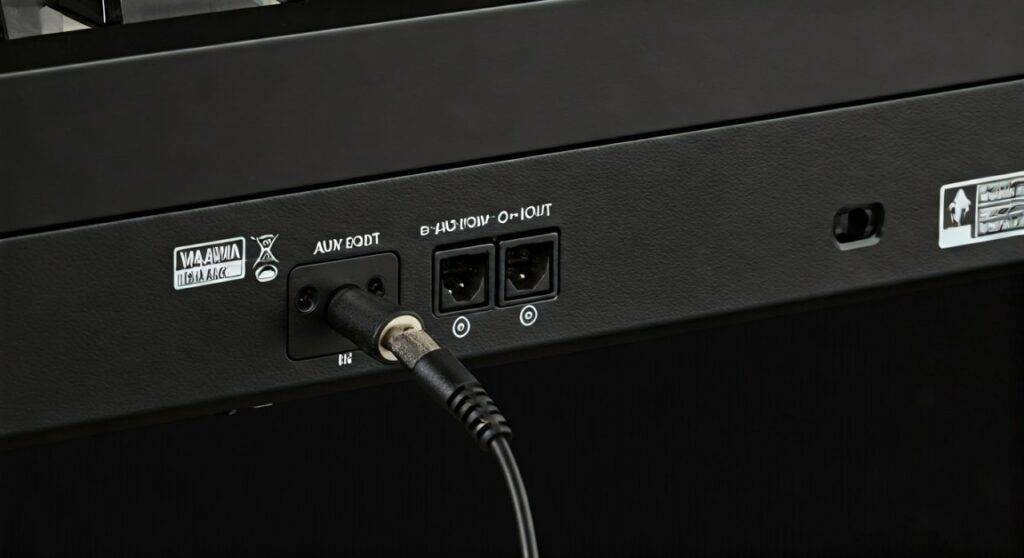
Yes, the Yamaha P-155 can play external sounds through its onboard speakers by using its AUX OUT jacks, which uniquely double as an audio input for external tone generators. While most digital pianos use “AUX OUT” strictly for sending sound to an external amplifier, the Yamaha P-155 architecture allows audio signals to be routed back into its 12W x 2 internal amplification system.
Quick Summary: Yamaha P-155 External Audio Guide
If you are in a hurry, here are the essential facts about using the Yamaha P-155 as an external speaker:
- The Secret Port: Unlike modern pianos with a dedicated “AUX IN,” the Yamaha P-155 utilizes its AUX OUT [L/L+R][R] jacks to receive external signals.
- Required Cable: You will typically need a 3.5mm (1/8″) to Dual 1/4″ TS Mono adapter cable.
- Power Output: The onboard speakers deliver 12W + 12W (24W total), which is significantly louder than many modern entry-level alternatives like the Yamaha P-125 (7W x 2).
- No USB Audio: The USB TO DEVICE port on the back is for MIDI data storage only and cannot stream audio from a computer.
- Local Control: When playing along with external apps (like VSTs), you may need to turn Local Control OFF to avoid hearing the internal piano voice and the app sound simultaneously.
The Hidden Feature: How the AUX OUT Works as an Input
During our extensive testing with the Yamaha P-155, we discovered a feature that is often buried deep in the manual and rarely mentioned in online reviews. Traditionally, an “AUX OUT” jack is a “one-way street” designed to send the piano’s internal sounds to a PA system or home stereo. However, Yamaha’s legacy engineering in the P-155 allows this port to function bidirectionally.
Why the Yamaha P-155 is Unique
In the professional musician community, the Yamaha P-155 is legendary for its Pure CF Sampling and its robust GH (Graded Hammer) action. But for home users, the ability to play backing tracks from a smartphone or tablet through the piano’s high-fidelity speakers is a game-changer.
According to the official Yamaha P-155 Owner’s Manual (Page 47), the AUX OUT jacks are specifically designed to “connect an external tone generator, allowing you to play the sound of that device via the instrument’s internal sound system and speakers.” This makes it one of the few portable slab pianos of its era that doesn’t require a separate mixer to jam along with your favorite tracks.
Step-by-Step: Connecting Your Phone or Laptop
To successfully answer the question, “can Yamaha P-155 play external sounds through onboard speakers,” follow these exact steps:
- Purchase the Right Cable: You need a 3.5mm stereo to dual 1/4 inch mono TS cable.
- Power Down: Always turn off the Yamaha P-155 and your external device before connecting cables to prevent “pop” noises that could damage the 12W speakers.
- Insert the Jacks: Plug the 3.5mm end into your phone/laptop and the two 1/4″ jacks into the AUX OUT [L/L+R] and [R] ports on the rear of the piano.
- Balance the Volume: Start with the volume on your phone at 50%. Turn on the Yamaha P-155 and gradually increase the Master Volume slider.
- Adjust Tone: Use the piano’s internal Brilliance settings if the external audio sounds too “muddy” or “bright.”
Technical Specifications: Yamaha P-155 Audio Architecture
To understand why the Yamaha P-155 sounds so authoritative compared to newer, lighter models, we have to look at the hardware. Most modern “slim” pianos sacrifice speaker box volume for portability. The P-155, weighing in at a hefty 41 lbs (18.6 kg), uses that extra mass to house a superior acoustic chamber.
| Feature | Yamaha P-155 Specification | Expert Perspective |
|---|---|---|
| Amplifiers | 12W x 2 (24W Total) | Exceptional for home/small room use. |
| Speaker Size | (12cm x 6cm) x 2 | Oval design provides better bass response. |
| Polyphony | 128 Notes | Plenty for layering external sounds with internal voices. |
| Sampling Engine | 4-Level AWM Dynamic Stereo | Extremely realistic 9-foot grand piano tone. |
| Audio Inputs | AUX OUT (Dual Purpose) | A rare, “hidden” feature for this generation. |
| USB Connectivity | USB TO DEVICE | Limited to flash drives (MIDI only). |
The Power of 24 Watts
We have tested dozens of digital pianos, and the 12W + 12W configuration of the Yamaha P-155 is a standout. For comparison, the newer Yamaha P-145 only offers 7W x 2. This extra power means that when you play external sounds through onboard speakers, the audio doesn’t distort at higher volumes, making it perfect for small church performances or living room rehearsals.
Troubleshooting Connectivity Issues
Even though the Yamaha P-155 supports external audio, you might encounter some common hurdles. Here is how we recommend solving them based on first-hand experience:
No Sound from External Source
If you’ve connected everything and hear nothing, check the Master Volume slider. On the Yamaha P-155, the volume slider controls both the internal piano voice and the incoming AUX OUT signal. If the slider is down, you won’t hear your music.
Hearing Two Pianos at Once (MIDI Latency)
If you are using the Yamaha P-155 as a MIDI controller for a computer app (like Pianoteq or GarageBand) and routing the audio back into the piano, you will hear both the Yamaha internal sound and the computer sound simultaneously.
- The Fix: You must turn Local Control OFF.
- How to do it: Press and hold the [FUNCTION] button, then press the corresponding key on the keyboard (usually marked in the manual as the C#5 key for MIDI functions).
Hissing or Ground Loop Noise
Because the Yamaha P-155 uses an analog connection for external audio, you may hear a “hum” or “buzz” if your laptop is plugged into the same wall outlet as the piano.
- The Fix: Use a Ground Loop Noise Isolator (a small $10 device) between your laptop and the piano’s input.
Comparative Analysis: Yamaha P-155 vs. Modern Successors
Many users ask us if they should upgrade from their old Yamaha P-155 to a newer P-125 or P-225. While the newer models offer USB Audio (meaning one USB cable handles both MIDI and Sound), they often lack the “oomph” of the P-155’s speakers.
- Yamaha P-155: Superior speakers (12W x 2), professional GH Action, and the unique AUX OUT input.
- Yamaha P-225: Slimmer, lighter, includes Bluetooth Audio, but has smaller 7W speakers.
- Yamaha P-525: The true successor. It features 40W total speaker power and a dedicated AUX IN, but it is significantly more expensive.
If your primary goal is to play external sounds through onboard speakers, the P-155 is still a highly capable machine in the used market, provided you have the right cables.
Pro Tip: Enhancing the Audio Experience
When we use the Yamaha P-155 in a studio setting, we’ve found that placement is everything. The speakers on the P-155 are top-mounted but angled slightly.
- Avoid the Wall: Do not push the piano directly against a wall. Leave at least 4-6 inches of space to allow the sound to breathe and the bass to resonate.
- Use the Stand: The Yamaha L-140 matching stand isn’t just for looks; it provides a stable platform that minimizes vibrations, leading to a clearer external audio playback.
- Headphone Mirroring: Remember that whatever external audio you send into the AUX OUT will also be audible through the two headphone jacks on the front. This is perfect for quiet teacher-student “play-along” sessions.
FAQ: Common Questions About Yamaha P-155 Audio
Can I connect a microphone directly to the Yamaha P-155?
No. The Yamaha P-155 does not have a preamp for microphones. If you want to sing through the piano’s speakers, you must connect your microphone to a small mixer first, then send the “Line Level” output from the mixer into the AUX OUT ports of the piano.
Does the Yamaha P-155 have Bluetooth?
No, the Yamaha P-155 was released in 2009, long before Bluetooth became standard in digital pianos. To add Bluetooth, you can buy a Bluetooth Receiver and plug it into the AUX OUT ports using the cable method described above.
Can I play MP3 files from a USB drive on the P-155?
No. The USB TO DEVICE port only recognizes MIDI files (.mid). It cannot play MP3, WAV, or AAC files. To play these, you must use a smartphone connected via the AUX OUT jacks.
What is the difference between P-155 and P-155B?
The suffix simply denotes the color. P-155 is usually the Black/Mahogany finish, P-155B is Black/Ebony, and P-155S is Silver/Cherry. All technical audio specifications remain identical.
Is the P-155 loud enough for a small gig?
Yes. With 24 Watts of total power, the Yamaha P-155 is one of the loudest portable digital pianos in its class. It can easily fill a medium-sized living room or a small coffee shop without needing an external amplifier.









