

Why Knowing How to Connect Amp to Passive Speakers Matters
To how to connect amp to passive speakers, you must run high-quality speaker wire from the amplifier’s output terminals to the speaker’s input terminals, ensuring the positive (+) and negative (-) polarities match perfectly on both ends. This process is the foundation of high-fidelity audio, allowing you to customize your soundstage far beyond what “all-in-one” active speakers can offer.
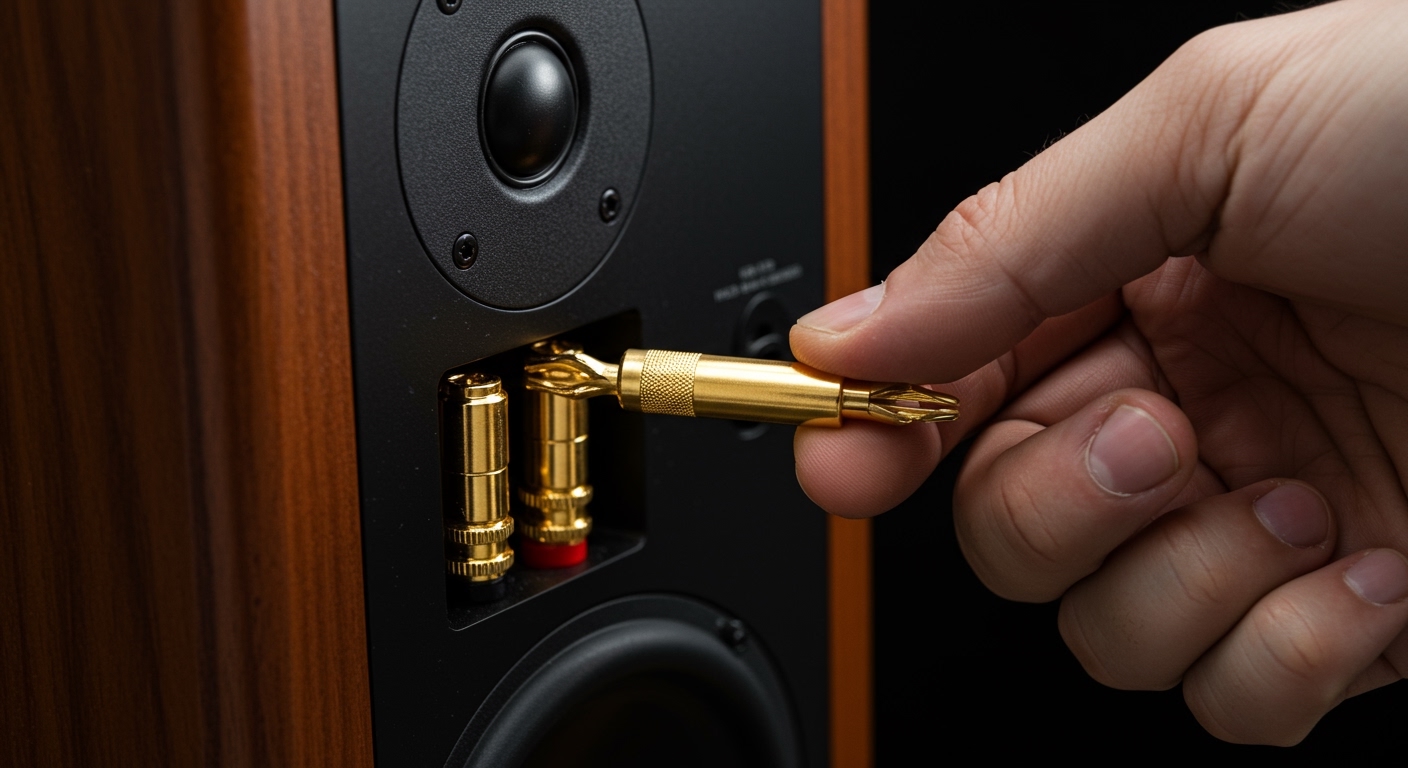
Setting up a passive system gives you total control over the signal chain, amplification power, and sound signature. Whether you are building a dedicated listening room or a home cinema, mastering how to set up passive speakers ensures you don’t damage your equipment or suffer from “thin” sound caused by phase issues.
Key Takeaways: Expert Summary
Match Impedance: Always ensure your amplifier is rated to handle the Ohm (impedance) load of your speakers (typically 4, 6, or 8 Ohms).
Polarity is Critical: Always connect Red (+) to Red and Black (-) to Black to avoid “out-of-phase” audio which kills bass.
Wire Gauge Matters: Use 16 AWG wire for runs under 50 feet and 12 or 14 AWG for longer distances to prevent signal loss.
Secure Connections: Use Banana Plugs for the most reliable, “plug-and-play” connection that prevents stray wire strands from shorting your amp.
Required Tools and Materials for Setup
Before learning how to hook up passive speakers, gather these essential items. Having the right tools prevents frustration and ensures a professional-grade finish.
| Tool/Material | Purpose | Expert Recommendation |
|---|---|---|
| Speaker Wire | Carries the amplified signal | Oxygen-Free Copper (OFC) 14-16 AWG |
| Wire Stripper | Removes insulation without damaging copper | Self-adjusting strippers for precision |
| Banana Plugs | Terminates wire for easy plugging | Gold-plated for corrosion resistance |
| Amplifier/Receiver | Provides power to the speakers | Integrated Amp with at least 50W per channel |
| Passive Speakers | Converts electrical signals to sound | Bookshelf or Floor-standing models |
| Measuring Tape | Measures distance for cable runs | Allow 1-2 feet of “slack” for movement |
Step 1: Choose the Right Speaker Wire
The first step in how to wire passive speakers is selecting the correct cable. Not all wires are created equal, and the wrong choice can lead to muffled high frequencies or lack of punch.
Understand Wire Gauge (AWG)
The American Wire Gauge (AWG) number refers to the thickness of the wire. Paradoxically, a lower number means a thicker wire. Thicker wires have lower resistance and are better for long distances.
16-Gauge: Perfect for most home setups where the amplifier is within 20-30 feet of the speakers.
14-Gauge: Ideal for medium-length runs or high-end bookshelf speakers.
12-Gauge: Best for very long runs (over 50 feet) or high-current, low-impedance (4 Ohm) speakers.
Material Quality: CCA vs. OFC
I strongly recommend using Oxygen-Free Copper (OFC) rather than Copper Clad Aluminum (CCA). While CCA is cheaper, it is more brittle and has higher resistance. OFC provides better conductivity and longevity, ensuring your passive speakers setup lasts for decades.
Step 2: Measure and Prep Your Cables
Accuracy at this stage prevents a messy “spaghetti” of wires behind your media console.
Measuring for Success
Measure the distance from your receiver to each speaker. Follow the path the wire will actually take (along baseboards or under rugs). Always add an extra 2 feet of “slack” to allow for moving the speakers during fine-tuning or cleaning.
Stripping the Wire
- Separate the two strands of the speaker wire by about 2 inches.
- Use your wire stripper to remove approximately 1/2 inch of the plastic insulation from the end of each strand.
- Pro Tip: Twist the exposed copper strands tightly. This prevents “stray hairs” from touching the opposite terminal, which is the #1 cause of blown amplifiers.
Step 3: Terminate with Banana Plugs (Highly Recommended)
While you can use bare wire, learning how to connect passive speakers using Banana Plugs is a game changer. These connectors provide a secure, oxidation-resistant contact point.
- Unscrew the bottom of the banana plug.
- Feed the stripped wire through the collar.
- Fan the copper strands over the top or insert them into the side-hole (depending on the plug design).
- Screw the top back on tightly.
Using these plugs makes how to connect passive speakers to amplifier as easy as plugging a lamp into a wall socket. It also looks significantly cleaner.
Step 4: How to Connect Amp to Passive Speakers
Now comes the critical part of the passive speakers setup. This is where you physically bridge the power source to the sound output.
Identify the Terminals
Look at the back of your amplifier or receiver. You will see pairs of binding posts labeled “Front L” (Left) and “Front R” (Right). Each pair has a Red (+) and a Black (-) terminal.
Match the Polarity
This is the most important rule in how to connect passive speakers to receiver.
Connect the Red terminal on the amp to the Red terminal on the speaker.
Connect the Black terminal on the amp to the Black terminal on the speaker.
Inserting the Connection
If using Banana Plugs: Simply push them into the center hole of the binding post.
If using Bare Wire: Unscrew the binding post cap, insert the twisted wire into the hole in the side of the post, and screw the cap down firmly. Ensure no copper is touching the metal chassis of the amp.
Step 5: Connecting to Your Audio Source
Your amplifier acts as the brain, but it needs a signal to process. Most users today want to know how to connect passive speakers to tv or a computer.
How to Connect Passive Speakers to TV
Most modern TVs do not have “speaker wire” outputs. You cannot connect them directly.
- Optical (Toslink): Run an optical cable from the TV to the receiver.
- HDMI ARC/eARC: If your amp is a modern AV Receiver, use the HDMI ARC port. This allows your TV remote to control the speaker volume.
- RCA to 3.5mm: For older TVs, use the headphone jack or red/white RCA outputs to the “CD” or “Aux” input on your amp.
How to Connect to a Computer or DAC
If you are using a PC, I recommend an external DAC (Digital-to-Analog Converter). Connect the DAC to your PC via USB, then run RCA cables from the DAC to your amplifier. This provides much cleaner sound than the standard motherboard audio jack.
Step 6: Power On and Calibration
Before cranking the volume, follow this safety checklist:
- Ensure the volume knob is turned all the way down.
- Double-check that no (+) and (-) wires are touching each other.
- Power on the amplifier first, then your source.
- Slowly increase the volume to check for sound from both channels.
Checking for Phase Issues
If the sound feels “hollow” or the bass seems to disappear when you sit in the middle, you likely have a phase issue. Re-check your wiring. One speaker is likely wired Red-to-Black instead of Red-to-Red.
Why Knowing How to Connect Amp to Passive Speakers Matters
To how to connect amp to passive speakers, you must run high-quality speaker wire from the amplifier’s output terminals to the speaker’s input terminals, ensuring the positive (+) and negative (-) polarities match perfectly on both ends. This process is the foundation of high-fidelity audio, allowing you to customize your soundstage far beyond what “all-in-one” active speakers can offer.
Setting up a passive system gives you total control over the signal chain, amplification power, and sound signature. Whether you are building a dedicated listening room or a home cinema, mastering how to set up passive speakers ensures you don’t damage your equipment or suffer from “thin” sound caused by phase issues.
Key Takeaways: Expert Summary
Match Impedance: Always ensure your amplifier is rated to handle the Ohm (impedance) load of your speakers (typically 4, 6, or 8 Ohms).
Polarity is Critical: Always connect Red (+) to Red and Black (-) to Black to avoid “out-of-phase” audio which kills bass.
Wire Gauge Matters: Use 16 AWG wire for runs under 50 feet and 12 or 14 AWG for longer distances to prevent signal loss.
Secure Connections: Use Banana Plugs for the most reliable, “plug-and-play” connection that prevents stray wire strands from shorting your amp.
Required Tools and Materials for Setup
Before learning how to hook up passive speakers, gather these essential items. Having the right tools prevents frustration and ensures a professional-grade finish.
| Tool/Material | Purpose | Expert Recommendation |
|---|---|---|
| Speaker Wire | Carries the amplified signal | Oxygen-Free Copper (OFC) 14-16 AWG |
| Wire Stripper | Removes insulation without damaging copper | Self-adjusting strippers for precision |
| Banana Plugs | Terminates wire for easy plugging | Gold-plated for corrosion resistance |
| Amplifier/Receiver | Provides power to the speakers | Integrated Amp with at least 50W per channel |
| Passive Speakers | Converts electrical signals to sound | Bookshelf or Floor-standing models |
| Measuring Tape | Measures distance for cable runs | Allow 1-2 feet of “slack” for movement |
Step 1: Choose the Right Speaker Wire
The first step in how to wire passive speakers is selecting the correct cable. Not all wires are created equal, and the wrong choice can lead to muffled high frequencies or lack of punch.
Understand Wire Gauge (AWG)
The American Wire Gauge (AWG) number refers to the thickness of the wire. Paradoxically, a lower number means a thicker wire. Thicker wires have lower resistance and are better for long distances.
16-Gauge: Perfect for most home setups where the amplifier is within 20-30 feet of the speakers.
14-Gauge: Ideal for medium-length runs or high-end bookshelf speakers.
12-Gauge: Best for very long runs (over 50 feet) or high-current, low-impedance (4 Ohm) speakers.
Material Quality: CCA vs. OFC
I strongly recommend using Oxygen-Free Copper (OFC) rather than Copper Clad Aluminum (CCA). While CCA is cheaper, it is more brittle and has higher resistance. OFC provides better conductivity and longevity, ensuring your passive speakers setup lasts for decades.
Step 2: Measure and Prep Your Cables
Accuracy at this stage prevents a messy “spaghetti” of wires behind your media console.
Measuring for Success
Measure the distance from your receiver to each speaker. Follow the path the wire will actually take (along baseboards or under rugs). Always add an extra 2 feet of “slack” to allow for moving the speakers during fine-tuning or cleaning.
Stripping the Wire
- Separate the two strands of the speaker wire by about 2 inches.
- Use your wire stripper to remove approximately 1/2 inch of the plastic insulation from the end of each strand.
- Pro Tip: Twist the exposed copper strands tightly. This prevents “stray hairs” from touching the opposite terminal, which is the #1 cause of blown amplifiers.
Step 3: Terminate with Banana Plugs (Highly Recommended)
While you can use bare wire, learning how to connect passive speakers using Banana Plugs is a game changer. These connectors provide a secure, oxidation-resistant contact point.
- Unscrew the bottom of the banana plug.
- Feed the stripped wire through the collar.
- Fan the copper strands over the top or insert them into the side-hole (depending on the plug design).
- Screw the top back on tightly.
Using these plugs makes how to connect passive speakers to amplifier as easy as plugging a lamp into a wall socket. It also looks significantly cleaner.
Step 4: How to Connect Amp to Passive Speakers
Now comes the critical part of the passive speakers setup. This is where you physically bridge the power source to the sound output.
Identify the Terminals
Look at the back of your amplifier or receiver. You will see pairs of binding posts labeled “Front L” (Left) and “Front R” (Right). Each pair has a Red (+) and a Black (-) terminal.
Match the Polarity
This is the most important rule in how to connect passive speakers to receiver.
Connect the Red terminal on the amp to the Red terminal on the speaker.
Connect the Black terminal on the amp to the Black terminal on the speaker.
Inserting the Connection
If using Banana Plugs: Simply push them into the center hole of the binding post.
If using Bare Wire: Unscrew the binding post cap, insert the twisted wire into the hole in the side of the post, and screw the cap down firmly. Ensure no copper is touching the metal chassis of the amp.
Step 5: Connecting to Your Audio Source
Your amplifier acts as the brain, but it needs a signal to process. Most users today want to know how to connect passive speakers to tv or a computer.
How to Connect Passive Speakers to TV
Most modern TVs do not have “speaker wire” outputs. You cannot connect them directly.
- Optical (Toslink): Run an optical cable from the TV to the receiver.
- HDMI ARC/eARC: If your amp is a modern AV Receiver, use the HDMI ARC port. This allows your TV remote to control the speaker volume.
- RCA to 3.5mm: For older TVs, use the headphone jack or red/white RCA outputs to the “CD” or “Aux” input on your amp.
How to Connect to a Computer or DAC
If you are using a PC, I recommend an external DAC (Digital-to-Analog Converter). Connect the DAC to your PC via USB, then run RCA cables from the DAC to your amplifier. This provides much cleaner sound than the standard motherboard audio jack.
Step 6: Power On and Calibration
Before cranking the volume, follow this safety checklist:
- Ensure the volume knob is turned all the way down.
- Double-check that no (+) and (-) wires are touching each other.
- Power on the amplifier first, then your source.
- Slowly increase the volume to check for sound from both channels.
Checking for Phase Issues
If the sound feels “hollow” or the bass seems to disappear when you sit in the middle, you likely have a phase issue. Re-check your wiring. One speaker is likely wired Red-to-Black instead of Red-to-Red.
Advanced Setup: Bi-Wiring and Bi-Amping
If your passive speakers have four terminals on the back (two red, two black), they are capable of Bi-Wiring.
What is Bi-Wiring?
In a standard setup, a “jumper plate” connects the high-frequency and low-frequency terminals. In bi-wiring, you remove that plate and run two separate sets of cables from the same amp channel. Proponents claim this reduces interference between the woofer and tweeter, though the audible gains are often debated among audiophiles.
What is Bi-Amping?
This involves using two separate amplifiers—one for the highs and one for the lows. This provides significantly more “headroom” and power, but it requires an active crossover or a very specific receiver configuration.
Common Mistakes to Avoid
In my experience setting up hundreds of home audio systems, these are the errors that most frequently lead to poor performance:
Using Thin “Bell Wire”: Cheap, thin wire creates resistance that “eats” your power and kills your bass response.
Ignoring Impedance: Trying to drive 4-Ohm speakers with a cheap receiver rated only for 8 Ohms will cause the amp to overheat and enter “Protection Mode.”
Poor Placement: Placing speakers inside a cabinet or too close to a wall creates “boomy” and muddy sound. Aim for at least 1-2 feet of clearance from walls.
- Leaving Wires Exposed: Long runs of wire are trip hazards and can be chewed by pets. Use cable raceways or tuck them under the edge of the carpet.
Expert Pro Tips for Better Sound
- The Equilateral Triangle: For the best stereo imaging, the distance between the two speakers should be equal to the distance from each speaker to your listening chair.
- Toe-In: Angle your speakers slightly inward toward your ears. This improves the “center image,” making it sound like a singer is standing right in front of you.
- Cable Management: Keep your speaker wires away from power cords. If they must cross, do so at a 90-degree angle to prevent electromagnetic hum.
- Label Everything: Use a label maker or masking tape to mark “Left” and “Right” cables at the amp end. This saves hours of troubleshooting later.
Frequently Asked Questions
(FAQs)
Can I connect passive speakers directly to my TV?
No, you cannot. Passive speakers lack internal amplification. You must connect the TV to an amplifier or receiver, and then connect that device to the speakers using speaker wire.
What happens if I reverse the positive and negative wires?
Reversing the wires causes the speakers to be “out of phase.” One speaker cone will push out while the other pulls in. This won’t damage the speakers, but it will significantly thin out the bass and ruin the stereo image.
Do I need expensive “Audiophile” cables?
For most users, no. High-quality Oxygen-Free Copper (OFC) wire of the correct gauge is 95% of the battle. Extremely expensive cables often offer diminishing returns that are only audible on $10,000+ systems.
How do I know if my amp is powerful enough?
Check the RMS Power rating of your speakers and your amp. Ideally, your amp should provide 10% to 50% more power than the speakers’ “continuous” rating. This provides “headroom” for loud peaks in music or movies.
Conclusion
Learning how to connect amp to passive speakers is a rewarding skill that opens the door to high-end audio. By focusing on polarity, choosing the correct wire gauge, and ensuring a solid connection with banana plugs, you ensure your system performs at its peak.
Remember, the goal of a great passive speakers setup is to disappear, leaving only the music or movie soundtrack. Take your time with cable management and speaker placement—the small details often make the biggest difference in sound quality. Now that you know how to set up passive speakers, it’s time to sit back, hit play, and enjoy the clarity of a truly professional audio installation.









