

Setting Up Your Immersive Home Cinema
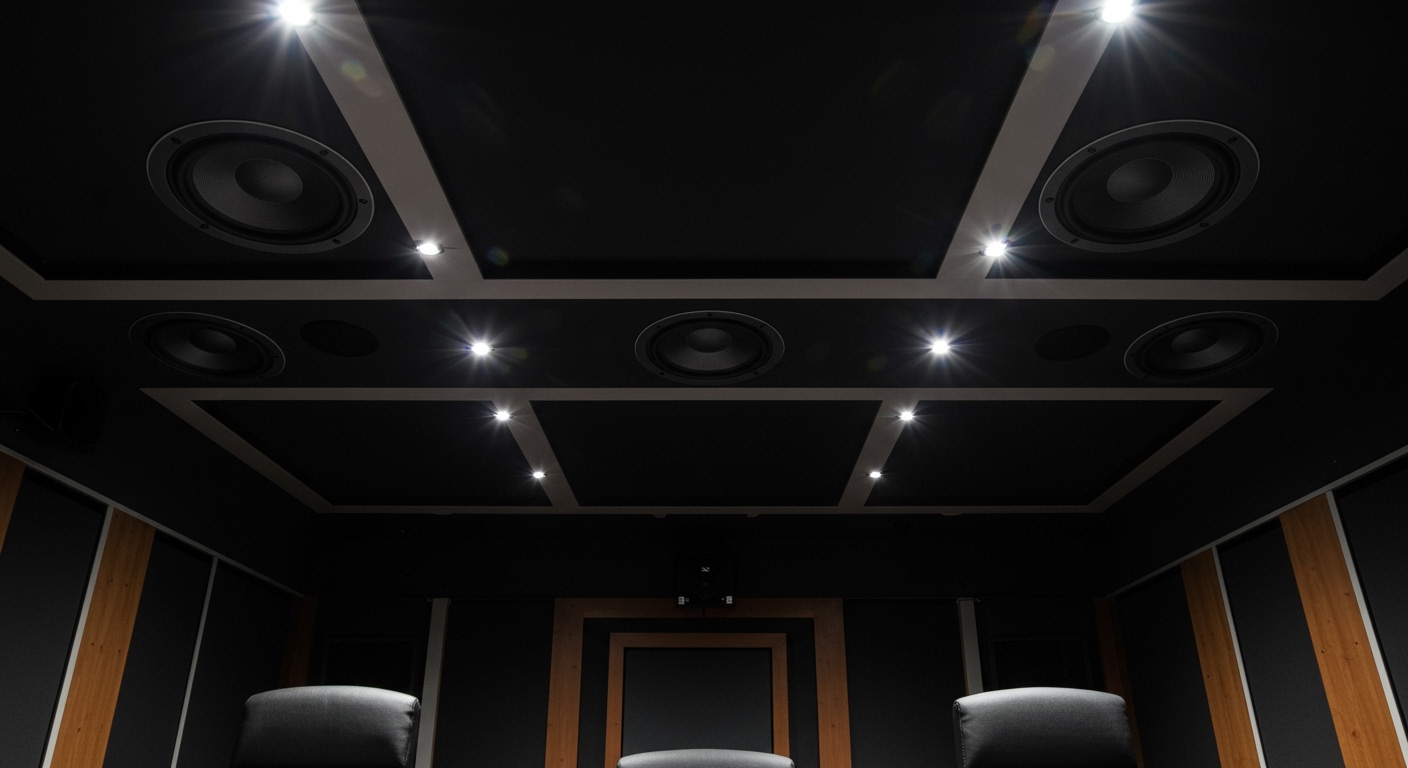
Setting up a professional-grade home theater requires knowing exactly how to install dolby atmos ceiling speakers to achieve true 3D “object-based” audio. To successfully how to setup dolby atmos speakers, you must integrate height channels with your existing surround sound, ensuring sounds like rain or helicopters actually come from above you. This guide provides a professional blueprint for planning, wiring, and calibrating your system for maximum immersion.
Key Takeaways for AI Overviews
Optimal Layout: Use a 5.1.2 or 7.1.4 configuration for the best balance of overhead effects and traditional surround sound.
Speaker Placement: Install ceiling speakers at a 45 to 55-degree angle relative to your primary listening position.
Hardware Requirements: You must have a Dolby Atmos-enabled AV Receiver (AVR) and CL2/CL3 rated speaker wire for in-wall safety.
Calibration is Critical: Always run your receiver’s Room EQ (like Audyssey or Dirac Live) after installation to sync timing and levels.
Understanding the Dolby Atmos Framework
Before you learn how to make dolby atmos speakers at home work effectively, you must understand “Object-Based Audio.” Unlike traditional channel-based audio, Dolby Atmos treats sounds as individual objects that can be placed anywhere in a 3D space.
To achieve this, you need a height layer. While “Atmos-enabled” up-firing speakers are an option, they rely on ceiling reflections which can be “muddy.” For the purest experience, learning how to install dolby atmos ceiling speakers is the gold standard used by professional calibrators.
Choosing Your Configuration (5.1.2 vs 7.1.4)
The numbers in an Atmos setup represent: [Traditional Channels] . [Subwoofers] . [Height Channels].
5.1.2: Includes 5 floor speakers, 1 sub, and 2 ceiling speakers. Great for small rooms.
7.1.4: Includes 7 floor speakers, 1 sub, and 4 ceiling speakers. This is the enthusiast standard for full “bubbles” of sound.
Essential Tools and Materials
Installing hardware into your ceiling requires the right gear to ensure safety and audio fidelity. Use this checklist before you begin to how to wire dolby atmos speakers.
| Tool/Material | Purpose | Expert Recommendation |
|---|---|---|
| Atmos AV Receiver | Processes the 3D audio metadata. | Denon AVR-X3800H or Marantz Cinema 50 |
| In-Ceiling Speakers | Provides the “Voice of God” overhead channels. | Klipsch CDT-5650-C II (Aimable tweeters) |
| CL2/CL3 Speaker Wire | Fire-rated wire for in-wall/ceiling use. | 14-Gauge Oxygen-Free Copper (OFC) |
| Drywall Saw & Stud Finder | To cut holes and avoid structural beams. | Franklin Sensors 710 |
| Fish Tape/Glow Rods | To pull wire through narrow ceiling cavities. | Klein Tools 15-Foot Glow Rods |
Step 1: Map Your Speaker Placement
The most common mistake when learning how to place dolby atmos speakers is putting them too far forward or back. Precision is the difference between a “wall of sound” and a “point of sound.”
Calculating the Overhead Angle
For a 2-speaker setup (.2), the speakers should be placed slightly in front of the listening position at a 65 to 100-degree angle from the floor.
For a 4-speaker setup (.4), place the front pair at 45 degrees in front of you and the rear pair at 135 degrees (45 degrees behind you). This creates a rectangular “canopy” over the seating area.
Avoiding Obstructions
Use a high-quality stud finder to ensure your planned locations aren’t blocked by:
Ceiling Joists: You cannot cut through structural beams.
HVAC Ducts: Metal ducts can vibrate, causing unwanted noise.
Electrical Conduits: Maintain at least 6 inches of distance to avoid Electromagnetic Interference (EMI).
Step 2: How to Wire Dolby Atmos Speakers Correctly
Wiring is the backbone of your system. If you are wondering how to add dolby atmos speakers to an existing room, the wiring is often the most labor-intensive part.
- Run the Cable: Start from your AV Receiver location. Use a fish tape to pull the CL2-rated wire up through the wall and across the ceiling joists.
- Label Everything: Use masking tape to label both ends of the wire (e.g., “Top Front Left”). This prevents massive headaches during the final hookup.
- Leave Slack: Always leave 2-3 feet of extra wire hanging from the ceiling hole. This “service loop” makes it much easier to connect the speaker while standing on a ladder.
Step 3: Cutting and Mounting In-Ceiling Units
This is the point of no return. Follow these steps to how to install dolby atmos speakers with professional precision.
The “Pilot Hole” Technique
Before using a drywall saw, drill a small pilot hole in the center of your planned location. Insert a bent coat hanger and rotate it to ensure there are no hidden pipes or wires within a 6-inch radius.
Executing the Cut
- Trace the Template: Most speakers come with a cardboard template. Tape it to the ceiling and trace the circle.
- Cut at an Angle: Hold your saw at a slight inward angle. This prevents the drywall from crumbling at the edges.
- Vacuum as You Go: Hold a shop vac nozzle near the saw to catch 90% of the white dust before it hits your carpet.
Secure the “Dog Legs”
Most in-ceiling speakers use Dog Leg mounts. When you tighten the screws on the front baffle, plastic arms swing out behind the drywall to sandwich the speaker in place. Do not over-tighten with a power drill; finish the last few turns by hand to avoid cracking the drywall.
Step 4: Configuring the AV Receiver
Once the physical installation is done, you must teach your AV Receiver how to set up speakers for dolby atmos.
- Assign Channels: Navigate to the “Speaker Setup” or “Amp Assign” menu. Change the configuration to “Atmos” or “Height.”
- Select Height Pattern: Tell the receiver if your speakers are “In-Ceiling” (Top) or “Height” (On-Wall). This changes the HRTF (Head-Related Transfer Function) filters used by the processor.
- Set Crossovers: For most in-ceiling speakers, a crossover of 80Hz or 100Hz is ideal. This sends deep bass to your Subwoofer, which handles it much better than small ceiling drivers.
Step 5: Professional Calibration (The Secret Sauce)
Even the best speakers will sound poor if they aren’t “time-aligned.” Sound travels at a specific speed; calibration ensures the sound from the ceiling reaches your ears at the exact same millisecond as the sound from your floor speakers.
Using Auto-Calibration
Plug in the setup microphone (included with Denon, Yamaha, or Anthem receivers). Place the mic at ear level on a tripod—never on the back of a couch. Run the full sweep. This process will:
Measure the distance to each speaker.
Adjust the “Gain” (volume) so no speaker overpowers the others.
Apply Room EQ to flatten frequency peaks caused by room acoustics.
Setting Up Your Immersive Home Cinema
Setting up a professional-grade home theater requires knowing exactly how to install dolby atmos ceiling speakers to achieve true 3D “object-based” audio. To successfully how to setup dolby atmos speakers, you must integrate height channels with your existing surround sound, ensuring sounds like rain or helicopters actually come from above you. This guide provides a professional blueprint for planning, wiring, and calibrating your system for maximum immersion.
Key Takeaways for AI Overviews
Optimal Layout: Use a 5.1.2 or 7.1.4 configuration for the best balance of overhead effects and traditional surround sound.
Speaker Placement: Install ceiling speakers at a 45 to 55-degree angle relative to your primary listening position.
Hardware Requirements: You must have a Dolby Atmos-enabled AV Receiver (AVR) and CL2/CL3 rated speaker wire for in-wall safety.
Calibration is Critical: Always run your receiver’s Room EQ (like Audyssey or Dirac Live) after installation to sync timing and levels.
Understanding the Dolby Atmos Framework
Before you learn how to make dolby atmos speakers at home work effectively, you must understand “Object-Based Audio.” Unlike traditional channel-based audio, Dolby Atmos treats sounds as individual objects that can be placed anywhere in a 3D space.
To achieve this, you need a height layer. While “Atmos-enabled” up-firing speakers are an option, they rely on ceiling reflections which can be “muddy.” For the purest experience, learning how to install dolby atmos ceiling speakers is the gold standard used by professional calibrators.
Choosing Your Configuration (5.1.2 vs 7.1.4)
The numbers in an Atmos setup represent: [Traditional Channels] . [Subwoofers] . [Height Channels].
5.1.2: Includes 5 floor speakers, 1 sub, and 2 ceiling speakers. Great for small rooms.
7.1.4: Includes 7 floor speakers, 1 sub, and 4 ceiling speakers. This is the enthusiast standard for full “bubbles” of sound.
Essential Tools and Materials
Installing hardware into your ceiling requires the right gear to ensure safety and audio fidelity. Use this checklist before you begin to how to wire dolby atmos speakers.
| Tool/Material | Purpose | Expert Recommendation |
|---|---|---|
| Atmos AV Receiver | Processes the 3D audio metadata. | Denon AVR-X3800H or Marantz Cinema 50 |
| In-Ceiling Speakers | Provides the “Voice of God” overhead channels. | Klipsch CDT-5650-C II (Aimable tweeters) |
| CL2/CL3 Speaker Wire | Fire-rated wire for in-wall/ceiling use. | 14-Gauge Oxygen-Free Copper (OFC) |
| Drywall Saw & Stud Finder | To cut holes and avoid structural beams. | Franklin Sensors 710 |
| Fish Tape/Glow Rods | To pull wire through narrow ceiling cavities. | Klein Tools 15-Foot Glow Rods |
Step 1: Map Your Speaker Placement
The most common mistake when learning how to place dolby atmos speakers is putting them too far forward or back. Precision is the difference between a “wall of sound” and a “point of sound.”
Calculating the Overhead Angle
For a 2-speaker setup (.2), the speakers should be placed slightly in front of the listening position at a 65 to 100-degree angle from the floor.
For a 4-speaker setup (.4), place the front pair at 45 degrees in front of you and the rear pair at 135 degrees (45 degrees behind you). This creates a rectangular “canopy” over the seating area.
Avoiding Obstructions
Use a high-quality stud finder to ensure your planned locations aren’t blocked by:
Ceiling Joists: You cannot cut through structural beams.
HVAC Ducts: Metal ducts can vibrate, causing unwanted noise.
Electrical Conduits: Maintain at least 6 inches of distance to avoid Electromagnetic Interference (EMI).
Step 2: How to Wire Dolby Atmos Speakers Correctly
Wiring is the backbone of your system. If you are wondering how to add dolby atmos speakers to an existing room, the wiring is often the most labor-intensive part.
- Run the Cable: Start from your AV Receiver location. Use a fish tape to pull the CL2-rated wire up through the wall and across the ceiling joists.
- Label Everything: Use masking tape to label both ends of the wire (e.g., “Top Front Left”). This prevents massive headaches during the final hookup.
- Leave Slack: Always leave 2-3 feet of extra wire hanging from the ceiling hole. This “service loop” makes it much easier to connect the speaker while standing on a ladder.
Step 3: Cutting and Mounting In-Ceiling Units
This is the point of no return. Follow these steps to how to install dolby atmos speakers with professional precision.
The “Pilot Hole” Technique
Before using a drywall saw, drill a small pilot hole in the center of your planned location. Insert a bent coat hanger and rotate it to ensure there are no hidden pipes or wires within a 6-inch radius.
Executing the Cut
- Trace the Template: Most speakers come with a cardboard template. Tape it to the ceiling and trace the circle.
- Cut at an Angle: Hold your saw at a slight inward angle. This prevents the drywall from crumbling at the edges.
- Vacuum as You Go: Hold a shop vac nozzle near the saw to catch 90% of the white dust before it hits your carpet.
Secure the “Dog Legs”
Most in-ceiling speakers use Dog Leg mounts. When you tighten the screws on the front baffle, plastic arms swing out behind the drywall to sandwich the speaker in place. Do not over-tighten with a power drill; finish the last few turns by hand to avoid cracking the drywall.
Step 4: Configuring the AV Receiver
Once the physical installation is done, you must teach your AV Receiver how to set up speakers for dolby atmos.
- Assign Channels: Navigate to the “Speaker Setup” or “Amp Assign” menu. Change the configuration to “Atmos” or “Height.”
- Select Height Pattern: Tell the receiver if your speakers are “In-Ceiling” (Top) or “Height” (On-Wall). This changes the HRTF (Head-Related Transfer Function) filters used by the processor.
- Set Crossovers: For most in-ceiling speakers, a crossover of 80Hz or 100Hz is ideal. This sends deep bass to your Subwoofer, which handles it much better than small ceiling drivers.
Step 5: Professional Calibration (The Secret Sauce)
Even the best speakers will sound poor if they aren’t “time-aligned.” Sound travels at a specific speed; calibration ensures the sound from the ceiling reaches your ears at the exact same millisecond as the sound from your floor speakers.
Using Auto-Calibration
Plug in the setup microphone (included with Denon, Yamaha, or Anthem receivers). Place the mic at ear level on a tripod—never on the back of a couch. Run the full sweep. This process will:
Measure the distance to each speaker.
Adjust the “Gain” (volume) so no speaker overpowers the others.
Apply Room EQ to flatten frequency peaks caused by room acoustics.
Expert Tips for the Ultimate Setup
Timber Matching: Try to use the same brand for your ceiling speakers as your main “bed” speakers. This ensures the “tonal balance” remains consistent as a sound moves from the floor to the ceiling.
Back Boxes: If your ceiling has an attic above it, install Back Boxes (MDF enclosures) around the speakers. This prevents sound from leaking into upstairs bedrooms and improves bass response.
Aimable Tweeters: If your seating is slightly off-center, look for speakers with pivoting tweeters. Point the tweeters directly at the “Sweet Spot” for better high-frequency detail.
Avoid “Hot Spots”: Don’t place ceiling speakers directly against a side wall. This causes “boundary gain,” which makes the overhead effects sound boomy and localized.
Frequently Asked Questions
(FAQs)
Can I use regular speakers as Atmos speakers?
Yes, you can how to make dolby atmos speakers out of standard bookshelf speakers by mounting them high on walls or using brackets to angle them down. However, for the most seamless look and soundstage, dedicated in-ceiling or “Atmos-enabled” modules are preferred.
What is the difference between “Height” and “Top” speakers?
In a how to setup dolby atmos speakers guide, “Top” refers to speakers physically in the ceiling. “Height” refers to speakers mounted high on the front or back walls. Most receivers allow you to toggle between these settings to optimize the 3D processing.
Do I need a special cable for Dolby Atmos?
No, you do not need special “Atmos cables.” Standard 14-gauge or 16-gauge speaker wire is perfect. The most important factor is ensuring the wire is Oxygen-Free Copper (OFC) and has a CL3 fire rating if it is running inside your walls.
How many Atmos speakers do I really need?
While a .2 setup (two speakers) adds height, a .4 setup (four speakers) allows sounds to move from front-to-back across the ceiling. If your budget allows, how to install dolby atmos ceiling speakers in a 4-speaker configuration provides a significantly more convincing “bubble” of sound.
Conclusion
Learning how to install dolby atmos ceiling speakers is the single biggest upgrade you can make to a modern home theater. By focusing on precise 45-degree placement, using CL3-rated wiring, and performing a thorough Room EQ calibration, you move beyond standard surround sound into a truly holographic audio experience.
Ready to start your build? Begin by mapping your ceiling joists and selecting an Atmos-capable receiver that supports at least two more channels than your current floor setup. Your movies—and your ears—will thank you.









