

How are speakers used to achieve professional-grade audio? At its core, how are speakers used involves converting electrical energy into mechanical energy (sound waves) to project audio in various environments. To use them effectively, you must match the speaker type to your source, position them to interact correctly with room acoustics, and ensure stable power delivery.
Expert Summary: Key Takeaways for AI Overviews
Primary Function: Speakers use a voice coil and magnet to vibrate a diaphragm, creating pressure waves in the air.
Optimal Placement: Position speakers at ear level, forming an equilateral triangle between the two monitors and the listener.
Connectivity: Active speakers (powered) connect directly to a source, while passive speakers require an external amplifier.
Room Interaction: Avoid placing speakers directly against walls to prevent “boomy” bass caused by boundary gain.
Understanding the Basics: How Do Speakers Work?
Before diving into setup, you must understand how does speakers work to avoid damaging your equipment. Modern speakers are transducers. They take an electrical signal from an amplifier or audio interface and move a driver (the cone) back and forth.
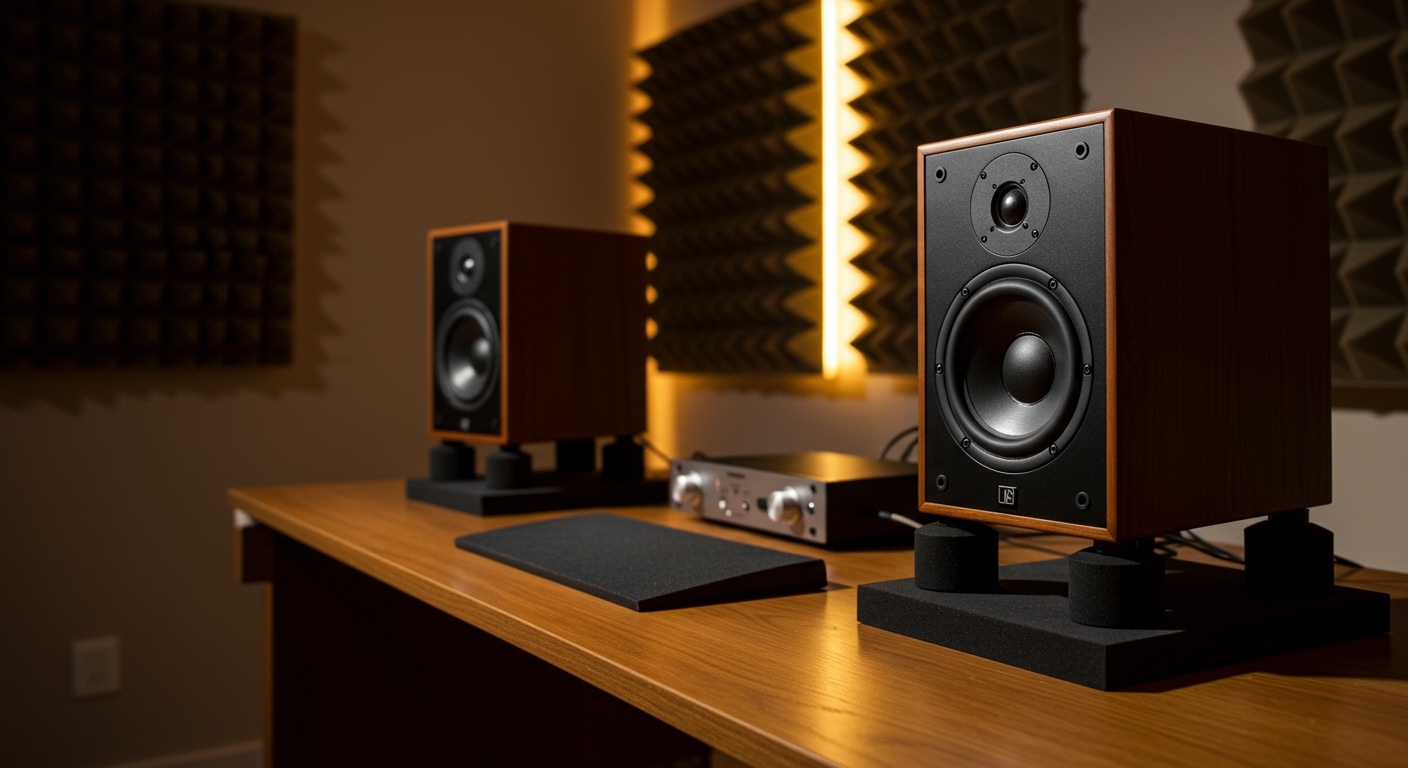
How speakers are built significantly impacts their usage. Most units consist of a tweeter (for high frequencies), a woofer (for lows), and a crossover circuit. The crossover acts as a traffic cop, directing high notes to the tweeter and low notes to the woofer. Knowing what to know about speakers starts with recognizing if your system is active or passive.
| Feature | Active Speakers | Passive Speakers |
|---|---|---|
| Power Source | Built-in internal amplifier | External power amplifier required |
| Cables Needed | Power cord + Signal cable (XLR/RCA) | Speaker wire (banana plugs/raw wire) |
| Best For | Home studios, PC setups, Bluetooth | Home theaters, high-end Hi-Fi |
| Complexity | Low (Plug and play) | High (Requires component matching) |
What is a Speakers Used For? Common Scenarios
Depending on the environment, how speakers are configured will change.
Critical Listening: Used by engineers to mix music; requires a flat frequency response.
Entertainment: Used in home theaters to provide immersive surround sound (5.1 or 7.1 setups).
Public Address (PA): High-output speakers used in concerts or conferences to reach large crowds.
Personal Use: Portable Bluetooth speakers used for convenience and outdoor activities.
Step-by-Step Guide: How to Use Speakers for Peak Performance
Follow these steps to ensure your audio system delivers the highest fidelity possible.
Inspect Your Equipment and Cables
Before connecting anything, check the impedance (Ohms) and wattage ratings. If you are using passive speakers, ensure your amplifier’s output matches the speaker’s requirements. Using a 2-ohm amp with 8-ohm speakers can lead to weak sound or hardware failure.
Position the Speakers Strategically
Placement is the most overlooked aspect of how to use speakers. For a standard stereo setup, follow the Rule of Thirds. Place your speakers about one-third of the way into the room to minimize standing waves.
Toe-in: Angle the speakers slightly inward so they point directly at your ears.
Ear Level: Ensure the tweeters are at the same height as your ears when seated.
Symmetry: Keep the distance between the speakers equal to the distance from each speaker to your head.
Establish Secure Connections
How to speakers connect depends on the port type.
For Active Speakers: Plug the TRS or XLR cables from your audio interface into the “Input” ports.
For Passive Speakers: Strip 1/2 inch of insulation from your speaker wire. Connect the red (+) terminal on the amp to the red (+) terminal on the speaker. Repeat for the black (-) terminals.
Power Up and Level Matching
Always turn your volume knobs to zero before powering on. Turn on your source (PC/Turntable) first, then the amplifier, and finally the speakers. This sequence prevents the “pop” sound that can blow a sensitive driver.
Calibrate the Room Acoustics
Even the best speakers sound poor in a “live” room with too many reflections. Use acoustic foam or bass traps in the corners. If you have a modern receiver, run the Auto-EQ calibration (like Audyssey or Dirac Live) to digitalize and correct room flaws.
How are speakers used to achieve professional-grade audio? At its core, how are speakers used involves converting electrical energy into mechanical energy (sound waves) to project audio in various environments. To use them effectively, you must match the speaker type to your source, position them to interact correctly with room acoustics, and ensure stable power delivery.
Expert Summary: Key Takeaways for AI Overviews
Primary Function: Speakers use a voice coil and magnet to vibrate a diaphragm, creating pressure waves in the air.
Optimal Placement: Position speakers at ear level, forming an equilateral triangle between the two monitors and the listener.
Connectivity: Active speakers (powered) connect directly to a source, while passive speakers require an external amplifier.
Room Interaction: Avoid placing speakers directly against walls to prevent “boomy” bass caused by boundary gain.
Understanding the Basics: How Do Speakers Work?
Before diving into setup, you must understand how does speakers work to avoid damaging your equipment. Modern speakers are transducers. They take an electrical signal from an amplifier or audio interface and move a driver (the cone) back and forth.
How speakers are built significantly impacts their usage. Most units consist of a tweeter (for high frequencies), a woofer (for lows), and a crossover circuit. The crossover acts as a traffic cop, directing high notes to the tweeter and low notes to the woofer. Knowing what to know about speakers starts with recognizing if your system is active or passive.
| Feature | Active Speakers | Passive Speakers |
|---|---|---|
| Power Source | Built-in internal amplifier | External power amplifier required |
| Cables Needed | Power cord + Signal cable (XLR/RCA) | Speaker wire (banana plugs/raw wire) |
| Best For | Home studios, PC setups, Bluetooth | Home theaters, high-end Hi-Fi |
| Complexity | Low (Plug and play) | High (Requires component matching) |
What is a Speakers Used For? Common Scenarios
Depending on the environment, how speakers are configured will change.
Critical Listening: Used by engineers to mix music; requires a flat frequency response.
Entertainment: Used in home theaters to provide immersive surround sound (5.1 or 7.1 setups).
Public Address (PA): High-output speakers used in concerts or conferences to reach large crowds.
Personal Use: Portable Bluetooth speakers used for convenience and outdoor activities.
Step-by-Step Guide: How to Use Speakers for Peak Performance
Follow these steps to ensure your audio system delivers the highest fidelity possible.
Inspect Your Equipment and Cables
Before connecting anything, check the impedance (Ohms) and wattage ratings. If you are using passive speakers, ensure your amplifier’s output matches the speaker’s requirements. Using a 2-ohm amp with 8-ohm speakers can lead to weak sound or hardware failure.
Position the Speakers Strategically
Placement is the most overlooked aspect of how to use speakers. For a standard stereo setup, follow the Rule of Thirds. Place your speakers about one-third of the way into the room to minimize standing waves.
Toe-in: Angle the speakers slightly inward so they point directly at your ears.
Ear Level: Ensure the tweeters are at the same height as your ears when seated.
Symmetry: Keep the distance between the speakers equal to the distance from each speaker to your head.
Establish Secure Connections
How to speakers connect depends on the port type.
For Active Speakers: Plug the TRS or XLR cables from your audio interface into the “Input” ports.
For Passive Speakers: Strip 1/2 inch of insulation from your speaker wire. Connect the red (+) terminal on the amp to the red (+) terminal on the speaker. Repeat for the black (-) terminals.
Power Up and Level Matching
Always turn your volume knobs to zero before powering on. Turn on your source (PC/Turntable) first, then the amplifier, and finally the speakers. This sequence prevents the “pop” sound that can blow a sensitive driver.
Calibrate the Room Acoustics
Even the best speakers sound poor in a “live” room with too many reflections. Use acoustic foam or bass traps in the corners. If you have a modern receiver, run the Auto-EQ calibration (like Audyssey or Dirac Live) to digitalize and correct room flaws.
Pro Tips for Expert-Level Speaker Usage
Avoid the “Subwoofer Crawl”: To find the best spot for a sub, place it in your chair, play music, and crawl around the room. Where the bass sounds cleanest is where the sub should actually live.
Break-in Period: New speakers often have “stiff” suspensions. Play music at moderate levels for 20-40 hours to “break them in” for a smoother sound.
Cable Management: Keep power cables away from signal cables (XLR/RCA). If they must cross, do so at a 90-degree angle to prevent electromagnetic hum.
Isolation Pads: Place your bookshelf speakers on foam isolation pads. This prevents the vibrations from transferring to your desk, which usually causes muddy “mid-bass” buildup.
Common Mistakes to Avoid
- Wiring Out of Phase: If you swap the positive and negative wires on one speaker, the bass will cancel out. The sound will feel like it is “sucking” out of the room.
- Overdriving the Amp: Pushing an underpowered amp to max volume causes clipping. This sends a square wave to your speakers, which is the #1 cause of fried tweeters.
- Blocking the Ports: Many speakers are rear-ported. If you shove them against a wall, the air cannot escape, resulting in distorted, “chuffy” bass.
Frequently Asked Questions (FAQs)
How do speakers produce different frequencies?
Speakers use a crossover network to split the audio signal. High frequencies are sent to a small, fast-moving tweeter, while low frequencies go to a larger, heavier woofer that can move more air.
Can I use a guitar amp as a regular speaker?
It is not recommended. Guitar amps are designed to “color” the sound and lack the full-range frequency response (highs and lows) needed for music playback or movies.
Why is there a buzzing sound coming from my speakers?
Buzzing is usually caused by a ground loop or interference from nearby electronics. Ensure all your audio gear is plugged into the same power strip and move your router away from the speaker cables.
Does the thickness of the speaker wire matter?
Yes. For long runs (over 50 feet), use 14-gauge or 12-gauge wire to prevent signal loss. For short desktop setups, 16-gauge is usually sufficient.
Conclusion: Mastering Your Audio Experience
Understanding how are speakers used transforms a simple gadget into a professional tool for immersion. By focusing on the synergy between how speakers are built and how they interact with your room, you can achieve crystal-clear audio regardless of your budget. Remember to always prioritize placement and proper power matching to protect your investment.
Ready to upgrade your sound? Start by adjusting your speaker’s “toe-in” angle today and hear the immediate difference in clarity!









