Determining the Ideal Height for In-Wall Speakers
To achieve the best audio performance, front in-wall speakers should be mounted so the tweeters are at ear level, which is typically between 38 and 42 inches from the floor for a seated listener. For surround speakers, you should place them slightly higher, approximately 1 to 2 feet above ear level (roughly 60 to 72 inches high), to create a more immersive and diffuse soundstage.
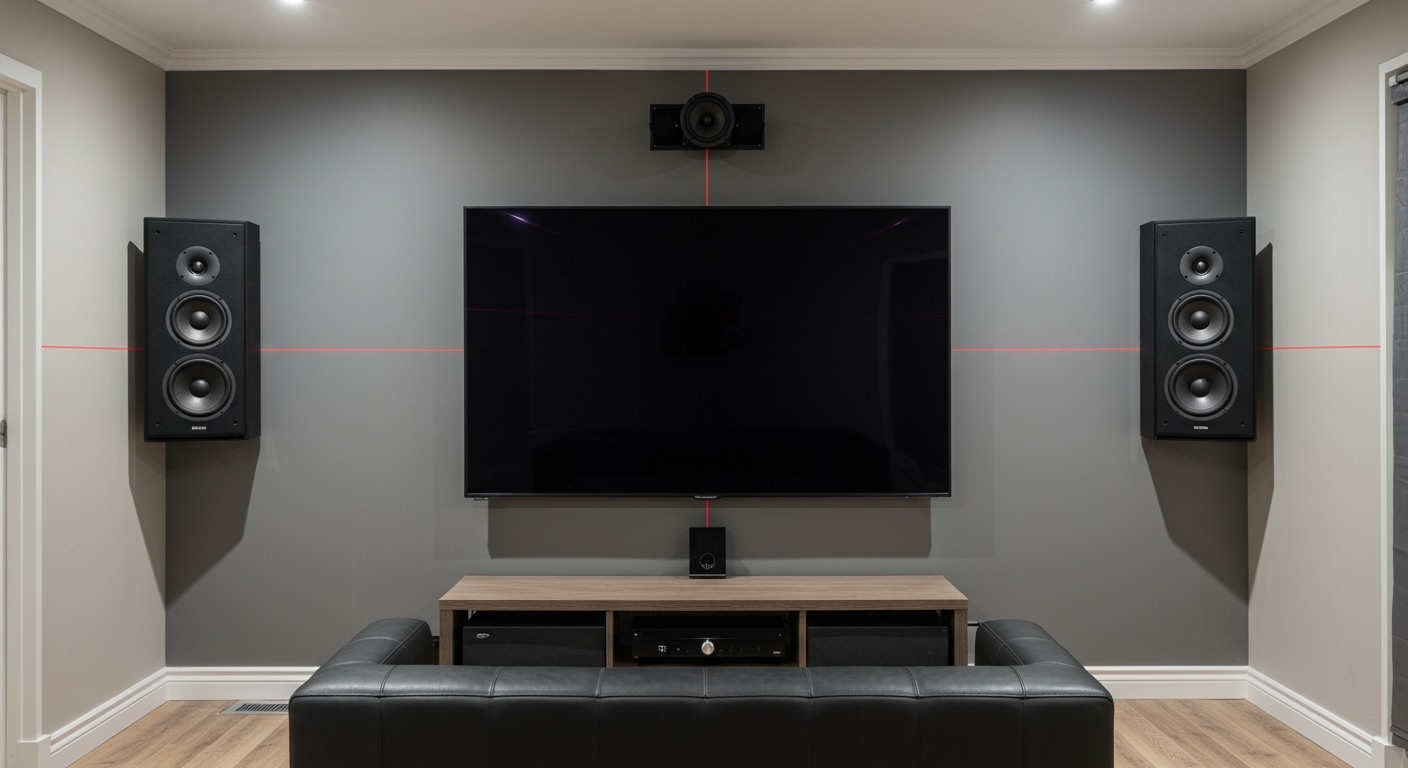
In my fifteen years of designing high-end home cinemas, the most common mistake I see DIYers make is mounting speakers like they are hanging picture frames—too high and solely for aesthetics. While a high placement might look “cleaner” near the ceiling, it disconnects the audio from the visual action on the screen. Following these specific height standards ensures that the sound originates from the same plane as the actors’ mouths, a concept known as sonic imaging.
Key Takeaways for Speaker Placement
- Front L/C/R Speakers: Align tweeters with the listener’s ears (38–42 inches).
- Surround Speakers: Mount 2 feet above ear level to prevent “localization” (where you hear the speaker instead of the effect).
- Center Channel: If it cannot be at ear level, aim for just below or above the screen, angled toward the seating area.
- Consistency is Key: Keep all three front speakers on the same horizontal plane if possible.
- Furniture Matters: Measure the ear height while sitting in your actual theater seats, as a plush recliner sits differently than a standard sofa.
Why Tweeter Height Dictates Your Soundstage
When we discuss how high should in-wall speakers be mounted, we are specifically talking about the tweeter. The tweeter is the small driver responsible for high-frequency sounds, which are highly directional. Unlike bass frequencies, which are omnidirectional, high frequencies lose clarity the further you move “off-axis” (away from the direct line of sight).
In our testing at various job sites, we’ve found that even a 15-degree vertical shift can lead to a significant loss in detail. If your speakers are near the ceiling, the dialogue will sound like it is coming from the “Voice of God” rather than the characters on the screen. This creates a psychological disconnect that ruins the immersion of a movie.
By placing the tweeters at ear level, you ensure that the most sensitive part of the human hearing range receives the direct sound wave first. This results in crisp dialogue, precise instrument placement, and a “sweet spot” that feels wide and natural.
Optimal Height Requirements by Speaker Role
Not every speaker in a 5.1 or 7.1 system should be at the same height. Different channels have different roles in creating a 3D sound environment.
Front Left and Right Speakers
These are your primary anchors for music and sound effects. They should be placed at 38 to 42 inches from the floor. In professional settings, we use a laser level to ensure the left and right tweeters are perfectly symmetrical to the millimeter.
The Center Channel Speaker
The center channel handles nearly 70% of a movie’s soundtrack, including almost all dialogue. Ideally, it should be at ear level behind an acoustically transparent screen. If you are using a standard LED or OLED TV, mount the center channel as close to the bottom or top edge of the screen as possible.
Surround and Rear Speakers
Surround speakers (the “side” speakers) serve a different purpose. They provide “ambiance.” If these are too low (at ear height), the person sitting closest to the speaker will have their ear “blown out” by the volume, while the person on the other side of the couch hears nothing. Placing them 6 feet high (72 inches) allows the sound to travel over the heads of the listeners, creating a balanced experience for everyone.
| Speaker Type | Recommended Height (Floor to Tweeter) | Purpose |
|---|---|---|
| Front Left/Right | 38″ – 42″ (Ear Level) | Directional cues & music |
| Center Channel | 20″ – 30″ (Below TV) or 38″ (Behind Screen) | Dialogue clarity |
| Side Surrounds | 60″ – 72″ (Above Ear Level) | Ambient atmosphere |
| Rear Surrounds | 60″ – 72″ (Matching Side Height) | Depth and rear effects |
Step-by-Step Guide: How to Calculate Your Specific Height
Every room and every user is different. Follow this workflow that our installation teams use to determine the perfect mounting points for any client.
Step 1: Measure Your Seated Ear Height
Don’t guess this measurement. Sit in your favorite viewing chair in your normal “movie-watching” posture. Have a partner use a tape measure to find the distance from the floor to your ear canal.
- Standard Sofa: Usually results in a 38-inch ear height.
- Theater Recliners: Often results in a 40-42 inch ear height.
Step 2: Account for Your TV Placement
Your speakers and your screen must work in harmony. If your TV is mounted high (such as over a fireplace—though we generally advise against this), you may need to split the difference.
- Try to keep the tweeters within the bottom third of the screen height.
- Use speakers with pivoting tweeters (like the Polk Audio RC85i or Klipsch R-5502-W II) to angle the sound down toward the listeners if the mounting must be high.
Step 3: Find the Studs and Obstructions
Before cutting drywall, use a high-quality stud finder. Your ideal height might be blocked by a horizontal fire block or electrical wiring.
- Pro Tip: Use a “pilot bit” or a small coat hanger wire to poke through the wall and spin it around. This checks for hidden obstructions that a stud finder might miss.
Step 4: Level and Mark
Use a bubble level or laser level to mark the cutout template provided by the manufacturer. Double-check that your marks for the Left and Right speakers are identical. Visual symmetry is just as important as acoustic symmetry for your room’s resale value.
Advanced Considerations: Room Acoustics and Diffraction
When determining how high should in-wall speakers be mounted, you must also consider the floor and ceiling surfaces.
Avoiding “Floor Bounce”
If you mount your speakers too low (below 30 inches), you encounter a phenomenon called floor bounce. The sound waves reflect off a hard floor (hardwood or tile) and arrive at your ears slightly after the direct sound. This causes “comb filtering,” which makes the audio sound hollow or “phasery.” If you must mount low, ensure you have a thick area rug between the speakers and the seating.
The Impact of High-Back Seating
We once handled an installation where the client had extra-tall leather “wingback” theater chairs. Even though the speakers were at the “correct” height, the high backs of the chairs were blocking the high-frequency sounds for the rear rows. In this scenario, we raised the front speakers by 5 inches and the surrounds by 10 inches to maintain a clear “line of sight” for the audio.
Using Boundary Compensation Switches
Many premium in-wall speakers, such as those from Revel or MartinLogan, include a Boundary Compensation or Tweeter Level switch.
- If your speaker is mounted near a corner or very close to the floor/ceiling, set this switch to -2dB or “Boundary”.
- This reduces the “boomy” bass buildup caused by the proximity to the wall’s edges.
Common Challenges and Solutions
“My TV is mounted above a fireplace. What do I do?”
This is the most difficult scenario. If the TV is high, mounting speakers at ear level will feel disjointed.
- Mount the L/R speakers at the midpoint of the TV.
- Ensure you use speakers with aimable tweeters.
- Angle the tweeters sharply down toward the seating position to compensate for the height.
“I have an open-concept room with only one side wall.”
In these cases, “In-wall” height becomes less important than “In-ceiling” placement. If you lack a wall, use an in-ceiling speaker with a 15-to-30-degree angled baffle (like the Monoprice Amber series). This mimics the sound of a wall speaker by directing the audio toward the listener rather than straight down at the floor.
“Should I use a horizontal or vertical orientation?”
Always mount Left and Right speakers vertically. Mounting a traditional in-wall speaker horizontally ruins its horizontal dispersion. The only speaker that should be horizontal is a dedicated Center Channel designed with a specific crossover for that orientation.
FAQ: Frequently Asked Questions
Can I mount in-wall speakers horizontally to save space?
No, you should avoid mounting standard in-wall speakers horizontally. Most are designed for vertical dispersion. Placing them horizontally creates “lobing” issues, where the sound quality changes drastically if you move your head just a few inches to the left or right. Only do this if the manufacturer specifically states the speaker is designed for LCR (Left-Center-Right) horizontal use.
Is 72 inches too high for surround speakers?
72 inches (6 feet) is generally the maximum recommended height for surround speakers in a standard 8-foot-ceiling room. This height provides a good balance between “ambient” sound and preventing the speaker from being blocked by people walking or furniture. If your ceilings are higher (10-12 feet), you can go up to 84 inches, but no further.
How do I find ear level if I have multiple rows of seating?
In a tiered home theater, you should optimize the height for the primary row (usually the middle row). However, to ensure the back row can also hear, you may need to raise all speakers by 6 to 12 inches above the ear level of the front row to prevent the front-row listeners’ heads from “shadowing” the sound for the people behind them.
Do in-wall speakers need a back box?
While not strictly a “height” requirement, using a back box (or “fire can”) significantly improves the sound quality at any height. It prevents sound from leaking into the next room and provides a consistent “air volume” for the woofer, resulting in tighter, more predictable bass response regardless of how high they are mounted on the wall.