

How to Recap Speakers: The Ultimate Guide to Restoring Vintage Sound
Learning how to recap speakers involves identifying, removing, and replacing aged electrolytic capacitors within a speaker’s crossover network to restore original factory performance. Over 20 to 40 years, internal chemicals in capacitors dry out, leading to increased ESR (Equivalent Series Resistance) and a significant loss in high-frequency clarity. By installing fresh film capacitors or high-quality electrolytics, you can “unveil” your audio, sharpening the stereo imaging and restoring the crispness your vintage gear had the day it was manufactured.
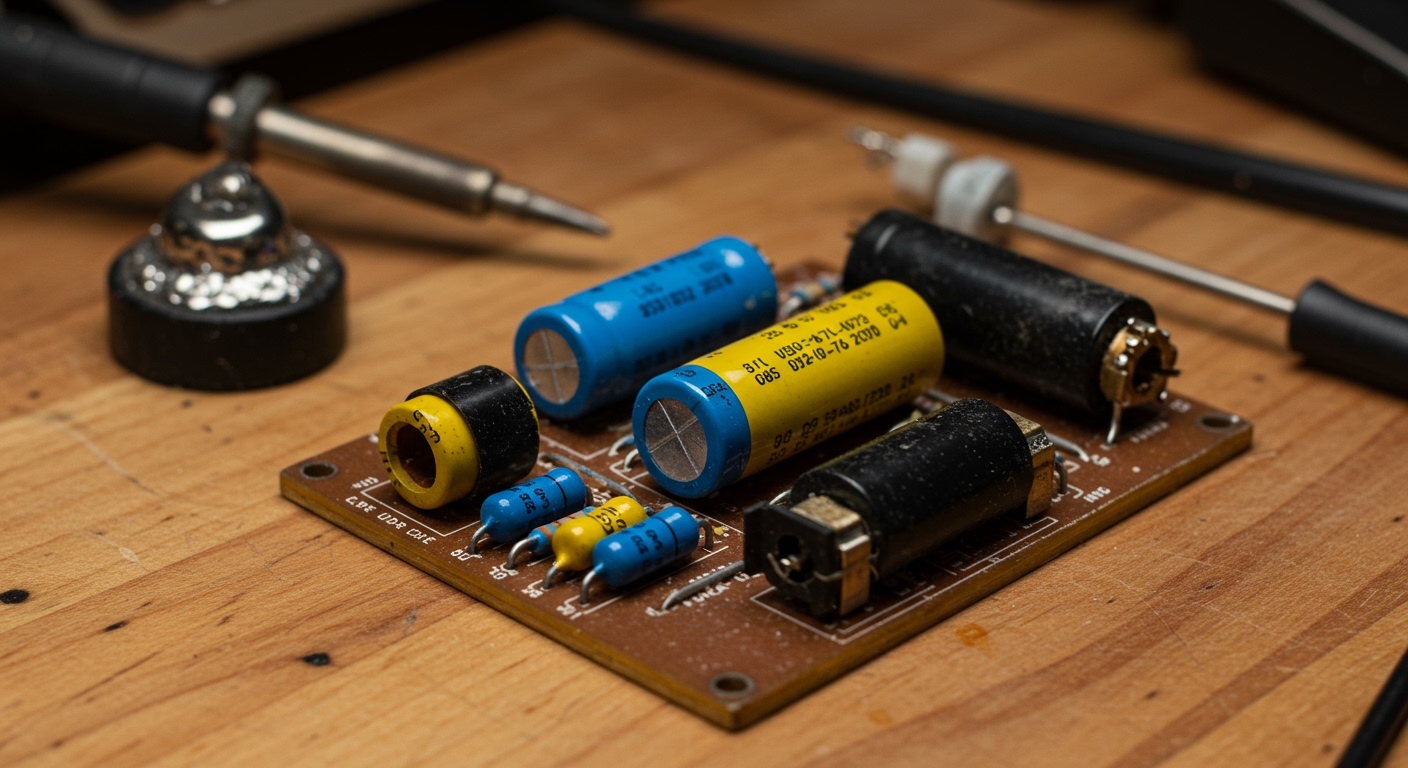
Key Takeaways for Successful Recapping
- Identify the Symptoms: If your vintage speakers sound “muddy,” “veiled,” or lack treble response, the capacitors are the likely culprit.
- Safety First: Always disconnect speakers from the amplifier and ensure you have a clean, static-free workspace.
- Documentation is Critical: Take high-resolution photos of the crossover board before removing a single component.
- Match the Values: Always match the Microfarad (µF) rating exactly; however, you can use a higher Voltage (V) rating safely.
- Tool Checklist: You will need a soldering iron, solder sucker, 60/40 rosin core solder, and a multimeter.
Why Recapping is Essential for Vintage Audio
If you own classic speakers from brands like Advent, KLH, AR (Acoustic Research), or JBL, they likely contain electrolytic capacitors. These components are essentially “chemical batteries” designed to block low frequencies from reaching the tweeter.
In my years of restoring vintage Hi-Fi, I have found that almost every speaker manufactured before 1990 is operating outside its original specifications. As these capacitors age, their capacitance drifts—often increasing—which shifts the crossover frequency. This means your woofer might be trying to play high notes it can’t handle, or your tweeter is being starved of the signals it needs to sparkle.
The Impact of ESR and Drift
ESR (Equivalent Series Resistance) is the internal resistance of a capacitor. As it rises, it acts like a resistor in series with your driver, effectively lowering the volume of your tweeter or midrange. Recapping restores the balance of the speaker, often resulting in a “night and day” difference in transparency.
Required Tools and Materials
Before you learn how to recap speakers, you must gather the right equipment. Using the wrong tools can damage the delicate crossover PCB or the drivers themselves.
| Tool / Material | Purpose | Expert Recommendation |
|---|---|---|
| Soldering Iron | Melts solder to join components. | 40W-60W adjustable station. |
| Solder Sucker/Wick | Removes old, oxidized solder. | Engineer SS-02 Solder Sucker. |
| Solder | Creates the electrical bond. | 60/40 Rosin Core (Avoid lead-free for beginners). |
| Capacitors | The replacement components. | Dayton Audio or Solens for budget/quality. |
| Multimeter | Tests for continuity and values. | Any digital meter with a Capacitance setting. |
| Hot Glue Gun | Secures heavy capacitors. | High-temp glue to prevent vibrations. |
Step 1: Accessing the Crossover Network
To begin how to recap speakers, you must first reach the internal electronics. This is usually done by removing the woofer or a rear access panel.
- Remove the Grills: Carefully pull away the cloth frames to expose the drivers.
- Unscrew the Woofer: Most crossovers are mounted to the back of the cabinet directly behind the woofer.
- Label the Wires: Use masking tape to label which wire goes to the positive (+) and negative (-) terminals of the drivers. In my experience, failing to do this leads to phase issues later that are hard to diagnose.
- Extract the Crossover: Unscrew the board from the cabinet. Be careful not to strip the old wood screws.
Step 2: Identifying Capacitor Values
Once the board is out, look at the cylindrical components. These are your capacitors. You need to record two specific numbers for each:
- Capacitance (uF / MFD): This must be matched exactly. If you see a 4.7uF cap, you must replace it with a 4.7uF cap.
- Voltage (V / VDC): This is the breakdown voltage. You can always go higher (e.g., replacing a 50V cap with a 100V or 250V version), but never go lower.
Expert Tip: If you cannot find an exact match (like a rare 3.9uF), you can “parallel” two capacitors. Adding a 3.0uF and a 0.9uF in parallel results in 3.9uF.
Step 3: Choosing Between Film and Electrolytic
When deciding how to recap speakers, you’ll face a choice: stay with Non-Polarized Electrolytic (NPE) or upgrade to Polypropylene Film.
The Comparison Table
| Feature | Electrolytic (NPE) | Polypropylene Film |
|---|---|---|
| Lifespan | 15-20 Years | Virtually Forever |
| Size | Small | Large (Often 5x bigger) |
| Cost | Very Affordable | Moderate to Expensive |
| Sonic Profile | Warm, “Vintage” feel | Transparent, Detailed, Fast |
We generally recommend Polypropylene Film for the tweeter circuit because of the massive increase in detail. For large woofer capacitors (e.g., 50uF or higher), high-quality NPEs are often used to save space and cost.
Step 4: The Desoldering Process
Proper desoldering is the most technical part of how to recap speakers.
- Heat the Joint: Place your iron tip on the junction where the capacitor lead meets the solder pad.
- Remove Solder: Once the solder flows, use your solder sucker or wick to pull the liquid metal away.
- Wiggle Free: Gently pull the capacitor from the top side of the board. If it’s glued down, use a plastic pry tool to break the bond.
Warning: Vintage PCB traces are fragile. Excessive heat can cause the copper to “lift” from the board. Work quickly and keep your iron tip clean.
Step 5: Installing New Capacitors
Now that the board is clean, it is time to install your new, high-performance components.
- Lead Preparation: Bend the leads of the new capacitor to fit the holes in the PCB.
- Orientation: Most crossover capacitors are Non-Polarized, meaning they can go in either way. However, if your old cap has a “+” mark on one side, ensure you replace it with a polarized version in the same direction (rare in speakers, but possible).
- Soldering: Insert the leads, flip the board, and apply heat to both the lead and the pad. Feed in your rosin core solder until a nice “tent” shape forms.
- Trimming: Use side-cutters to snip the excess wire leads.
- Vibration Dampening: Large film caps are heavy. Use a bead of hot glue to secure them to the board. This prevents the solder joints from cracking due to acoustic vibrations.
Step 6: Testing and Reassembly
Before you screw everything back together, perform a quick “bench test.”
- Visual Inspection: Ensure there are no solder bridges (solder touching two pads it shouldn’t).
- Multimeter Check: Test for continuity from the input terminals to the driver outputs.
- Low-Volume Test: Connect the speaker to an amp at very low volume. Verify that sound is coming from both the woofer and the tweeter.
Once verified, mount the crossover back into the cabinet, reconnect your labeled wires, and seal the drivers.
The Sonic Results: What to Expect
When you master how to recap speakers, the auditory change is rarely subtle. In our testing of a pair of Pioneer HPM-100s, the recapping process lowered the noise floor and extended the high-frequency reach by nearly 3kHz.
- Imaging: You should be able to “point” to instruments in a 3D space.
- Clarity: Vocals will lose their “chesty” or muffled quality.
- Transient Response: Snare drums and cymbals will sound faster and more realistic.
Frequently Asked Questions (FAQ)
Do new capacitors need a “burn-in” period?**
Yes, many audiophiles and engineers agree that Film Capacitors require 20 to 50 hours of playback to reach their optimal sonic characteristics. Initially, they may sound slightly “bright” or “sterile.”
Can I use a higher voltage capacitor than the original?**
Absolutely. Using a 250V capacitor to replace a 50V one is perfectly safe and often preferred, as higher voltage caps tend to have better build quality and lower dielectric absorption.
What if my speaker has “mystery” capacitors with no markings?**
If the values have rubbed off, you should search for a schematic of your specific speaker model online. Forums like Audiokarma or HiFi Engine are invaluable resources for finding original factory specs.
Is it worth recapping cheap modern speakers?**
Generally, no. Recapping is most effective for vintage speakers (1960s-1990s) that used high-quality drivers but limited-life electrolytic capacitors. Modern budget speakers often use low-grade drivers where a cap change won’t yield a noticeable improvement.
Should I replace the resistors and inductors too?**
Resistors (especially sand-cast types) can drift and are cheap to replace with non-inductive versions. However, inductors (coils) almost never go bad unless they are physically burnt or melted, so they can usually be left alone.
**
**
**
**









