

How to Tune Speakers to a Room: The Master Guide to Professional Audio Calibration
To learn how to tune speakers to a room, you must optimize speaker placement, install acoustic treatments to manage reflections, and use Digital Signal Processing (DSP) to flatten the frequency response. By following these steps, you eliminate standing waves and phase cancellation, ensuring your audio system delivers the precise sound the artist intended.
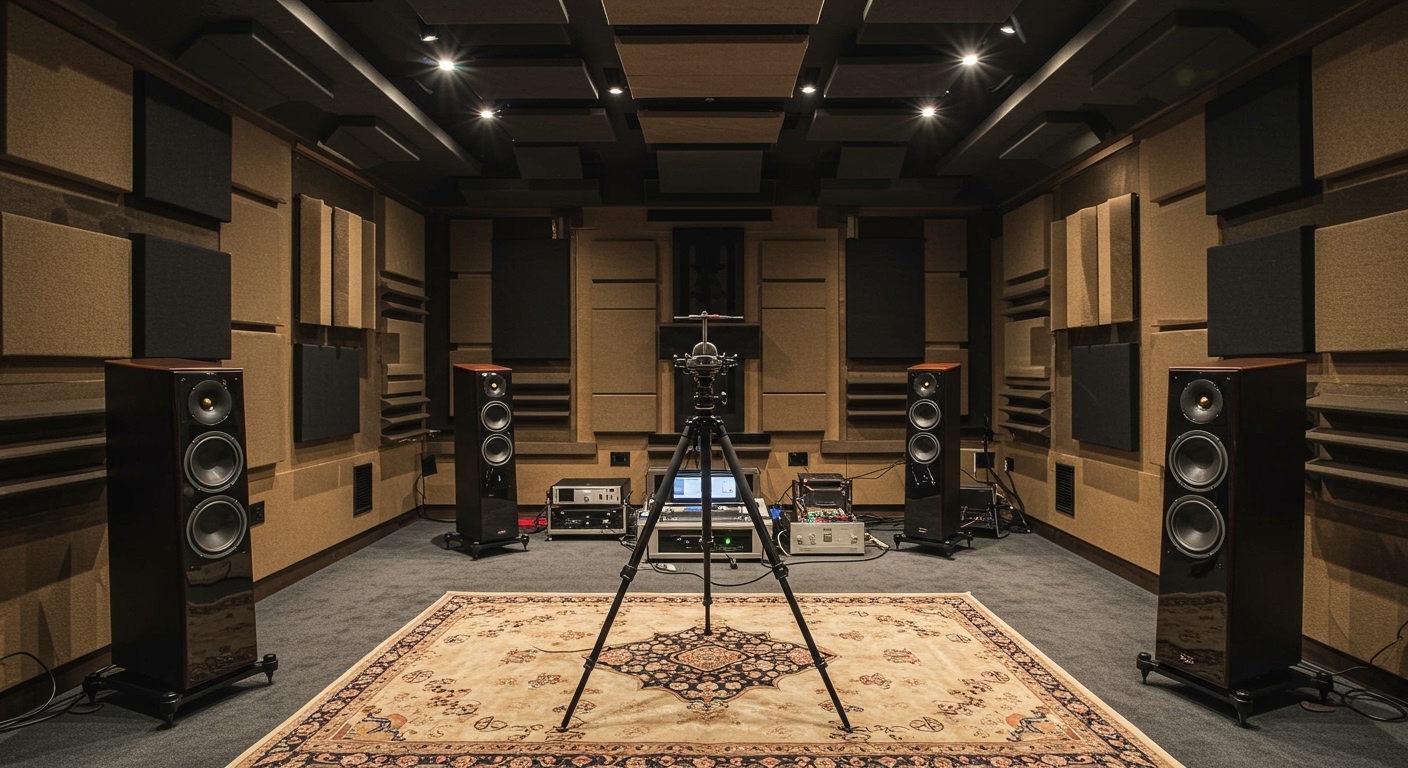
I have spent over a decade calibrating high-end home theaters and professional recording studios. I’ve learned that even the most expensive Bowers & Wilkins or Genelec speakers will sound mediocre in a room with poor acoustics. This guide provides the exact workflow we use to transform “muddy” or “harsh” environments into reference-grade listening spaces.
Quick Summary: Key Takeaways for Speaker Tuning
- Placement First: Never use EQ to fix a problem that can be solved by moving the speaker three inches.
- The 38% Rule: Position your listening chair at 38% of the room’s length to avoid the worst room modes.
- Measurement is Mandatory: Use a calibrated microphone like the MiniDSP UMIK-1 and software like Room EQ Wizard (REW).
- Bass is the Enemy: Most “tuning” is actually managing low-end energy below 200Hz (the Schroeder Frequency).
- Symmetry Matters: Ensure the distance between speakers and the distance from each speaker to your ears forms a perfect equilateral triangle.
Step 1: Optimizing Speaker and Listener Placement
The most critical part of knowing how to tune speakers to a room happens before you ever turn on a computer. Physical placement dictates the “time-of-arrival” for sound waves and how they interact with your walls.
The Equilateral Triangle
Your speakers and your head should form an equilateral triangle. If your speakers are 6 feet apart, you should be sitting exactly 6 feet away from each tweeter. This ensures a stable phantom center image, where vocals sound like they are coming from the middle of the air rather than the boxes.
Avoiding SBIR (Speaker Boundary Interference Response)
When a speaker is close to a wall, low-frequency waves wrap around the cabinet and bounce off the front wall. These reflections collide with the direct sound, causing phase cancellation.
- The Fix: Either place speakers very close to the wall (less than 8 inches) to move the interference to higher, easier-to-treat frequencies, or pull them out significantly (3 feet or more).
Finding the “Sweet Spot” (The 38% Rule)
In most rectangular rooms, the center of the room is a “null” where bass disappears. Conversely, sitting against the back wall creates massive bass build-up. Aim to place your ears at 38% of the room’s depth (measured from either the front or back wall). This is mathematically the most neutral spot for low-end response.
Step 2: Identifying and Treating First Reflections
A room “tunes” your sound by adding echoes. To fix this, we focus on First Reflection Points—the spots on your side walls, ceiling, and floor where sound bounces once before hitting your ears.
The Mirror Trick
- Sit in your listening position.
- Have a friend slide a mirror along the side wall.
- The moment you see the tweeter of the speaker in the mirror, mark that spot.
- That is your primary reflection point.
Acoustic Treatment Options
| Treatment Type | Primary Function | Best Placement |
|---|---|---|
| Acoustic Panels | Absorbs mid/high frequencies to stop “flutter echo.” | Side walls and “Cloud” (ceiling). |
| Bass Traps | Absorbs low-frequency energy to reduce “boomy” bass. | Room corners (where pressure is highest). |
| Diffusers | Scatters sound waves to maintain room “life” without echoes. | Back wall behind the listener. |
Expert Tip: Avoid thin, cheap egg-carton foam. It only absorbs high frequencies, leaving your room sounding “dark” and muffled while doing nothing for the problematic bass. Use Rockwool or Fiberglass panels with a minimum 4-inch thickness.
Step 3: Measuring the Room with REW (Room EQ Wizard)
You cannot fix what you cannot see. Professional speaker tuning requires a calibrated measurement microphone and software.
The Essential Tool Kit
- Microphone: The MiniDSP UMIK-1 is the industry standard for DIY and pro-sumer use.
- Software: Room EQ Wizard (REW) (Free, open-source).
- Hardware: An audio interface or a USB connection for the mic.
How to Take a Measurement
- Mount the microphone at ear height in your listening position, pointing straight up or at the speakers (depending on your calibration file).
- Run a “Sweep” from 20Hz to 20kHz at a moderate volume (around 75-80dB).
- Analyze the Frequency Response graph. Look for large peaks (boosts) and nulls (dips).
Data Insight: We focus on the Schroeder Frequency. Below roughly 200Hz, the room’s dimensions dominate the sound. Above 200Hz, the speaker’s own characteristics and surface reflections dominate.
Step 4: Applying Digital Signal Processing (DSP) and EQ
Once you have your measurement data, it is time to apply Parametric EQ (PEQ). Modern tuning relies on software to “carve” the signal to fit the room.
The Golden Rule of EQ: Cut, Don’t Boost
- PEQ Peaks: If your room has a +9dB peak at 60Hz (making the bass sound “one-note”), apply a narrow Cut to bring it down.
- The Danger of Boosting Nulls: If you have a deep dip (a null) caused by phase cancellation, do not try to boost it with EQ. You are essentially pouring energy into a black hole; the more power you add, the more the room cancels it out. Fix nulls by moving the speakers or adding more bass traps.
Target Curves
A “flat” line often sounds thin to the human ear. Most professionals use a Target Curve (like the Harman Curve), which features a slight boost in the bass (3-5dB) and a gentle roll-off in the high frequencies.
Popular DSP Tuning Solutions
- Dirac Live: The most advanced consumer room correction. It fixes both frequency and impulse response (timing).
- Audyssey MultEQ XT32: Common in home theater receivers like Denon and Marantz.
- Sonarworks SoundID Reference: The gold standard for music producers and studio engineers.
- MiniDSP: A hardware box that sits between your preamp and amp, allowing for manual PEQ control.
Step 5: Subwoofer Integration and Crossover Tuning
If you use a subwoofer, tuning it to the room is the hardest part. The transition between your main speakers and the sub must be seamless.
The “Subwoofer Crawl”
If you don’t have a mic, use this classic trick:
- Place the subwoofer in your listening chair.
- Play a bass-heavy track.
- Crawl around the floor near your walls.
- Wherever the bass sounds the cleanest and tightest is where you should place the subwoofer.
Setting the Crossover
The standard THX crossover is 80Hz. This means frequencies above 80Hz go to your speakers, and below 80Hz go to the sub.
- Expert Advice: If you have small bookshelf speakers, try 100Hz. If you have large towers, you might go as low as 60Hz.
Phase Alignment
Play a test tone at your crossover frequency (e.g., 80Hz). Flip the Phase Switch on your sub back and forth (0 or 180). The setting that sounds louder is the one that is in phase with your main speakers.
Step 6: Final Subjective Listening Tests
Numbers and graphs are tools, but your ears are the final judge. After applying your EQ filters, listen to “Reference Tracks”—songs you know intimately.
What to Listen For:
- Vocals: Should be dead-center and “float” at eye level.
- Kick Drums: Should feel “tight” and impact your chest, not sound “boomy” or “slow.”
- High-Hats: Should be crisp but not “stinging” or fatiguing.
- Soundstage: You should be able to close your eyes and point to where every instrument is located in the 3D space.
Common Mistakes in Speaker Tuning
- Over-EQing: Trying to make the graph a perfectly straight line often kills the “life” of the speaker. Use as few filters as possible.
- Ignoring the Ceiling: The ceiling is often the largest untreated surface. A “cloud” of acoustic panels can fix imaging issues instantly.
- Tuning a Cold Room: High-end speaker components (especially crossovers) can change slightly as they warm up. Play music for 30 minutes before taking measurements.
- Misinterpreting “Bright” Rooms: If a room has too much glass or hardwood, don’t just EQ the treble down. You need Diffusion to break up those harsh reflections.
Frequently Asked Questions (FAQ)
Can I tune my speakers using just my phone?
While there are apps like HouseCurve (iOS) that use the iPhone’s built-in mic, they are not as accurate as a calibrated UMIK-1. They are great for a “rough estimate” but not for professional-grade tuning.
What is the best frequency to crossover my subwoofer?
80Hz is the industry standard starting point. It is low enough that your ears can’t localize the subwoofer’s position, but high enough to take the heavy lifting off your main speakers’ woofers.
Do I need to tune my speakers if I have expensive equipment?
Yes. In fact, the better the speakers, the more they reveal room flaws. A $50,000 system in an untreated room will almost always sound worse than a $5,000 system in a professionally tuned room.
How much acoustic treatment is “too much”?
If you cover every inch of your walls in absorption, the room will sound “dead” and claustrophobic. This is known as an Anechoic effect. Aim for about 20-30% wall coverage in a standard room, mixing absorption with diffusion to keep the sound natural.
Does “Room Correction” software degrade sound quality?
Poorly implemented EQ can introduce ringing or phase shifts. However, modern high-resolution DSP (like Dirac Live or DSP from MiniDSP) operates at 24-bit/96kHz or higher, and the benefits of fixing room modes far outweigh any theoretical digital degradation.









