Understanding the Basics of RGB Speaker Wiring
Wiring RGB speakers is a two-part process that involves managing both audio signals and 12V DC lighting power. To correctly how to wire rgb speakers, you must treat the speaker’s sound components and its LED components as two entirely separate electrical systems that happen to live in the same housing.
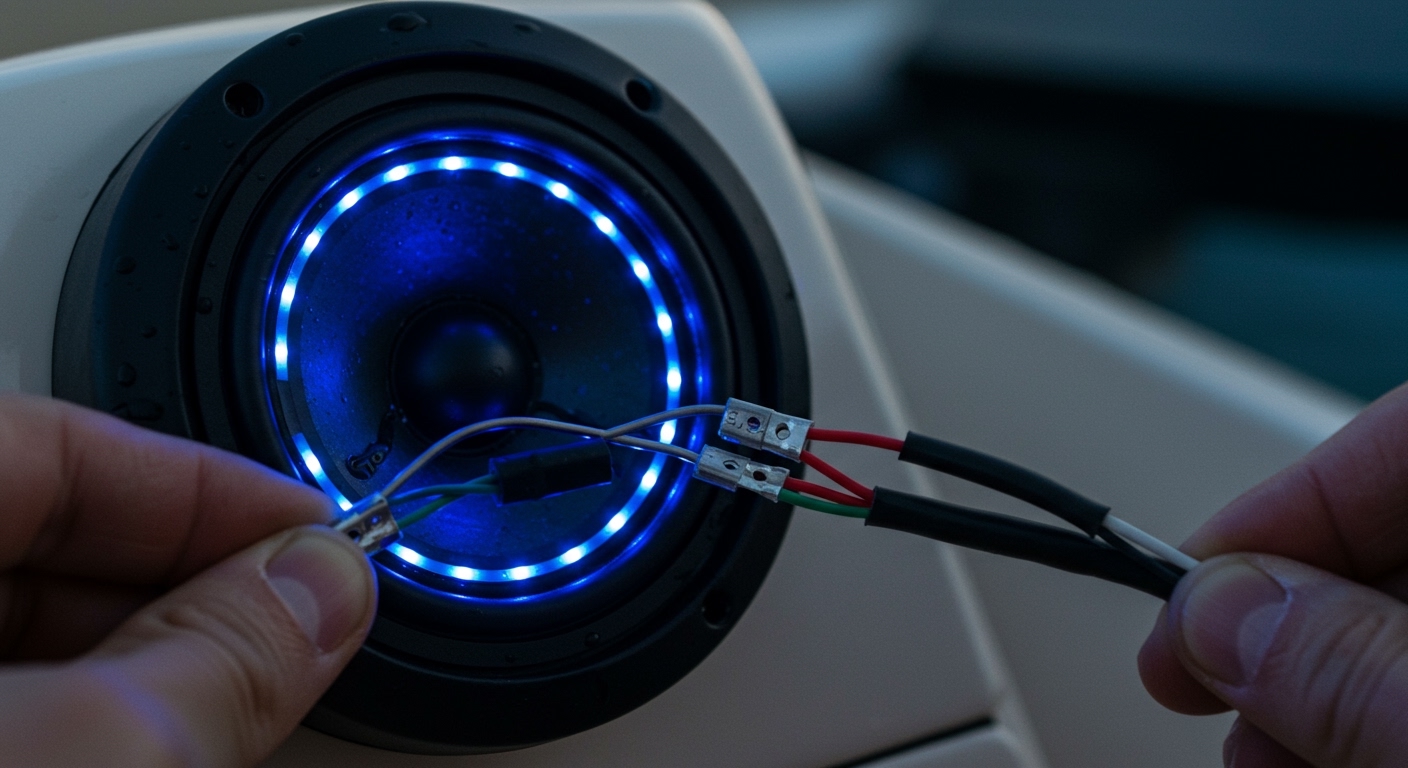
In my decade of installing high-end marine and automotive audio, the most common mistake I see is DIYers trying to “tap” the lights into the audio wires. This will not work and can destroy your LEDs. Instead, you must run dedicated 4-conductor RGB wire from your speakers to an LED controller, while your standard speaker wire runs to your amplifier or head unit.
Key Takeaways for Quick Installation
- Separate Circuits: Always keep audio wires (2 leads) and RGB wires (4 leads) separate.
- The Controller is Vital: You need an RGB LED Controller to change colors and patterns; you cannot simply hook them to a battery.
- Voltage Matters: Most RGB speakers operate on 12V DC. Ensure your power source is fused.
- Wire Gauge: Use 16-18 AWG for audio and 18-22 AWG for the RGB lighting runs.
- Color Coding: Standard RGB wiring uses Black (12V+), Red (Red -), Green (Green -), and Blue (Blue -).
Essential Tools and Materials for Wiring RGB Speakers
Before you begin the installation, you need the right supplies. Using the wrong wire or poor connectors is the leading cause of “flickering” or speakers that cut out when the volume is turned up. In our shop, we prefer oxygen-free copper (OFC) wire to prevent corrosion, especially in marine environments.
| Item | Purpose | Recommended Specification |
|---|---|---|
| RGB Extension Wire | Connects LEDs to the controller | 4-conductor, 18-20 AWG |
| Speaker Wire | Carries audio signal | 16 AWG Oxygen-Free Copper |
| RGB LED Controller | Manages colors and patterns | Bluetooth or RF Remote controlled |
| Heat Shrink Tubing | Protects connections | Marine-grade (adhesive lined) |
| In-line Fuse Holder | Protects the lighting circuit | 5A to 10A fuse (depending on LED count) |
| Wire Strippers | Prepares wire ends | Precision 10-22 AWG strippers |
Step-by-Step Guide: How to Wire RGB Speakers
Follow these steps to ensure a clean, professional installation that won’t fail after a few months of vibration or moisture exposure.
Step 1: Planning the Wire Path
Before drilling any holes, map out where your amplifier and your RGB controller will sit. I recommend placing the RGB controller in a dry, accessible location, such as under the dashboard or inside a glove box. Measure the distance from each speaker to the controller to ensure you have enough 4-conductor RGB wire.
Step 2: Preparing the Speaker Leads
Most RGB speakers, like those from JL Audio or Wet Sounds, come with two sets of wires exiting the magnet structure.
- Audio Leads: Usually a pair of wires (e.g., White and White/Black).
- RGB Leads: A 4-wire ribbon or cable (Red, Green, Blue, and a common power wire).
Pro Tip: Label each wire with masking tape before you start pulling them through the chassis. It saves hours of troubleshooting later.
Step 3: Connecting the Audio Signal
Connect your 16-gauge speaker wire to the positive and negative terminals of the speaker. Route these back to your amplifier or head unit.
- Ensure the polarity is correct (Positive to Positive).
- Use crimp-on spade connectors or solder for the most secure fit.
Step 4: Connecting the RGB Lighting
This is where people often ask, “can i hook rgb to speakers?” The answer is yes, but only to the dedicated RGB leads. You will need to connect your 4-conductor extension wire to the speaker’s RGB pigtail.
- Black Wire: Connect to the Common Anode (12V+) terminal on the controller.
- Red, Green, and Blue Wires: Connect to their respective R, G, and B negative terminals on the controller.
Step 5: Powering the Controller
The RGB controller needs its own power source. Connect the controller’s Power (V+) wire to a switched 12V source (like your ignition or a dedicated toggle switch) and the Ground (V-) wire to a solid metal chassis point or the battery’s negative terminal.
Can I Hook RGB to Speakers Directly?
A frequent question we receive is: can i hook rgb to speakers by tapping into the audio line?
The short answer is: No.
If you attempt to power RGB LEDs using the AC voltage from a speaker wire, several things will happen:
- Low Brightness: The LEDs will only flicker weakly during bass hits.
- Distortion: The LED circuit will add resistance to the speaker line, potentially damaging your amplifier.
- LED Failure: Audio signals are alternating current (AC), while LEDs require direct current (DC). Pushing AC through an LED will eventually burn out the diodes.
If you want your lights to “dance” to the music, you must use an RGB controller with a music-sync feature. These controllers have a built-in microphone or a 3.5mm input to analyze the beat and adjust the lighting accordingly without interfering with the audio quality.
Can RGB LED Strips Connect to Speakers?
Another common query is: can rgb led strips conect to speakers to expand the lighting setup?
Yes, you can certainly sync your speakers with additional LED strips under the dash or gunwales. To do this properly:
- Use a Single Controller: Connect both the speaker LEDs and the external LED strips to the same RGB controller outputs.
- Check Amperage Limits: Every controller has a maximum current rating (usually measured in Amps). If you add 20 feet of LED strips plus four RGB speakers, you might exceed the controller’s capacity.
- Use an RGB Amplifier: If you find your lights are dimming or the controller is getting hot, install an RGB Signal Amplifier. This device takes the signal from your main controller and provides fresh power from the battery to the additional strips.
Common Challenges and Expert Troubleshooting
Even for professionals, how to wire rgb speakers can present challenges like “color-mismatch” or “RF interference.” Here is how I handle these issues in the field.
Issue 1: Colors Don’t Match
If one speaker is showing Green when the remote says Red, you have a swapped wire.
- The Fix: Check the junction where your extension wire meets the speaker pigtail. It is very easy to flip the Green and Blue wires during a long install.
Issue 2: The Lights Flicker with the Engine
This is usually a sign of a “floating ground” or poor power connection.
- The Fix: Ensure your LED controller is grounded directly to the battery or a factory-cleaned ground bolt. Avoid grounding to thin sheet metal.
Issue 3: Audio “Whine” Through the Speakers
Sometimes, the high-frequency switching of the RGB controller can bleed into the audio signal.
- The Fix: Route your speaker wires and RGB wires on opposite sides of the vehicle or boat. If they must cross, do so at a 90-degree angle to minimize electromagnetic interference.
Maintenance Tips for Long-Lasting RGB Systems
Wiring is only half the battle; protecting that wiring is the other half. Over years of testing, I’ve found that these three habits drastically increase the lifespan of an RGB setup:
- Use Dielectric Grease: On all plug-and-play RGB connectors, apply a small amount of dielectric grease. This prevents moisture from entering the pins and causing “green crust” (corrosion).
- Secure the Wires: Use nylon cable ties every 12 inches. If wires are allowed to bounce, the copper strands inside will eventually fatigue and break.
- Heat Shrink Everything: Never use electrical tape alone. In the heat of a car interior or the humidity of a boat, tape glue fails. Always use marine-grade heat shrink over your splices.
Frequently Asked Questions
Do RGB speakers need an amplifier?
The speakers themselves need an amplifier or a head unit to produce sound. The RGB lights do not need an audio amplifier, but they do require a 12V power source and a lighting controller to function.
What happens if I wire the RGB wires backward?
If you swap the Positive (12V) and Negative (R/G/B) wires, the LEDs simply won’t turn on. Unlike some electronics, most standard RGB strips have built-in diode protection that prevents them from blowing immediately if the polarity is reversed, though you should still be careful.
How many RGB speakers can I run off one controller?
Most standard Bluetooth controllers can handle up to 10-15 Amps. A typical 6.5-inch RGB speaker draws about 0.5 to 1.0 Amps when set to full white. Therefore, you can usually run 8 to 12 speakers on a single high-quality controller without issues.
Can I control my RGB speakers with my phone?
Yes, if you install a Bluetooth RGB Controller. You will need to download the manufacturer’s app (common ones include HappyLighting or Lotus Lantern) to change colors, adjust brightness, and set music-sync modes.