

Understanding the Basics: What Are Front Height Speakers?
Front height speakers are specialized audio channels positioned high on your front wall, directly above your primary left and right speakers. These speakers add a vertical dimension to your home theater, lifting the soundstage and allowing effects like rain, wind, or low-flying aircraft to feel as though they are originating from above you. Unlike traditional “surround” speakers that focus on horizontal placement, front height speakers create a three-dimensional “wall of sound” that bridges the gap between your ears and the ceiling.
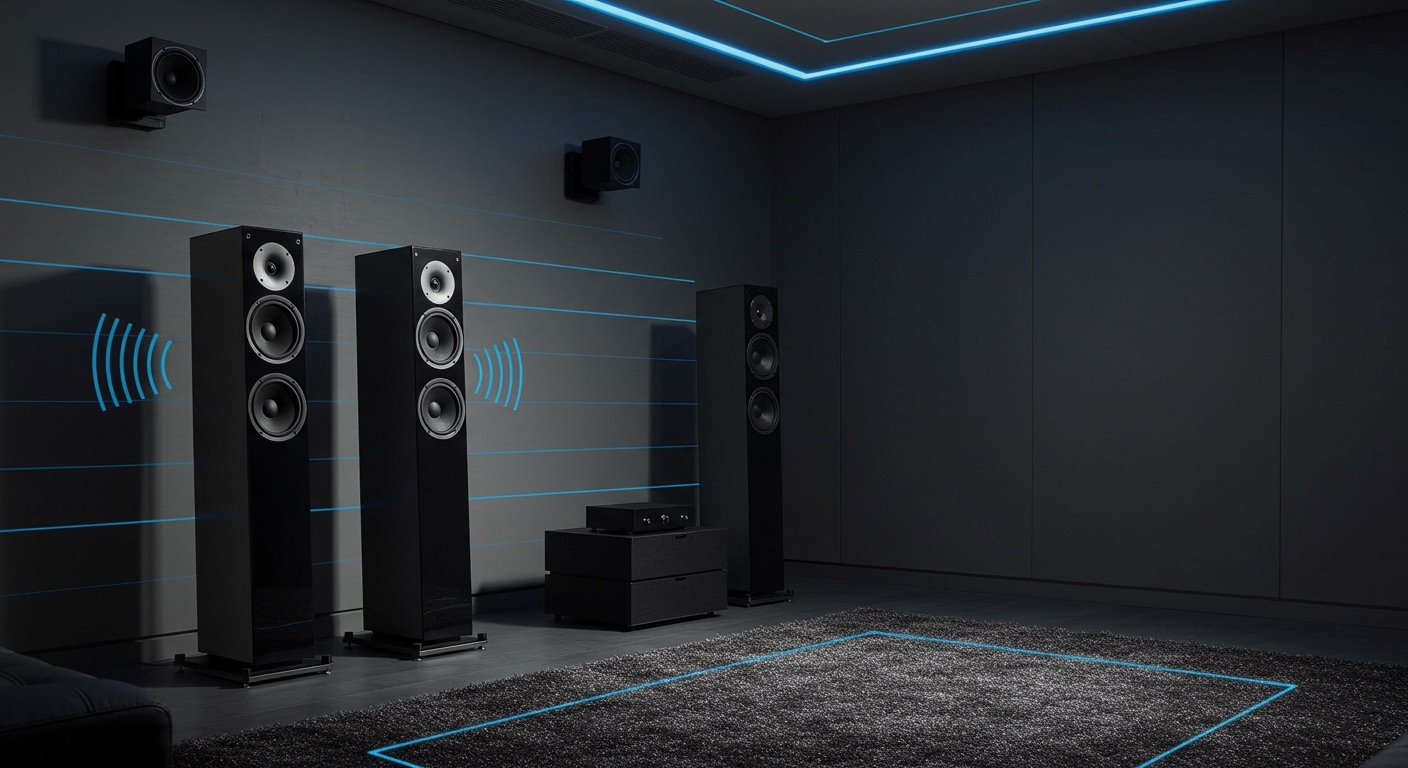
In my years of calibrating high-end home theaters, I have found that front height speakers are the “secret sauce” for rooms where cutting holes in the ceiling for Atmos isn’t an option. They provide a much more stable imaging experience than up-firing “bounce” speakers because they fire sound directly at the listener from an elevated position. This setup is officially supported by major spatial audio formats like Dolby Atmos, DTS:X, and Auro-3D, making them a versatile addition to any modern receiver.
Key Takeaways for Quick Setup
- Verticality: They add height to the front soundstage, making the screen feel much larger.
- Placement: Mount them at least 3 to 4 feet above your main front speakers, angled toward the primary listening position.
- Compatibility: Works with 5.1.2, 7.1.2, or higher configurations using modern AV Receivers.
- Performance: Generally superior to up-firing “Atmos-enabled” speakers for rooms with vaulted or treated ceilings.
- Wiring: Requires standard speaker wire runs from the “Height” or “Extra SP” terminals on your receiver.
Why You Should Add Front Height Speakers to Your Setup
When people ask me what are front height speakers and why they matter, I usually point to the “presence” effect. Traditional 5.1 or 7.1 systems keep all the action at ear level, which can feel disconnected from the massive visuals of a modern 4K television or projector screen. By adding height channels, you expand the “sweet spot” and create a more cohesive audio-visual bond.
The Science of “Presence” Channels
Originally popularized by Yamaha as “presence speakers,” this concept has evolved into a standard for immersive audio. When a sound is pined to a height channel, your brain perceives a larger acoustic space. This is particularly effective for orchestral scores and environmental ambiance, where the “air” of the room needs to feel expansive.
Comparing Height Options: Front Height vs. Others
Choosing the right vertical speaker can be confusing. Here is a breakdown based on my testing in various room environments:
| Feature | Front Height Speakers | In-Ceiling (Top) | Up-Firing Modules |
|---|---|---|---|
| Installation Difficulty | Moderate (Wall Mount) | High (Cutting Drywall) | Easy (Plug & Play) |
| Audio Directivity | Excellent (Direct Fire) | Best (Overhead) | Moderate (Relies on Reflection) |
| Best Room Type | Any (Versatile) | Flat Ceilings Only | Flat, Hard Ceilings Only |
| Aesthetic Impact | Visible on wall | Stealth/Hidden | Visible on top of speakers |
| Immersion Level | Very High | Maximum | Good |
Step-by-Step Guide: How to Install Front Height Speakers
Installing front height speakers requires a bit of planning to ensure they integrate seamlessly with your existing gear. Follow these steps to ensure you get the most out of your investment.
Step 1: Choosing the Right Hardware
You don’t necessarily need “special” speakers for this role, but they should ideally match the timbre of your front left and right speakers. Using the same brand and series ensures that as a sound moves from the floor to the ceiling, the “tone” of the sound doesn’t change. Look for bookshelf speakers or dedicated “on-wall” speakers that include integrated mounting brackets.
Step 2: Optimal Positioning and Angles
Placement is the most critical factor. For the best results, place your front height speakers directly above your front left and right towers. According to Dolby guidelines, they should be at an angle of roughly 30 to 45 degrees relative to your seated position.
I recommend mounting them as close to the ceiling as possible while still allowing a slight downward tilt. This tilt ensures the high frequencies—which are very directional—hit your ears directly rather than firing over your head.
Step 3: Wiring and Connectivity
Run high-quality 16-gauge or 14-gauge speaker wire from the speakers back to your AV Receiver (AVR). Look at the back of your receiver for terminals labeled “Height 1,” “Extra SP,” or “Presence.”
If you are running a 7.1.2 system, you will use the standard 7 channels for your base layer and the remaining 2 for your heights. Ensure your receiver is powered off during this process to avoid any short circuits.
Step 4: Receiver Configuration (The Software Side)
Once connected, you must tell your receiver what are front height speakers in the settings menu.
- Navigate to the Speaker Setup or Amp Assign menu.
- Select a configuration that includes “Height” speakers (e.g., 5.1.2).
- Set the speaker type specifically to “Front Height” rather than “Top Middle” or “Dolby Enabled.” This tells the processor to apply the correct timing and equalization filters for that specific location.
Expert Calibration Tips for Maximum Impact
Physical installation is only half the battle. To truly make your front height speakers disappear into the soundstage, you need to calibrate them correctly.
Run Auto-Room Correction
Most modern receivers come with a microphone and software like Audyssey, Dirac Live, or YPAO. Use these! These tools measure the distance from the height speakers to your ears down to the inch. This ensures that the sound from the ceiling arrives at the exact same time as the sound from your main speakers.
Manual Crossover Adjustments
Even if you use auto-calibration, I suggest checking your Crossover Settings. Since front height speakers are usually smaller bookshelf units, they shouldn’t be handling deep bass. I typically set a crossover of 80Hz or 100Hz. This sends the heavy lifting to your subwoofer, allowing the height speakers to produce clearer, more detailed high-end effects.
Level Matching
Sometimes, auto-calibration sets height channels a bit too quiet for my taste. If you feel like you aren’t “hearing” the height effect, try bumping the level of the height channels up by 1.5dB or 2dB in the manual settings. This provides a slightly more pronounced atmospheric effect without overwhelming the main dialogue.
Common Challenges and Solutions
In my experience, users often run into a few recurring issues when setting up front height speakers. Here is how to handle them:
- Wire Management: If you can’t run wires behind the wall, use paintable wire channels (raceways). They stick to the wall and can be painted to match your decor, making the wires virtually invisible.
- The “Hole” in the Middle: If your heights are too far apart, you might lose the center imaging. Ensure they aren’t wider than your main front speakers.
- Vaulted Ceilings: If your ceiling is angled, front height speakers are actually your best friend. Unlike ceiling speakers which fire straight down at an awkward angle, wall-mounted heights can be aimed regardless of the ceiling’s pitch.
The Role of Front Heights in Different Audio Formats
Understanding how different technologies utilize front height speakers will help you choose the right content to watch.
Dolby Atmos
In an Atmos setup, these speakers function as “Object-Based” channels. Instead of being assigned a specific “track,” sounds are treated as objects that move through 3D space. When a bird flies overhead in a movie, the Atmos processor calculates exactly how much sound to send to your front height speakers to simulate that movement.
DTS:X
DTS:X is more flexible than Atmos. It doesn’t require specific speaker locations. It adapts to whatever layout you have. If you tell the DTS processor you have front height speakers, it will remap the audio to ensure the height cues are perfectly localized.
Auro-3D
Auro-3D actually prefers height speakers over ceiling speakers. It uses a “layer” approach (Ear Level, Height Level, and Top Level). In an Auro-3D setup, the front height speakers are essential for creating the “Height Layer” that adds verticality to music and movies.
Frequently Asked Questions
Can I use any speaker as a front height speaker?
Yes, you can use almost any bookshelf or satellite speaker. However, for the best results, use speakers that match the brand and series of your main front speakers to maintain a consistent timbre.
How high should I mount my front height speakers?
Ideally, they should be mounted as high as possible on the front wall, usually just a few inches below the ceiling. They should be at least 3 feet higher than your main front left and right speakers.
Are front height speakers better than Atmos up-firing speakers?
In most cases, yes. Front height speakers fire sound directly at you, whereas up-firing speakers rely on reflecting sound off the ceiling. Reflections can be absorbed by acoustic treatments or scattered by popcorn ceilings, making the effect less convincing.
Do I need a special amplifier for height speakers?
You need an AV Receiver that supports at least 7 channels of amplification (for a 5.1.2 setup) or more. Ensure the receiver is rated for Dolby Atmos or DTS:X to properly utilize the height channels.
Will front height speakers work with regular 5.1 content?
Yes! Most modern receivers have “Upmixers” like Dolby Surround or DTS Neural:X. These programs analyze standard 5.1 or stereo signals and intelligently send ambient sounds to your front height speakers, creating an immersive experience even with older movies.









