

Mastering Your Korg Volca Setup: The Ultimate Connectivity Guide
To learn how to connect korg volca to speakers, you primarily need a 3.5mm (1/8 inch) TRS stereo cable that matches your speaker inputs—most commonly a 3.5mm to dual 1/4-inch TS cable for studio monitors or a 3.5mm to 3.5mm aux cable for portable speakers. Simply plug the cable into the Headphone/Output jack on the top of your Korg Volca, then connect the other end to your powered speakers or mixer and adjust the volume levels accordingly.
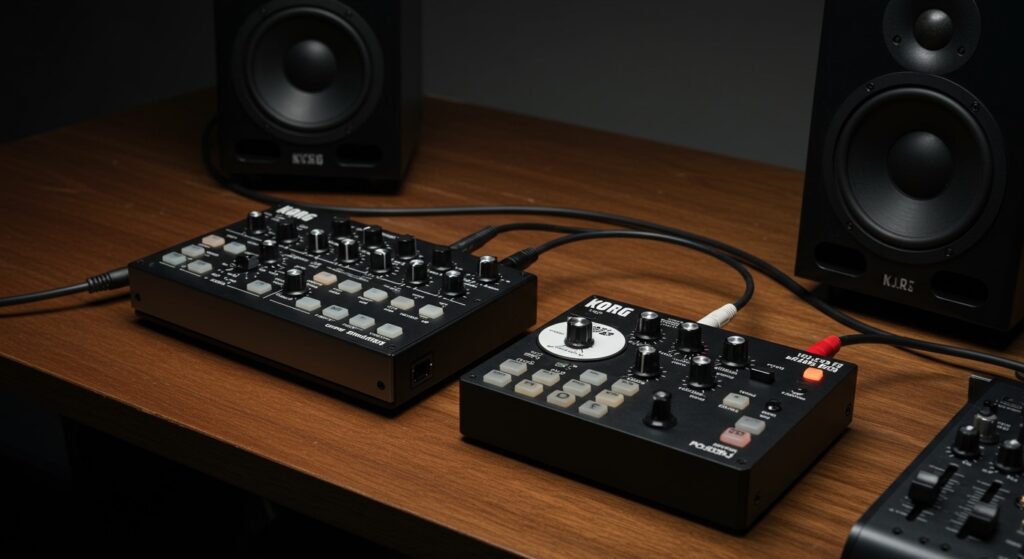
During my years of performing live with “Volca-only” rigs, I have found that the most common mistake is using the wrong cable type, which results in audio only coming out of one speaker or a thin, phased-out sound. Because Korg Volcas output a stereo signal (even if the internal sound is mono), using a standard mono guitar cable with an adapter often causes hardware issues.
🚀 Key Takeaways: Quick Setup Guide
- Output Type: All Korg Volcas use a 3.5mm (1/8″) TRS jack for audio output.
- Ideal Cable: Use a 3.5mm TRS to Dual 1/4″ TS Breakout Cable for professional studio monitors.
- Volume Control: Keep your Volca volume at roughly 75% to avoid internal clipping while maintaining a strong signal-to-noise ratio.
- Power Tip: Using a shared power supply can cause a high-pitched hum; a ground loop isolator is a lifesaver for clean audio.
- Speaker Choice: Use powered (active) speakers; the Volca does not have enough power to drive passive speakers without an external amplifier.
Choosing the Right Cables for Your Korg Volca
The first step in how to connect korg volca to speakers is identifying the input on your destination device. Unlike professional synthesizers that use large 1/4-inch jacks, the Volca line is designed for portability, utilizing the same size jack found on standard wired headphones.
Connection Scenarios and Required Gear
| Speaker Type | Input Jack Type | Required Cable/Adapter |
|---|---|---|
| Studio Monitors (e.g., KRK, Yamaha) | Dual 1/4″ Mono Jacks | 3.5mm TRS to Dual 1/4″ TS Breakout |
| Portable Bluetooth Speaker | 3.5mm Aux Input | 3.5mm TRS to 3.5mm TRS (Aux Cable) |
| Home Stereo/Hi-Fi | RCA (Red and White) | 3.5mm TRS to Dual RCA Male |
| Audio Interface (Focusrite, etc.) | 1/4″ Instrument Input | 3.5mm TRS to Dual 1/4″ TS Breakout |
| Guitar Amp | Single 1/4″ Mono | 3.5mm TRS to 1/4″ TS Mono (Summed) |
Why “Stereo Breakout” Cables Matter
When I first started using the Volca Bass, I tried using a simple headphone adapter into a single guitar cable. The result was a weak, “hollow” sound.
Most Korg Volcas (especially the Volca FM and Volca Sample) send signals to both the left and right channels of the 3.5mm jack. If you plug this into a balanced mono input on a mixer using a single cable, the mixer may cancel out the audio. Always use a breakout cable to split that signal into two separate 1/4″ plugs.
Step-by-Step: How to Connect Korg Volca to Studio Monitors
If you are setting up a home studio, you likely have active studio monitors. These are speakers with built-in amplifiers. Follow these steps for a clean, professional signal.
Power Down Your Gear
Before plugging anything in, ensure your speakers and Korg Volca are turned off. This prevents loud “pops” that can damage your speaker tweeters. I’ve seen many beginners blow a fuse or a driver by “hot-plugging” their gear at max volume.
Connect to the Volca Output
Insert the 3.5mm TRS plug into the jack labeled “Headphone” or “Output” on the top right or center of your Korg Volca. Ensure it “clicks” firmly into place. If you are using a protective case, make sure the cable isn’t being pushed out by the plastic housing.
Connect to the Speakers
Take the two 1/4-inch TS plugs (usually colored red and black/white). Plug the Left (Tip) into the left speaker and the Right (Ring) into the right speaker. If your speakers are chained together, plug them into the Line Inputs on the primary speaker.
Level Staging
Turn your Korg Volca volume knob to zero. Turn your speakers on. Slowly increase the Volca volume to the 12 o’clock position, then adjust your speaker volume until you reach a comfortable listening level.
Connecting Multiple Korg Volcas to One Set of Speakers
Once you have more than one Volca, you face a new challenge: how do you hear them all at once? You cannot simply “daisy chain” the audio like you can with the Sync cables.
Using a Hardware Mixer
To learn how to connect korg volca to speakers when you own a full “Volca Trio,” you need a mixer. I personally recommend the Korg Volca Mix, as it provides power to three other units and includes built-in speakers for quick jamming.
- Connect Audio: Run a 3.5mm TRS cable from each Volca output to the input channels on the Volca Mix.
- Main Out: Connect the RCA outputs on the back of the Volca Mix to your speakers using an RCA to 1/4-inch or RCA to 3.5mm cable.
- Syncing: Use the included 3.5mm sync cables to link the Sync-Out of your master clock (usually the Volca Drum or Sample) to the Sync-In of the next unit. This ensures all your devices stay on the same beat.
The Ground Loop Hum Problem
In my experience, the biggest headache in a Korg Volca setup is the “ground loop.” This happens when you power multiple Volcas from the same wall outlet or a “daisy chain” power adapter.
You will hear a high-pitched whine or buzzing. To fix this:
- Use batteries for all units (not ideal for long sessions).
- Buy a Ground Loop Noise Isolator. This small device sits between the Volca and the speaker/mixer and physically breaks the ground connection that causes the noise.
- Use high-quality, shielded cables like those from Hosa or Roland.
Recording Your Korg Volca: Connecting to a Computer
If your goal is to record your music into a DAW (Digital Audio Workstation) like Ableton Live or FL Studio, your “speakers” are essentially your Audio Interface.
Setup for Audio Interfaces
- Use a 3.5mm TRS to Dual 1/4″ TS cable.
- Plug the dual jacks into Input 1 and Input 2 of your interface (e.g., Focusrite Scarlett 2i2).
- In your DAW, create a Stereo Audio Track.
- Set the inputs to 1 & 2.
- Engage Direct Monitoring on your interface so you can hear the Volca through your computer speakers without latency.
Expert Insight: If you only have one input available on your interface, you can use a 3.5mm to 1/4″ Mono (TS) adapter. However, be aware that on a Volca FM, you will lose the lush stereo chorus effect.
Essential Accessories for Your Volca Setup
To get the most out of your Korg Volca setup, consider these specific upgrades that I’ve found essential for a reliable performance:
- MyVolts 5-Way Power Splitter: This allows you to power five Volcas from a single wall plug. It is much more reliable than cheap universal adapters.
- Decksaver Covers: Volcas are dust magnets. Because the knobs are small and use potentiometers that can get “scratchy” if dust enters, these plastic covers are a wise investment.
- External Effects: The Volca line sounds incredible when run through a Zoom MS-70CDR pedal or a Strymon BigSky. Connect the Volca to the pedal first, then the pedal to the speakers.
Troubleshooting Common Connection Issues
No Sound at All
- Check the Auto Power Off feature. Volcas turn off automatically after a period of inactivity to save battery.
- Ensure the Volume knob is turned up. On the Volca Keys, ensure the Sustain and Peak settings aren’t cutting off the sound.
- Check your Mute settings. On the Volca Beats or Sample, you might have accidentally muted all parts.
Sound is Very Quiet
- Check the Gain or Trim on your mixer/interface.
- Ensure you are using a Line Level input on your speakers, not a Phono input (which is for turntables).
- If using batteries, they may be low. Low voltage often results in lower audio output and distorted pitches.
Sound Only in One Ear
- This usually means you are using a Mono (TS) cable in a Stereo (TRS) jack.
- Swap your cable for a 3.5mm TRS to Dual 1/4″ TS breakout cable.
FAQ: Frequently Asked Questions
Can I connect a Korg Volca to a guitar amp?
Yes, you can connect a Korg Volca to a guitar amp using a 3.5mm TRS to 1/4″ TS cable. However, keep the Volca volume very low (start at 10%) because synthesizers output a much hotter signal than guitars. Guitar amps also tend to color the sound significantly, which might make the Volca sound muffled.
Do Korg Volcas have built-in speakers?
Yes, every Korg Volca features a small, built-in 1W speaker on the bottom. While these are fine for sketching out ideas on a bus, they lack bass response. For any serious music production or performance, you must use the how to connect korg volca to speakers methods described above.
Can I use Bluetooth speakers with a Volca?
You cannot connect via Bluetooth directly because Volcas lack Bluetooth transmitters. You must use a physical 3.5mm Aux cable. Note that some Bluetooth speakers have “latency” (a delay in sound) even when plugged in, which can make playing the Volca keys in real-time very difficult.
Is it safe to use a headphone splitter to connect two speakers?
It is safe, but not ideal. A passive splitter will drop the signal level significantly. It is much better to use a mixer or a dedicated breakout cable to ensure both speakers receive a strong, clear signal.









