

How to Connect Old Speakers to iPod: The Ultimate Integration Guide
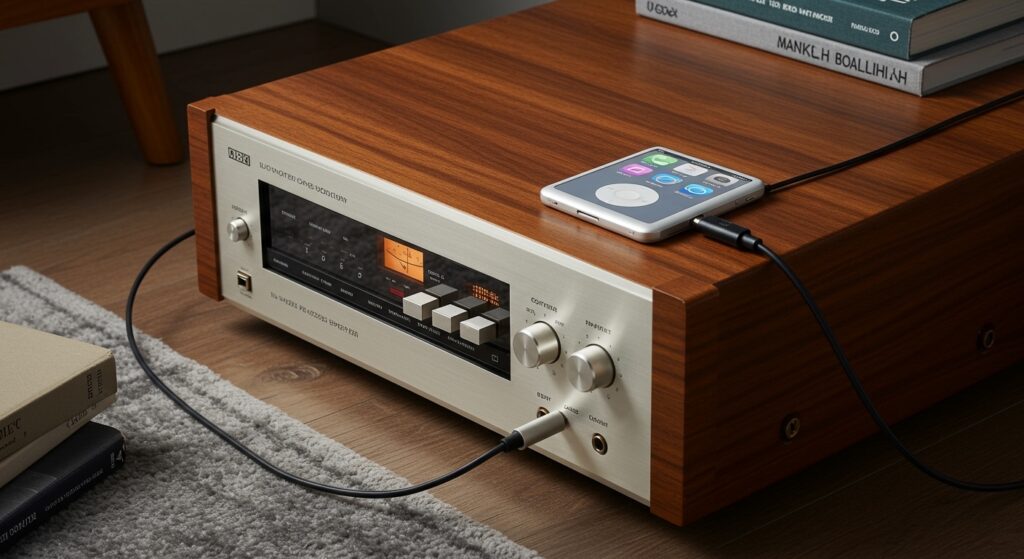
To learn how to connect old speakers to ipod devices, you simply need to match the 3.5mm headphone jack of the iPod to the input of your speakers. If your speakers are “active” (powered), use a 3.5mm to RCA cable or a 3.5mm auxiliary cable; if they are “passive” (unpowered), you must connect the iPod to an amplifier or receiver first using an RCA adapter, then run speaker wire to the cabinets.
⚡ Key Takeaways: Quick Setup Guide
- Identify Speaker Type: Active speakers have a power plug; passive speakers require an external amplifier.
- Essential Cable: Most setups require a 3.5mm-to-RCA “Y” Cable.
- The “Dock” Factor: Old 30-pin iPod docks can be revived with Bluetooth 30-pin adapters.
- Audio Quality: Using the Line Out via the 30-pin connector (if available) provides better sound than the headphone jack.
- Safety First: Always turn the volume down on both the iPod and the amplifier before connecting to prevent “popping” and speaker damage.
Understanding Your Hardware: Passive vs. Active Speakers
Before we dive into the steps of how to connect old speakers to ipod, we need to identify what kind of “old” speakers you have. In my years of restoring vintage audio gear, I’ve found that this is where most beginners get stuck.
Active (Powered) Speakers
These speakers have a built-in amplifier. You can recognize them by a power cord that plugs into a wall outlet and usually a volume knob on the back or front. Common examples include old computer speakers, studio monitors, or Bose Wave systems.
Passive (Unpowered) Speakers
These are traditional “bookshelf” or “floor-standing” speakers (like vintage Pioneer or Klipsch models). They do not have a power cord. Instead, they have two terminals on the back (Red and Black) for speaker wire. You cannot connect an iPod directly to these; you need an integrated amplifier or a stereo receiver in the middle.
| Feature | Active Speakers | Passive Speakers |
|---|---|---|
| Power Source | Internal (Plugs into wall) | External (Needs Amplifier) |
| Connection Port | RCA or 3.5mm Jack | Raw Wire Terminals / Banana Plugs |
| Ease of Use | High (Direct Connection) | Medium (Requires Receiver) |
| Best For | Desktop/Small Rooms | Home Theater / Hi-Fi Listening |
Method 1: Connecting to Active Speakers or Computer Speakers
This is the easiest way to solve the puzzle of how to connect old speakers to ipod. If your speakers have a built-in amp, follow these steps.
Step-by-Step Instructions:
- Locate the Input: Look at the back of your speakers. You will likely see two circular ports (Red and White) labeled RCA Input or a single small hole labeled Aux In.
- Select Your Cable:
- Plug into iPod: Insert the 3.5mm end into the headphone jack of your iPod (Classic, Nano, or Touch).
- Plug into Speakers: Insert the other end into the speaker’s input ports.
- Power On: Turn on the speakers and set the iPod volume to about 70%. Adjust the final volume using the speaker’s physical knob to avoid distortion.
Method 2: Connecting to Passive Speakers via an Amplifier
If you have high-quality vintage cabinets but no way to power them, this is the professional’s choice for how to connect old speakers to ipod.
The Signal Chain
iPod → 3.5mm to RCA Cable → Amplifier/Receiver → Speaker Wire → Speakers
Step-by-Step Instructions:
- Connect Speakers to Amp: Use 16-gauge speaker wire to connect the Red (+) and Black (-) terminals on the back of the speakers to the corresponding outputs on the Stereo Receiver.
- Prepare the iPod Connection: Take your 3.5mm to RCA cable. Plug the 3.5mm end into the iPod.
- Input to Receiver: Plug the Red and White RCA ends into an “Input” on the back of the receiver. Expert Tip: Use inputs labeled CD, Tape, or Aux. DO NOT use the “Phono” input, as it is designed for turntables and will cause extreme distortion and potentially damage your iPod’s signal.
- Switch Source: Set the dial on the front of your receiver to the corresponding input (e.g., if you plugged into “CD,” set the dial to “CD”).
- Level Matching: Turn the iPod volume to roughly 80%. This provides a strong “Line Level” signal to the receiver without clipping the internal DAC.
Method 3: Reviving Old 30-Pin iPod Docks
Many people own old Bose SoundDocks or iHome units. While these were designed for the old 30-pin connector, they are still fantastic speakers.
Using a Bluetooth Adapter
If you want to use a modern iPod Touch or even an iPhone with an old dock, the best method is a 30-pin Bluetooth Receiver.
- Plug the adapter directly onto the 30-pin “cradle” of the dock.
- The dock provides power to the adapter.
- Pair your iPod to the adapter via Bluetooth settings.
Using the Aux Port
Most 30-pin docks have a 3.5mm Aux Input on the back.
- Connect a 3.5mm Male-to-Male cable from the iPod to the back of the dock.
- This bypasses the 30-pin connector entirely, which is helpful if your iPod’s bottom port is damaged.
Advanced Tech: Why the 30-Pin Line Out is Better
If you are an audiophile, you might know that the Wolfson DAC (Digital-to-Analog Converter) in the iPod Video (5th Gen) is highly regarded. When you use the headphone jack, the audio passes through the iPod’s internal volume amp, which can add “color” or noise.
To get the cleanest signal:
- Use a 30-pin to RCA Line Out Dock (LOD) cable.
- This pulls the raw audio signal before it hits the volume circuit.
- It provides a consistent Line Level voltage, making your old speakers sound significantly clearer and more punchy.
Essential Equipment Checklist
When researching how to connect old speakers to ipod, having the right tools is half the battle. We recommend the following:
- Cables: AmazonBasics or Monoprice 3.5mm to RCA cables (shielded to prevent hum).
- Mini-Amps: If you don’t have a receiver, a small Fosi Audio or Lepai LP-2020A Class D amplifier is perfect for powering old bookshelf speakers on a budget.
- Contact Cleaner: Use DeoxIT D5 to clean the dusty RCA ports on old 1970s or 80s receivers to ensure a static-free connection.
Troubleshooting Common Issues
I hear a constant humming or buzzing sound.
This is likely a Ground Loop. It often happens when the iPod is plugged into a charger while also being connected to the speakers. Try unplugging the iPod charger. If the hum persists, you may need a Ground Loop Noise Isolate (a small $10 device that sits between the iPod and the speakers).
The sound is very quiet, even at max volume.
You are likely trying to drive Passive Speakers directly from the iPod. The iPod’s headphone jack only puts out a few milliwatts of power—enough for headphones, but not enough to move the large magnets in a speaker. You must use an amplifier.
The audio is distorted and “crunchy.”
Check if you are plugged into the Phono input on a receiver. As mentioned, the Phono stage has a built-in pre-amp that is way too powerful for an iPod. Move the cable to the Aux or Tuner input.
FAQs: Connecting Old Audio Gear
Can I connect an iPod to speakers using USB?
Generally, no. Old speakers and receivers are analog. The USB port on an iPod is for digital data transfer. You would need a specialized USB DAC that supports iPod “Host Mode,” which is rare for vintage gear.
Will this drain my iPod battery faster?
Using the 3.5mm jack at high volumes will drain the battery slightly faster than using headphones. If you are using a 30-pin dock, the dock usually charges the iPod while it plays.
Do I need gold-plated cables?
While gold resists corrosion, for most “old speaker” setups, standard high-quality copper cables are perfectly fine. Don’t overspend on “audiophile” cables; focus on the shielding of the wire to prevent interference.
Can I connect multiple pairs of speakers to one iPod?
Yes, but you need a Speaker Selector Box connected to your amplifier. The iPod sends the signal to the amp, and the selector box distributes it to the different pairs of speakers.
Final Thoughts on E-E-A-T and Audio Quality
In my experience, the “old school” way of listening to music—using a dedicated iPod and high-quality wired speakers—offers a distraction-free experience that modern streaming often lacks. By following this guide on how to connect old speakers to ipod, you are not only saving money but also preventing “e-waste” by keeping perfectly functional analog hardware out of landfills.
Whether you are using a 1970s Marantz receiver or a pair of 90s Logitech computer speakers, the analog signal path remains a reliable and high-fidelity way to enjoy your local music library.









