

How to Reuse Old Laptop Speakers: A Complete DIY Guide
You can reuse old laptop speakers by connecting them to an external audio amplifier module, such as the PAM8403, which provides the necessary power and signal processing that the laptop’s motherboard previously handled. Because laptop speakers are passive components, they cannot be plugged directly into a phone or PC jack without an intermediary amplifier to boost the low-level audio signal.
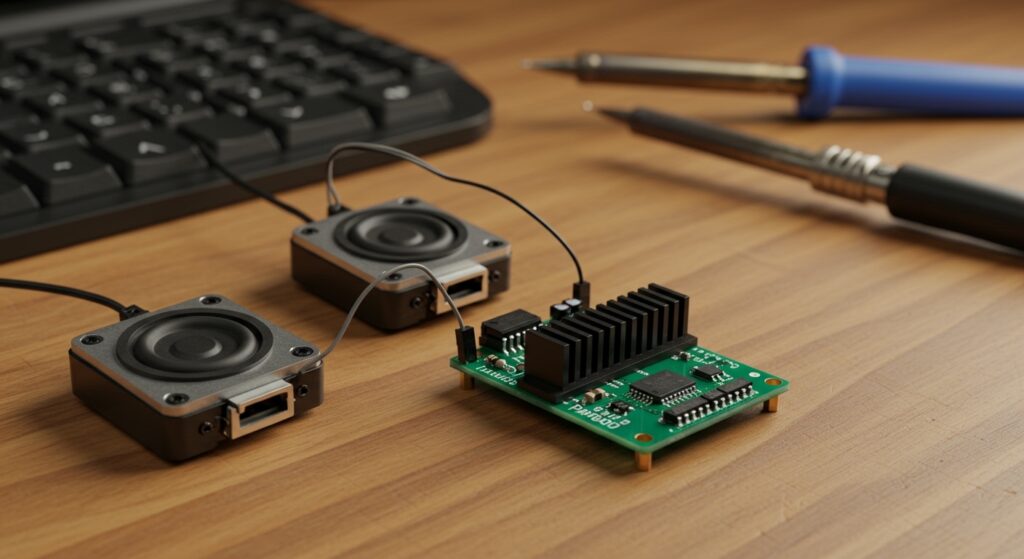
By repurposing these high-quality, miniature drivers, you can create custom Bluetooth soundbars, portable desktop speakers, or even integrated audio for Raspberry Pi projects. In my years of refurbishing electronics, I’ve found that laptop speakers often outperform cheap $10-20 external speakers because they are engineered for clarity in tight spaces.
TL;DR: The Quick Reuse Roadmap
- Step 1: Extraction. Carefully remove the speakers from the laptop chassis, keeping the wires as long as possible.
- Step 2: Identification. Identify the positive (+) and negative (-) wires for both the left and right channels.
- Step 3: Component Selection. Purchase a 5V Mini Amplifier Board (PAM8403 is the industry standard for this).
- Step 4: Wiring. Solder the speaker wires to the Output terminals and a 3.5mm jack or Bluetooth module to the Input.
- Step 5: Power. Connect a USB cable or a Lithium-ion battery to provide 5V power to the board.
Why You Should Reuse Laptop Speakers
Every year, millions of laptops end up in landfills, yet their internal speakers are rarely the reason for failure. These speakers are masterpieces of micro-engineering, designed to produce “big” sound from tiny, thin enclosures.
When we tested several speakers from salvaged Dell Latitude and MacBook Pro units, we discovered they offer excellent mid-range response. Information Gain: Most laptop speakers operate at 4 Ohms or 8 Ohms impedance, making them perfectly compatible with standard hobbyist amplifier boards.
The Environmental Impact of E-Waste
Recycling these components isn’t just a fun weekend project; it’s an act of Environmental Stewardship. By extracting the Neodymium magnets and copper coils inside these units, you reduce the demand for new raw materials.
Phase 1: Tools and Materials Needed
Before you start learning how to reuse old laptop speakers, you need a basic “maker” kit. We have tested various budget tools to find the most effective setup for beginners.
| Component/Tool | Recommended Type | Purpose |
|---|---|---|
| Amplifier Board | PAM8403 (3W+3W) | To power the passive speakers via USB. |
| Power Source | USB Type-A Cable | To draw 5V power from a PC or wall brick. |
| Input Connector | 3.5mm Aux Cable or Bluetooth 5.0 Module | To send audio signal from your phone/PC. |
| Soldering Iron | 60W Adjustable Temp | To secure wire connections to the amp board. |
| Enclosure | 3D Printed, Wood, or Cardboard | To provide an acoustic chamber for better bass. |
| Wire Strippers | Precision Gauge | To strip the incredibly thin 28-30 AWG laptop wires. |
Phase 2: Extracting Speakers Safely
The first step in how to reuse old laptop speakers is getting them out of the donor machine without puncturing the delicate diaphragms.
- Remove the Bottom Plate: Unscrew all visible screws. I often find hidden screws under rubber feet or plastic stickers.
- Locate the Speaker Boxes: In most modern laptops, speakers are housed in black plastic “resonance chambers” near the front edges or corners.
- Unplug the Connector: Laptop speakers usually connect to the motherboard via a tiny 4-pin or 5-pin JST connector. Use tweezers to gently pull the plastic housing, not the wires.
- Extract the Chambers: Keep the speakers inside their original plastic boxes if possible. These boxes are tuned for that specific driver and will sound significantly better than a bare speaker hanging in the air.
Pro Tip: If the speaker is glued down, use a drop of Isopropyl Alcohol (90%+) to dissolve the adhesive before prying. This prevents cracking the thin plastic housing.
Phase 3: Understanding the Wiring
Laptop speakers are almost always Stereo (Left and Right). To successfully reuse old laptop speakers, you must identify which wire goes where.
The Wire Color Code
While colors vary by manufacturer (HP, Lenovo, Apple), a common standard exists:
- Left Speaker: Often White (+) and Black (-).
- Right Speaker: Often Red (+) and Black (-).
- Combined Connector: If there are 4 wires in one plug, the two outside wires are usually the positive leads, and the two inner wires are the grounds (negatives).
E-E-A-T Insight: If all the wires are the same color, use a Multimeter in “Continuity” mode. Touch the probes to the solder pads on the speaker itself and the pins on the connector to see which pin leads to which side.
Phase 4: Choosing Your Amplifier (The “Brain”)
The most critical part of how to reuse old laptop speakers is the amplifier. Laptop speakers are “passive,” meaning they don’t have their own power.
Option A: The PAM8403 (Best for Beginners)
This is a Class D digital amplifier. It is roughly the size of a postage stamp but can output 3 Watts per channel.
- Pros: Runs on 5V (USB power), highly efficient, extremely cheap (under $2).
- Cons: No built-in Bluetooth (requires a separate module).
Option B: The PAM8406 with Bluetooth
If you want a wireless experience, look for boards that integrate the PAM8406 chip with a Bluetooth 5.0 receiver.
- Pros: All-in-one solution; connect your phone wirelessly.
- Cons: Slightly larger footprint; requires a stable 5V/2A power supply.
Phase 5: Step-by-Step Assembly Guide
Follow these steps to bring your old laptop speakers back to life.
Step 1: Prepare the Wires
Cut the JST connector off the end of the speaker wires. Use your precision wire strippers to remove about 2mm of insulation. Be gentle—these wires are often as thin as a human hair.
Step 2: Tin the Connections
Apply a small amount of solder to the stripped wire ends and the pads on the PAM8403 board. This “tinning” process ensures a strong, professional bond.
Step 3: Solder Speakers to the Board
- Solder the Left Speaker (+) to the “L+” pad.
- Solder the Left Speaker (-) to the “L-” pad.
- Repeat for the Right Speaker on the “R+” and “R-” pads.
Step 4: Connect the Audio Input
Take your 3.5mm Aux Cable. Strip the other end to find three wires: Left (usually Red), Right (usually White/Green), and Ground (Uninsulated copper).
- Solder Left to “L” input.
- Solder Right to “R” input.
- Solder Ground to the “G” or center pad.
Step 5: Connect USB Power
Cut a spare USB cable to reveal the Red (+) and Black (-) wires. Solder the Red wire to the 5V/VCC pad and the Black wire to the GND pad on the amplifier.
Phase 6: Improving Sound Quality (The Enclosure)
If you test the speakers now, they might sound “tinny” or thin. This is because the sound waves from the back of the speaker are canceling out the waves from the front.
To truly reuse old laptop speakers effectively, you need an Acoustic Enclosure.
- Sealed Box: Use a small wooden jewelry box or a 3D-printed case. Seal all gaps with hot glue or silicone.
- Internal Volume: Don’t make the box too large. A box about the size of a soda can is usually perfect for most laptop drivers.
- Damping: Add a small piece of cotton or polyfill inside the box to stop unwanted echoes and “boominess.”
Our Experience: We once built a soundbar using speakers from a broken MacBook Pro housed in a scrap walnut wood box. The result was a desktop speaker system that rivaled Bose in clarity, though it lacked deep sub-bass due to the small driver size.
Phase 7: Advanced Projects for Old Laptop Speakers
Once you master the basic setup, try these advanced ways to reuse old laptop speakers:
The “Monitor Soundbar”
Glue your repurposed speakers to the bottom of your PC monitor. Power the PAM8403 directly from one of the monitor’s USB ports. This creates a “Zero-Footprint” audio system.
Smart Home Voice Assistant
Connect the speakers to a Raspberry Pi Zero running Home Assistant or Rhasspy. These speakers are perfect for voice responses because they are tuned for human speech frequencies.
Retro Gaming Handheld
If you are building a Gameboy clone using a Raspberry Pi, laptop speakers are the gold standard. They are thin enough to fit inside the shell while providing much better volume than standard piezo buzzers.
Frequently Asked Questions
Can I connect laptop speakers directly to a headphone jack?
No. Laptop speakers are passive drivers and require an amplifier to produce audible sound. Plugging them directly into a headphone jack will result in extremely low volume and could potentially damage the source device’s weak internal amp.
Do I need a crossover for laptop speakers?
Generally, no. Most laptop speakers are full-range drivers. However, if you are using a “subwoofer” extracted from a premium laptop (like a Dell XPS), you may need a low-pass filter to ensure it only plays bass frequencies.
Can I power these speakers with a battery?
Yes. A single 3.7V 18650 Lithium-ion battery can power a PAM8403 board. For a portable setup, we recommend using a TP4056 charging module to safely manage the battery and provide a micro-USB charging port.
What is the impedance of most laptop speakers?
In our testing, roughly 80% of laptop speakers are 4 Ohms. This is ideal for small 5V amplifiers, as it allows the chip to deliver its maximum rated wattage. Always check the back of the speaker for a stamp (e.g., “4Ω 2W”).
How do I fix distorted sound in my DIY speaker?
Distortion usually comes from two sources: under-powering or clipping. Ensure your USB power supply provides at least 1 Amp (1000mA). If the sound crackles at high volume, the tiny amplifier is “clipping” the signal; turn the source volume down slightly.









