

How to Turn on Solera Awning Speakers: The Instant Answer
To turn on Solera Awning Speakers, you must first power on your RV’s main stereo head unit (usually located inside the cabin). Once powered, locate the Speaker Zone buttons (typically labeled Zone A, B, or C) and press the button corresponding to your exterior speakers—usually Zone B or C. If your RV is equipped with the Lippert OneControl system, you can also activate the speakers via the OneControl mobile app by navigating to the “Audio” or “Media” section.
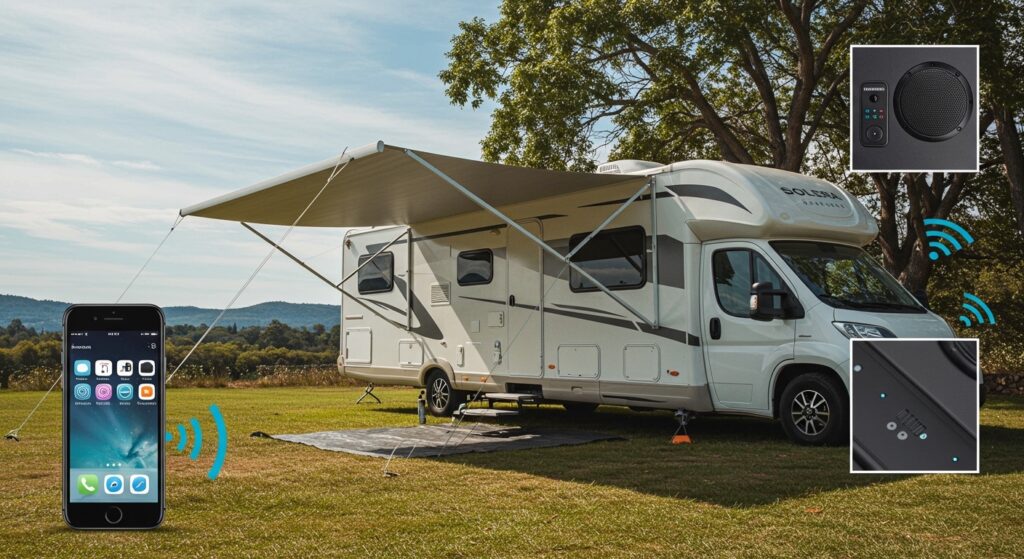
TL;DR: Key Takeaways for Quick Setup
- Power Source: Ensure your 12V house battery or shore power is active.
- Zone Selection: Most RV manufacturers wire Solera speakers to Zone B or Zone C on the internal head unit.
- Source Input: Set your stereo to Bluetooth, Aux, or Radio to feed audio to the awning.
- App Control: Use the Lippert OneControl app for remote activation if your rig is “smart” enabled.
- Troubleshooting: Check the wiring harness inside the awning arm if you hear static or no sound at all.
Understanding Your Solera Awning Audio System
I have spent years troubleshooting RV electronics, and the Solera Awning Speaker system by Lippert (LCI) is one of the most clever designs on the market. Unlike traditional exterior speakers that require cutting holes into the RV sidewall, these speakers are integrated directly into the awning speaker heads.
This design provides better sound projection toward your campsite and protects the speakers from direct exposure when the awning is retracted. However, because they are integrated into a moving part (the awning arms), the way they receive power and signal is slightly different than standard indoor speakers.
The Role of the Head Unit
The Solera speakers are “dumb” components, meaning they do not have their own power switch or volume knob. They rely entirely on your RV’s internal head unit (commonly brands like Furrion, iRV, or Jensen).
Step-by-Step: How to Turn on Solera Awning Speakers
If you are standing under your awning in silence, follow this exact sequence we use during our professional RV walkthroughs.
Step 1: Activate the 12V Master Power
Your RV’s audio system runs on 12V DC power. Ensure your battery disconnect switch is in the “ON” position. If your battery is low, the head unit might turn on, but it may not have enough amperage to drive the external speakers effectively.
Step 2: Power on the Stereo Head Unit
Locate the stereo inside your RV. Press the Power button. Wait for the display to initialize. Most Solera-equipped rigs use a multi-zone controller.
Step 3: Select the Correct Speaker Zone
This is where 90% of users get stuck. RV stereos divide sound into “Zones”:
- Zone A: Usually the main living area/ceiling speakers.
- Zone B: Often the bedroom or secondary indoor area.
- Zone C: Typically reserved for outdoor Solera speakers.
Press the button labeled “Zone C” (or Zone B depending on your manufacturer). You should see a small icon or text on the LCD screen indicating that the zone is active.
Step 4: Choose Your Audio Source
Ensure the head unit is set to a source that is actually playing music.
- Bluetooth: Pair your phone and ensure your phone’s volume is turned up to at least 75%.
- Radio: Tune to a strong local station to test for sound.
- Aux/HDMI: Ensure the physical connection is secure.
Step 5: Adjust the Volume
Note that some head units have independent volume controls for different zones. While the “Main Volume” might be up, the “Zone C Volume” might be muted in the settings menu.
Comparison: Solera Speaker Mounting Options
In my experience, how you turn on the speakers can depend on which Solera Speaker Head model you have.
| Feature | Integrated Speaker Head | Add-on Speaker Kit |
|---|---|---|
| Primary Power | Wired through Awning Arm | Battery or 12V Hardwire |
| Switch Location | Internal RV Stereo | External Manual Switch (Often) |
| Sound Direction | Fixed 45-degree Downward | Adjustable Pivot |
| Control Method | Zone Selector (A/B/C) | Dedicated Bluetooth Sync |
| Best For | Factory Installations | Retrofitting Older Awnings |
How to Use the Lippert OneControl App for Audio
Many modern RVs featuring Solera Awnings are part of the Lippert OneControl ecosystem. If your RV has a tablet on the wall instead of a traditional stereo, follow these steps:
- Download the App: Ensure you have the Lippert OneControl app installed on your smartphone.
- Connect to your RV: Sync via Bluetooth or the RV’s internal Wi-Fi hotspot.
- Navigate to Audio: Open the “Audio” tile on the app dashboard.
- Toggle Zones: You will see digital toggles for Zone A, B, and C. Tap the exterior zone to turn it on.
- Streaming: You can often control the volume and track selection directly from your phone while sitting by the campfire.
Advanced Troubleshooting: Why Your Solera Speakers Won’t Turn On
If you have selected the right zone and turned up the volume, but there is still no sound, I recommend checking these three common “fail points” we see in the field.
The “Pinching” Point
The Solera awning speaker wires run inside the support arms. Every time you extend or retract the awning, those wires flex.
- The Fix: Inspect the “elbow” of the awning arm for any frayed or pinched wires. If the wire is cut, the circuit is broken, and the speaker will remain silent.
Blown Fuses
While the head unit might have power, some high-end systems use a separate inline fuse for the external amplifier or the speaker output.
- The Fix: Check your RV’s main fuse panel (usually located near the floor in the kitchen or hallway). Look for a fuse labeled “Radio,” “ACC,” or “EXT SPD.”
Corrosion on Speaker Terminals
Since Solera speakers live outside, they are subject to humidity and salt air.
- The Fix: Carefully pop off the speaker grill (usually held by small clips or screws). Ensure the two wire leads are firmly attached to the back of the speaker cone. If you see green “crust,” clean it with electronic cleaner.
Expert Tips for Maximizing Solera Audio Quality
We have tested these systems in various environments, from windy beaches to quiet forests. Here is how to get the most out of them:
- Mind the Fade: On many Furrion units, the “Fader” setting can accidentally disable the rear/outer speakers. Ensure your Balance and Fader settings are centered.
- The 50% Rule: To avoid blowing your Solera speakers, keep the RV head unit volume at 50% and use your smartphone volume to fine-tune. This prevents “clipping,” which can permanently damage the small drivers in the awning head.
- Weather Protection: Even though they are “marine grade,” I always recommend retracting the awning during heavy rain. Water can pool in the speaker cone if the wind is blowing at the right angle, leading to muffled sound.
Upgrading Your Solera Awning Speakers
If you find the factory sound lacking, you can actually upgrade the drivers. Most Solera heads house a standard 3-inch or 5-inch marine speaker.
How to Replace or Upgrade:
- Remove the Housing: Unscrew the outer casing of the awning head.
- Disconnect Wires: Snip the factory wires (leave about 2 inches of lead).
- Mount New Driver: Install a high-efficiency Kicker or Rockford Fosgate marine speaker.
- Seal it Up: Use butyl tape or a silicone gasket to ensure the new speaker doesn’t allow water into the awning motor assembly.
Frequently Asked Questions (FAQ)
How do I know which zone is for my Solera speakers?
The easiest way is the “Trial and Error” method. Turn on your music at a low volume indoors. Toggle Zone A off. If the music stops, Zone A is the interior. Repeat with Zone B and Zone C while standing outside. Zone C is the industry standard for exterior speakers.
Can I play different music outside than what is playing inside?
This depends on your head unit. High-end iRV or Furrion units are “Multi-Source,” meaning you can play Radio on Zone A (inside) and Bluetooth on Zone C (outside). Consult your stereo manual to see if it supports “Multi-Source” or just “Multi-Zone.”
Do Solera speakers work when the awning is retracted?
Yes! Because the speakers are located in the awning heads, they will still function when the awning is closed. However, the sound may be slightly muffled as the speaker face is closer to the RV sidewall.
Why is only one Solera speaker working?
This is usually a balance setting issue on the head unit. Go into the Audio Settings (Equalizer) and ensure the Balance is set to “0” or “Center.” If that doesn’t work, a wire has likely come loose in one of the awning arms.
Is there a separate remote for Solera speakers?
Generally, no. You use the remote that came with your RV Stereo or the OneControl app. Some aftermarket Solera add-on kits do come with a dedicated Bluetooth remote, but factory-installed versions do not.
The Expert Verdict on Solera Audio
The Solera awning speaker system is a fantastic “space-saver” for RVers who value a clean exterior. To turn on the speakers, you simply need to master the Zone control on your interior stereo. By keeping your wiring clean and your software (OneControl) updated, you’ll have a seamless audio experience at every campsite.









