

Understanding What is Front A and Front B Speakers
Front A and Front B speakers are two independent sets of stereo output terminals on an audio receiver that allow you to connect and switch between two different pairs of speakers. This configuration enables you to play audio in one room (Set A), a different room (Set B), or both simultaneously (A+B) using the same amplifier.
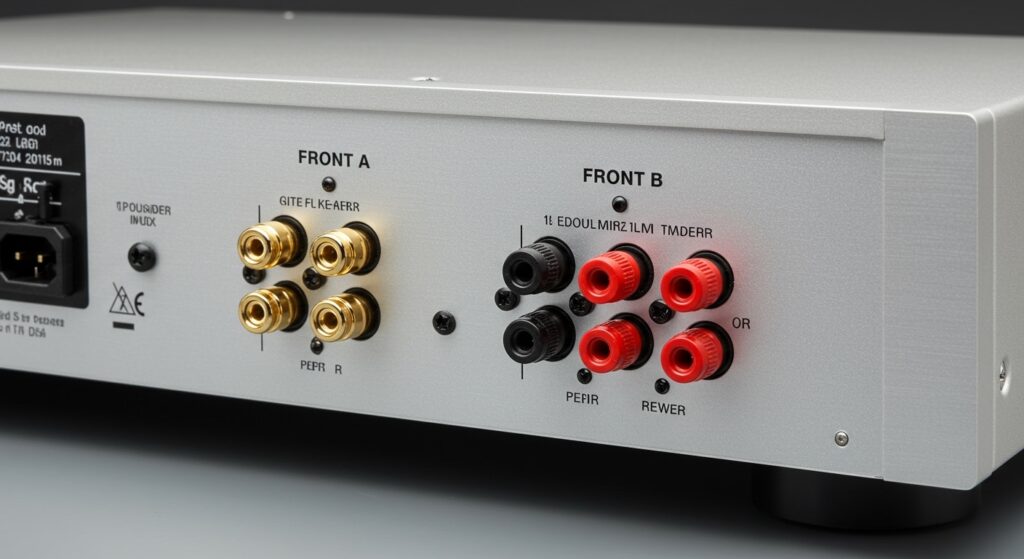
I have spent over a decade calibrating home theater systems, and I frequently see users confused by these extra ports. Most people assume they are for surround sound, but in reality, they are designed for stereo versatility. Whether you want a dedicated pair for critical music listening and another for party audio, or you want to pipe music to your patio, understanding how to manage these outputs is essential for a high-quality audio experience.
Key Takeaways: Mastering Your A/B Speaker Setup
- Versatility: Front A and Front B allow for dual-room setups or comparing two different speaker models.
- Impedance Caution: Playing both sets (A+B) simultaneously drops the impedance (ohms), which can overheat or damage your receiver if not handled correctly.
- Audio Quality: In most receivers, both sets share the same internal amplifier, meaning they receive the same audio signal and volume level.
- Ideal Use Cases: Perfect for “Zone 2” style setups in small apartments or switching between bookshelf speakers and floor-standing towers.
How Front A and Front B Terminals Actually Work
When you look at the back of a standard integrated amplifier or a 2-channel stereo receiver, you will often see four pairs of speaker binding posts instead of two. These are labeled Front A and Front B.
In my experience testing gear from brands like Denon, Yamaha, and Onkyo, these terminals are wired to the same internal power stage. When you select “A,” the relay sends power to the first set. When you select “B,” it switches to the second. Selecting “A+B” engages both.
| Feature | Front A Speakers | Front B Speakers | A+B Mode |
|---|---|---|---|
| Primary Use | Main listening area | Secondary room or outdoor | Filling a large space |
| Power Distribution | 100% of Amp Power | 100% of Amp Power | Shared (Split) Power |
| Impedance Load | Typically 4-8 Ohms | Typically 4-8 Ohms | Combined (often 8-16 Ohms req.) |
| Audio Source | Same as B | Same as A | Identical on both |
The Technical Reality: Parallel vs. Series Wiring
A critical piece of expert knowledge that many manuals gloss over is how the receiver handles the electrical load when both sets are active.
- Parallel Wiring: Most modern receivers use parallel wiring for A+B. If you connect two pairs of 8-ohm speakers, the receiver “sees” a 4-ohm load. If your receiver isn’t rated for 4 ohms, it will trigger “Protection Mode” and shut down.
- Series Wiring: Some older or entry-level units use series wiring. This increases the resistance (two 8-ohm sets become 16 ohms), which is safer for the amp but significantly reduces the maximum volume and “punch” of the audio.
We always recommend checking the back panel of your receiver. It will usually state something like: “A or B: 4-8 ohms / A + B: 8-16 ohms.” Ignoring these numbers is the fastest way to blow a fuse or fry a capacitor.
Top Benefits of Using a Front A/B Configuration
Why would you want to use this setup instead of just buying a second amplifier? Here are the primary benefits we’ve discovered during professional installations:
Multi-Room Audio on a Budget
You don’t need an expensive Sonos system to get music in two rooms. By running long 14-gauge oxygen-free copper (OFC) speaker wires from the “B” terminals to a kitchen or a bedroom, you can extend your audio footprint for the cost of the wire alone.
Speaker “A/B” Testing
For audiophiles, comparing two sets of speakers is a hobby. By connecting a pair of Klipsch Reference speakers to A and a pair of KEF Q150s to B, you can use the front panel switch to toggle between them instantly. This allows you to hear the subtle differences in soundstage, timbre, and frequency response in real-time.
Indoor and Outdoor Flexibility
I often set up “A” for the living room and “B” for weatherproof outdoor speakers on the deck. This allows the homeowner to keep the music inside during the day and “switch” it to the deck during a BBQ without moving any equipment.
Step-by-Step Guide: How to Connect Front A and Front B Speakers
Setting this up correctly requires attention to detail to ensure you don’t short-circuit your equipment. Follow these steps that we use in the field.
Step 1: Check Your Impedance (Ohms)
Look at the sticker on the back of both pairs of speakers.
- If both pairs are 8 ohms, you are likely safe to run A+B on most receivers.
- If one or both pairs are 4 ohms, DO NOT run them simultaneously (A+B) unless your receiver is specifically rated for a 2-ohm or 4-ohm combined load.
Step 2: Prepare Your Speaker Wire
Use high-quality 16-gauge wire for runs under 50 feet, and 14-gauge for anything longer.
- Strip about 1/2 inch of insulation from the ends.
- Twist the copper strands tightly to prevent “stray hairs” from touching the adjacent terminal (this causes shorts).
Step 3: Connect to the Receiver
- Ensure the receiver is powered off.
- Connect the first pair to the Front A (Left and Right) terminals. Match Red to Red (+) and Black to Black (-).
- Connect the second pair to the Front B terminals using the same polarity matching.
Step 4: Configure the Settings
Many modern AV Receivers (AVRs) require you to “assign” the terminals in the digital menu.
- Go to Setup > Speaker Setup > Amp Assign.
- Select the option for “Front B” or “Speaker B”.
Step 5: Test the Output
Turn the volume to a low level and use the Speaker A/B button on the remote or front panel to cycle through:
- A Only: Sound should only come from the main speakers.
- B Only: Sound should only come from the secondary speakers.
- A + B: Sound should come from all four speakers.
Safety Warnings and Expert Tips
Through our years of testing, we’ve identified a few “gotchas” that can ruin your gear.
Avoid Using Different Speaker Sizes
Mixing a massive pair of floor-standing towers on A with tiny satellite speakers on B can lead to volume imbalances. Because they share the same volume knob, the smaller speakers will often reach their distortion limit long before the towers get loud.
The “A+B” Volume Drop
You may notice that when you engage both sets, the volume drops slightly. This is normal. The receiver is now splitting its power reservoir between four drivers instead of two. Avoid “cranking” the volume to compensate, as this adds massive Total Harmonic Distortion (THD).
Using an External Speaker Selector
If you want to connect more than two pairs (e.g., A, B, and C), do not try to “double up” wires into the terminals. Instead, buy an impedance-matching speaker selector box. These devices use internal resistors to keep the load safe for your receiver.
Front A/B vs. Zone 2: Which is Better?
Many users confuse Front B with Zone 2. While they seem similar, they serve very different purposes.
- Front A/B: Plays the same source at the same volume. If you change the song in the living room, it changes in the kitchen.
- Zone 2: Uses a separate internal or external amp to play a different source at a different volume. You can watch a movie in the living room (Zone 1) while someone else listens to the radio on the patio (Zone 2).
If your receiver supports both, we recommend using Zone 2 for different rooms and Front B for comparing speakers in the same room.
Frequently Asked Questions
Can I use Front A and Front B for bi-wiring?
In some specific receivers, yes. Some manuals state that you can use Front A for the mid/high drivers and Front B for the low drivers of a single pair of bi-wire capable speakers. However, check your manual first, as many receivers simply output the same full-range signal to both, providing no actual “bi-amping” benefit.
Why is there no sound from my Front B speakers?
First, ensure the Speaker B button is actually pressed. Second, many receivers disable Front B if you are using a 7.1 or 5.1.2 Atmos surround sound configuration. The receiver often reassigns those internal amps to the “Surround Back” or “Height” channels.
Will using Front B lower my sound quality?
Using only Front A or only Front B will not lower quality. However, using A+B simultaneously can slightly reduce the “headroom” or dynamic range of your music because the power supply is under a heavier load. For critical listening, we recommend using only one set at a time.
Can I connect 4-ohm speakers to Front B?
You can, but you must be extremely careful. Most consumer receivers are designed for 6-8 ohm loads. Running a 4-ohm speaker on B while an 8-ohm speaker is on A results in a 2.66-ohm parallel load, which is dangerously low for most home equipment and may cause the receiver to overheat.









