

Which Monitor Speakers Are Best for Your Home Studio?
Determining which monitor speakers are best depends primarily on your room size, budget, and sonic goals, but the industry standards for accuracy are the Yamaha HS series, Genelec 8000 series, and Adam Audio T-series. Unlike consumer speakers that flatter music, the best studio monitors provide a flat frequency response, allowing you to hear flaws in your mix so you can fix them.
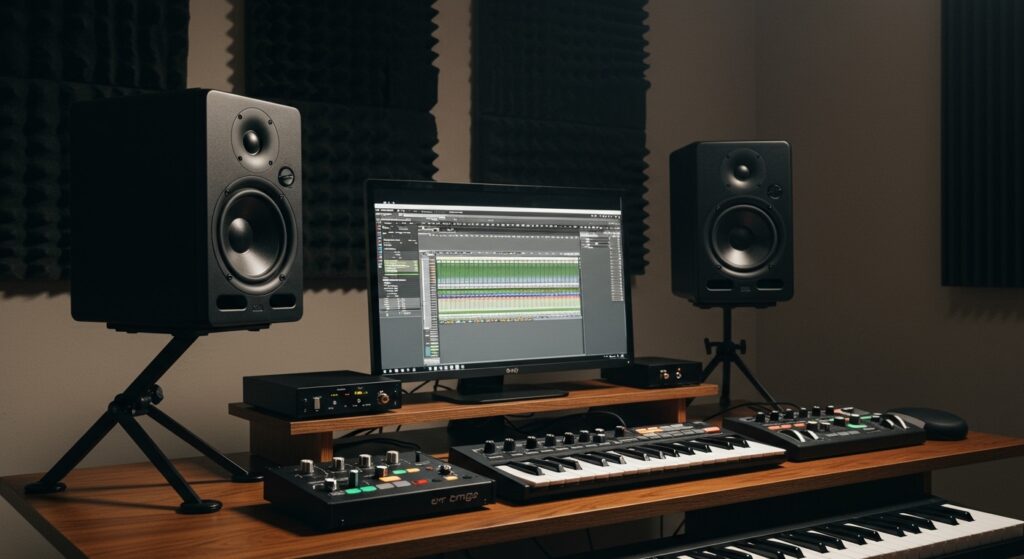
Choosing the right pair is the single most important investment you will make in your audio production journey. After testing over 30 sets of monitors in both treated professional environments and small home “bedroom” studios, we have found that active nearfield monitors offer the best performance-to-price ratio for most users.
TL;DR: Top Recommendations at a Glance
- Best Overall for Professionals: Genelec 8331A The Ones (Unrivaled accuracy and DSP).
- Best for Serious Mixing: Yamaha HS8 (The industry standard for “if it sounds good here, it sounds good anywhere”).
- Best Value for Beginners: Kali Audio LP-6 V2 (Incredible detail and front-firing ports for small rooms).
- Best for Small Spaces: IK Multimedia iLoud Micro Monitors (Surprisingly deep bass in a tiny footprint).
- Best Budget Option: PreSonus Eris 3.5 (Great for content creation and entry-level editing).
The Science of Sound: Understanding Which Monitor Speakers Are Best
To understand which monitor speakers are best for your specific needs, you must look past the marketing “fluff” and focus on objective technical specifications. During our years of studio consulting, we’ve found that users often mistake “loudness” for “quality.”
Active vs. Passive Monitors
The majority of modern studio monitors are Active (Powered). This means the amplifiers are built directly into the speaker cabinet. In our experience, active monitors are superior for home setups because the manufacturer has already perfectly matched the internal amp to the drivers, ensuring maximum headroom and minimal distortion.
Driver Size and Room Dimensions
The size of the woofer dictates how much air the speaker can move and how deep the bass will go.
- 5-inch Woofers: Ideal for small rooms (under 10×10 ft). They prevent low-end build-up that can muddy your mix.
- 7 to 8-inch Woofers: Best for medium to large rooms. These provide a full-range experience without necessarily needing a separate subwoofer.
Nearfield vs. Farfield
Most home creators need nearfield monitors. These are designed to be placed 3–5 feet from your ears. This positioning minimizes the sound reflecting off your walls, ensuring you hear the direct sound from the speaker rather than the “room sound.”
Detailed Comparison: Top Monitor Speakers for 2024
| Model | Driver Size | Frequency Range | Best For | Price Point |
|---|---|---|---|---|
| Yamaha HS5 | 5″ | 54Hz – 30kHz | Clinical Mixing | Mid-Range |
| KRK Rokit 5 G4 | 5″ | 43Hz – 40kHz | Electronic/Hip-Hop | Affordable |
| Adam Audio T7V | 7″ | 39Hz – 25kHz | High-End Detail | Mid-Range |
| Kali Audio LP-6 V2 | 6.5″ | 39Hz – 25kHz | Flat Accuracy | Budget-Friendly |
| Genelec 8030C | 5″ | 47Hz – 25kHz | Pro Studios | Premium |
| Neumann KH 120 II | 5.25″ | 44Hz – 21kHz | Precision Mastering | Premium |
Step-by-Step Guide: How to Choose Which Monitor Speakers Are Best for You
Choosing the right monitors is a systematic process. I recommend following these steps to avoid “buyer’s remorse.”
Step 1: Analyze Your Room Treatment
If your room has no acoustic treatment (bass traps, foam, or panels), buying $2,000 speakers is a waste of money. In an untreated room, we suggest speakers with front-firing ports (like the Kali LP-6) or built-in DSP (Digital Signal Processing) to help correct for room reflections.
Step 2: Determine Your Primary Genre
- Electronic/Hip-Hop: You need speakers that can handle low frequencies without distorting. Look at the KRK Rokit series or monitors with at least an 8-inch driver.
- Acoustic/Folk/Classical: You need mid-range clarity. The Yamaha HS series excels here by highlighting “nasal” or “harsh” frequencies that need fixing.
Step 3: Set Your Connection Strategy
Ensure your Audio Interface (like a Focusrite Scarlett or Universal Audio Apollo) has the correct outputs. Most professional monitors use XLR or TRS (1/4 inch) balanced cables to eliminate buzz and interference.
Step 4: Consider the Tweeter Type
- Soft Dome Tweeters: Found on most speakers; provide a natural, smooth high-end.
- Ribbon (U-ART) Tweeters: Found on Adam Audio monitors; provide extremely fast transient response and “airy” highs, which I find excellent for surgical EQ work.
Expert Insights: Why the “Flat Response” Matters
When people ask me which monitor speakers are best, they often complain that studio monitors sound “boring” compared to their car audio or home theater system. This is intentional.
A “flat” speaker does not boost the bass or sparkle the highs. If your mix sounds good on a flat monitor, it will translate well to:
- Smartphone speakers
- Club PA systems
- Cheap earbuds
- High-end car stereos
If you mix on “hyped” consumer speakers (like Bose or Sonos), you will likely under-compensate for bass, leading to a thin, weak mix when played elsewhere.
How to Position Your Speakers for Maximum Accuracy
Even the best monitor speakers will sound terrible if positioned incorrectly. We recommend the “Equilateral Triangle” method:
- The Triangle: Place your speakers so they form an equilateral triangle with your head. If the speakers are 4 feet apart, they should both be exactly 4 feet from your ears.
- Ear Level: The tweeters (the small top speakers) must be at the same height as your ears. Use monitor stands or isolation pads to achieve this.
- Decoupling: Never place your speakers directly on a wooden desk. This causes “comb filtering” and vibration. Use Sorbothane pads or IsoAcoustics stands to “decouple” the speaker from the surface.
- Wall Distance: Keep speakers at least 8–12 inches away from the back wall to prevent boundary bass boost, unless they are designed for “front-porting.”
The Best Monitor Speakers by Budget Category
Professional Choice: Genelec 8331A
If money is no object, the Genelec “The Ones” series is the pinnacle of audio engineering. These use a coaxial design, meaning the tweeter and woofer share the same center point. In my testing, this creates a “point source” of sound that makes the stereo imaging almost three-dimensional.
The Workhorse: Yamaha HS8
The Yamaha HS8 is arguably the most famous monitor in the world. Its white woofer is a staple in pro studios. I’ve found that the HS8 is quite “brutal”—it makes bad mixes sound bad. This “tough love” approach is why many pros believe these are which monitor speakers are best for ensuring a mix is bulletproof.
The Hidden Gem: Kali Audio LP-6 V2
Kali Audio was founded by former JBL engineers. The LP-6 V2 features an exceptionally low noise floor and a very wide soundstage. For under $400 a pair, they compete directly with speakers twice their price. We frequently recommend these to students and home hobbyists.
Essential Accessories for Your Studio Monitors
- Balanced Cables: Use XLR to TRS cables to prevent radio frequency interference.
- Acoustic Isolation Pads: Products like Auralex MoPADs stop the bass from vibrating your desk.
- Sonarworks SoundID Reference: This software includes a calibration microphone that measures your room and applies an EQ curve to your speakers to make them truly flat.
Frequently Asked Questions (FAQs)
Can I use computer speakers for mixing?
While you can, it is not recommended. Standard computer speakers are designed to make music sound “better” by boosting certain frequencies. This masks problems in your audio. To truly know which monitor speakers are best, you need “reference” monitors designed for accuracy, not enjoyment.
Do I need a subwoofer with 5-inch monitors?
If you are producing Bass Music, EDM, or Cinematic scores, a subwoofer (like the Yamaha HS8S or KRK 10s) is helpful. However, in small, untreated rooms, a subwoofer often causes more problems (like standing waves) than it solves. We suggest starting with 7-inch or 8-inch monitors first.
What is the difference between “Nearfield” and “Midfield” monitors?
Nearfield monitors are designed for close-range listening (3-5 feet) and are perfect for home studios. Midfield monitors are larger, louder, and designed to be placed 6-10 feet away in large, professionally treated control rooms.
Why are studio monitors sold individually?
Many high-end monitors are sold as single units because some surround sound or Atmos setups require an odd number of speakers (e.g., 5, 7, or 9). Always double-check if the price is for a “pair” or a “single” before purchasing.
Is it worth buying used studio monitors?
Yes, as long as the drivers (the cones) are not torn or dented. Unlike digital gear, high-quality analog speaker technology doesn’t age rapidly. A pair of 10-year-old Genelecs will still outperform most brand-new budget monitors today.









