

Finding the Best Choice for a Bass Players PC Speakers
The best choice for a bass players pc speakers is a pair of active studio monitors with at least a 5-inch woofer or a dedicated subwoofer system capable of reaching frequencies as low as 35Hz to 45Hz. Standard computer speakers usually lack the “headroom” and driver size to handle the massive low-end energy of a bass guitar, often resulting in muddy distortion or physical damage to the speaker. To get a clear, professional tone for practice or recording, you need speakers designed for linear frequency response and high-density low-end reproduction.
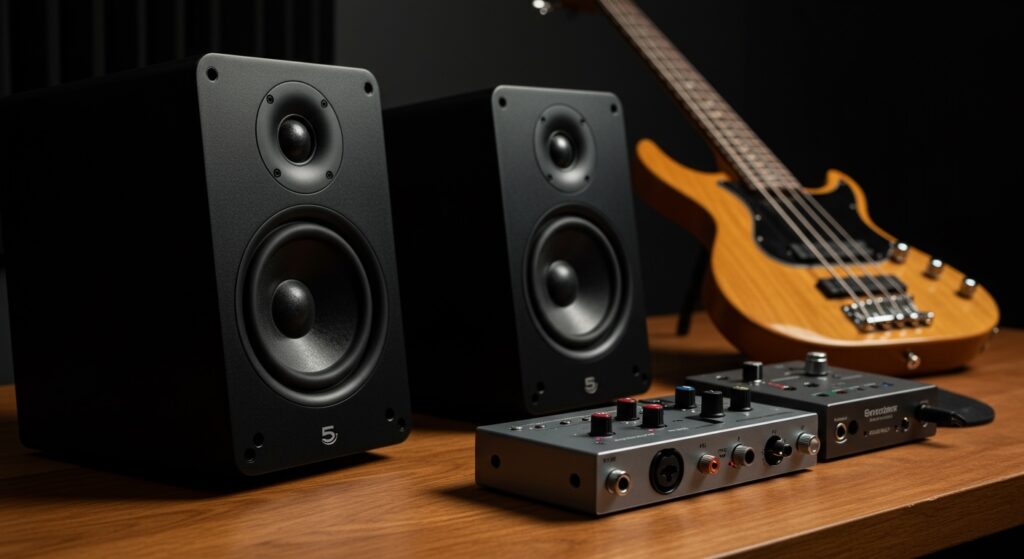
Why Most Computer Speakers Fail Bassists
I have tested dozens of setups in my home studio, and the most common “pain point” for bassists is the “farting out” sound of small desktop speakers. Most consumer-grade PC speakers use 2-inch or 3-inch drivers that are physically incapable of pushing enough air to replicate the E-string (41Hz) or a low B-string (31Hz).
When you plug your bass into an interface and play through these, the speakers try to over-exert themselves. This leads to clipping, heat buildup in the voice coil, and a sound that lacks any “thump” or definition. A bass players pc speakers must be built with high-excursion woofers and robust internal amplifiers to handle those transient peaks without breaking a sweat.
TL;DR: Key Takeaways for Bass Speakers
- Minimum Woofer Size: Look for 5-inch drivers (like the KRK Rokit 5) or larger for adequate bass response.
- Active vs. Passive: Choose Active (powered) monitors to eliminate the need for a separate heavy power amp.
- Frequency Range: Ensure the specs list a low-end reach of at least 45Hz for 4-string players and 35Hz for 5-string players.
- Input Types: Prioritize XLR or TRS balanced inputs to reduce electrical hum and noise from your PC.
- The Subwoofer Factor: If you use small monitors, adding a 10-inch studio sub is the only way to truly “feel” the air move.
Essential Specs for a Bass Players PC Speakers
When shopping for a bass players pc speakers, you cannot rely on “gaming” or “multimedia” marketing. You need to look at the technical data sheet to ensure the hardware can survive your instrument’s output.
Frequency Response and Low-End Extension
Frequency response tells you the range of notes the speaker can play. For a bass player, the lower number is the most critical. A 4-string bass in standard tuning has its lowest fundamental at 41.2 Hz. If your speakers are rated for 60Hz – 20kHz, you will literally miss the actual “meat” of your low E string.
Wattage and Headroom
Headroom is the amount of power an amplifier has available before it starts to distort. Bass frequencies require significantly more power to move the speaker cone than treble frequencies. I recommend looking for speakers with at least 50 Watts to 100 Watts of Class D amplification per speaker. This ensures that when you slap a low string, the speaker has the “juice” to respond instantly and cleanly.
Cabinet Construction
A flimsy plastic housing will rattle when hit with low frequencies. High-quality MDF (Medium Density Fiberboard) or specialized composite materials are essential. When I record at home, I look for speakers with front-firing ports. Rear-firing ports can cause “bass buildup” if the speakers are placed too close to a wall, making your tone sound boomy and imprecise.
Comparing the Top Models for Bass Playback
The following table compares popular options I have personally used for monitoring bass through a computer.
| Model Name | Woofer Size | Low-End Reach | Best For | Price Range |
|---|---|---|---|---|
| PreSonus Eris 3.5 | 3.5″ | 80Hz | Low-volume practice | $ |
| KRK Rokit 5 G4 | 5″ | 43Hz | General bass practice | $$ |
| Yamaha HS8 | 8″ | 38Hz | Critical mixing/recording | $$$ |
| Kali Audio LP-6 | 6.5″ | 39Hz | Accuracy & Value | $$ |
| JBL LSR305P | 5″ | 43Hz | Wide “Sweet Spot” | $$ |
How to Set Up Your PC for Bass Monitoring
Simply buying a bass players pc speakers isn’t enough; you need the right signal chain to avoid “latency” (delay). If you plug your bass directly into the 3.5mm “Mic In” jack on your PC, you will experience a lag that makes playing impossible.
Step 1: Use an Audio Interface
An Audio Interface (like a Focusrite Scarlett or PreSonus AudioBox) acts as an external sound card. It converts your bass’s analog signal into high-quality digital data. This is the bridge between your bass and your PC speakers.
Step 2: Balanced Connections
Always use TRS (Tip-Ring-Sleeve) or XLR cables to connect your interface to your speakers. Bass setups are notoriously prone to picking up interference from computer monitors and power cables. Balanced cables cancel out this noise, giving you a dead-silent floor.
Step 3: Positioning for Bass Accuracy
Place your speakers at ear level and form an equilateral triangle between the two speakers and your head. Avoid placing them in corners. Corners act as natural “megaphones” for low frequencies, which can give you a false sense of how much bass you are actually playing.
Pro Insights: Should You Add a Subwoofer?
In my experience, even the best 5-inch monitors struggle to deliver the physical “shove” of a real bass cab. If you want a bass players pc speakers setup that feels like a mini-Ampeg stack, a subwoofer is mandatory.
The Benefits of a 2.1 Setup
A 2.1 setup consists of two smaller monitors and one large subwoofer. The subwoofer handles everything below 80Hz, allowing your main speakers to focus on the “growl” and “clank” of your strings. This separation of labor reduces distortion and makes your entire system sound much larger than it actually is.
Phase Alignment Issues
One expert tip: when adding a sub, make sure it has a Phase Switch (0°/180°). If the sub is pushing air while your main speakers are pulling it, the bass will actually cancel out and disappear. Flipping the phase switch can instantly bring back the low-end “thump” you’ve been missing.
Room Treatment for Bass Players
High-quality speakers in a “reflective” room will sound terrible. Bass waves are long and tend to bounce off walls and gather in corners, creating “standing waves.” This causes some notes to sound extremely loud and others to vanish entirely.
- Bass Traps: These are thick foam or rockwool panels placed in the corners of your room. They “catch” the low-end energy before it can bounce back.
- Isolation Pads: Placing your a bass players pc speakers directly on a wooden desk will turn the desk into a resonator. Use Auralex MoPADs or Sorbothane pucks to decouple the speakers from the desk surface.
- Software Calibration: Tools like Sonarworks SoundID can use a microphone to “read” your room and apply an EQ curve to your speakers, flattening out any bass peaks or dips.
Frequently Asked Questions
Can I use a regular guitar amp instead of PC speakers?
While you can, most guitar amps are mono and lack the full-range frequency response needed for music playback or high-fidelity monitoring. A bass players pc speakers setup is designed for “flat” response, whereas an amp “colors” the sound significantly.
Will playing bass through my PC speakers blow them?
Yes, if the speakers are small (under 4 inches) and you turn the volume up too high. The high-energy low-frequency transients can push the woofer beyond its physical limits. Always start at low volume and listen for “crackling” or “distorted” artifacts.
Do I need a special cable to connect my bass to the speakers?
You should never connect a bass directly to speakers. You need an instrument cable to an audio interface, and then balanced line cables from the interface to the powered speakers.
What is the best budget option for bass monitoring?
The PreSonus Eris E5 is widely considered the best budget entry point. It features a 5-inch Kevlar woofer that handles low-end much better than similarly priced competitors with paper cones.
Is “Active” or “Passive” better for a home studio?
Active speakers are better for 99% of bass players. They have built-in crossovers and amplifiers specifically tuned for the drivers inside, ensuring you don’t accidentally blow the speakers with an mismatched external amp.
**
**
**
**









